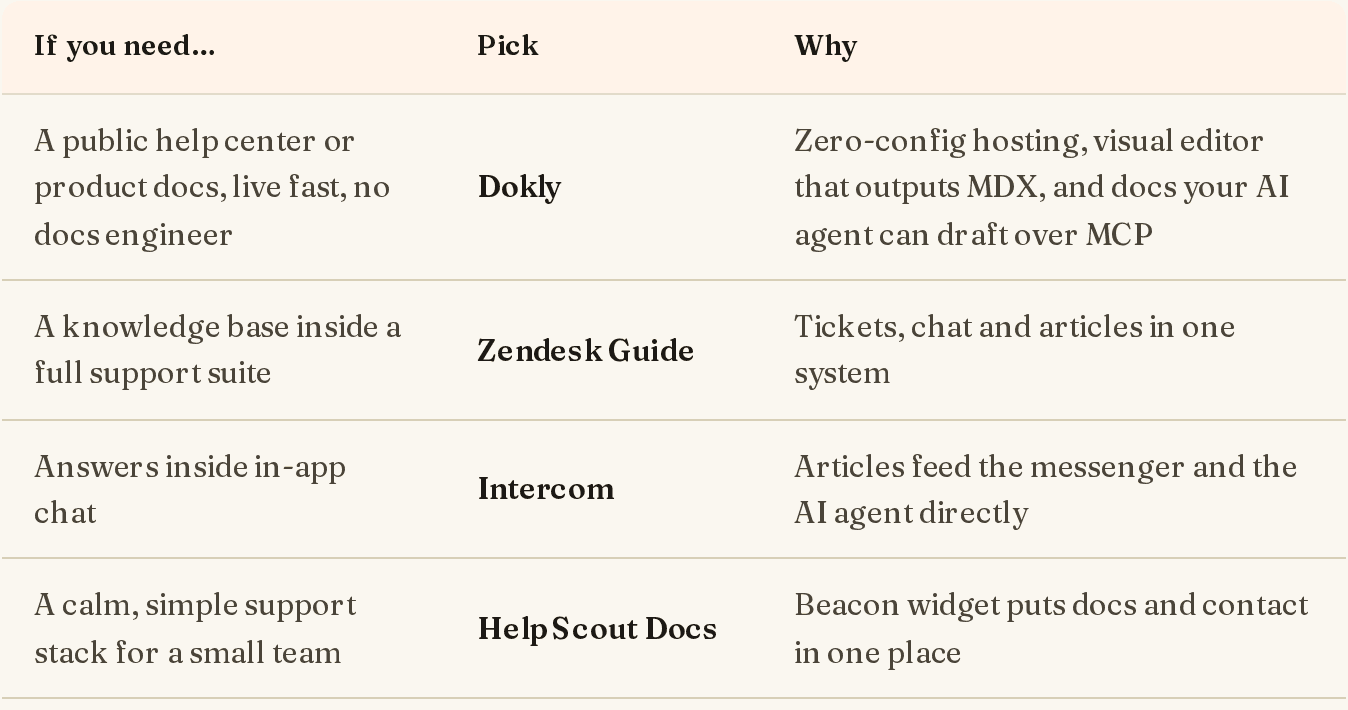
Short answer: the best documentation tool is the one that matches who writes your docs and who reads them. Here are the picks first, then the detail. Every price below was checked on the vendor's own pricing page on 2 November 2026.
| If you need… | Pick | Starting price |
|---|---|---|
| Public product docs or a help center live fast, written by you or your AI agent | Dokly | Free; paid from $29/mo flat |
| Polished developer docs from a Git repo, and budget isn't the constraint | Mintlify | Free; Pro $450/mo (annual) |
| Docs close to engineering, with two-way Git sync | GitBook | Free; $65/site + $12/user (annual) |
| An API developer hub with a "Try it" console | ReadMe | Free; Pro $250/mo (annual) |
| A governed knowledge base for a writer-led team | Document360 | Quote only |
| An internal wiki for a company on Jira | Confluence | Free up to 10 users |
| A drafting workspace that also holds docs | Notion | Free; Plus $10/member/mo |
| Full control and $0 in licences, with an engineer to run it | Docusaurus | Free (open source) |
| Product docs plus internal docs in one tool | Archbee | From $80/mo |
| Sphinx or MkDocs docs for an open-source project | Read the Docs | Free for OSS; Business from $50/mo |
A note on bias: I build Dokly, so it's on the list. I've tried to make each entry say plainly when not to pick that tool, Dokly included.
How we picked#
"Documentation tools" covers four different jobs, and most bad buying decisions come from mixing them up:
- Public product and developer docs: guides, references and changelogs that customers read. SEO, speed, custom domains and good code blocks matter.
- API reference: generated from an OpenAPI spec, ideally with a console to try requests.
- Help centers and knowledge bases: support articles that deflect tickets. See our knowledge base software roundup for that job specifically.
- Internal wikis: team knowledge that never leaves the company.
We scored each tool on who can write in it (engineers only, or anyone), what it costs once a real team uses it, how it handles AI agents (llms.txt, MCP, agent write access) and how hard it is to leave.
That last AI point is new for 2027 and it matters. A growing share of your docs' readers are agents: Claude, ChatGPT and Cursor pulling pages to answer questions. And a growing share of the writing is done by agents too. A docs tool that an agent can't read cleanly, or can't propose changes to, is going to age badly. More on that in our llms.txt guide.
1. Dokly#
Best for: teams that want public docs or a help center live today, and want their own AI agent to keep it current.
Dokly is a hosted docs platform with a visual editor that writes MDX underneath. No repo to set up, no build to babysit. You get a subdomain on signup and your own domain from the Starter plan.
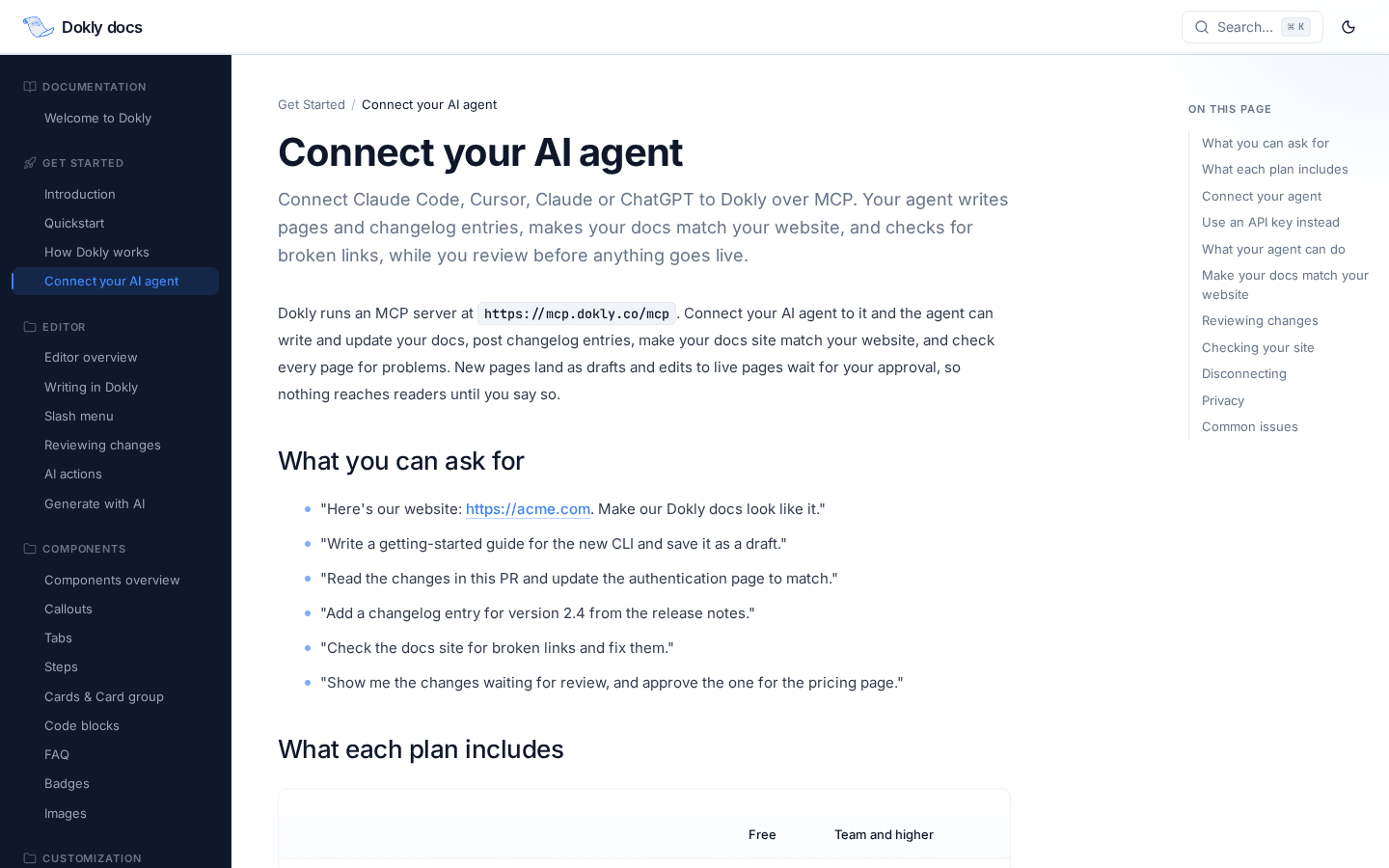
The part nobody else on this list does the same way: your AI agent writes to Dokly over MCP, and you approve each change as a diff. Connect Claude Code, Cursor or any MCP client, ask it to document the feature you just shipped, and the edit lands as a proposed change you review and approve. New pages arrive as drafts. Nothing goes live without you. There's no Git repo in the loop and Dokly doesn't meter the agent's writes.
What you get:
- Visual editor that outputs clean MDX, plus components (callouts, tabs, steps, code groups)
- Two layouts: classic docs, or a help center with a search-first homepage
- Auto-generated
llms.txtso agents can read your docs - One-way GitHub sync (Markdown in your repo publishes on every push)
- API playground on Team and up
- Custom domain and SSL from Starter
Pricing (2 Nov 2026): Free for one site with unlimited pages. Starter $29/mo (custom domain). Team $99/mo (5 sites, analytics, API playground). Business $199/mo. Enterprise is custom. All flat, no per-user fees.
When not to pick Dokly: if you need two-way Git sync, built-in translations, a reader-facing AI chat assistant, or multi-editor workspaces with roles today. Dokly doesn't have those yet. GitBook and Mintlify do.
2. Mintlify#
Best for: well-funded developer-tool companies that want beautiful docs-as-code and are happy to pay for it.
Mintlify set the visual bar for modern developer docs. Content lives as MDX in your Git repo, there's a web editor for non-engineers, and the reader-facing AI Assistant answers questions from your docs.
Pricing (2 Nov 2026): Starter is free. Pro is $450/mo billed annually, or $540/mo billed monthly. Enterprise is custom. The Assistant is metered: Pro includes 10,000 AI credits a month, then $0.01 per credit, and each answer costs about 25 credits.
When not to pick it: if $5,400+ a year is a lot for your team, or if the people writing docs don't want a Git workflow. See Mintlify alternatives and our Mintlify pricing breakdown.
3. GitBook#
Best for: engineering-adjacent teams that want a polished editor and two-way sync with GitHub or GitLab.
GitBook's two-way Git sync is still the best in the category: writers edit in the browser, engineers edit in the repo, and both stay in step. It also has the most accessible translation pricing of any tool here.
Pricing (2 Nov 2026): Free for one user. Essential is $65 per site per month plus $12 per user. Ultimate is $249 per site plus $12 per user, and that's where the reader-facing Assistant and AI Insights live. Prices are for annual billing.
When not to pick it: if you run several docs sites (each one is priced separately) or a growing team of editors. Five sites on Essential starts at $337/mo before extra users. More in GitBook alternatives.
4. ReadMe#
Best for: API-first companies that want a full developer hub: reference, guides, changelog and a "Try it" console.
ReadMe generates interactive API reference from your OpenAPI spec and adds developer dashboards that show which endpoints people actually call. For a public API, that analytics layer is genuinely useful.
Pricing (2 Nov 2026): Starter is free. Pro is $250/mo billed annually. Enterprise is contact-sales, annual only.
When not to pick it: if most of your docs are guides rather than API reference, you're paying for a console you won't lean on. Compare it with Mintlify in ReadMe vs Mintlify, or see our API documentation tools roundup.
5. Document360#
Best for: larger support or docs teams that need review workflows, versioning, multiple languages and access control.
Document360 is built for process: draft, review, publish, with a category tree, version history and private or mixed-access knowledge bases. It suits teams where several writers and approvers touch every article.
Pricing (2 Nov 2026): quote only. The pricing page asks how many editors, workspaces and languages you need, then routes you to a demo.
When not to pick it: if you're a small team that wants to publish this week. The process that helps a 20-writer team is overhead for a team of two.
6. Confluence#
Best for: internal wikis at companies that already live in Jira.
Confluence is the default internal wiki for a reason: spaces, page trees, permissions, and tight Jira links. It's an excellent place for engineering specs and team runbooks.
Pricing (2 Nov 2026): Free for up to 10 users. Standard is roughly $5–6 per user per month depending on billing period; Premium roughly double that.
When not to pick it: for public, customer-facing docs. Confluence pages don't make a good public docs site, and the SEO, design and navigation show it. Compare it in GitBook vs Confluence.
7. Notion#
Best for: small teams that want one workspace for notes, specs and early docs.
Notion is the nicest writing environment on this list. Plenty of startups write their first docs in it and publish a page to the web.
Pricing (2 Nov 2026): Free. Plus $10 per member per month. Business $20 per member per month. Enterprise is custom. Yearly billing saves up to 20%.
When not to pick it: once your docs are public and need to rank, load fast and look like your product. Published Notion pages are thin on docs navigation, versioning and SEO control. See GitBook vs Notion.
8. Docusaurus#
Best for: teams with a front-end engineer who want full control and no licence fees.
Docusaurus is Meta's open-source static site generator for docs. It's React-based, MDX-native, supports versioning and i18n, and you host it anywhere.
Pricing: free and open source. The real cost is engineering time: setup, upgrades, search, hosting and every content change going through a pull request.
When not to pick it: if non-engineers need to edit docs, or nobody owns the build. See Docusaurus vs Mintlify.
9. Archbee#
Best for: teams that want product docs and internal docs in one tool with a block editor.
Archbee covers public docs, API reference and internal wikis, with a block editor that non-engineers pick up quickly.
Pricing (2 Nov 2026): Growing from $80/mo. Scaling from $350/mo. Enterprise is custom. Startups can get 50% off for two years.
When not to pick it: if you only need public docs, a dedicated docs platform will be simpler. Compare it in Archbee vs GitBook.
10. Read the Docs#
Best for: open-source Python projects (and others) already on Sphinx or MkDocs.
Read the Docs builds and hosts your docs from your repo on every commit, with versioned builds per branch or tag. It's been the backbone of Python documentation for over a decade.
Pricing (2 Nov 2026): Community is free for open-source projects. Business plans are $50, $150 and $250 per month.
When not to pick it: for a commercial product's customer docs where design and a visual editor matter. It's a build-and-host service, not an authoring tool.
Documentation software comparison table#
| Tool | Who writes | Git workflow | How an AI agent writes | Custom domain from | Paid from |
|---|---|---|---|---|---|
| Dokly | Anyone + your agent | Optional (one-way sync) | Over MCP, as diffs you approve | $29/mo | $29/mo |
| Mintlify | Engineers + web editor | Yes | Admin MCP; saves open a PR | Free plan | $450/mo |
| GitBook | Anyone | Optional (two-way) | Change requests | Essential | $65/site + $12/user |
| ReadMe | Anyone | Optional | Not advertised | Paid plans | $250/mo |
| Document360 | Writers | No | Not advertised | Quote | Quote |
| Confluence | Anyone | No | Not advertised | n/a (internal) | ~$5–6/user |
| Notion | Anyone | No | Not advertised | Paid plans | $10/member |
| Docusaurus | Engineers | Required | Through your repo | Self-hosted | Free |
| Archbee | Anyone | Optional | Not advertised | Paid plans | $80/mo |
| Read the Docs | Engineers | Required | Through your repo | Business | $50/mo |
"Not advertised" means the vendor's site doesn't describe a way for your own agent to write changes for review as of 2 November 2026. Most of these tools have a built-in AI writer, which is a different thing.
How to choose documentation software#
1. Decide who writes. If only engineers write, docs-as-code (Docusaurus, Mintlify, Read the Docs) is natural. If product, support or founders write, you need a visual editor (Dokly, GitBook, Archbee, Document360). If an AI agent does the first draft, you need a tool that lets it propose changes safely and lets a human approve them.
2. Price it at your real size. Per-user and per-site pricing looks cheap on the pricing page and expensive a year later. Count your editors and your sites (docs, help center, changelog), then do the maths for each finalist.
3. Check the agent story. Ask two questions: can an agent read your docs cleanly (llms.txt, clean Markdown), and can an agent write to them without bypassing review? In 2027 both will matter more than another editor feature.
4. Check the exit. Can you export everything as Markdown or MDX? Tools that keep content in a portable format are cheaper to leave, which also makes them safer to choose.
5. Ship something in the trial. Publish one real page, on your real domain, during the trial. The tool that gets you there with the least friction is usually the right one.
Frequently Asked Questions#
What is the best documentation tool in 2027?#
It depends on the job. For public product docs or a help center that your own AI agent can keep up to date, Dokly. For docs-as-code with a large budget, Mintlify. For two-way Git sync, GitBook. For an API developer hub, ReadMe. For an internal wiki on Jira, Confluence.
What is the difference between documentation tools and a knowledge base?#
Documentation tools usually mean product and developer docs: guides, API reference and changelogs. A knowledge base usually means support articles meant to deflect tickets. Many tools do both. Dokly, for example, offers a docs layout and a help-center layout. For support-led knowledge bases, see our knowledge base software comparison.
Is there a free documentation tool?#
Yes. Docusaurus and Read the Docs (for open source) are free, and Dokly, Mintlify, GitBook, ReadMe, Confluence and Notion all have free plans with limits. The usual limits are one site, one user, or no custom domain.
Can AI write my documentation?#
AI agents can now draft and update docs well, especially from code changes. The risk is publishing unchecked output. Look for a tool where the agent's edits arrive as drafts or diffs that a person approves. Dokly works this way over MCP; Mintlify and GitBook route agent edits through pull requests or change requests.
What is llms.txt and does my documentation tool need it?#
llms.txt is a plain-text index of your docs that AI assistants can read in one request. It helps tools like Claude and ChatGPT answer questions about your product accurately. Several hosted docs platforms, including Dokly, Mintlify and GitBook, generate it for you; static site generators usually need a plugin. Read more in our llms.txt guide.
Final thoughts#
There's no single best documentation tool, but there is a wrong one for each team: an internal wiki pretending to be public docs, a docs-as-code stack nobody has time to maintain, or a per-seat bill that grows faster than the docs do.
If you want docs that are live today and that your AI agent can keep current while you approve every change, try Dokly free. One site, unlimited pages, no card.