Home/Billing & plans/Upgrading your plan
Upgrading your plan
How to switch from Free to Team or Business, what changes immediately, and how proration works.
Was this article helpful? Yes No
Same editor. Two shapes. Ship in minutes — no setup, no engineers.
Trusted by people building at
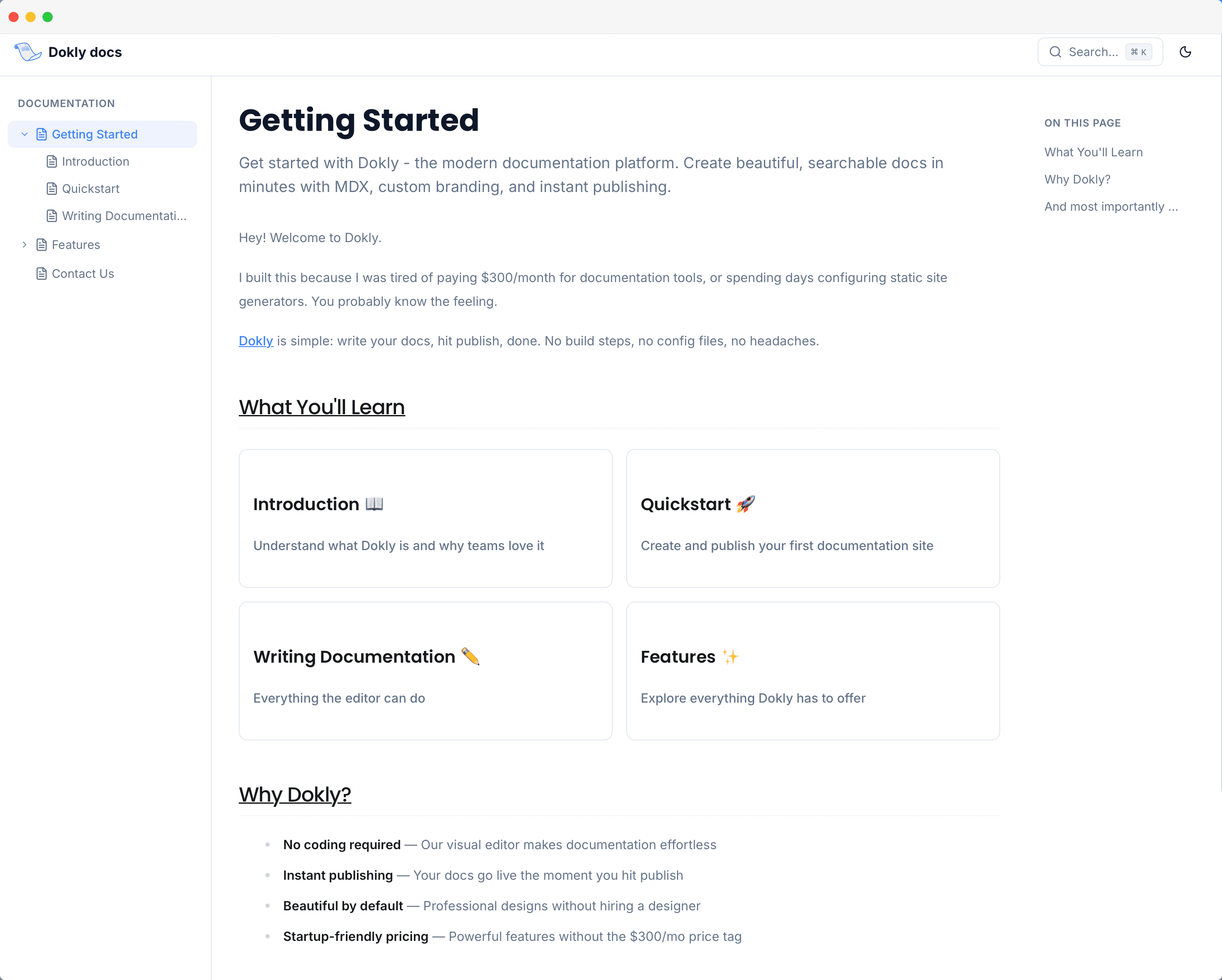
This is the real editor and the real renderer. Try editing it.
This is the actual editor and the actual renderer — not a mockup.
Today they go stale. With Dokly, your team ships them — in minutes.
A typo means a ticket, a PR, an engineer.
Publish it yourself. Live in seconds — no engineer in the loop.
A generic gray wiki, nothing like your product.
Your brand, in clicks. Colors, fonts, and domain — no CSS.
Search misses, support gets the email, AI guesses.
Answers, not dead ends. Instant search and cited AI replies.
Whatever you're writing, Dokly works.

Public-facing docs for your app or SDK. On a custom domain.

Help center, internal wiki, FAQ — fully searchable.

OpenAPI specs, code samples, auto-generated endpoints.
No clone, no PR, no deploy. Open the editor, type, hit Publish — live in seconds. Writers ship the docs themselves, engineering stays focused on the product.
~6 engineering hours saved per week vs. git-based docs workflows.
Set colors, fonts, and your own domain in clicks. Docs that look like the product convert better, get cited more, and reassure prospects they're in the right place.
2× higher trust signals on brand-matched docs vs generic wikis — and zero “is this the real site?” tickets.
Dokly auto-generates llms.txt on every page, every save. Claude, ChatGPT, Cursor, and Perplexity cite your docs directly — so customers get answers instantly, and your team handles fewer “how do I…” emails.
~40% drop in “how do I” tickets after publishing — AI agents handle the routine, you handle the rest. Already live on 35 Dokly sites.
Already cited by
 Claude
 ChatGPT
 Cursor
 Perplexity
 Copilot
 Gemini
# Dokly docs > Official documentation of Dokly. Create stunning documentation websites > without the hefty price. 2-minute setup, AI-ready by default. ## Welcome to Dokly URL: https://docs.dokly.co Summary: Beautiful documentation for modern teams. A block editor, a hosted site, and your custom domain — in minutes. Dokly is a documentation platform for product teams who care about how their docs look, how fast they ship, and how easy they are to maintain. You write in a block editor — slash menu, drag handles, live styled previews of every component. Dokly handles the site, the search, the styling, the custom domain, and the boring infrastructure. ## What's in here Create your first project, write a page, and publish to a live URL in under five minutes. Callouts, Tabs, Steps, Cards, API Playground — everything you need to make docs scannable. Import an OpenAPI spec and get an interactive playground for every endpoint. ## Built for the way teams actually work No CLI, no local preview, no syntax to memorize. Open the editor, hit `/` to insert a block, and type. Starter projects get `yourname.dokly.co`. Pro plans get a custom domain like `docs.yourcompany.com` with HTTPS handled for you. Edit a page, hit Save, the live site reflects it within seconds. No CI, no preview deploys, no build queue. # Dokly docs > Official documentation of Dokly. Create stunning documentation websites > without the hefty price. 2-minute setup, AI-ready by default. ## Welcome to Dokly URL: https://docs.dokly.co Summary: Beautiful documentation for modern teams. A block editor, a hosted site, and your custom domain — in minutes. Dokly is a documentation platform for product teams who care about how their docs look, how fast they ship, and how easy they are to maintain. You write in a block editor — slash menu, drag handles, live styled previews of every component. Dokly handles the site, the search, the styling, the custom domain, and the boring infrastructure. ## What's in here Create your first project, write a page, and publish to a live URL in under five minutes. Callouts, Tabs, Steps, Cards, API Playground — everything you need to make docs scannable. Import an OpenAPI spec and get an interactive playground for every endpoint. ## Built for the way teams actually work No CLI, no local preview, no syntax to memorize. Open the editor, hit `/` to insert a block, and type. Starter projects get `yourname.dokly.co`. Pro plans get a custom domain like `docs.yourcompany.com` with HTTPS handled for you. Edit a page, hit Save, the live site reflects it within seconds. No CI, no preview deploys, no build queue.
Short, no-fluff walkthroughs — from a blank project to a live, AI-readable docs site.

Instant, typo-tolerant search across every page. Fewer “where is X?” emails landing in support.
Rewrite, audit, generate. Real Claude AI in the editor — not a chatbot bolted on the side.
Auto-published llms.txt on every save. AI agents read your docs first.
Point a CNAME, ship at docs.yourcompany.com. TLS auto-issued.
Inline red→green diff before publish. No PR review needed, no merge mistakes shipped.
Changelog page + RSS feed your subscribers actually follow. Release notes ship themselves.
Import an OpenAPI spec. Devs try every endpoint in the browser before they sign up.
Push markdown to your repo, watch it land in Dokly automatically.
Point Dokly at a GitHub repo. Get draft pages straight from the code in one click.
Real-time collaboration, in-context comments, resolved threads — no PRs, no rebases.
Building product docs? Use the docs layout with a sidebar tree. Building support content? Use the help-center layout with a search hero and category cards. Switch any time in settings.
Same editor, same publish flow — the help-center layout swaps in a search hero and category cards on the homepage, and adds breadcrumbs + a “Was this helpful?” widget on every article.
Search the Acme help center, or browse the categories below.
How to switch from Free to Team or Business, what changes immediately, and how proration works.
Each theme is a complete typographic decision. Switch any time; your content moves with you.
Start free on a dokly.co subdomain — no card required. Team and Business both add a 7-day trial. Business is what most growing teams ship on.
/llms.txt (the index) and /llms-full.txt (every page as clean markdown) on every publish. Your docs are AI-readable by default.cname.dokly.co and Dokly issues and renews the TLS certificate automatically.Start with a blank page, your repo, or your OpenAPI spec. Writers ship in minutes. AI agents read your docs the moment they go live.