Most advice about help center jobs is stuck in the past. It treats support as a queue, the work as interchangeable, and the people doing it as temporary labor until something better comes along.
That view misses what happens in strong teams. The best help center roles sit at the intersection of customer experience, product feedback, operations, and documentation. If you're a candidate, that means the path is broader than “answer tickets and move on.” If you're hiring, it means the wrong job design will trap your team in reactive work, while the right one turns support into a knowledge engine.
Table of Contents#
- The Truth About Help Center Jobs in 2026
- Your Path Into a Help Center Career
- Acing the Help Center Interview
- How to Hire for Your Help Center
- Building a Proactive Support Team
- The Modern Help Center Tech Stack
The Truth About Help Center Jobs in 2026#
The lazy take is that help center jobs are disappearing. The accurate picture is more useful than that.
The U.S. Bureau of Labor Statistics reported 2,814,000 customer service representatives employed in May 2024, with the occupation projected to decline 5% from 2024 to 2034. But the same BLS outlook still expects about 341,700 openings each year on average, mostly because workers leave the role or retire (BLS customer service representative outlook). That's not a dead function. That's a large, durable labor market with constant replacement demand.
What has changed is the shape of the work. Weak teams still hire people to close tickets. Strong teams hire people to identify patterns, improve articles, tighten macros, and feed product issues back to engineering or operations.
Practical rule: If a help center role gives you no path to improve content, process, or routing, you're applying for a queue job, not a support craft.
That distinction matters for both audiences reading this.
For candidates, help center jobs can lead into customer success, technical support, operations, product education, QA, and knowledge management. The role teaches triage, written communication, product judgment, and calm decision-making under pressure. Those skills travel well.
For hiring managers, support is where customers tell you what's broken, confusing, or missing. If your team only reacts, your ticket volume becomes a tax. If your team captures and publishes what it learns, the help center becomes part of product delivery.
Why the old view keeps failing#
A lot of generic career content still describes support as low-skill, entry-level work. That's only true in poorly run environments.
In practice, help center work usually includes some mix of these responsibilities:
- Issue isolation: Separate access problems from product bugs, policy questions, billing issues, and training gaps.
- Decision-making under ambiguity: Figure out what can be solved immediately and what needs escalation.
- Written clarity: Turn a messy user report into an answer someone else can reuse.
- Pattern recognition: Notice recurring incidents before they become a weekly fire drill.
The teams that perform well treat documentation as part of support work, not side work.
Customers don't care whether the answer came from a person, an article, or a workflow. They care whether they got the right answer fast.
That's why the future of help center jobs is less about raw ticket volume and more about proactive knowledge creation.
Your Path Into a Help Center Career#
Most candidates over-focus on titles and under-focus on the actual operating environment. “Help center specialist,” “support associate,” “customer support representative,” “service desk analyst,” and “patient access representative” can look similar in a search result and feel completely different once you start the job.
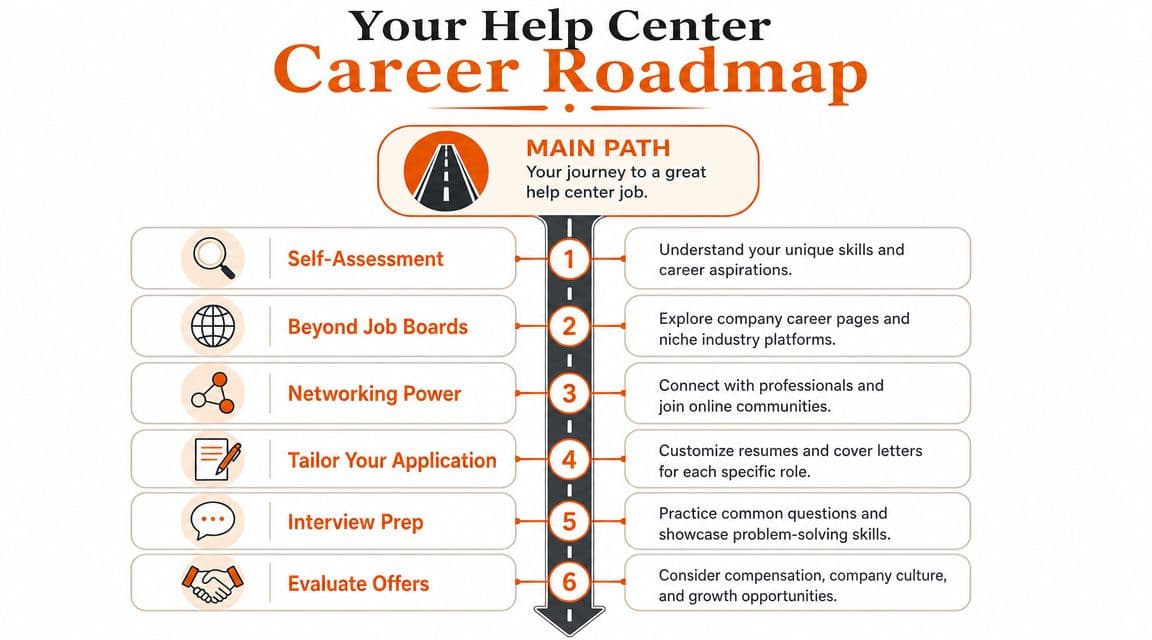
The first filter isn't the title. It's the workflow. Some help center jobs are product support roles with heavy writing and troubleshooting. Others are service-center roles tied to registration, scheduling, insurance verification, shift coverage, or incident handling. Public-service and healthcare-adjacent roles often have credential, background, or scheduling requirements that the listing doesn't explain clearly.
What employers actually want#
A lot of companies say they want “great communicators.” That's too vague to help you.
They usually want proof that you can do five things:
-
Calm the situation down When a customer or user is frustrated, can you reduce confusion instead of amplifying it?
-
Find the underlying problem Good support people don't answer the first question. They identify the underlying one.
-
Write clearly If your ticket replies are fuzzy, your escalations are weak, and your notes are incomplete, the team pays for it later.
-
Learn the product quickly Product acumen matters more than polished corporate language.
-
Document what you've learned The strongest candidates signal that they won't just solve issues once. They'll make the next issue easier to solve.
Skills-based hiring has grown because employers are using outreach programs and skills assessments instead of leaning only on traditional resume screening, which gives candidates more room to demonstrate ability through project, volunteer, or adjacent work (skills-based hiring guidance from TestGorilla).
That opens the door if you don't have the “right” degree. But it doesn't mean standards disappear. Employers still screen for reliability, writing quality, judgment, and follow-through.
How to make your background relevant#
Don't describe your experience as duties. Translate it into support signals.
A weak bullet says:
- Answered customer questions
- Managed emails
- Helped clients with issues
A stronger version says:
- Resolved unclear requests: Turned incomplete inbound questions into actionable next steps by clarifying the issue, checking account context, and documenting the resolution.
- Reduced repeat confusion: Wrote reusable answers for recurring questions so teammates could respond consistently.
- Handled high-friction conversations: Managed upset customers without losing accuracy or tone.
- Coordinated handoffs: Escalated billing, technical, or access issues with enough context that the next team didn't have to start from zero.
If you have no formal support title, use adjacent evidence. Retail returns, front-desk work, volunteer hotline shifts, community moderation, scheduling, onboarding users, and internal admin support all count if you frame them around triage, communication, and process discipline.
For candidates who want to stand out, it also helps to understand how good support teams think about content. This guide on building a knowledge base that people actually use is worth reading before you apply, because modern support hiring increasingly rewards people who can turn repeated questions into durable documentation.
Where strong roles usually show up#
Big job boards are useful for volume, not clarity. Better roles often show up in places where the company explains the product, the customer, and the support model well.
Check these first:
- Company career pages: You can usually spot whether support reports into operations, success, or a mature support function.
- Product help centers: If the docs are solid, the team probably values written work.
- Niche communities: SaaS, developer tools, healthcare admin, fintech, and education platforms often hire through tighter channels than giant aggregators.
- Nonprofit and public-sector employers: These can be meaningful entry points, but read requirements closely because access barriers are often hidden in the process rather than the headline.
A good help center job has three signs: the company respects documentation, the role includes judgment rather than script reading, and the listing explains what success looks like beyond answering volume.
Acing the Help Center Interview#
Most candidates prepare for support interviews by rehearsing generic questions about conflict, communication, and time management. That's fine. It won't separate you.
The move that changes the conversation is simple. Review the company's help center before the interview and show that you can improve it without being arrogant about it.
Research the help center before you talk to anyone#
Open their docs, help center, academy, forum, and public ticket touchpoints if they have them. You're not trying to catch them out. You're trying to understand how the company teaches, routes, and resolves.
Look for specific friction:
| What to inspect | What it tells you |
|---|---|
| Outdated screenshots | Docs ownership is weak or product changes outrun maintenance |
| Thin articles with no steps | The team may close tickets faster than it captures knowledge |
| Duplicate pages on the same topic | Search and information architecture may be messy |
| Broken paths between article and contact options | Escalation logic may be unclear |
| Forum posts with no durable answer | The team may solve issues socially, not systematically |
Bring one or two observations, not a teardown.
For example:
I noticed a few articles answer the “what” but not the “when should I escalate” part. If I joined, I'd look for places where users need decision trees, not just definitions.
That kind of answer shows product sense, documentation instincts, and restraint.
Questions that separate you from the stack#
The best interview questions reveal how the team really operates.
Ask things like:
- How does your team decide what belongs in the help center versus what stays in macros or internal notes?
- Who owns article quality after a product change?
- What happens when support spots the same issue repeatedly over a short period?
- How do you measure a strong support interaction beyond ticket closure?
- Do agents get to update documentation directly, or does that go through a separate team?
These questions work because they expose maturity. If the interviewer has clear answers, you're likely speaking with a thoughtful team. If the answers are vague, you've learned something important.
A support interview gets better when you stop trying to sound “customer obsessed” and start sounding useful.
You should also prepare a short story that shows how you work under uncertainty. Pick an example where the issue wasn't obvious, the customer context was incomplete, and you had to clarify, route, and follow through. That's closer to daily help center work than the usual “tell me about a difficult person” script.
One more thing. Don't oversell speed. Hiring managers know anyone can promise to move fast. They care more about whether you can move cleanly. In support, rushed answers create repeats, escalations, and trust problems.
How to Hire for Your Help Center#
The hiring market for help center jobs gets distorted by bad job descriptions. Companies ask for empathy, resilience, multitasking, communication, and a positive attitude, then wonder why they attract people who sound interchangeable.
If you want stronger hires, write the role like a systems job.

Write the job for builders, not seat fillers#
A weak posting says the candidate will answer inquiries and maintain satisfaction. That's not a real picture of the work.
A better posting explains the operating environment:
- what the team supports
- how issues are triaged
- what kinds of judgment calls the role makes
- whether the person writes or updates help content
- how product, engineering, billing, or operations handoffs work
The role should also say whether you're hiring for a queue manager or a knowledge creator. If you expect article maintenance, macro improvement, recurring issue analysis, or process feedback, say that plainly.
Here's the difference in practice:
| Weak hiring signal | Strong hiring signal |
|---|---|
| “Respond to tickets in a timely manner” | “Investigate issues, resolve what you can, and improve the article or macro when a pattern repeats” |
| “Excellent communication required” | “Write clear customer replies and reusable internal notes that reduce rework” |
| “Escalate as needed” | “Use defined escalation criteria and include enough context to prevent duplicate triage” |
Use pay and scope to signal seriousness#
If the role includes technical troubleshooting, cross-functional handoffs, and documentation ownership, pay it like a specialist role.
The BLS reported median annual pay of $61,550 for computer support specialists in 2024, with user support specialists at $60,340 (BLS computer support specialist pay data). That doesn't mean every help center role should match those exact benchmarks. It does mean many companies underprice support work when the role clearly requires technical judgment and structured problem solving.
Underpaying has predictable consequences. You attract candidates who view the job as temporary, lose stronger people to adjacent functions, and end up with a brittle team that needs constant supervision.
If your help center role requires product reasoning, precise writing, and disciplined escalation, don't price it like generic inbox coverage.
A practical job description outline#
Use this structure instead of a giant bullet dump:
-
Start with the mission Explain what users are trying to get done and why support matters to that experience.
-
Describe the actual work Include channels, issue types, and expected handoffs.
-
Define ownership Be explicit about docs, macros, QA, and feedback loops.
-
State the must-haves narrowly Don't ask for every tool under the sun. Ask for judgment, writing quality, and relevant workflow experience.
-
Separate trainable from fundamental abilities Product knowledge is trainable. Poor written communication usually isn't.
-
Show growth paths Candidates take support more seriously when you show how the role can expand into operations, technical support, QA, or knowledge management.
The best help center jobs attract people who want to improve systems. Your posting should make that visible before the first interview.
Building a Proactive Support Team#
Most support onboarding still focuses on tool access, macros, and queue etiquette. That's necessary, but it isn't enough. If new hires only learn where to click, they'll stay reactive.
A proactive team learns how the product works, how decisions get made, and how to leave the system better than they found it.
Onboard people into systems, not just tools#
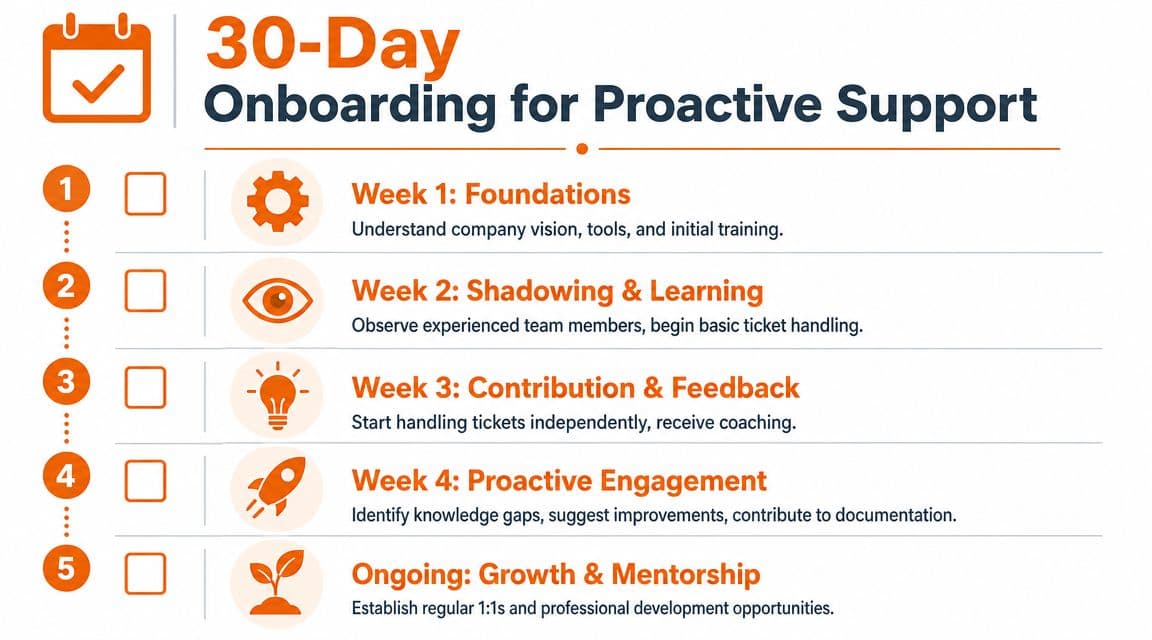
A good first month should move in this order:
- Week one Product basics, customer segments, core workflows, and escalation map.
- Week two Shadowing, supervised replies, and annotation of why certain decisions were made.
- Week three Independent handling of lower-risk issues with structured QA review.
- Week four First meaningful improvement to a macro, internal note, or help article.
That last part matters. If a new hire ships even one useful doc improvement in the first month, you've taught them that support includes knowledge creation.
This is also where many teams fail. They treat documentation as senior-team work, so frontline agents learn to identify gaps without fixing them. The result is familiar. The same questions repeat, new hires depend on tribal knowledge, and article quality drifts.
For managers building that muscle, this guide to knowledge base management for support teams is useful because it frames documentation as an operating system, not a side repository.
Give agents real authority#
A national workforce survey found that 55% of U.S. workers have limited input on decisions affecting their work, and in support environments that lack of autonomy is associated with more errors and weaker retention. Giving agents authority to edit documentation directly is a practical way to improve both job quality and performance (Job Quality Study from JFF).
That doesn't mean chaos. It means guardrails with ownership.
Use a simple model:
- Clear article owners: Every important article needs a named owner, even if multiple people can suggest edits.
- Update expectations: Define when stale content must be reviewed after product or policy changes.
- Escalation boundaries: Agents should know what they can publish, what needs approval, and what belongs with legal, security, or product.
- Visible feedback loop: If an agent updates a doc because of recurring confusion, the team should see that change and learn from it.
Here's a useful walkthrough on that shift from reactive answers to reusable knowledge:
Teams get better when the person closest to the recurring problem can fix the explanation, not just tag the issue.
The fastest way to burn out strong support people is to make them responsible for outcomes but powerless over the system producing those outcomes. Give them measured autonomy, and the team starts preventing tickets instead of merely surviving them.
The Modern Help Center Tech Stack#
Tooling shapes behavior. If your stack makes documentation hard to update, hard to search, or hard to structure, the team will fall back to tickets, private notes, and memory.
That's why many help centers feel busy but don't get smarter.
What breaks in legacy setups#
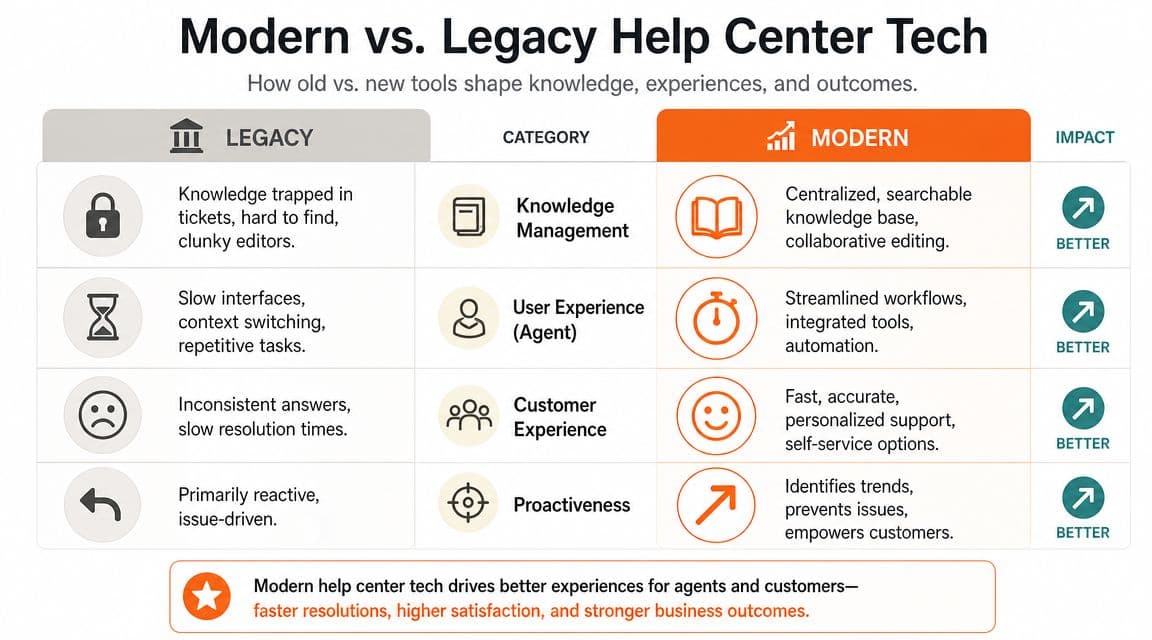
A lot of teams still run support across a help desk tool, a separate doc tool, scattered internal notes, and a pile of macros no one wants to own. The problems are predictable.
- Knowledge gets trapped in tickets: Great answers stay buried in agent conversations.
- Editing becomes specialized: If only one person can publish clean docs, the queue learns faster than the knowledge base.
- Search quality suffers: Users find near-matches instead of decision-ready guidance.
- AI readiness is weak: Content that looks acceptable to a human reader may still be badly structured for AI systems to parse well.
Zendesk and Intercom can run serious support operations, but many teams end up using them as case systems first and knowledge systems second. Docusaurus and Mintlify can produce polished documentation, but they often assume a workflow that support teams don't want to maintain day to day. The gap isn't about brand reputation. It's about operational fit.
What a modern stack should do#
A modern help center stack should make these jobs easy:
| Capability | Why it matters |
|---|---|
| Fast article creation and editing | Agents need to fix knowledge gaps while the issue is still fresh |
| Strong information structure | Users and AI systems both depend on clean headings and predictable organization |
| Search insight | You need to know what people are trying to find but can't |
| Low publishing friction | If updates require too many handoffs, stale content wins |
| Public and internal content discipline | Teams need a clean split between customer guidance and internal runbooks |
For teams evaluating options, this roundup of knowledge base platforms for modern support teams is a solid place to compare categories and trade-offs before you commit.
The right stack won't fix bad hiring or weak process. It will remove excuses. That's important because help center jobs become more strategic when agents can convert live issue handling into reusable, structured knowledge with very little friction.
Your best support system is the one that helps the next customer before they open a ticket at all.
If you're building a help center that treats documentation as a core support asset, Dokly is worth a close look. It gives support teams a fast, no-config way to publish structured docs, knowledge bases, and API content without the setup burden that comes with heavier platforms. You can explore tutorials on the Dokly YouTube channel or test useful workflows through the Dokly tools library.