You're usually searching for delete table if exists SQL when a deployment just failed, a rollback script is half-finished, or a migration needs to run more than once without blowing up. The immediate problem looks small. Drop a table if it's there. Move on.
In practice, such contexts often reveal the inherent fragility of database automation. A script that can't tolerate a missing table isn't production-ready. A script that assumes every database supports the same syntax is worse. And a script that ignores foreign key dependencies is the kind that passes in development and breaks in the pipeline.
Table of Contents#
- Why 'If Exists' Is a Lifesaver for Your SQL Scripts
- Core Syntax Across SQL Server, PostgreSQL, and MySQL
- Writing Backwards-Compatible Drop Scripts
- Why 'IF EXISTS' Fails and How CASCADE Fixes It
- When to TRUNCATE or DELETE Instead of DROP
- Production Safety and Migration Best Practices
Why 'If Exists' Is a Lifesaver for Your SQL Scripts#
A plain DROP TABLE is fine right up until it isn't. You run a migration in staging, it works. You run the same migration again after a partial rollback, and the script dies because the table is already gone. That failure has nothing to do with business logic. It's just brittle DDL.
That's why idempotency matters. An idempotent script can be executed more than once and still leave the database in the intended state. For teardown steps, cleanup routines, and repeatable migrations, that's not a nice-to-have. It's the baseline for reliable automation.
DROP TABLE IF EXISTS fixes the most obvious failure mode. If the table is present, the database drops it. If it isn't, execution continues. That simple behavior is what makes repeated deployments survivable.
Practical rule: If a migration might run twice in development, CI, or recovery, write it so the second run doesn't punish you.
This matters even more in CI/CD. Pipelines don't care that a table “should” exist. They only care whether the command succeeded. If your script assumes a perfect previous state, you're writing for an imaginary environment, not a real one.
A professional database script handles uncertainty cleanly:
- Missing objects: It doesn't crash just because a prior step already removed them.
- Repeat execution: It tolerates retries after partial failures.
- Automation: It behaves predictably when a human isn't there to intervene.
That said, IF EXISTS only solves one class of problem. It protects you from “table not found” errors. It doesn't make a drop operation universally portable, and it doesn't make dependency problems disappear. Those two issues are where most tutorials stop being useful.
Core Syntax Across SQL Server, PostgreSQL, and MySQL#
The syntax commonly sought is short, readable, and safe enough for repeatable scripts.
The one line most teams want#
DROP TABLE IF EXISTS table_name;That form is supported in PostgreSQL 14, MySQL 8.0, and MariaDB 10.3, and it wasn't available in PostgreSQL before version 9.1, according to CloudTweaks' syntax summary.
For daily work, that means the command is straightforward in modern PostgreSQL and MySQL environments:
PostgreSQL
DROP TABLE IF EXISTS employees;MySQL
DROP TABLE IF EXISTS employees;SQL Server 2016 and later
DROP TABLE IF EXISTS dbo.Employees;Use the schema-qualified name in SQL Server unless you enjoy debugging the wrong object in the wrong schema.
Quick reference table#
| Database | Supported Version | Syntax |
|---|---|---|
| SQL Server | 2016 and later | DROP TABLE IF EXISTS dbo.TableName; |
| PostgreSQL | 9.1 and later | DROP TABLE IF EXISTS table_name; |
| PostgreSQL | 14 | DROP TABLE IF EXISTS table_name; |
| MySQL | 8.0 | DROP TABLE IF EXISTS table_name; |
| MariaDB | 10.3 | DROP TABLE IF EXISTS table_name; |
If you maintain shared internal runbooks, keep this kind of quick matrix close to the actual migration examples. Teams often bury compatibility notes in prose, then wonder why scripts fail. Good technical docs should make copy-paste use safe, which is exactly why examples like those in sample technical documents for engineering teams matter.
What changed in SQL Server#
SQL Server was late to the cleaner syntax. The DROP TABLE IF EXISTS form was officially introduced in SQL Server 2016 as a simplified alternative to pre-2016 conditional logic that required checking OBJECT_ID or sysobjects before deletion, according to Devart's SQL Server reference.
Before that change, teams had to write extra T-SQL around every drop. The command became cleaner, but its primary benefit wasn't aesthetics. It reduced noise in deployment scripts and removed one common source of conditional DDL mistakes.
The best migration scripts are boring to read. Short, explicit, and resistant to reruns.
Writing Backwards-Compatible Drop Scripts#
A lot of migration failures come from developers assuming the modern syntax is universal. It isn't. If you work across mixed SQL Server versions, old vendor environments, or a database estate that includes Oracle, you need a fallback pattern.
One analysis of Stack Overflow migration discussions says 40% of failed migration scripts stem from assuming the DROP TABLE IF EXISTS syntax works across all SQL Server versions. That's a portability problem, not a syntax problem.
SQL Server before 2016#
On older SQL Server versions, the safe pattern checks object existence before dropping.
IF OBJECT_ID('dbo.Employees', 'U') IS NOT NULL
    DROP TABLE dbo.Employees;
That's the version you use when you can't rely on SQL Server 2016 or later. It's more verbose, but it works where the newer syntax doesn't.
A few practical points matter here:
- Use the schema name:
dbo.Employeesis safer thanEmployees. - Use the object type:
'U'ensures you're checking for a user table. - Keep it explicit: Don't hide DDL behind dynamic SQL unless you need to.
Oracle needs a different pattern#
Oracle doesn't support DROP TABLE IF EXISTS natively. You need PL/SQL logic that attempts the drop and handles the “table does not exist” case.
BEGIN
   EXECUTE IMMEDIATE 'DROP TABLE employees';
EXCEPTION
   WHEN OTHERS THEN
      IF SQLCODE != -942 THEN
         RAISE;
      END IF;
END;
/
This is one reason I don't treat “delete table if exists SQL” as a single universal answer. The intent is universal. The implementation isn't.
Portability is a design choice#
If your team supports multiple engines, decide early whether scripts are:
- Dialect-specific, with separate migration paths per database.
- Generated from tooling, where compatibility logic lives outside the script.
- Manually portable, which means you own every syntax branch.
Teams often drift into the third option without admitting it. That's when documentation gets messy, handoffs get sloppy, and mid-level developers have to guess whether an example is safe for their environment. If you're standardizing migration notes, technical documentation templates for engineering workflows help because they force you to capture engine, version, and fallback syntax in one place.
Why 'IF EXISTS' Fails and How CASCADE Fixes It#
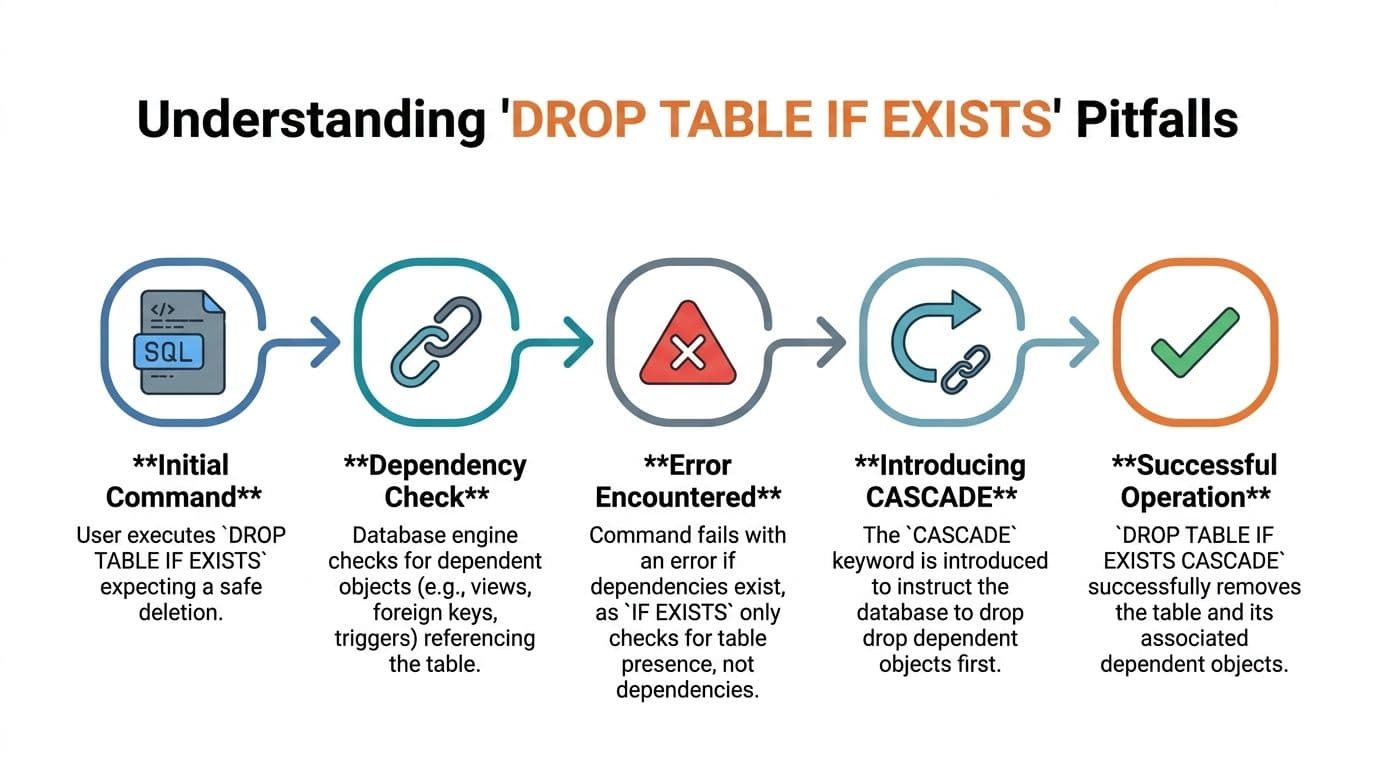
A lot of developers read IF EXISTS as “safe drop.” It isn't. It only means the command won't fail because the table is missing.
It can still fail because another object depends on that table.
The error most developers misread#
Foreign keys are the usual reason. A parent table exists. A child table references it. You run:
DROP TABLE IF EXISTS departments;The table exists. The statement still fails.
That's not a contradiction. IF EXISTS never promised dependency handling. It only checks whether the target object is present.
According to a Stack Overflow discussion summarized in the referenced analysis, 60% of failed drop operations in automated deployment pipelines are caused by undropped foreign key dependencies, not missing tables. That's the main trap in automated schema cleanup.
If your drop script doesn't account for dependencies,
IF EXISTSis just nicer error handling for the wrong problem.
Other dependent objects can also block the operation, depending on the engine and the object graph. Views, triggers, and constraints all deserve inspection before a destructive change.
Where CASCADE helps and where it doesn't#
In PostgreSQL, CASCADE can remove dependent objects automatically:
DROP TABLE IF EXISTS departments CASCADE;That's powerful. It's also dangerous if you don't know exactly what depends on the table. CASCADE is for controlled teardown, not lazy cleanup.
Use it when:
- You're dropping a table in a known non-production environment.
- You've reviewed what will be removed.
- The migration explicitly intends to remove dependent objects too.
Avoid it when:
- You're in production and dependency scope isn't fully understood.
- You need a narrow, auditable change.
- The table has unknown downstream consumers.
SQL Server is different. It doesn't give you the same “just add CASCADE” escape hatch for table drops. You usually need to identify and drop foreign key constraints first, or drop child objects before parent objects.
That difference is why portable migration guides need more than syntax snippets. They need dependency strategy. The command itself is easy. The object graph is what makes it hard.
When to TRUNCATE or DELETE Instead of DROP#
A lot of bad schema work starts with using DROP TABLE when the actual goal is just “empty this table.” That's not the same operation.
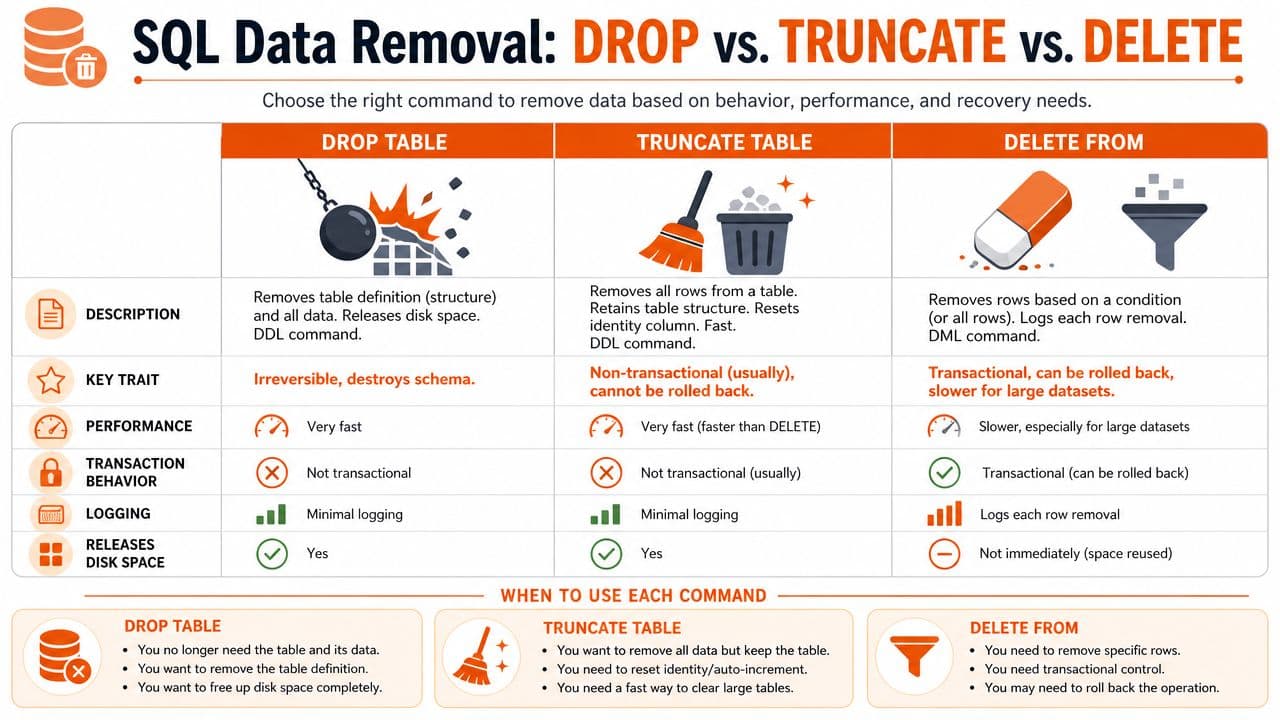
DROP removes the table object. TRUNCATE keeps the structure and clears all rows. DELETE removes rows, optionally with a filter. Those are three different intents, and production-safe work starts with picking the right one.
Choose based on intent#
Use DROP TABLE when the schema object itself should no longer exist.
DROP TABLE IF EXISTS audit_staging;Use TRUNCATE TABLE when you want a fast reset of all rows but still need the table definition for the next load.
TRUNCATE TABLE audit_staging;Use DELETE FROM when you need row-level control, transaction visibility, or a WHERE clause.
DELETE FROM audit_log
WHERE created_at < CURRENT_DATE;
The video below gives a quick visual explanation of the common differences teams mix up in practice.
A practical decision framework#
When I review migration scripts, I use a simple test.
| Command | Keep table structure | Remove all rows | Remove selected rows | Typical use |
|---|---|---|---|---|
DROP TABLE | No | Yes | No | Schema removal |
TRUNCATE TABLE | Yes | Yes | No | Fast reset in staging or ETL workflows |
DELETE FROM | Yes | Yes | Yes | Controlled production cleanup |
A few hard rules help:
- Choose
DROPfor deprecation: If the object is obsolete, remove the table itself. - Choose
TRUNCATEfor resets: Staging tables, scratch tables, and reload targets usually fit here. - Choose
DELETEfor business logic: If retention, filtering, or auditability matters, don't useDROP.
Don't use a schema command to solve a data problem.
This distinction also protects you from writing rollback-hostile scripts. If someone expects the table to exist after cleanup, dropping it is the wrong move no matter how elegant the syntax looks.
Production Safety and Migration Best Practices#
The safest DROP TABLE script isn't the shortest one. It's the one that makes the blast radius obvious.
In production, a table drop should be the last step after you've mapped dependencies, validated the target environment, and decided how recovery works if the change goes sideways. The syntax is easy. The operational discipline is the true skill.
What a safe drop process looks like#
A production-ready checklist looks like this:
- Verify object identity: Confirm the schema, environment, and exact table name before executing destructive DDL.
- Map dependencies first: Inspect foreign keys, views, and triggers before you decide whether order-of-operations or dependency removal is required.
- Prefer explicit sequencing: Drop child dependencies first when the engine requires it. Don't assume the database will infer your intent.
- Use
CASCADEsparingly: In engines that support it, treat it as a controlled demolition tool, not a convenience feature. - Plan rollback realistically: Some DDL can't be “rolled back” in a meaningful way without a restore or a prebuilt recreation script.
If you want a concise companion resource on disciplined query habits, Bridge Global's SQL query writing best practices is worth bookmarking. It's not a migration guide, but it aligns with the same principle: be explicit, readable, and predictable.
Documentation is part of the safety model#
Teams often separate migration quality from documentation quality. That's a mistake. If the runbook doesn't state engine version, dependency assumptions, fallback path, and rollback expectations, the script is only half-written.
Good database operations need docs that are versioned alongside schema changes. If the migration says “drop obsolete table,” the documentation should answer four questions immediately: which environment, which engine, which dependencies, and what replaces it. That's why disciplined teams treat schema notes the same way they treat code changes, with documentation version control for operational changes.
A migration nobody can safely read is a migration nobody should run.
The final standard is simple. A safe script for Delete Table If Exists SQL handles reruns, respects engine differences, accounts for dependencies, and makes the intent obvious to the next engineer. Anything less is just a future incident wearing neat syntax.
Dokly is a strong fit if your team wants operational docs that are easy for humans to maintain and easy for AI systems to parse. Instead of scattered migration notes in wikis, editor blocks, and stale docs, Dokly gives you structured documentation that stays readable, version-friendly, and machine-consumable. If you're documenting database runbooks, release procedures, or teardown steps, it's a cleaner choice than heavier setups like Docusaurus or Mintlify when you want fast publishing without the config burden.