Your team probably has some version of this right now: a shared drive, a docs folder, and filenames like User_Guide_Final_v2, User_Guide_Final_v2_JohnEdits, and User_Guide_Final_REAL. Someone in support links one copy. Product updates another. Engineering ships a change that never makes it into the public docs. A customer reads an old setup step and opens a ticket that never should've existed.
That mess isn't a file naming problem. It's a documentation version control problem.
A lot of teams still treat version control as something for source code, while docs get whatever the wiki, drive, or CMS happens to allow. That assumption breaks fast once docs become part of product delivery. API references, release notes, onboarding guides, compliance pages, and internal runbooks all need a clear current version, visible history, and a controlled way to publish updates.
There's another problem that hasn't been fully accounted for yet. A frequent gap in documentation version control guidance is AI-ready publishing. Most advice still centers on naming conventions, check-in and check-out, audit trails, and rollback. It rarely addresses how versions should be structured so both humans and machines can consume them reliably, even though documentation is increasingly discovered and summarized through AI systems, while mainstream guidance still frames version control as a collaboration and compliance problem rather than a parsing and retrieval problem, as noted in Accruent's discussion of document version control.
If your versioning process creates messy outputs, duplicate URLs, ambiguous drafts, or pages that are hard for AI systems to parse, you're not just frustrating your team. You're making your docs less usable for a major audience that now influences evaluation, onboarding, and support.
Good documentation version control isn't bureaucracy. It's the system that tells everyone, including machines, what is current, what changed, what was approved, and what should never be edited again.
Table of Contents#
- What Is Documentation Version Control Really
- Why Version Control for Docs Is Non-Negotiable
- Three Approaches to Version Control and Their Real Costs
- Practical Workflows and Publishing Strategies
- Best Practices and Common Pitfalls to Avoid
- Migrating to a Modern Version Control System
What Is Documentation Version Control Really#
Documentation version control starts with one practical shift. You stop treating a document as a single mutable file and start treating it as a recorded history of changes.
A foundational milestone in document version control was the move from ad hoc file naming to standardized versioning such as v1.0, v1.1, and v2.0, paired with dates and naming conventions so teams can track revisions and retrieve earlier copies reliably, according to GlobalVision's guidance on document version control.
The four pillars that matter#
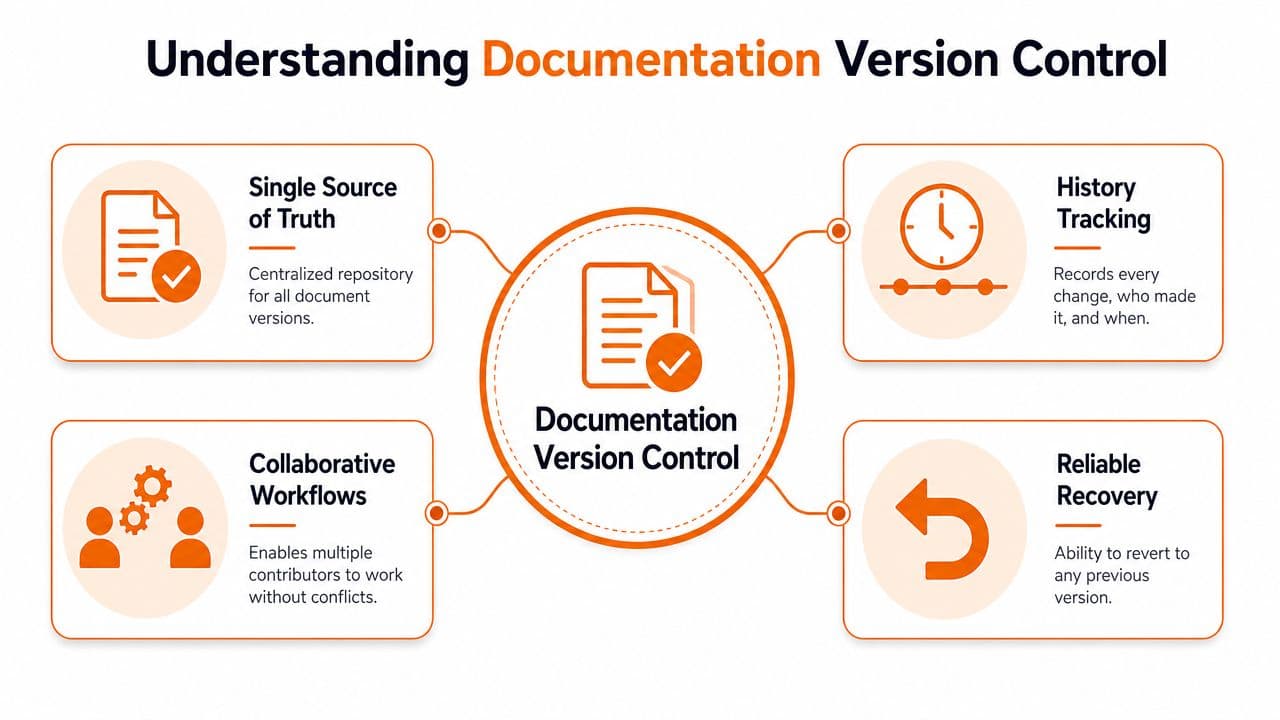
Often, this is overcomplicated. A working system only needs four things, but it needs them consistently.
| Pillar | What it means in practice | Why it matters |
|---|---|---|
| Single source of truth | One official current version lives in one place | People stop guessing which file is current |
| History tracking | Every edit has context, including what changed and who changed it | Reviewers can verify decisions later |
| Reliable recovery | You can restore an earlier state without rebuilding from memory | Bad edits stop being disasters |
| Draft and published separation | Work in progress stays editable, approved content becomes controlled | Customers don't see half-finished updates |
Think of it as Google Docs revision history, but with publishing discipline. Internal drafting can stay fluid. Published output can't.
Practical rule: If your team can't answer “Which version is live right now?” in a few seconds, you don't have version control. You have storage.
What version control is not#
It isn't just adding a number to a filename. It isn't keeping old copies in an archive folder no one trusts. And it isn't solved by saying “we use Git” if only one engineer understands how docs are released.
Real documentation version control creates a chain of custody. A draft gets updated in a controlled location. Comments, edits, and approvals get recorded. A published version becomes the approved record. The next change becomes a new version, not a stealth edit to the old one.
That distinction matters more than the tool itself. Teams fail with Git when no one maintains the process. Teams fail with wikis when published pages remain editable by too many people. The win comes from governance that's simple enough to survive a busy release cycle.
Why Version Control for Docs Is Non-Negotiable#
The easiest way to understand the value is to look at the cost of not having it. Teams don't usually notice bad documentation version control in a dashboard. They notice it through friction.
Trust breaks when docs drift#
A customer reads one page, support sends another, and product has a third copy in a private workspace. Even when the content is technically close, the inconsistency damages confidence. People assume the product is changing faster than the company can explain it.
Version control fixes that by making the approved version visible and previous states traceable. If release notes change, people can see the change. If a setup guide gets revised, support isn't guessing whether a screenshot or instruction is old. A structured release notes template makes those diffs legible in the first place — a CHANGELOG.md that follows Keep a Changelog is much easier to review across versions than free-form prose.
Stable docs build trust because they show that the team knows what was published, when it changed, and why.
Engineering and support both pay the price#
Support teams feel the damage first. They answer questions created by outdated screenshots, stale troubleshooting steps, and old policy pages that should've been retired. Engineering feels it next when developers test against obsolete API instructions or missing configuration notes.
For product and engineering teams, documentation version control also keeps docs tied to delivery. If a feature ships, the related docs should move through review and publication with the same discipline. When that doesn't happen, internal teams waste time validating what should already be obvious.
Three outcomes usually improve when version control gets serious:
- Customer confidence: People can find a current answer and trust it.
- Support consistency: Agents use the same approved material customers see.
- Engineering speed: API docs, release notes, and product guides stay aligned with shipped behavior.
This is why documentation version control isn't an admin detail. It's operational infrastructure.
Three Approaches to Version Control and Their Real Costs#
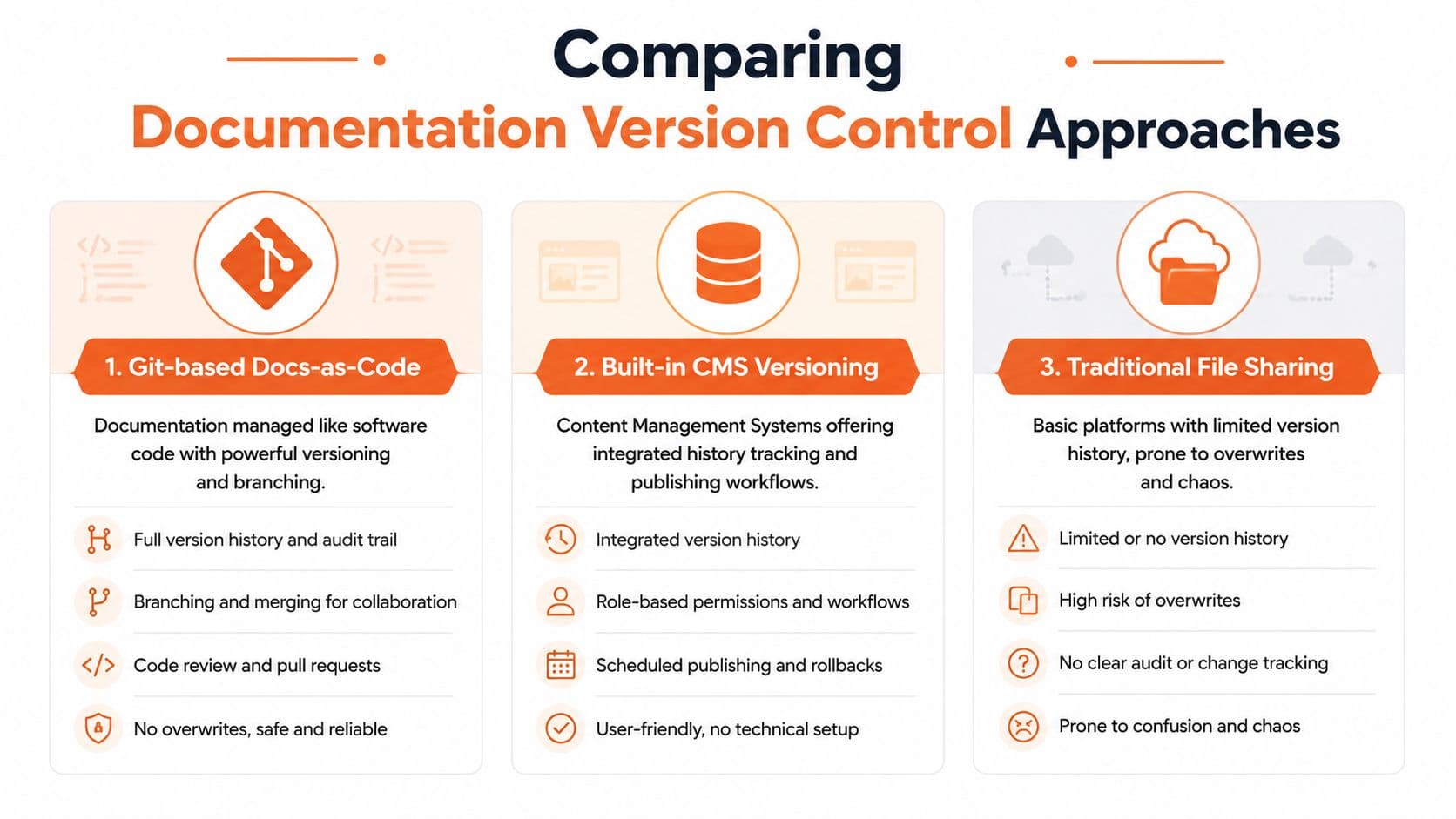
Every team ends up in one of three buckets. Some use Git-based docs-as-code stacks. Some rely on built-in CMS history. Some move to managed documentation platforms that handle versioning without handing the whole workflow to engineers.
The differences aren't philosophical. They're operational.
Git-based docs-as-code#
This is the Docusaurus, GitHub, Markdown, pull request route. It can work well, especially for teams already comfortable with code review and release pipelines.
The upside is obvious. Branches are clear. Change history is durable. Reviews are explicit. Technical teams can keep docs close to code.
The hidden cost is the setup tax. Someone has to own the repo, the build process, the deployment pipeline, broken previews, branch hygiene, permissions, and theme maintenance. Writers often need engineering help just to ship simple content updates. Even strong tools like Docusaurus or repo-backed Mintlify can create bottlenecks when docs depend on developer bandwidth.
A lot of current guidance recommends branches, approvals, centralized storage, and regular reviews, but it rarely tells lean teams when that process becomes overhead. That gap is called out in daily.dev's version control guidance, which reflects a shift toward engineering workflows without settling the harder question of how much process is worth carrying.
Built-in CMS versioning#
Confluence, Zendesk, SharePoint, and similar systems usually make revision history easier for nontechnical teams. That's their strength. Editors can update content directly, managers can approve changes, and teams can often view older states without touching a repository.
This category is better than shared drives and random files. For internal knowledge bases, it may be enough.
The tradeoff is that many CMS systems weren't designed for public product docs, versioned API references, or structured AI-readable publishing. They often handle page history well enough, but struggle with clean release versioning, docs tied to product versions, or developer-facing publishing workflows. Teams also hit limits when they want consistent doc URLs, stronger content structure, or public docs that feel like product infrastructure rather than a help center.
Platform-managed versioning#
This is the category more fast-moving teams should examine first. The idea is simple: keep the strengths of controlled versioning, review, rollback, and publication, but remove repo management from the critical path.
That means writers and product teams can work in a visual editor, submit changes for review, publish controlled versions, and preserve history without maintaining a docs stack. For small to mid-sized teams, that usually maps better to reality. These teams don't need “docs like code” as an identity. They need docs that stay accurate without stealing engineering time.
One example is Dokly's guide to documentation versioning strategies. Dokly uses a no-repo workflow with a visual editor, structured publishing, and AI-oriented output, including clean MDX and machine-readable documentation layers. That model fits teams that want governance without CI maintenance.
A managed platform isn't automatically better for every company. If your docs team already lives comfortably in Git and engineering actively supports the publishing pipeline, docs-as-code can remain the right call. But if your current system makes straightforward updates feel like release engineering, you're paying too much for the process.
A quick product walkthrough helps make the contrast concrete.
Practical Workflows and Publishing Strategies#
Teams usually don't need an elaborate release framework for docs. They need a workflow that survives real shipping pressure and still protects published content.
A technically strong workflow makes the repository or platform the official distribution source and keeps published releases read-only so the approved version remains discoverable while rollback and auditability stay intact, as explained in Technical Writer HQ's document version control guidance.
A lightweight workflow that small teams can keep running#
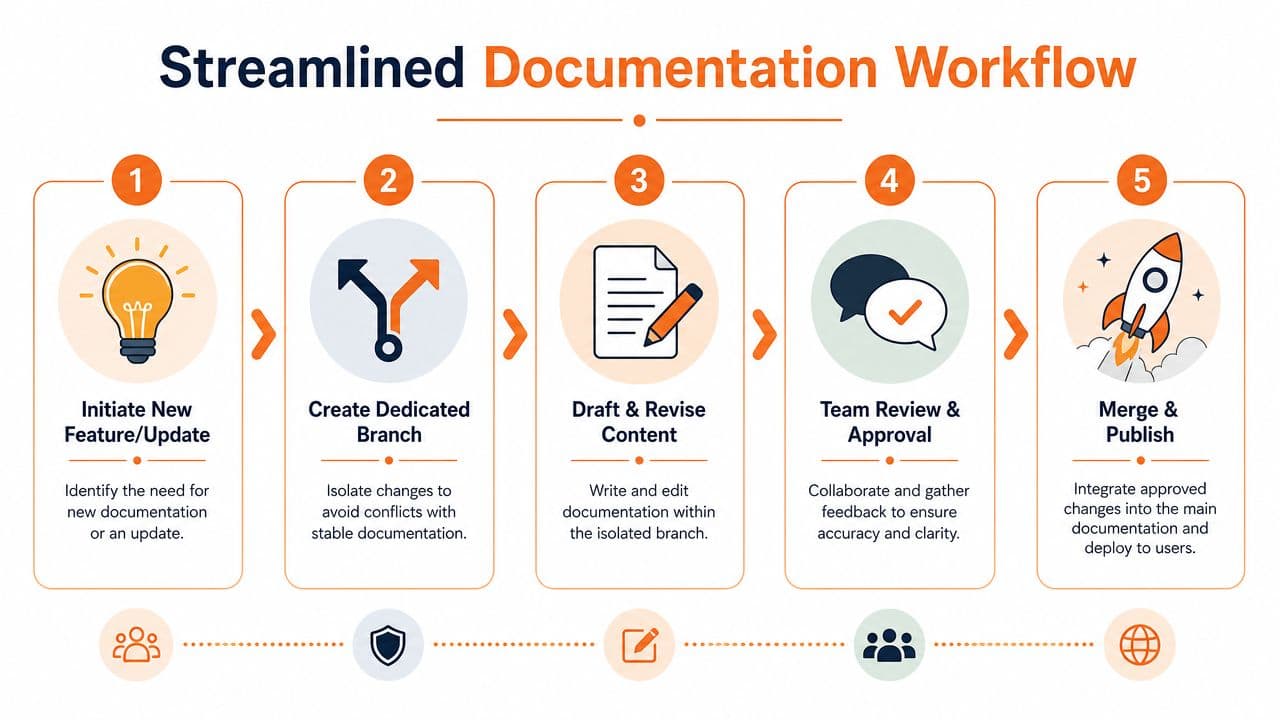
For most startups and growing product teams, this is enough:
-
Create one official published line
Keep a single current documentation version that customers and internal teams should trust by default. -
Draft changes away from the live version
Use a branch, draft state, or staging workspace for updates tied to a feature, fix, or release. -
Review for accuracy, not theater
Product or engineering checks technical correctness. Support or success checks clarity if the page affects customers. -
Publish an immutable approved version
Once live, that version shouldn't accept silent edits. Any material update becomes a new revision. -
Keep old versions available when they still matter
This matters for API changes, release notes, policy documents, and regulated content.
The cleanest workflow is the one your team keeps using after the launch week enthusiasm is gone.
A good review process also needs clear ownership. If everyone can edit but no one approves, the workflow looks collaborative while accountability disappears.
How this differs from pure Git workflows#
In Git, the same flow often looks like this: create a branch, edit Markdown, open a pull request, wait for preview generation, request review, merge, rebuild the site, then verify production output. That can be fine when docs are tightly coupled to code changes.
For many teams, though, it's too much ceremony for everyday product updates. A visual system can map that same logic to something much simpler: draft privately, request review, approve, publish, retain history.
That difference matters more than people admit. Tools don't fail because branching is wrong. They fail because the team's actual contributors won't use the workflow without help.
If you're tightening your review layer, this document review platform guide covers the approval side well. For API-first teams, the same principle applies to specs. Keep the source structured, publish from one official location, and avoid side copies of OpenAPI files. If your platform supports an interactive API playground, even better, because it reduces drift between reference content and real usage.
Best Practices and Common Pitfalls to Avoid#
Teams usually know they need version control. They get into trouble when the process is either too loose to trust or too heavy to maintain.
A mature versioning scheme uses incremental numbering that humans can read. Drafts often start at 0.1, move to 1.0 at formal approval, and then advance to 1.1, 1.2, and so on. Formal revisions should also carry the revision date and a change log, as outlined in the NCCIH version control guidelines.
What to standardize#
A small set of rules solves most of the confusion:
- Use predictable version numbers so people know whether a page is a draft, a minor update, or a major revision.
- Add the revision date on formal documents, policy pages, and anything that may be audited or referenced later.
- Write a short change summary for each revision so reviewers can tell whether the update was editorial, functional, or compliance-related.
- Control editing rights on published content so approved pages don't drift after review.
- Archive deliberately so obsolete material stays available for reference without cluttering the current workspace.
A good changelog doesn't need to be long. It needs to be legible. “Updated authentication section for token flow” is useful. “Minor edits” usually isn't.
What usually goes wrong#
The most common failure isn't technical. It's social. Teams agree on a process, then bypass it during a rush release.
Watch for these patterns:
- Approval theater: Too many approvers create delays, then people start publishing outside the process.
- Invisible ownership: If no one owns a section, it goes stale even if version history is perfect.
- Binary file sprawl: Large design exports, slide decks, and document attachments create confusion when they're versioned separately from the source content.
- Stealth edits to published pages: This destroys auditability and makes support harder.
- Old versions left hanging in search: Deprecated pages keep attracting readers unless you archive or label them clearly.
One hard rule: if a page is obsolete, mark it as obsolete. Hidden ambiguity creates more damage than visible deprecation.
The best systems are boring. They make correct behavior easy and incorrect behavior obvious.
Migrating to a Modern Version Control System#
Most migrations fail because teams try to redesign everything at once. That's unnecessary. The goal isn't to become advanced overnight. The goal is to stop losing control of what is current.
A major step in modern document version control was built-in revision history in mainstream office and collaboration tools, which made tracking accessible to nontechnical teams and reduced reliance on manual file duplication, as described in Rebel's Guide to Project Management on document version control. That's useful context because it shows what people need: clear history without technical friction.
Move in stages, not in one big rewrite#
Start with the docs that cause the most confusion. Usually that's public product documentation, API references, onboarding guides, and policy pages that support keeps sending around.
Then standardize three things first:
- Current source location
- Publishing approval
- Version labels and changelogs
Only after that should you worry about perfect information architecture or a total content cleanup. If your current mess lives in a drive, wiki, and repo at the same time, consolidation matters more than elegance.
Choose the workflow your team will actually use#
This is the strategic decision. You can migrate into a stricter Git workflow, a legacy CMS, or a managed system designed for structured publishing. Pick based on contributor behavior, not ideology.
If writers, support, founders, and product managers all need to contribute, a no-repo model is often the cleaner choice. If you want a practical migration path, this guide to migrating legacy documentation is a useful starting point. If you're evaluating helpful utilities after the move, Dokly also publishes tools through its documentation tools library and shares product walkthroughs on the Dokly YouTube channel.
The right system should let your team write, review, publish, and preserve history without turning every documentation update into an engineering task. If it can't do that, it isn't modern enough for the way teams ship now.
If you're replacing shared-drive chaos or a repo-heavy docs workflow, Dokly is worth a look. It gives teams a visual editing workflow, structured publishing, version-aware documentation management, and AI-readable output without requiring repo setup, config work, or developer involvement for routine updates.