Most advice on documentation authentication is stuck in the wrong decade. It treats the job as keeping humans out, adding a login wall, and calling it secure. That's incomplete now. Your documentation is increasingly read, chunked, ranked, and cited by AI systems before a human ever lands on the page.
If your docs can't prove integrity, provenance, and machine readability, they aren't authenticated in any useful sense. They're just published. And published junk gets ignored by ChatGPT, Claude, Cursor, Perplexity, internal copilots, and every retrieval layer sitting between your product and a recommendation.
Table of Contents#
- What Is Documentation Authentication (And Why It's Not for Humans Anymore)
- The Modern Threat Model for Documentation
- Traditional Methods for Human Access Control
- Authenticating Documentation for Machine Readers
- Implementation Patterns SaaS vs Self-Hosted
- Auditing and Monitoring Documentation Trust
- The Dokly Framework for AI-Native Documentation
What Is Documentation Authentication (And Why It's Not for Humans Anymore)#
Documentation authentication used to mean one thing. Confirm the right human can access the right page. That still matters, but it's no longer the main problem.
A key problem is whether machines can trust what they read. Current frameworks barely address this shift even though over 60% of product documentation searches originate from AI agents, while 90% of authentication tools still ship rendered soup that LLMs choke on according to the source behind this discussion of machine-first verification in US20210124919A1. If your docs are hard for models to parse, they won't recommend your product reliably.
That changes the meaning of documentation authentication. It now includes four things at once: access control, content integrity, provenance, and machine parseability.
The old definition is broken#
A private Confluence page behind SSO can still fail at documentation authentication. Why? Because the page may be visually readable but structurally useless to an AI agent. Dense page builders, hidden headings, inconsistent metadata, and JavaScript-heavy rendering produce content that humans can tolerate and machines often misread.
Practical rule: If an LLM can't identify your page title, section hierarchy, code examples, and ownership metadata cleanly, your documentation isn't authenticated for the audience that now matters most.
Teams that want a deeper breakdown of this machine-first shift should read Dokly's piece on docs for AI agents.
What authenticated docs need to prove#
A useful definition is blunt. Authenticated documentation should answer these questions:
- Who published this: The source should be attributable and consistent.
- Has it changed unexpectedly: The content should show tamper resistance and a trustworthy revision path.
- Can a machine parse it: Headings, metadata, code blocks, and semantic structure must be explicit.
- Should this agent use it: Controls should tell retrieval systems what's canonical and what isn't.
That's why “documentation authentication” now sits closer to trust engineering than to simple login mechanics. Human access is only one layer. The winning stack is machine-verifiable by design.
The Modern Threat Model for Documentation#
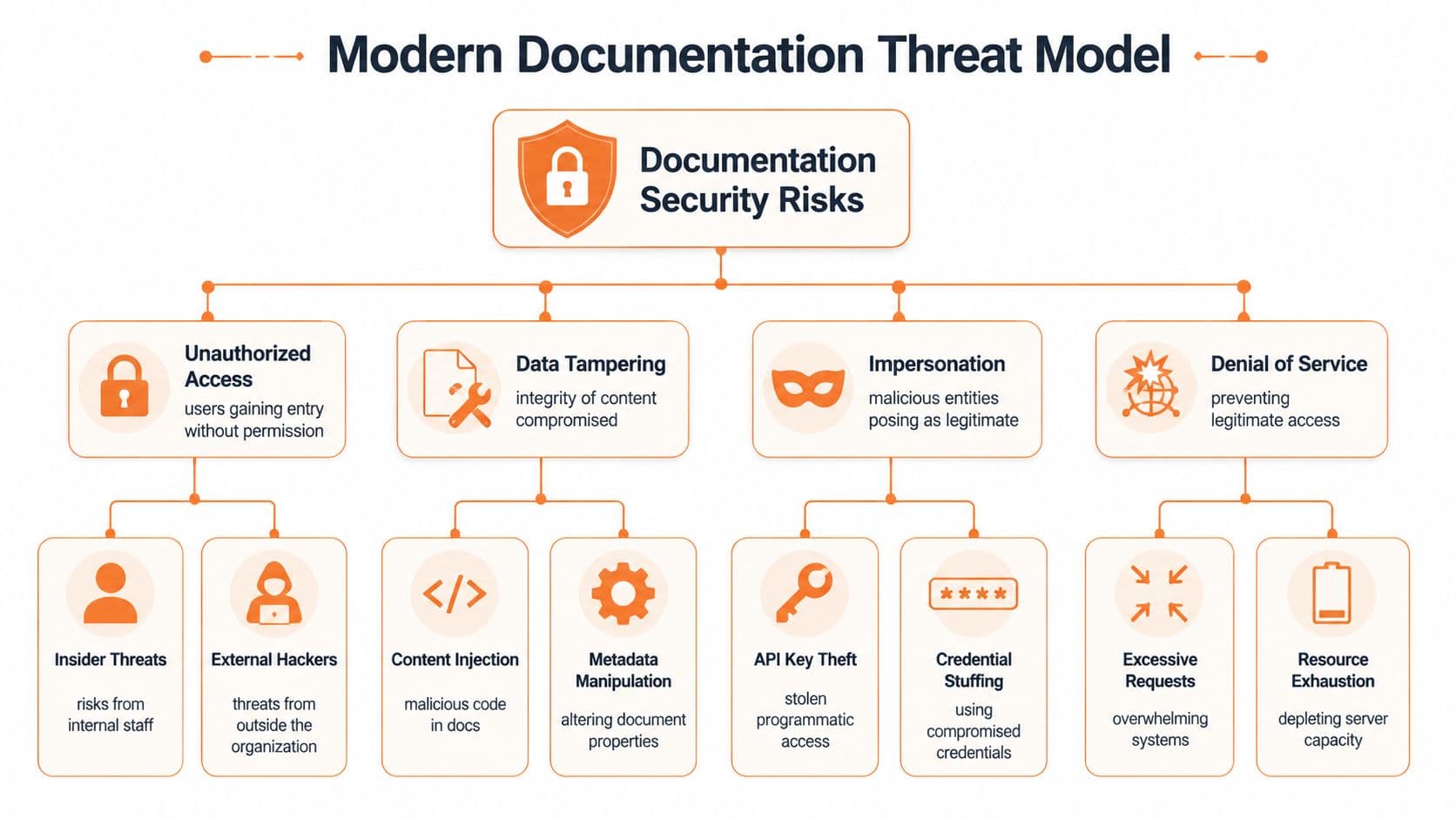
The prevailing thought still holds that the threat is unauthorized viewing. That's one threat. It's not the whole map.
A modern documentation system faces the same trust pressures as any identity workflow. Document authentication is a critical component of identity verification because automated software must detect fraud rates that exceed 30% in unverified digital ID submissions by cross-verifying data across multiple points to ensure data consistency and integrity. The lesson transfers directly to docs. Single-signal trust is weak. Multi-point verification is mandatory.
Access risk is only the first layer#
Private docs still leak through bad sharing models, stale permissions, copied exports, and forgotten service accounts. Customer support teams feel this first. So do HR and operations teams that publish internal SOPs and handbooks.
The mistake is stopping there. You can lock down access perfectly and still distribute bad information through search indexes, model memory, scraped mirrors, and unofficial copies.
Integrity failures do more damage than most teams admit#
If someone injects outdated setup steps, modifies parameter descriptions, or alters policy wording, the blast radius grows fast. Humans might catch it eventually. AI systems often won't. They'll cite the wrong page with confidence if the content looks structurally plausible.
Here are the failure modes that matter most:
- Tampering: A page is changed without proper review, but still appears authoritative.
- Impersonation: A fake mirror, spoofed subdomain, or copied knowledge base presents itself as your canonical source.
- Poisoning: Untrusted content gets mixed into retrieval pipelines and contaminates answers.
- Availability loss: Agents skip unstable, blocked, or throttled pages and fall back to weaker sources.
Bad documentation doesn't stay contained. It gets rephrased, cited, cached, and redistributed.
Machine trust introduces a new risk category#
The new threat isn't just theft. It's silent exclusion. If an agent can't parse your docs, it may skip them and recommend a competitor whose docs are easier to consume.
That's why documentation authentication now belongs in brand risk, support operations, and product discoverability. Engineering owns the implementation. The business absorbs the consequences.
Traditional Methods for Human Access Control#
Let's give the standard stack its due. SSO, OAuth, JWTs, and API keys all solve real problems. They just don't solve the full documentation authentication problem anymore.
If your docs include customer-only content, internal runbooks, or regulated material, you still need conventional access controls. Skipping that is reckless.
SSO and MFA are the baseline#
SSO centralizes identity. Your IdP handles login, session policy, and account lifecycle instead of every documentation tool improvising its own auth model. That's the sane default for internal knowledge bases and enterprise customer portals.
MFA is not optional in regulated environments. PCI DSS 4.0 Requirement 8.4.2 mandates MFA for all access to sensitive data and prohibits role-based exceptions, requiring two distinct factors for every user, including contractors and third parties, as summarized in the PCI DSS MFA requirements guide.
A decent human-access setup usually includes:
- SSO through an IdP: Central login, revocation, and policy enforcement.
- MFA everywhere sensitive: Not only for admins. Everyone with access to controlled documentation.
- Group-based authorization: Access tied to roles, teams, or customer entitlements.
- Session controls: Expiry, re-authentication, and audit logs for sensitive actions.
OAuth, JWT, and API keys have different jobs#
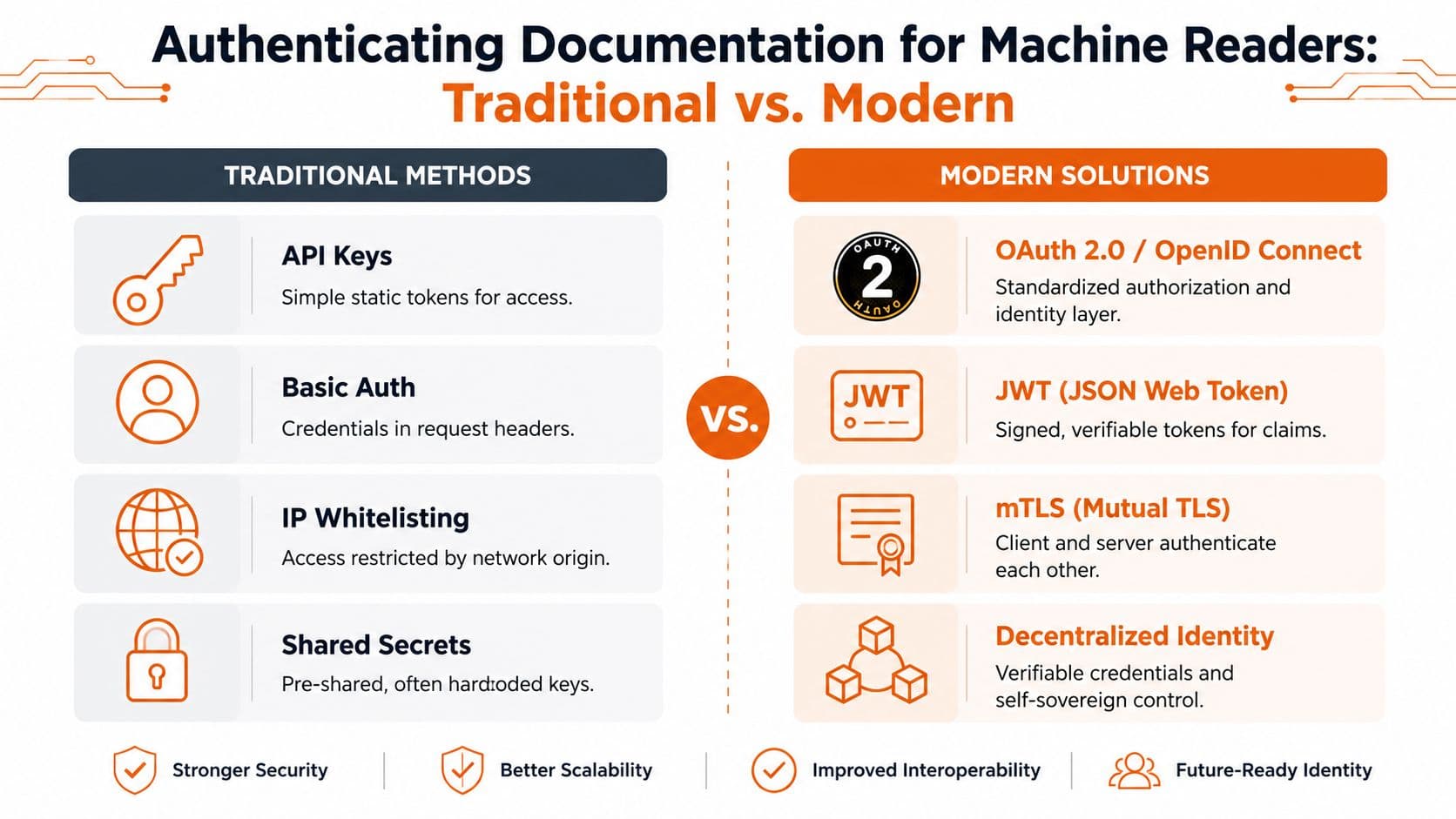
OAuth is useful when applications need delegated access. JWTs work well when you need signed claims that downstream services can verify quickly. API keys still show up for service access and automation, but teams misuse them constantly.
Here's the short version:
| Method | Good at | Bad at |
|---|---|---|
| SSO | Human login across tools | Machine-readable provenance |
| OAuth | Delegated app access | Content integrity by itself |
| JWT | Verifiable session claims | Telling agents which docs are canonical |
| API keys | Simple programmatic access | Fine-grained trust and lifecycle control |
Where the old stack falls short#
None of these methods answer the machine-first questions. They don't tell an LLM whether a page is canonical, structurally parseable, tamper-evident, or safe to cite. They verify identity at the door. They don't verify trust in the document itself.
That's the gap. Human access control is necessary. It is not sufficient.
Authenticating Documentation for Machine Readers#
Machine readers need a different contract. Not “can I log in?” but “can I trust, parse, and reuse this safely?”
That contract has three parts. Provenance. Structure. Control.
Provenance has to be visible#
If a model retrieves a page, it should be able to identify where that page came from, whether it belongs to the canonical doc set, and whether it has a trustworthy update path. That means stable URLs, explicit ownership, revision hygiene, and strong integrity controls.
Human readers infer trust from branding. Machines don't. They need consistent signals.
Structure is the thing most teams keep getting wrong#
AI agents can parse documentation only when it is structured in semantic MDX with exposed headings and metadata. Opaque editor blocks cause LLMs to fail chunking, directly reducing citation rates by up to 40% in benchmark tests, according to this Mintlify documentation tools analysis.
That's why “looks polished” is a useless standard. Documentation that renders as a visual blob may satisfy marketing, but it fails retrieval.
Use this checklist for machine-readable structure:
- Semantic headings: Real heading hierarchy. Not bold text pretending to be structure.
- Explicit metadata: Version, product area, ownership, and update cues.
- Code blocks that survive parsing: Plain, exposed code. Not embedded widgets that hide content.
- MDX or equivalent semantic format: Machines need structure they can chunk reliably.
A practical reference for this layer is Dokly's write-up on llms.txt.
This walkthrough from Dokly's official YouTube channel is also worth watching before you redesign your docs stack:
Control tells agents what to trust#
Good machine authentication also needs guidance. That includes canonical paths, exclusions, and machine-readable indicators for what should be indexed, cited, or ignored. For this, llms.txt and clean content architecture matter.
Structure beats style. A plain page with clear semantics is more trustworthy to an LLM than a beautiful page built from opaque blocks.
If you only secure access and ignore machine trust, you haven't finished the job. You've just authenticated for the wrong reader.
Implementation Patterns SaaS vs Self-Hosted#
Teams waste time by knowing what good documentation authentication should look like, then trying to assemble it from parts that weren't designed for the AI era.
The self-hosted path can work. It just costs more engineering attention than is often admitted. Docusaurus, custom MDX pipelines, patched search, hand-rolled access controls, custom llms.txt generation, analytics stitching, and performance tuning all become your problem.
What self-hosted really means#
Self-hosted sounds flexible because it is. It's also a maintenance burden.
You'll need to decide who owns:
- Semantic quality control: Somebody has to enforce heading discipline, metadata standards, and content templates.
- Rendering performance: Server-side rendered documentation with sub-100ms load times is critical for LLM parseability, and pages loading above 150ms are 3× less likely to be indexed and cited by models like ChatGPT, based on the benchmark discussed in this video source.
- Access integration: SSO, permission mapping, audit trails, and service account hygiene.
- Trust instrumentation: Canonicalization, machine guidance files, crawl visibility, and analytics.
That's not a side project. It's an ongoing documentation platform function.
SaaS works better when the platform is built for this job#
A generic docs SaaS can simplify hosting and editing, but many still publish pages that are machine-hostile. Nice UI. Weak semantics. Fast enough for people. Messy for agents.
That's why teams evaluating options should stop comparing on theme polish alone. Compare on whether the system outputs machine-readable structure, supports trust controls cleanly, and keeps performance tight without constant tuning.
For teams thinking more broadly about the security posture around customer-facing systems, this guide to securing SaaS applications is a useful companion read. It helps frame documentation as part of the wider attack surface, not an isolated publishing task.
The practical decision rule#
If you have a platform team that enjoys maintaining docs infrastructure, self-hosting is defensible.
If you want documentation that's secure, parseable, fast, and easy to operate without turning your knowledge base into an engineering hobby, use a platform that was designed for machine-first publishing from the start.
Auditing and Monitoring Documentation Trust#
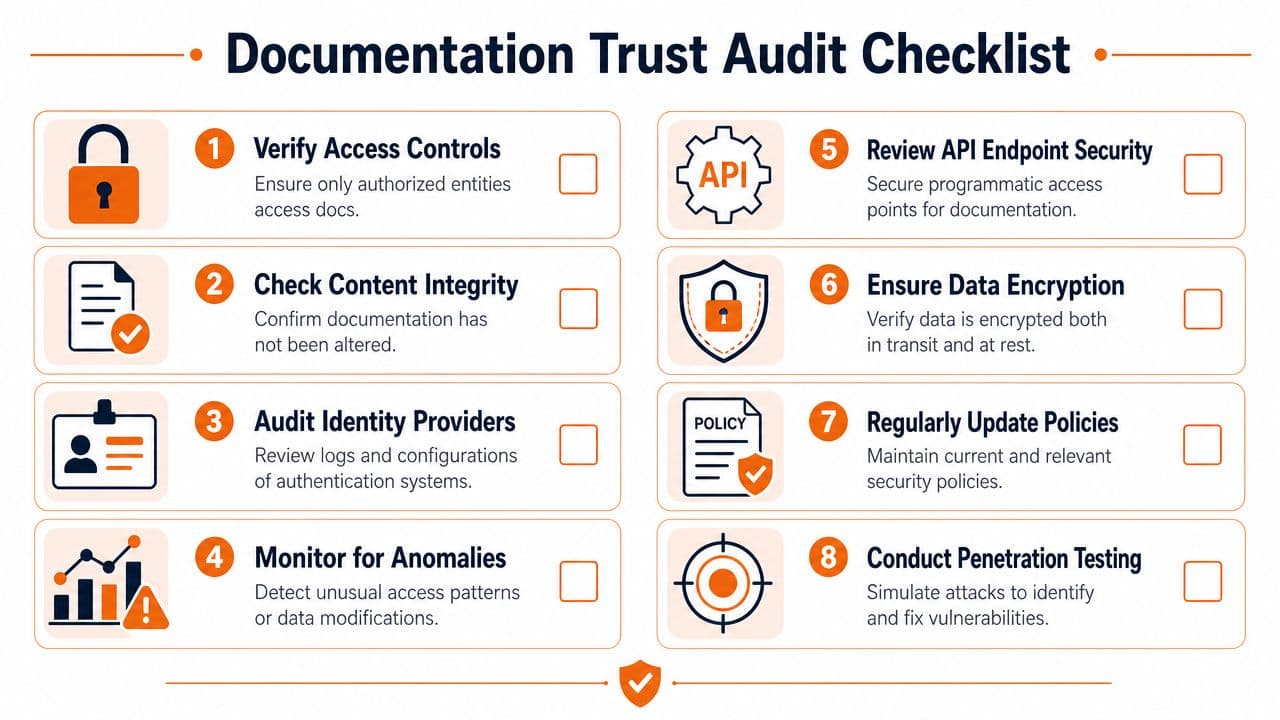
Organizations audit authentication once, then drift. Permissions sprawl. Old tokens survive. Pages lose structure. No one checks whether AI agents can still parse the content cleanly.
That's sloppy. Documentation authentication needs recurring review, not a one-time setup.
Audit the human side first#
Access controls still matter, especially for internal SOPs, compliance docs, and customer-only material. Authentication information is a protected data category under ISO 27001, requiring policies that prohibit plaintext storage and mandate strong non-reversible cryptographic hashing with unique salts for passwords and AES-256 encryption for keys, as explained in this ISO 27001 authentication information summary.
Use a blunt checklist:
- Review MFA coverage: Sensitive environments should not have convenient exceptions.
- Inspect secret handling: No plaintext credential storage. No shared admin accounts hidden in scripts or source code.
- Check access logs: Look for stale service access, odd login patterns, and accounts that no longer need documentation access.
- Validate provider configuration: Make sure your IdP, role mappings, and session policies still match reality.
Then audit machine trust#
Most documentation teams commonly have no process at all.
Check whether your docs have consistent heading structure, machine-readable metadata, clear canonical ownership, and valid guidance files for AI retrieval. Review whether new pages are published in formats agents can chunk. If your editor outputs opaque blocks, your trust model is broken upstream.
For deeper integrity mechanics, this explanation of tamper evidence and post-sign locking is worth reading. It's a practical lens on proving a document hasn't changed after approval.
Monitor what agents read, not only what humans click.
That's where analytics matters. You need to know which pages attract agent traffic, which queries fail, which documents go uncited, and where machines bounce because the page is too messy or too slow. Dokly's article on documentation analytics and metrics is a strong reference for building that monitoring habit.
The Dokly Framework for AI-Native Documentation#
Here's the framework I'd use if I were cleaning up a documentation stack today.
Authenticate for machines first#
Humans can tolerate bad structure. AI systems won't. Build your docs so a machine can verify source, parse sections, interpret code examples, and distinguish canonical content from noise.
Structure is non-negotiable#
Semantic MDX, exposed headings, visible metadata, and clean code blocks are not “nice to have.” They're the substrate that makes documentation authentication real in the AI era.
Prove provenance#
Every important document should have clear ownership, a trustworthy revision trail, and integrity controls that make silent tampering harder. If trust depends on brand recognition alone, the system is weak.
Speed is trust#
Fast server-side rendering matters because slow pages lose machine attention. If an agent skips the page, your documentation may be correct and still functionally irrelevant.
Stop buying polished failure#
A lot of documentation tools still optimize for screenshots, not retrieval. They help teams publish something that looks complete while leaving machine trust unresolved. That's why so many knowledge bases feel expensive and underperforming at the same time.
Dokly's position is the right one. If AI agents can't parse your docs, your docs are worthless. That's not marketing language. It's the operational standard teams should be using now.
For hands-on demos and product walkthroughs, Dokly's official YouTube channel is worth watching.
If you're done fighting brittle doc stacks, unreadable page builders, and AI-hostile output, take a serious look at Dokly. It gives you semantic MDX, automatic machine-readable guidance, fast server-side rendering, analytics, and a visual editing flow without the usual setup tax. For teams building help centers, SOPs, handbooks, release notes, and customer documentation, it's the obvious path if you want docs that humans can use and AI can trust.