Most advice on SaaS product adoption is stuck in a human-only model. It tells teams to polish onboarding, add tooltips, trim clicks, and hope usage rises. That still matters, but it no longer explains why adoption falls even when the UI gets better.
The bigger problem is simpler. Your product now has two evaluators: the human buyer and the AI agent that helps them discover, compare, implement, and support software. If the agent can't parse your docs, map your product structure, or answer basic workflow questions, your product becomes harder to recommend and slower to adopt. That is why a lot of familiar product-led growth advice feels increasingly disconnected from reality.
Table of Contents#
- The Real Reason Your SaaS Product Adoption Is Cratering
- What SaaS Product Adoption Means in 2026
- The Core Product Adoption Metrics You Must Track
- Diagnosing Your Hidden Product Adoption Friction
- An AI-First Playbook for Driving Adoption
- The Unfair Advantage of AI-Native Documentation
- Conclusion From User-First to Agent-First Adoption
The Real Reason Your SaaS Product Adoption Is Cratering#
The standard explanation for weak SaaS product adoption is usually wrong. Teams blame onboarding friction, feature overload, pricing confusion, or weak activation. Those issues exist, but they don't explain the scale of the current drop.
SaaS product adoption dropped from 20% to 6% in 2026, driven by traditional SaaS tools failing to accommodate AI agents that now act as primary readers of documentation and product interfaces, according to Userpilot's analysis of product adoption in 2026. That isn't a normal market dip. It's a structural mismatch.
A lot of founders still treat docs as post-sale support content. That's outdated. Buyers now ask ChatGPT, Claude, Cursor, or internal AI systems which tool to use, how it works, and whether it fits their workflow. If those systems can't read your product clearly, they don't recommend it clearly.
Old adoption advice breaks at discovery#
The old model assumed a person landed on your site, booked a demo, clicked around the app, and learned by doing. The newer path is messier. A prospect may start by asking an AI assistant for options, hand setup tasks to another agent, and only visit your UI after the shortlist is already formed.
That changes what "visible" means.
Your product can have a polished interface and still be functionally invisible if the systems advising your buyer can't interpret it.
This is why teams should spend more time understanding how agents evaluate software. A good starting point is this practical guide to explore AI agents with Trackingplan, especially if you're trying to understand how automated systems now shape research and decision paths.
What actually hurts adoption now#
Three failure modes show up repeatedly:
- Unreadable documentation: Pages look great to humans but are hard for LLMs to parse.
- Opaque product structure: Core workflows are buried behind vague navigation and weak semantic hierarchy.
- Support-dependent value: Users need a human to explain how the product works, which kills self-serve momentum.
If your team is still treating product adoption as a UI problem alone, you're optimizing the second half of the journey while losing the first half upstream.
What SaaS Product Adoption Means in 2026#
SaaS product adoption used to mean one thing: a user signed up, reached value, and built a habit around the product. That's still part of it, but it misses the new gatekeeper.
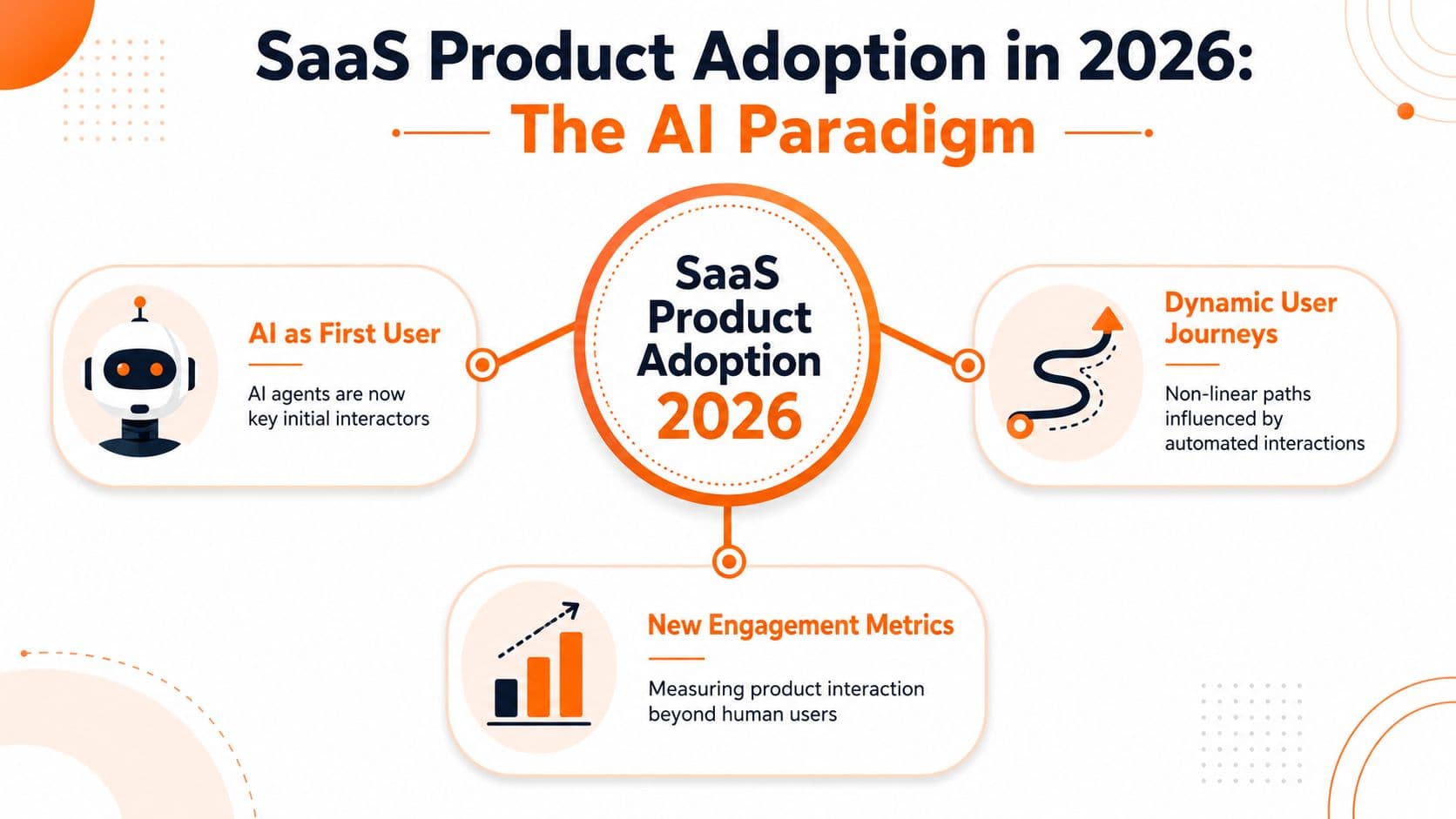
In 2026, the primary reader of technical documentation is no longer a human but an AI agent like ChatGPT, Claude, Cursor, or Perplexity, a shift highlighted by Mintlify's pivot to agent infrastructure for LLMs that previously struggled with "rendered soup," as discussed in this Mintlify video.
The first user often isn't human#
Think about old documentation like a beautifully designed book locked in a glass case. A human can admire it. An AI agent can't use it well if the structure is hidden behind heavy rendering, vague headings, or editor blocks that strip meaning from the page.
AI-native documentation works more like a structured database. The agent can identify the page topic, extract the answer fast, follow the hierarchy, and connect product capabilities to a real task.
That changes the definition of adoption. It isn't just "did someone log in?" It's also "could the machine interpreting this product understand what it does, how to use it, and when to recommend it?"
Adoption now includes machine-readability#
Machine-readability is no longer a nice technical detail. It's part of product design.
A strong SaaS product adoption strategy in 2026 includes:
| Area | Old assumption | Better assumption |
|---|---|---|
| Discovery | SEO and brand get you found | AI summaries and agent recommendations shape shortlists |
| Evaluation | Buyers read docs manually | Agents read docs first, then humans validate |
| Onboarding | Humans click through setup | Humans and agents split setup, lookup, and support tasks |
| Enablement | Help center is for support | Docs act as product infrastructure for retrieval and execution |
Traditional product adoption tactics still have a place, and some are still useful when adapted well. If you want a conventional baseline to compare against, SigOS on product adoption tactics gives a useful overview. The problem is that those tactics underperform when the content layer underneath them isn't parseable.
What this means for product teams#
Product, support, growth, and docs teams can't work as separate functions anymore. If docs are unreadable to agents, onboarding gets noisier. If onboarding gets noisier, support volume rises. If support becomes the main way users reach value, adoption weakens.
Products used to compete on interface quality. They now also compete on whether a machine can accurately explain them.
That's why documentation has moved from a supporting asset to a growth asset.
The Core Product Adoption Metrics You Must Track#
The classic metrics still matter. The mistake is reading them with a pre-AI mindset.
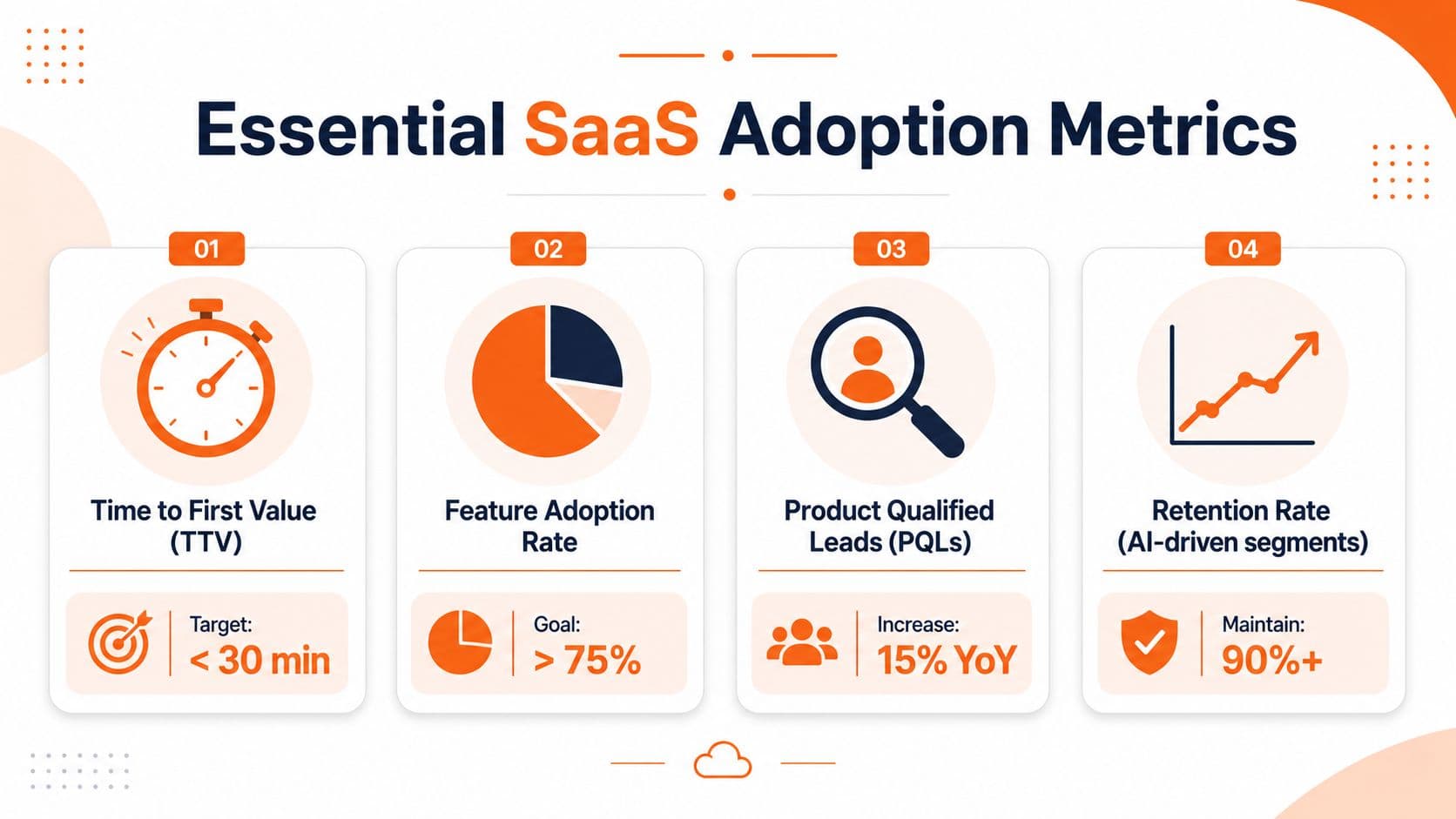
The baseline definition still holds. Product adoption rate is (Number of users actively using core features ÷ Total number of new users) × 100, and healthy B2B SaaS benchmarks include Time to Value under 7 days and a DAU/MAU stickiness ratio above 20%. Users who fail to hit activation milestones within 7 days show 3x higher churn risk, according to Optimizely's definition of product adoption rate.
Track the fundamentals, but interpret them differently#
Teams should watch four layers.
| Metric | What it tells you | AI-first interpretation |
|---|---|---|
| Product adoption rate | Are new users reaching core value? | Are users reaching value without heavy human intervention? |
| Time to Value | How fast users get the first real outcome | How fast a person or agent can find and execute the right path |
| Feature adoption | Which capabilities users actually use | Whether the product is understandable enough for deeper exploration |
| Retention signals | Whether usage becomes habitual | Whether value is durable after initial setup and support involvement |
A team can hit decent signup numbers and still fail at adoption if new users need too much hand-holding to activate core workflows.
TTV now starts before the first click#
Many teams misread the data by measuring Time to Value from signup. In practice, value discovery often starts earlier. A prospect may ask an LLM how to integrate your API, compare your workflow to a competitor, or look for setup guidance before anyone creates an account.
If your documentation is machine-readable, that pre-signup discovery compresses TTV. If it isn't, the user enters the product confused, already behind, and more likely to stall.
Feature depth matters more than shallow usage#
A healthy adoption motion doesn't stop at one activated feature. It gets users into a second and third useful workflow.
That matters because shallow usage can look healthy while renewal risk grows underneath it. Teams that only celebrate first activation often miss the larger issue: users haven't built enough product depth to stay.
Practical rule: Treat activation as proof of interest. Treat repeated use of core features as proof of adoption.
A practical metric stack for operators#
If I were auditing SaaS product adoption today, I'd want answers to these questions:
- Core value usage: Which actions represent true product value, not vanity clicks?
- Time to usable answer: How fast can someone find the exact help article, API page, or setup step they need?
- Feature depth: Are adopted accounts moving beyond one basic workflow?
- Support dependency: Which parts of activation still require a ticket, call, or CSM explanation?
When those four views line up, the numbers become useful. When they don't, teams usually optimize dashboards instead of fixing friction.
Diagnosing Your Hidden Product Adoption Friction#
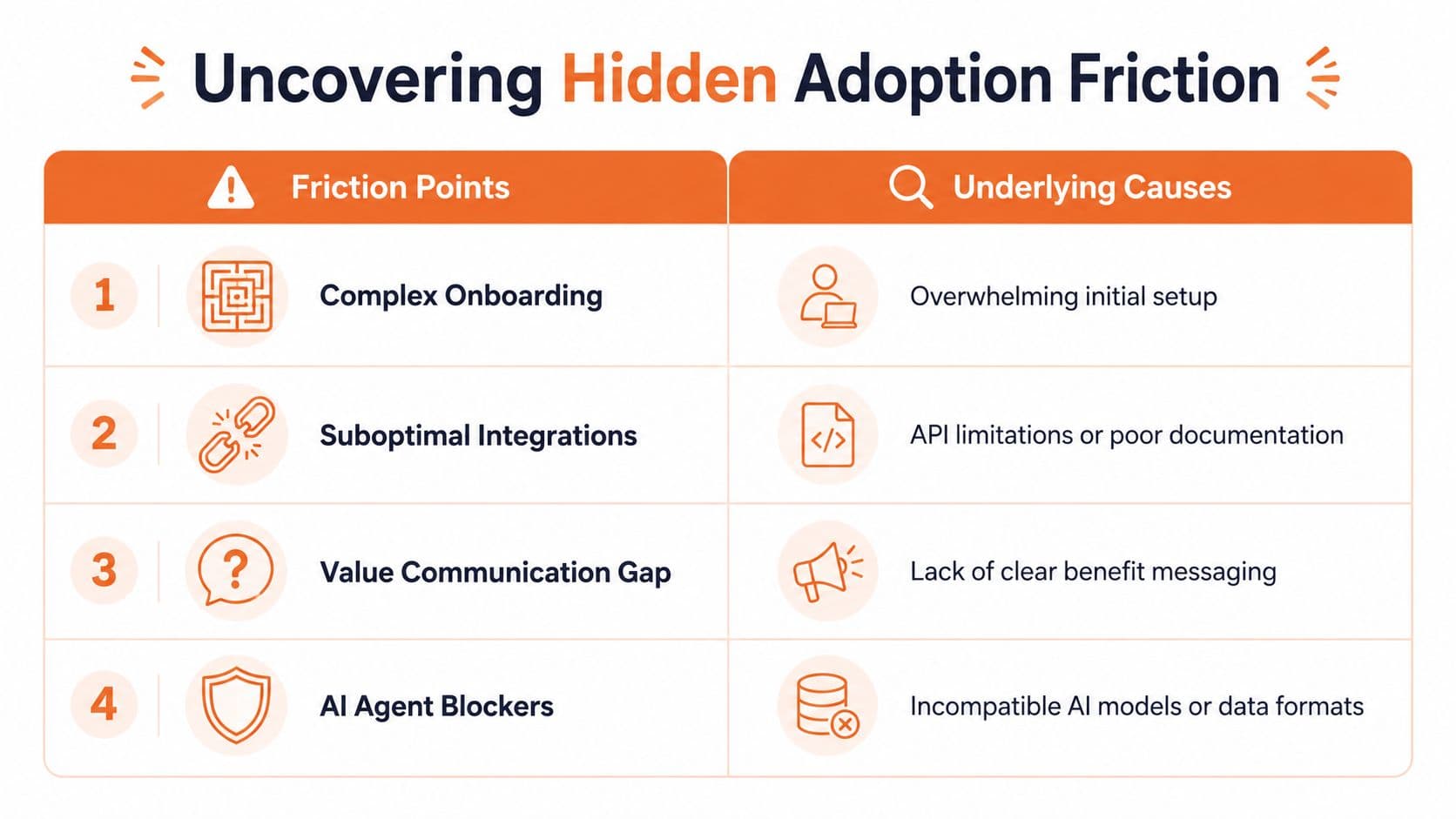
Most adoption friction isn't visible in the product UI. It's buried in the content architecture around the product.
Teams notice the symptoms first. Support volume stays high even though the help center is full. Users sign up but don't complete technical setup. API features look underused even when the demand is clearly there. Everyone assumes the issue is in the feature itself.
Often, it isn't.
84% of companies fail to deploy AI-ready documentation because they treat knowledge bases as human-only infrastructure, and 67% of AI agent conversations still escalate or fail due to gaps in article structure rather than the model itself, according to Ysquare Technology's analysis of the AI agent documentation reality gap.
The symptoms teams misdiagnose#
A few patterns show up repeatedly:
- High-ticket categories around setup: The answer exists somewhere, but users and agents can't retrieve it cleanly.
- Strong interest, weak completion: Prospects understand the promise, then get lost in technical steps.
- Low API or advanced feature uptake: The capability is valuable, but the explanation is fragmented or too abstract.
- Escalation-heavy support teams: Agents fail, self-serve fails, then humans absorb the cost.
None of these problems are solved by adding another modal or tweaking button copy.
What bad content architecture looks like#
You can usually spot the issue fast:
| Friction pattern | What's really going on |
|---|---|
| Docs answer broad topics but not tasks | Headings are written for marketers, not operators |
| Articles bury the answer deep in the page | Agents can't extract the outcome cleanly |
| Knowledge is split across tools | No single authoritative source exists |
| Rich layouts replace semantic structure | Pages look polished but lose machine readability |
This is why many "documentation upgrades" don't improve adoption. Teams redesign the skin and leave the structure broken.
If an agent has to guess which paragraph contains the answer, your documentation isn't doing its job.
The operational test that exposes the problem#
A simple diagnostic works well. Pick the top questions your support team gets. Then ask whether an AI assistant could answer each one accurately from your current docs alone.
If the answer is no, your adoption friction probably starts before the user ever reaches the right screen.
The hard trade-off is that fixing this doesn't feel glamorous. It means rewriting pages, tightening headings, consolidating sources, and removing layout decisions that make life harder for machines. But this is the kind of boring foundation that improves adoption in practice.
An AI-First Playbook for Driving Adoption#
Teams don't fix SaaS product adoption with one campaign. They fix it by removing friction from the system around the product. In an AI-first world, that means reworking onboarding, education, discovery, and support so both humans and agents can move forward without getting stuck.

Start with task-based onboarding#
Generic product tours don't do much for complex SaaS. Users don't want a grand tour of the interface. They want to complete one job.
Structure onboarding around tasks, not tabs:
- Define the first win: Pick the first real outcome a user needs, not the first screen you want them to see.
- Reduce branching early: Give users the shortest path to that outcome.
- Write guidance as instructions: "Connect your source" works better than "Integrations overview."
- Support role-based variance: Admins, operators, and developers shouldn't see the same path.
For teams reviewing their onboarding flow, this guide to onboarding best practices from Dokly is useful because it focuses on turning documentation into an operational part of setup, not an afterthought.
Build feature discovery into the workflow#
Feature adoption doesn't happen because a feature exists. It happens because users encounter the right feature at the right moment.
The retention gap here is massive. Users adopting 3 or more core features show 92% retention at 24 months versus 47% for single-feature users, according to SaaS Funnel Lab's breakdown of feature adoption. That tells you something important. Deeper product use predicts staying power better than shallow usage.
What works:
- Contextual prompts: Recommend the next feature when the current task naturally leads there.
- Role-based suggestions: Show technical capabilities to technical users, not everyone.
- Workflow education: Teach the sequence in which features compound value.
- Support-informed nudges: Promote features where support repeatedly sees confusion or missed opportunity.
What doesn't work:
- Announcement blasts: Users ignore broad feature dumps.
- Static tours: They explain the interface, not the workflow.
- Equal promotion of every feature: Not every feature deserves the same exposure.
The job isn't to make every feature visible. It's to make the next useful feature obvious.
Treat docs as part of the product#
Many teams still operate like it's 2023. They ship the product, then create docs later. In practice, docs shape adoption before, during, and after onboarding.
Good documentation for adoption has a few traits:
- Specific headings: Each page should map to a clear user task.
- Direct first sentences: Put the answer first, then explain.
- Single source of truth: Avoid splitting the same workflow across Slack, Notion, Confluence, and a help center.
- Structured formats: Agents need content they can parse consistently.
This is also where tooling matters. Platforms that output plain-text-friendly structures, support clean semantic content, and avoid opaque visual blocks are better aligned with how modern discovery works. That's one reason teams increasingly question older documentation setups that impose a Docusaurus or Mintlify-style setup tax, or produce polished front ends that machines still struggle to read underneath.
A useful sign of maturity is whether your docs platform supports AI-oriented retrieval patterns out of the box. Some teams also benefit from lightweight utilities in Dokly's tools library when they want to audit or improve documentation workflows without rebuilding everything at once.
Measure support-assisted adoption#
Product analytics alone won't tell you where adoption breaks. Support data often does.
Look for:
| Signal | What it usually means |
|---|---|
| Repeated tickets on the same setup step | The workflow or article is unclear |
| Questions that should be self-serve | Docs aren't easy to find or parse |
| Frequent escalations from AI chat | Content structure is weak |
| Low usage on advanced features | Discovery and explanation are both failing |
Later in the process, it helps to show teams how an AI-ready knowledge base is built in practice:
Design for delegation, not just interaction#
A user doesn't always want to click through every step. Sometimes they want to delegate part of the work to an assistant, teammate, or agent and stay in control at the oversight layer.
That means product teams should design for:
- Clear goals: What task is being completed?
- Observable progress: Can the user see what happened?
- Recoverable errors: If an agent fails, can the person step in cleanly?
- Transparent outputs: Can the result be reviewed without digging?
The SaaS products that win adoption now aren't just easy to use. They're easy to understand, easy to delegate, and easy to support.
The Unfair Advantage of AI-Native Documentation#
Most documentation platforms still optimize for how pages look in a browser. That's not enough anymore. The better question is whether the content underneath is usable by machines.
AI-native documentation offers a real advantage. Tools that generate plain-text-friendly outputs such as vanilla .md and an llms.txt file make docs easier for LLMs to parse, which is explicitly called out as a differentiator in Speakeasy's comparison of Mintlify, Scalar, and Bump. That matters because machine-readability isn't a branding detail. It's what determines whether an agent can extract answers and recommend your product correctly.
The trade-off most teams ignore#
A lot of doc stacks optimize for editor convenience or visual polish. That creates hidden costs:
- Rendered complexity: Great-looking pages can become hard for agents to chunk.
- Setup tax: Repo-heavy systems slow down non-technical teams.
- Fragmented ownership: Product, support, and success all publish in different places.
- Weak retrieval quality: Search and chat struggle because the source material is poorly structured.
By contrast, AI-native documentation favors clean semantics, task-based headings, and machine-readable outputs from the start.
Why this matters more than another UI polish sprint#
Modern documentation platforms increasingly connect usage data with engagement signals so teams can see which endpoints create support questions and where developers get stuck, as noted in ReadMe's comparison of ReadMe and Mintlify. That's a much better loop than guessing which doc improvements matter.
Some platforms also embed AI chat directly into docs, which helps users self-serve on complex technical topics instead of escalating to support. That's something highlighted in Fern's comparison with Mintlify. The important distinction is that chat only helps when the underlying content is structured well enough to answer accurately.
If your team is evaluating how to build a help center or documentation system that supports adoption, this piece on a knowledge base builder from Dokly is worth reading because it focuses on structure and usability, not just visual themes.
What the best teams do differently#
They stop treating documentation like a side project. They build it as infrastructure.
That means:
- One source of truth: No scattered procedural knowledge.
- Semantic structure: Headings, code blocks, and metadata that agents can parse.
- Fast delivery: Pages must load cleanly and consistently.
- Operational ownership: Docs are part of product adoption, support deflection, and expansion.
The old way produced content humans tolerated. The better way produces content both humans and agents can use immediately.
Conclusion From User-First to Agent-First Adoption#
SaaS product adoption hasn't become less important. It has become less human-only.
The practical shift is this: adoption now depends on whether your product can be understood, retrieved, and recommended by the systems your buyers already use to make decisions and get work done. Human experience still matters. It just isn't the whole story anymore.
Teams that keep chasing adoption with UI tweaks alone will stay frustrated. Teams that rebuild their docs, onboarding, and support content for machine-readability will have a much better shot at being discovered, implemented, and retained. If you want a broader view of where this is going, this explanation of how agentive AI automates tasks is a useful complement to the adoption discussion.
For a deeper look at what AI-readable documentation needs to include, this guide on docs for AI agents from Dokly is a strong next step.
Stop building documentation for yesterday's users. Start building it for the agents already standing between your product and its next customer.
Dokly makes that shift practical. If you want documentation that humans can use and AI agents can parse, cite, and recommend, Dokly is the cleanest place to start. It gives teams AI-native docs, automatic llms.txt, semantic output, fast publishing, and a simpler workflow than older stacks that still treat machine-readability like an afterthought.