A lot of teams are in the same bad spot right now. A customer asks ChatGPT, Claude, Perplexity, or Cursor a simple product question. The answer should come straight from your docs. Instead, the model gives a vague summary, cites a competitor, or says it can't find reliable information.
That failure usually gets blamed on the AI.
Most of the time, the primary problem is the documentation system. The old idea of a help center as a tidy library for human browsing is obsolete. In practice, your documentation now has two audiences: people and machines. If the machine side breaks, your content becomes much harder to discover, retrieve, cite, and recommend.
That's why the term knowledge base builder needs a reset. In 2026, this category isn't just about publishing articles faster. It's about creating an information architecture that support teams can trust, product teams can maintain, and AI systems can parse. If an AI can't read your docs cleanly, your docs are doing half the job at best.
Table of Contents#
- Introduction The AI Is Your New Top Customer
- What Is a Knowledge Base Builder Really For
- The New Technical Standard AI-Parseable Docs
- Your 2026 Knowledge Base Builder Evaluation Checklist
- How Different Teams Use a Modern Knowledge Base
- Your Implementation and Migration Strategy
- See It in Action How Dokly Delivers
Introduction The AI Is Your New Top Customer#
The first reader of your documentation often isn't a human anymore. It's an AI agent answering a pre-sales question, helping a user troubleshoot an issue, or summarizing your API for a developer evaluating tools.
That changes what “good docs” means.
A few years ago, a team could get away with a visually polished help center built from page-builder blocks, nested menus, and brittle search. It looked organized. It satisfied an internal checklist. But it didn't create a clean, structured source of truth that models could reliably retrieve from.
Now the stakes are different. Ontotext describes a knowledge base as more than a database. It's an interlinked, machine-readable collection built on semantic models, formal classification, and inference-friendly structure. That matters more as AI adoption moves into production. Korra's 2026 knowledge management and GenAI projections report that 80% of enterprises are expected to use GenAI APIs, applications, and models in production by 2026, up from under 5% in 2023, and project the knowledge management market to reach $2.1 trillion by 2030.
The job changed before most tools did#
Many documentation platforms still act like their only mission is publishing. Write article. Add category. Add search. Done.
That's not enough anymore. A modern knowledge base builder has to produce documentation that's:
- Readable by humans
- Retrievable by search systems
- Parseable by language models
- Maintainable by non-technical teams
If one of those breaks, the whole system weakens.
Practical rule: If your docs look good in a browser but fail when an AI tries to quote or summarize them, the problem isn't discoverability alone. It's information architecture.
Visibility now depends on structure#
This is the uncomfortable part for teams using legacy wikis, internal drives, and block-based editors. You can have excellent content trapped in a bad format. The words are right, but the system around them makes them hard to chunk, cite, and trust.
A knowledge base builder is no longer just a publishing tool. It's a production system for structured knowledge. Teams that grasp that shift early will be easier to find, easier to support, and easier for AI systems to recommend.
What Is a Knowledge Base Builder Really For#
Most buying conversations still start in the wrong place. Teams compare editors, themes, permissions, and templates. Those matter, but they're not the core reason a knowledge base builder exists.
The product has to do real work for the business.
Three jobs that matter#
The first job is still the obvious one. Deflect support demand through self-service. Higher Logic recommends measuring pre- and post-launch ticket volume together with page views and organic traffic to see whether the knowledge base is reducing incoming requests. In the same discussion, it references Document360's 2026 roundup, which reports that 51% of customers prefer technical support through a knowledge base, and 57% of support calls come from customers who couldn't find answers online first in this KPI-focused overview of knowledge base performance.
That's not a content vanity metric. It's an operations metric.
The second job is internal consistency. A good knowledge base builder standardizes how teams document process, policy, product behavior, and edge cases. Support, product, ops, HR, and compliance stop answering the same question from five different places.
The third job is the one many teams still miss. It has to fuel AI answers with citable, structured content. That means the tool isn't just storing information. It's shaping how machines access it.
| Job | What success looks like | What failure looks like |
|---|---|---|
| Self-service | Customers find answers before opening a ticket | Support gets flooded with basic questions |
| Internal alignment | Teams rely on one current source of truth | Knowledge splinters across docs, chats, and drives |
| AI retrieval | Models can parse, cite, and summarize content correctly | Your product disappears from AI-generated answers |
Why old tools fall apart#
Shared drives, old wiki setups, and earlier Confluence-style workflows usually break in the same places.
- Content gets duplicated: A process note lives in a doc, a Slack thread, and a help article.
- Structure decays: Pages grow long, headings get inconsistent, and metadata is missing.
- Search stays shallow: Keyword matching misses the way users ask questions.
- AI retrieval suffers: Models hit visual blocks, fragmented sections, or weak source context.
That's why “we already have docs” is often misleading. You may have written information, but not a reliable knowledge system.
Good documentation isn't just published. It's retrievable, constrained, and maintained.
A strong knowledge base builder should make the right behavior easy. It should help teams create content that serves support, internal operations, and AI consumption at the same time. If it only solves publishing, it's an outdated category dressed up with modern branding.
The New Technical Standard AI-Parseable Docs#
Most documentation tools still optimize for what the page looks like after rendering. AI systems care much more about what the content looks like before rendering.
That's the divide.
Semantic MDX versus rendered soup#
The cleanest way to explain it is this: semantic MDX is a recipe an AI can follow. Rendered soup is a photo of the finished dish. One gives the model structured ingredients, sequence, and labels. The other gives it a blob.
Knowledge bases that ship semantic MDX with headings, code blocks, and metadata get cited by AI systems more reliably. Knowledge bases built from opaque editor blocks suffer a 40% to 60% drop in model recommendation rates, because the model can't parse the structure cleanly. Load times matter too. When documentation takes over 200ms to load, the likelihood that an agent processes the context drops significantly. Those two details change platform selection fast.
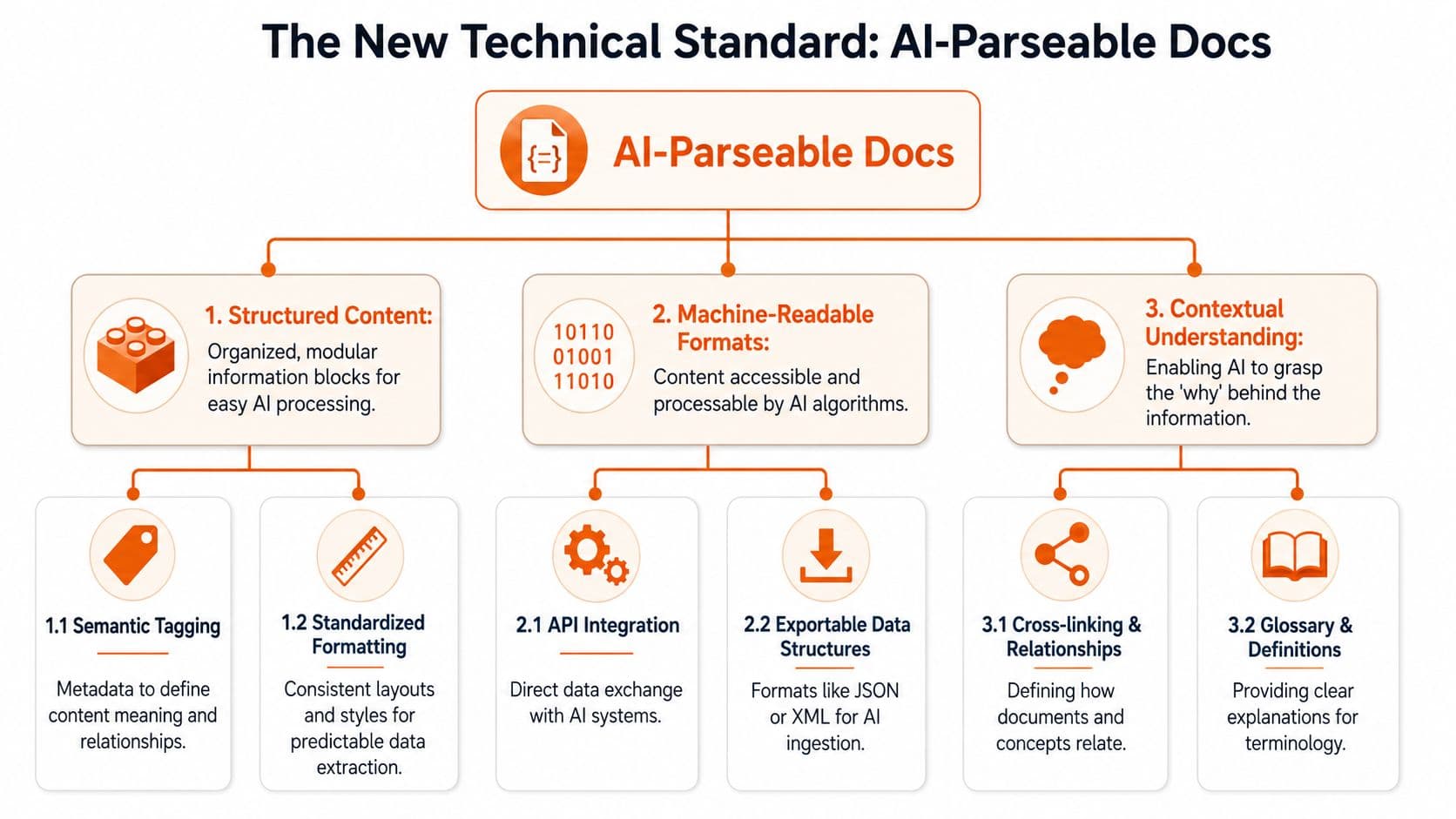
Here's what I now treat as essential in any knowledge base builder:
- Semantic output: Headings, lists, code blocks, tables, and metadata need to exist as structure, not visual decoration.
- Server-side rendering: Slow docs are hard for people and worse for machines.
- Stable URLs and source hierarchy: AI systems need predictable source references.
- Atomic content blocks: One page shouldn't contain five unrelated workflows smashed together.
For teams thinking through the retrieval side more thoroughly, Ivory Mind's piece on training AI with your documents is a useful companion because it reinforces the same practical point: the quality of the source layer determines the quality of the answer layer.
The machine-readable layer most teams skip#
Many organizations stop at “our docs are public.” Public isn't the same as machine-readable.
Slack's 2026 guidance pushes teams toward tags, question-and-answer pairs, rich metadata, and source links for AI use. That advice matters because traditional help-center structure doesn't tell a model enough about what each page means. If you want a deeper look at one specific file in that stack, Dokly's article on how llms.txt works in documentation is a practical place to start.
The machine-readable layer usually includes:
-
Metadata that tells the model what a page is Product guide, API reference, changelog, policy, troubleshooting entry, and so on.
-
Source links that preserve traceability Models need a path back to the original page.
-
Cross-linking between related concepts Setup, troubleshooting, limits, and examples should connect cleanly.
-
Formatting that survives chunking If a model splits the page into pieces, each piece still needs to make sense.
If a page can't survive chunking, it can't survive AI retrieval.
This is why so many attractive doc sites underperform. They were built as publishing surfaces, not as AI-ready information systems.
Your 2026 Knowledge Base Builder Evaluation Checklist#
The wrong buying question is “Does this tool have a nice editor?” The better question is “Will this platform make our knowledge reliably usable by humans and AI without creating a maintenance mess?”
That's a much harder question. It also leads to much better choices.
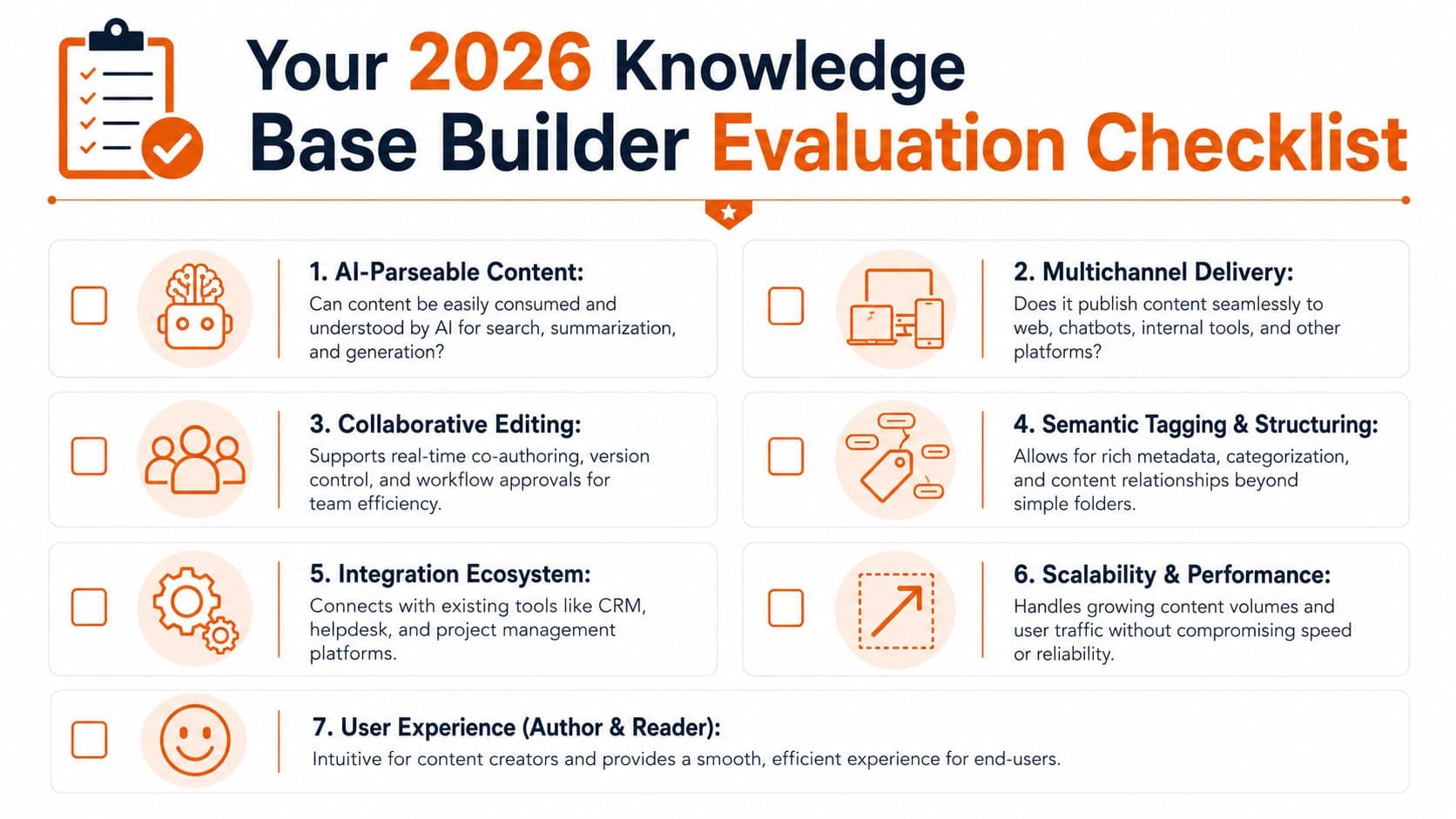
Questions worth asking every vendor#
Use these in demos. Ask for proof, not roadmap language.
-
Can the platform output AI-parseable content? Ask whether the system uses machine-readable formatting, semantic structure, rich metadata, and source links. Slack's AI guidance highlights those requirements directly in its overview of AI knowledge base features and best practices.
-
Is search semantic or mostly keyword-based? If a tool only works when users guess the exact phrase from the page title, it won't age well.
-
Does it support structured publishing beyond the website? Your docs should be usable in support tools, AI assistants, internal workflows, and other downstream systems.
-
What does maintenance look like for non-developers? A platform that needs repo wrangling, config edits, and fragile theme work creates hidden cost.
-
How fast is the rendered site? Performance affects user experience and AI retrieval.
-
What happens to metadata, links, and hierarchy during migration? A clean import is worth more than a flashy editor demo.
If you're comparing categories instead of just vendors, this roundup of the best tools for LLM visibility is helpful because it frames the market around discoverability by AI systems, not just traditional search.
What good answers sound like#
A strong vendor answer is concrete. It sounds like this:
| Evaluation point | Weak answer | Strong answer |
|---|---|---|
| Content format | “Our editor is flexible” | “Content ships in structured, machine-readable output” |
| Search | “We have search” | “We support semantic retrieval, not only keywords” |
| AI readiness | “We're exploring AI” | “We support metadata, source linking, and AI-readable formatting” |
| Setup burden | “Developers can customize anything” | “Non-technical teams can publish without engineering bottlenecks” |
I'd also compare the setup tax directly. Docusaurus can work well if you want a docs-as-code stack and you have engineering support. Older wiki tools can work for internal sprawl if AI retrieval isn't a priority. A purpose-built platform such as Dokly is worth considering when you want a visual editor that still outputs structured docs and handles knowledge base software evaluation criteria in more detail without forcing your team into repo-first workflows.
Buyer filter: Don't ask whether the tool can publish docs. Ask whether it can publish documentation that remains usable after search, chunking, summarization, and citation.
That question eliminates a lot of polished but outdated products very quickly.
How Different Teams Use a Modern Knowledge Base#
A modern knowledge base changes behavior across the company because it gives every team one place to publish answers in a format both people and AI systems can use.

That shift matters more than the usual “docs hub” pitch suggests. If a support bot, internal assistant, or search system cannot parse a page cleanly, the page is not doing its job. It is just stored content. Good documentation now has to survive retrieval, chunking, summarization, and citation without losing meaning or trust.
Different teams feel that standard in different ways.
Customer support and success#
Support usually sees the problem first.
In older setups, the official help center covers the basics, Slack holds the exceptions, and experienced agents carry the rest in their heads. That model works until ticket volume rises, new teammates join, or an AI assistant starts answering from partial context. Then the gaps show up fast. Answers drift. Escalations increase. Customers get inconsistent guidance depending on who picked up the case.
A better setup gives support one structured source of truth. Short troubleshooting articles answer one issue at a time. Decision trees explain when a case has crossed from self-serve to human help. Escalation pages spell out what to verify before routing to product or engineering.
That structure improves more than readability. It gives AI systems cleaner source material, which means fewer hallucinated steps and better citations back to the exact article. Support leaders should care about that as much as article count.
A practical pattern is to separate content into clear job types:
- Quick answers: one problem, one fix
- Decision guides: which path applies, and why
- Escalation references: what to collect before handing off
Product and engineering#
Product and engineering teams usually inherit a different mess. Release notes live in one tool. Internal decisions live in another. API changes sit in commit history, Jira comments, or a draft doc no one revisits. The result is familiar. Customers read one explanation, support repeats another, and engineering has to clarify the same edge case three times.
A modern knowledge base fixes that by connecting context, not just publishing pages.
Feature documentation should tie together what changed, who it affects, how it works, what can go wrong, and where the limits are. AI systems depend on those relationships. If setup steps, caveats, and version details are buried in separate disconnected pages, retrieval gets sloppy. Humans can sometimes work around that. AI usually cannot.
I have seen this firsthand in migrations. The biggest win was not prettier release notes. It was reducing the number of “can someone explain what this means?” messages after every launch.
A short product walkthrough helps make that concrete:
HR L and D and operations#
HR, L&D, and operations teams often have the highest consequences for stale documentation. A broken onboarding checklist wastes a week. An outdated policy creates compliance risk. An old SOP can send a team through the wrong approval path before anyone notices.
These teams also tend to be stuck with the worst formats. PDFs, duplicated folders, slide decks, and handbooks that were accurate once and then aged out. People search, find three versions, and ask in chat which one is current. That is a documentation failure, but it is also an information architecture failure.
A modern knowledge base gives these teams clear ownership, review cycles, and structured pathways by role or task. New hires can follow onboarding in sequence. L&D can publish role-based references that stay current. Operations can maintain SOPs as living procedures instead of static files.
The payoff is simple. Fewer trust breaks.
When someone asks, “Which version should I trust?”, the system has already failed. A modern knowledge base should answer that question before the user has to ask.
Your Implementation and Migration Strategy#
The biggest mistake in a documentation migration is trying to move everything at once. That creates a giant content dump, not a better knowledge base.
A calmer approach works better.
Start with one high-friction workflow#
Pick one area where the current system is obviously failing. Good candidates include support troubleshooting, onboarding materials, SOPs for repetitive operations, or product documentation tied to frequent customer questions.
Then narrow it further.
-
Choose a bounded content set
One product area, one team handbook, one support queue, one policy cluster. -
Rewrite for structure, not just style
Break giant pages into atomic articles. Add clear headings, metadata, and source relationships. -
Test with real questions
Don't ask whether the pages look complete. Ask whether someone can find and trust the answer quickly. -
Track operational impact qualitatively at first
Watch what gets searched, what still triggers tickets, and where people bypass the docs.
Build an operating model not just a site#
The hard part isn't launch. It's upkeep.
Kapa.ai reports that building an AI knowledge base in-house often leads to abandonment within 6 to 18 months due to high maintenance overhead, as explained in its analysis of why teams shouldn't build their own AI knowledge base. That lines up with what many product and support leaders have already learned the painful way. A clever prototype is easy. A current, governed, trustworthy knowledge system is not.
So set rules early:
- Assign ownership: Every content area needs a team owner.
- Define review triggers: Product changes, policy updates, and support escalations should trigger doc checks.
- Create approval paths: Especially for compliance, ops, and HR content.
- Retire stale pages fast: Dead content is worse than missing content.
A lightweight governance model beats heroic cleanup sessions every time. If you need a practical framework for that side of the work, this guide to knowledge management strategies for growing teams is useful because it focuses on keeping systems usable after launch.
A knowledge base dies slowly. First the edge cases go stale, then the team stops trusting search, then people go back to asking in chat.
That slide is preventable, but only if the builder makes maintenance easy enough for normal teams to sustain.
See It in Action How Dokly Delivers#
By this point, the shortlist should be clear. You want structured output, machine-readable formatting, fast rendering, manageable editing, and a setup that doesn't turn documentation into a developer side project.
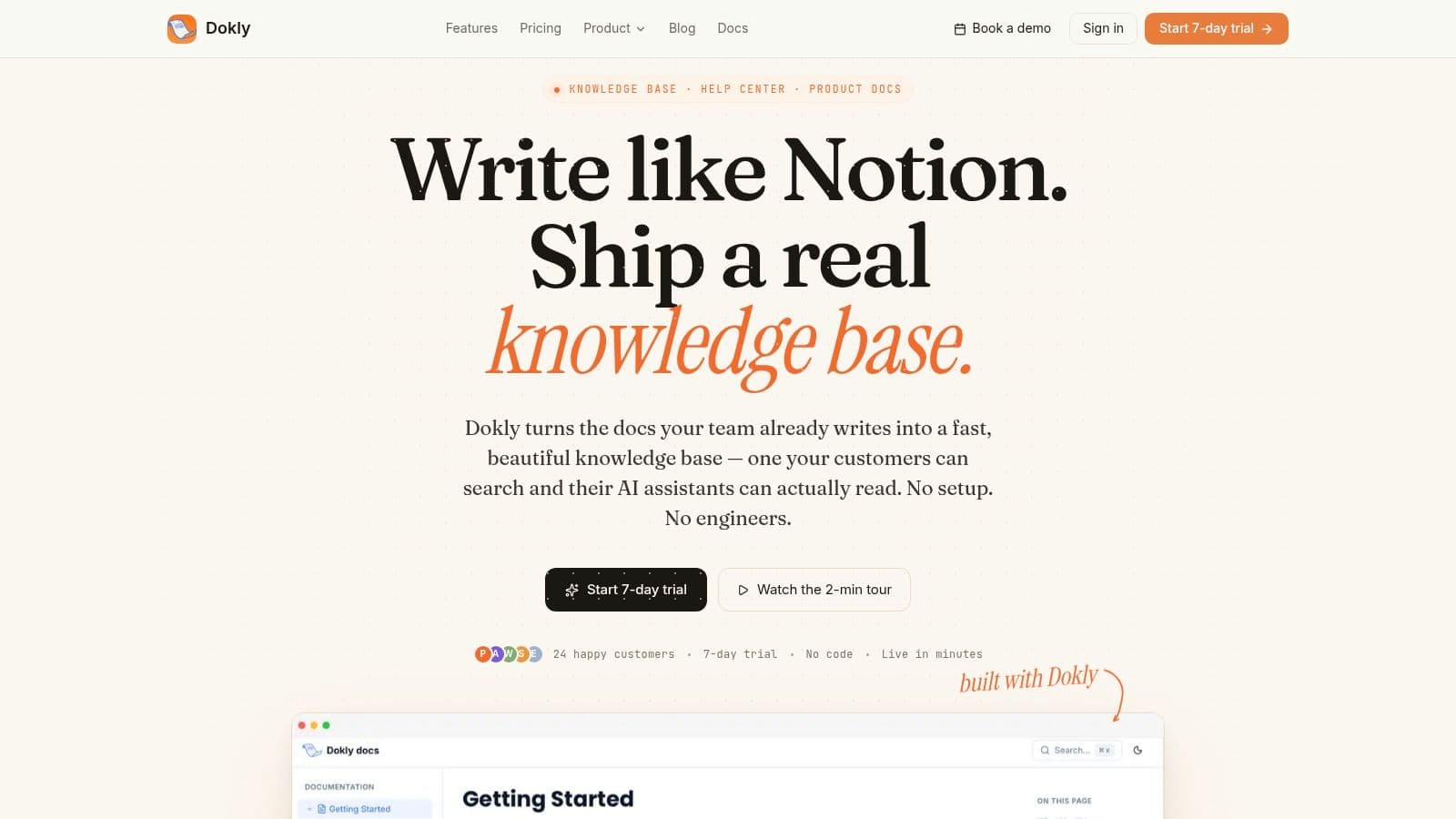
That's where Dokly fits the 2026 standard cleanly. It uses a visual editing experience, but the output is built for AI readability rather than trapped in opaque page-builder blocks. It also auto-generates llms.txt and llms-full.txt, server-side renders pages, supports custom domains, and gives teams a way to publish docs without taking on the setup tax that usually comes with docs-as-code stacks like Docusaurus.
That combination matters because many alternatives force an awkward trade-off. You either get an easy editor with weak machine structure, or a strong technical stack that non-technical teams won't maintain consistently.
If you want to evaluate your current docs before choosing a platform, Dokly's tools section at documentation and AI-readiness tools is a practical starting point. It's useful for spotting structural issues before migration.
A product demo helps more than a feature list. This one shows the workflow clearly:
The broader point is simple. A knowledge base builder shouldn't just help you publish pages. It should help your team produce documentation that support can use, customers can trust, and AI systems can read without guesswork.
If your docs still look fine to humans but disappear in AI workflows, it's a good time to test Dokly. The free plan makes it easy to try a small migration, validate the structure, and see whether your documentation finally behaves like a real knowledge system.