Most advice about documentation is already obsolete. Teams still obsess over sidebar design, landing page polish, and whether the prose feels friendly. That's backward. The first serious reader of your docs for AI agents isn't a developer scanning a page. It's a model trying to retrieve a procedure, infer a capability, and decide whether it can trust your content enough to act on it.
That shift breaks a lot of popular documentation habits. Beautiful pages built from messy components, vague headings, hidden metadata, and JavaScript-heavy rendering still look fine to humans. To agents, they often look like noise. If a system can't reliably discover, parse, and chunk your docs, it can't use your API well, cite your product accurately, or recommend your platform with confidence.
Table of Contents#
- Your Documentation Has a New Primary Reader
- What Docs for AI Agents Actually Are
- The Core Principles of Machine-Readable Content
- Essential Formats That AI Agents Consume
- How Agents Use Docs in RAG and Tool Integration
- Your Checklist for Creating AI-Ready Docs
- Frequently Asked Questions About AI Docs
Your Documentation Has a New Primary Reader#
By 2026, documentation needs to be machine-readable first, not just human-readable. That's not hype. Google Cloud's overview of AI agents defines them as systems that use AI to pursue goals and complete tasks on behalf of users, and a spring 2025 MIT Sloan Management Review survey cited there found 35% of respondents had already adopted AI agents by 2023, while 44% planned to deploy them shortly afterward. That's a combined 79% of respondents already using or near-term planning for agents that need to parse documentation to function, as summarized in Google Cloud's explanation of AI agents.
Most docs stacks were not built for that reality. They were built to render pages, not expose meaning. The result is what I think of as rendered soup: pretty HTML, weak semantics, inconsistent headings, and content that only makes sense if a human visually reconstructs the author's intent.
That old approach fails in a specific way. Agents don't "read around" ambiguity like experienced developers do. They don't infer that a warning box buried under a tab set overrides the cheerful quickstart above it. They don't enjoy your layout. They retrieve fragments, compare options, and act on what looks structurally trustworthy.
Most docs failures in agent workflows aren't writing failures. They're parsing failures.
If an agent can't identify the task, the prerequisites, the allowed inputs, and the expected output, your docs aren't operational. They're decorative.
That's why the old mantra of "write for humans first and the rest will follow" doesn't hold anymore. Human clarity still matters, but it's no longer enough. A page that reads well and parses badly loses in the environments where products now get discovered and used.
A lot of teams haven't accepted that yet. They still treat machine readability as a nice extra. It isn't. It's table stakes. If you want a blunt breakdown of where current sites fall apart, why AI agents can't read your docs is the right diagnosis.
What Docs for AI Agents Actually Are#
Docs for AI agents aren't a new tone of voice. They aren't "simpler copy" or "more examples." They're an engineering discipline for making knowledge operational.
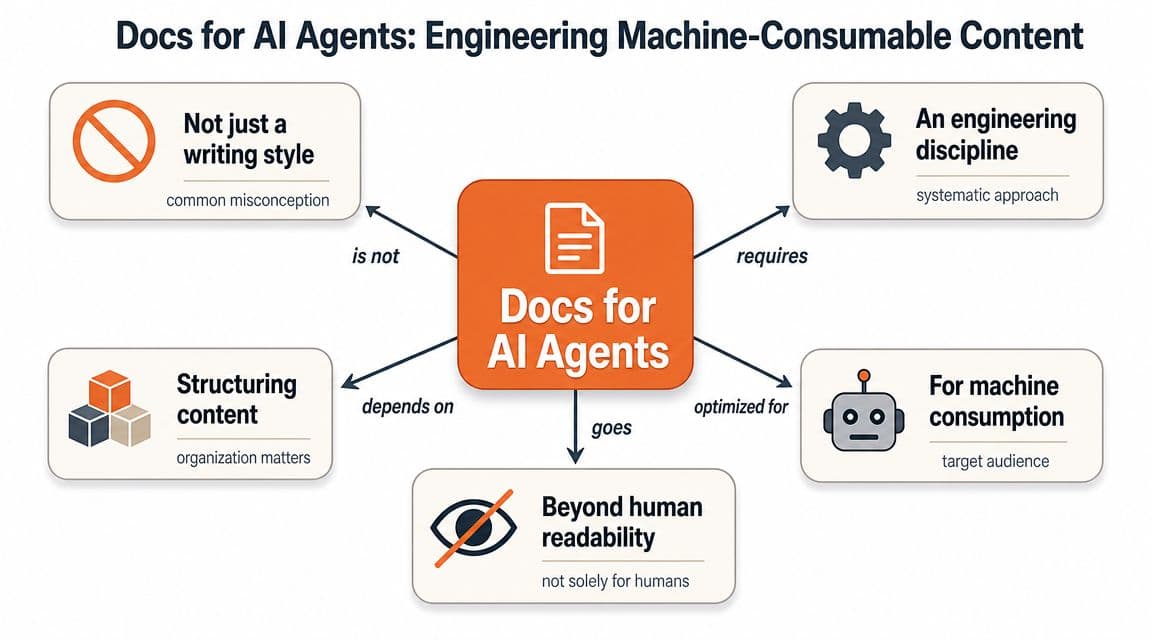
Traditional docs explain a product to a person. Agent-ready docs expose capabilities, constraints, procedures, and decision boundaries to software that needs to retrieve, reason, and sometimes act. That's a different job.
Behavior matters more than brochure copy#
The biggest gap I see is that teams document interfaces but skip behavior. That made sense when the reader was a human integrating a predictable API. It breaks down for agents because the system itself may be non-deterministic, policy-driven, or dependent on context.
A recent developer guide put the key point plainly: effective agent documentation should explain what inputs affect decisions, how the agent prioritizes actions, and what triggers fallback behavior, because those details are critical for non-deterministic systems and usually missing from traditional docs. That's covered in this practical guide on documenting AI agents.
If your page says "the agent summarizes support tickets," that isn't enough. An agent-ready version needs to say things like:
- What context it uses: ticket body, metadata, prior customer history, or escalation labels.
- How it chooses: whether urgency outranks recency, or whether account tier changes routing.
- When it stops: confidence thresholds, approval requirements, or fallback to a human queue.
Think GPS data, not a printed map#
Traditional docs are like a printed map. A human can interpret symbols, fill in gaps, and still get somewhere.
Docs for AI agents are closer to GPS data. The route has to be explicit. The labels have to be standardized. The machine needs coordinates, not vibes.
Human-readable content can tolerate implied meaning. Machine-usable content can't.
That changes the writing process. You stop asking, "Does this page look complete?" and start asking, "Can a retrieval system isolate the right chunk, and can an execution system trust it?"
Once you work this way, a lot of familiar docs habits look careless. Long mixed-purpose pages, cute heading names, and giant FAQ dumps don't scale. They force agents to guess. Guessing is exactly what you should be designing out.
The Core Principles of Machine-Readable Content#
The mechanics of machine-readable content aren't mysterious. They come down to three things: discoverability, structure, and context. Miss any one of them and the whole system gets brittle.
Discoverability comes first#
Agents need predictable places to start. If discovery is inconsistent, nothing downstream matters. Vercel's guidance recommends root-level files such as /llms.txt and sitemap.xml with lastmod dates, because most documentation still prioritizes visual polish over the machine-ingestible structure agents need for retrieval. That's outlined in Vercel's guide to making documentation readable by AI agents.
That advice sounds mundane until you watch agents fail. They often don't fail because your explanation is weak. They fail because they never found the authoritative page, or they found an outdated duplicate, or they had to scrape a dynamic interface that obscured the content.
Structure beats styling#
A machine-readable page needs a stable hierarchy. One topic per page when possible. Real headings in the right order. Code separated cleanly from prose. Tables used for data, not layout. Callouts that signal warnings and constraints instead of just adding color.
This is what helps:
- Clear heading levels: H1 for the page topic, H2 for major tasks or concepts, H3 for sub-steps or exceptions.
- Chunk-friendly sections: short, cohesive blocks so retrieval systems don't splice unrelated instructions together.
- Explicit procedures: prerequisites, inputs, steps, outputs, and failure conditions separated instead of blended into one paragraph.
A lot of legacy tools can be forced into this shape. That's part of the problem. They need themes, plugins, or disciplined teams constantly policing output. When the structure isn't native to the platform, it drifts.
Context closes the gap#
Even a well-structured page can be ambiguous without metadata. Agents need signals about page type, version, audience, product area, and whether the page is conceptual, procedural, or reference material.
A concise way to consider this:
| Element | Why it matters for agents |
|---|---|
| Page metadata | Helps classify the page before retrieval |
| Frontmatter | Signals version, category, and intent |
| Canonical task names | Reduces duplicate interpretations |
| Explicit ownership | Helps humans keep critical pages current |
Context also includes what a page is not. If a guide covers sandbox behavior only, say so. If a workflow requires approval, mark that constraint clearly. Ambiguity in docs for AI agents becomes operational risk fast.
Essential Formats That AI Agents Consume#
If your content isn't available in formats agents can reliably consume, you haven't finished the job. Nicely rendered pages are only one surface. The real work happens in the structured artifacts behind them.
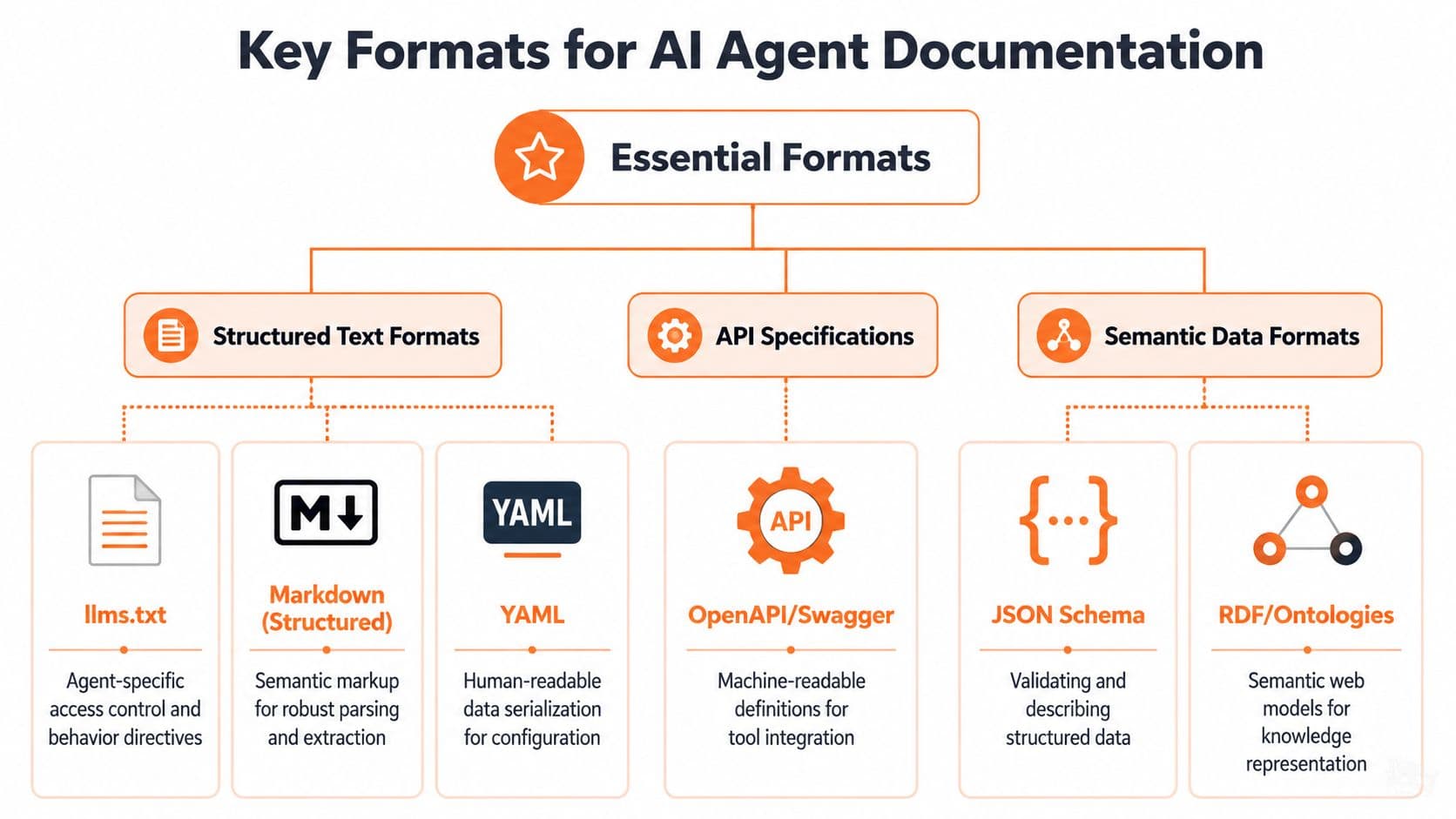
The files that actually help agents#
Addy Osmani's guidance is refreshingly practical: a good spec for AI agents should use clean schemas and standard formats, including OpenAPI for tool interfaces and llms.txt for documentation summaries, because that reduces ambiguity and prevents tool-use errors. He also argues the spec should be version-controlled and treated as a living document in this piece on writing a good spec for AI agents.
The formats worth caring about are not exotic.
llms.txtgives an agent a high-signal summary of your docs and where to look next.- OpenAPI tells a model what tools exist, what parameters they accept, and what outputs to expect.
- Clean Markdown or MDX preserves structure in a way parsers can handle without reverse-engineering your editor.
- Type definitions and schemas reduce guesswork around payloads, fields, and constraints.
If you need the practical role of discovery files spelled out, this guide to llms.txt is useful.
Practical rule: If a machine has to infer your structure from presentation, you've already made the docs harder to trust.
Why proprietary editor output is a problem#
Many visual-first documentation tools often fall short. Their editing experience feels modern, but the underlying content model is opaque. Blocks nest unpredictably. Exports are messy. Semantics are weak or lost entirely outside the rendered page.
That might be acceptable for a marketing site. It's a bad fit for docs for AI agents.
The safer path is boring on purpose. Use formats that survive transport, parsing, indexing, versioning, and reuse. If the same content can't power your page, your retrieval layer, and your internal knowledge workflows without manual cleanup, the format is working against you.
Machine-readable documentation isn't about adding one more file to the repo. It's about choosing source formats that remain useful after they leave the browser.
How Agents Use Docs in RAG and Tool Integration#
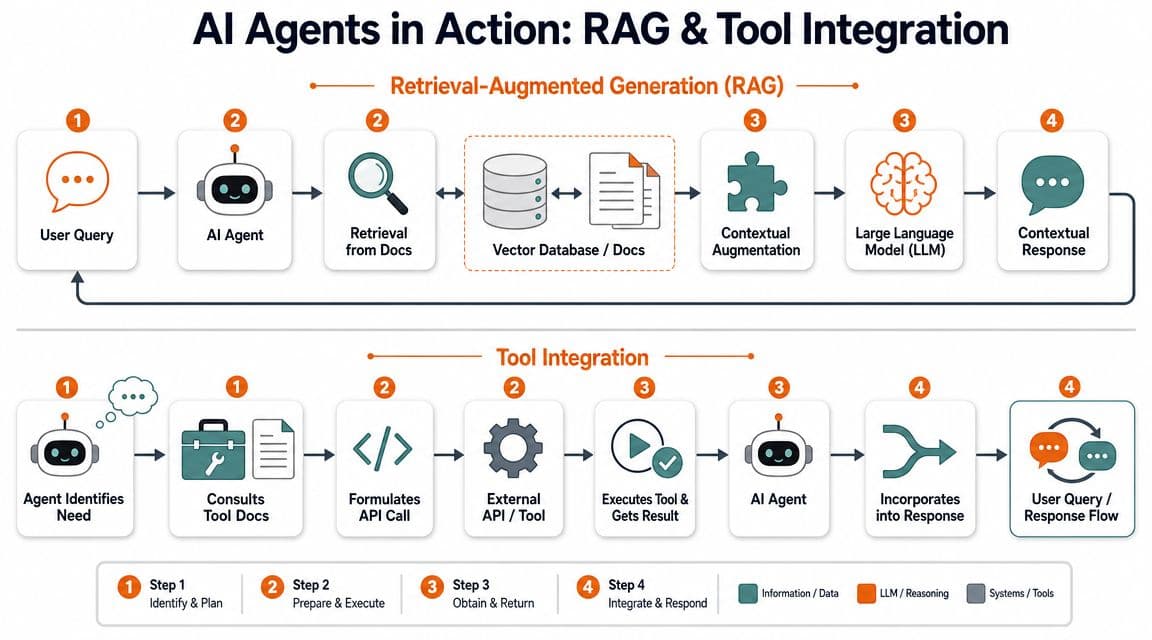
When people say an agent "uses your docs," they often mean two different things. Sometimes the agent retrieves documentation chunks to answer a question. Other times it consults documentation or a spec to decide how to use a tool. Those are related workflows, but they fail for different reasons.
Retrieval depends on chunk quality#
In retrieval-augmented generation, the model doesn't "know" your docs by magic. A retrieval layer pulls candidate chunks from indexed content, then the model uses those chunks as working context.
That means your docs need to chunk well. If one section mixes setup, permissions, limitations, and troubleshooting into an undifferentiated wall of text, retrieval gets sloppy. The system may pull the right page but the wrong passage. That's how you get answers that sound plausible and still miss a requirement.
A strong retrieval target usually has:
- One clear task per section
- Descriptive headings instead of clever ones
- Warnings and prerequisites separated from the happy path
- Stable terminology across guides, API reference, and support content
Tool use depends on constraints#
Tool integration is stricter. Here the agent isn't just answering. It's preparing to act.
A report from Merge.dev says 66% of companies will integrate agents with Slack or Microsoft Teams, which means internal knowledge bases and API docs have to work inside those environments, not only on polished public sites. That point appears in Merge.dev's AI agent statistics roundup.
If an agent is operating in Slack, for example, it may need to decide whether it can call an internal API, whether approval is required, what fields are mandatory, and what to do when a request fails. General prose isn't enough. It needs operational boundaries.
This is a good example of what that looks like in practice:
The useful pattern is simple. Retrieval gives the model grounded context. Tool docs give it safe action boundaries. If either side is weak, the whole workflow gets unreliable.
A model can tolerate imperfect prose. It can't safely tolerate undocumented approvals, hidden preconditions, or vague failure behavior.
That's why docs for AI agents should be treated as part of the execution path, not as a layer of explanation bolted on afterward.
Your Checklist for Creating AI-Ready Docs#
What's essential isn't another strategy deck, but a checklist that forces the docs into a shape agents can use. The easiest way to think about it is as a comparison between the old workflow and the one that doesn't waste time.
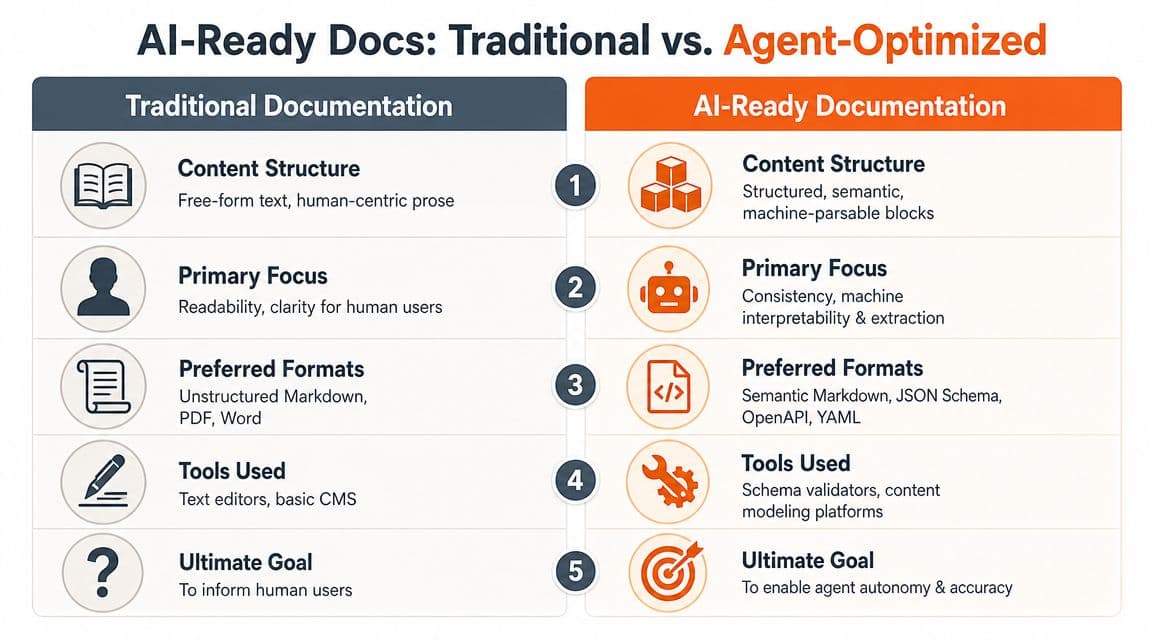
Audit what agents can actually read#
Start with the output, not the editor.
-
Check discovery files
Your site should expose predictable entry points for machines. If there is nollms.txt, weak sitemap coverage, or stale indexing signals, agents start from a worse position. -
Inspect rendered structure
Open a page and look past the design. Are headings semantic? Are tabs hiding core instructions? Are warnings embedded in custom components that flatten poorly? -
Review source portability
If your content is trapped in a proprietary block model, reuse becomes painful. Clean Markdown or MDX is still the safer baseline for long-term machine consumption. -
Separate task docs from narrative docs
A page that tries to teach, persuade, and troubleshoot at the same time usually retrieves badly. Split pages by job. -
Document constraints explicitly
Approval requirements, fallback paths, emergency stops, sandbox limits, and interoperability rules belong in the docs. The AI Agent Index makes the governance side of this hard to ignore by cataloging 30 AI agents across 1,350 fields and highlighting transparency gaps around safety testing and interoperability details.
Compare the old workflow with the sane one#
Here's the trade-off teams usually face:
| Task | Old way with legacy tools | Cleaner way |
|---|---|---|
| Discovery setup | Manual file creation, theme edits, custom routing | Built-in discovery outputs |
| Structure enforcement | Team discipline plus plugin sprawl | Native semantic defaults |
| API docs | Separate generators and awkward sync | Single source of truth |
| Editing | Repo friction or opaque visual blocks | Portable structured content |
| Testing readiness | Ad hoc prompt checks | Repeatable audit workflow |
The old path is still common with tools like Docusaurus, especially when teams are comfortable wiring configs by hand. Mintlify improved the visual baseline for many teams, but visual polish is not the same thing as agent readiness. If the system still leans on presentation over semantics, you're carrying hidden risk.
For a quick audit, this guide to AI-agent-friendly documentation is a useful reference, and a site analyzer at Dokly tools can help you inspect obvious gaps.
The practical checklist is blunt:
- Publish discoverable machine entry points
- Use semantic source formats
- Keep tasks isolated and chunkable
- Expose specs, schemas, and constraints
- Test retrieval and tool-use paths, not just page appearance
Teams that skip these steps usually end up doing the same work later under more pressure.
Frequently Asked Questions About AI Docs#
Do human readers still matter#
Yes. Human readers still matter. Good docs for AI agents usually improve the human experience because clean structure, explicit steps, and consistent terminology help everyone. The difference is that human readability is no longer the only acceptance test.
How do I test whether my docs are AI-readable#
Use a mix of simple checks.
- Crawl the site like a machine would: verify discovery files, sitemap coverage, and whether important pages are reachable without client-side gymnastics.
- Prompt-test against real tasks: ask an agent to answer setup and troubleshooting questions from your docs, then inspect which pages it used and what it missed.
- Check retrieval granularity: if the same chunk keeps returning mixed or incomplete instructions, the page probably needs to be split.
A lightweight analyzer helps catch the obvious failures faster than manual inspection.
Is it too late to fix an existing docs site#
No. Existing documentation can be repaired. The expensive part isn't migration. The expensive part is staying invisible or unreliable in agent-driven workflows because your docs still depend on humans to interpret them.
You also don't need to rewrite everything at once. Start with high-value surfaces: onboarding, API reference, authentication, permissions, error handling, and core workflows. Those pages do the most work in retrieval and tool use. Clean those up first, then expand outward.
If your docs still prioritize visual polish over machine-readable structure, you're building for the wrong reader. Dokly is built for this shift from the ground up, with semantic MDX output, automatic llms.txt generation, interactive API documentation, and tools that help teams publish docs AI agents can parse and use.