Most advice on README file structure is outdated. It assumes a human opens your repo, scans the page, and decides whether your project is worth their time.
That still happens. It just isn't the first event anymore.
The first reader is often an AI system embedded inside ChatGPT, Cursor, Claude, Copilot, or Perplexity. That changes the job of a README. A pretty GitHub page isn't enough. A clever intro isn't enough. If your README renders nicely for people but collapses into ambiguous chunks for machines, your project becomes hard to retrieve, hard to summarize, and easy to ignore.
A lot of teams still write READMEs like landing pages. Big hero copy. Sparse headers. Long narrative blocks. Decorative badges with no substance beneath them. That format looks modern and performs badly when an LLM tries to extract installation steps, licensing, repo layout, or dataset context. If the model can't parse the structure cleanly, it won't cite you cleanly either.
Table of Contents#
- Why Your README Is Being Read by Robots Not People
- The Anatomy of a Perfect README File Structure
- Human-Readable vs AI-Parseable Documentation
- The Universal AI-First README Template
- Adapting the Structure for Different Projects
- Best Practices for Clarity and Discoverability
- Stop Building READMEs Manually Use an AI-Native Platform
- Your README Questions Answered
Why Your README Is Being Read by Robots Not People#
Your README is no longer a page someone casually scans on GitHub. It is source material for retrieval systems, coding assistants, and LLMs that decide whether your project gets surfaced, cited, or ignored.
Developers still read READMEs. They often arrive after a machine has already summarized the repo for them. That change matters more than many documentation guides admit.
If your readme file structure depends on layout, badge clutter, screenshots, or implied meaning, AI systems miss the point. They do not see intent. They see tokens, headings, chunk boundaries, and repeated labels. A human can infer that the paragraph under a wall of badges explains the project. A model often cannot. It guesses, then passes that guess along as an answer.
That is the failure mode teams keep underestimating.
A weak README does not just confuse readers. It breaks retrieval. Installation steps get mixed with contributor setup. Example commands get quoted as production guidance. Feature lists get treated as guarantees. Once that happens, your repo becomes harder to recommend inside the tools people now use to evaluate libraries in the first place.
Teams that want to understand this shift should study how ChatGPT gets its information. The retrieval path shapes the answer. The selected chunks shape the citation. Your README often becomes the default chunk.
The practical problem is structural, not stylistic.
AI systems need explicit section boundaries, stable markdown hierarchy, and predictable labels. They work better when purpose, installation, usage, configuration, compatibility, and license are separated into named sections instead of buried in prose. They also benefit from machine-oriented companion files such as LLMs.txt for structured AI-readable documentation, because standard READMEs were written for human scanning, not for precise extraction.
Three patterns cause trouble fast:
- Marketing-first openings: They push operational facts below generic positioning copy.
- Inconsistent headings: Skipping levels or inventing cute section names weakens parsing.
- Image-led explanation: Screenshots help humans. They do little for models unless the surrounding text says exactly what matters.
Good README structure now does two jobs at once. It helps a developer decide whether to use the project. It gives machines enough semantic order to quote the project accurately.
That second job used to be optional. It is now part of discoverability.
The Anatomy of a Perfect README File Structure#
A strong readme file structure makes the project legible under skimming, search indexing, and model retrieval. The job is not to add every section a template generator suggests. The job is to put operational facts where a developer, crawler, or AI agent can extract them without guessing.
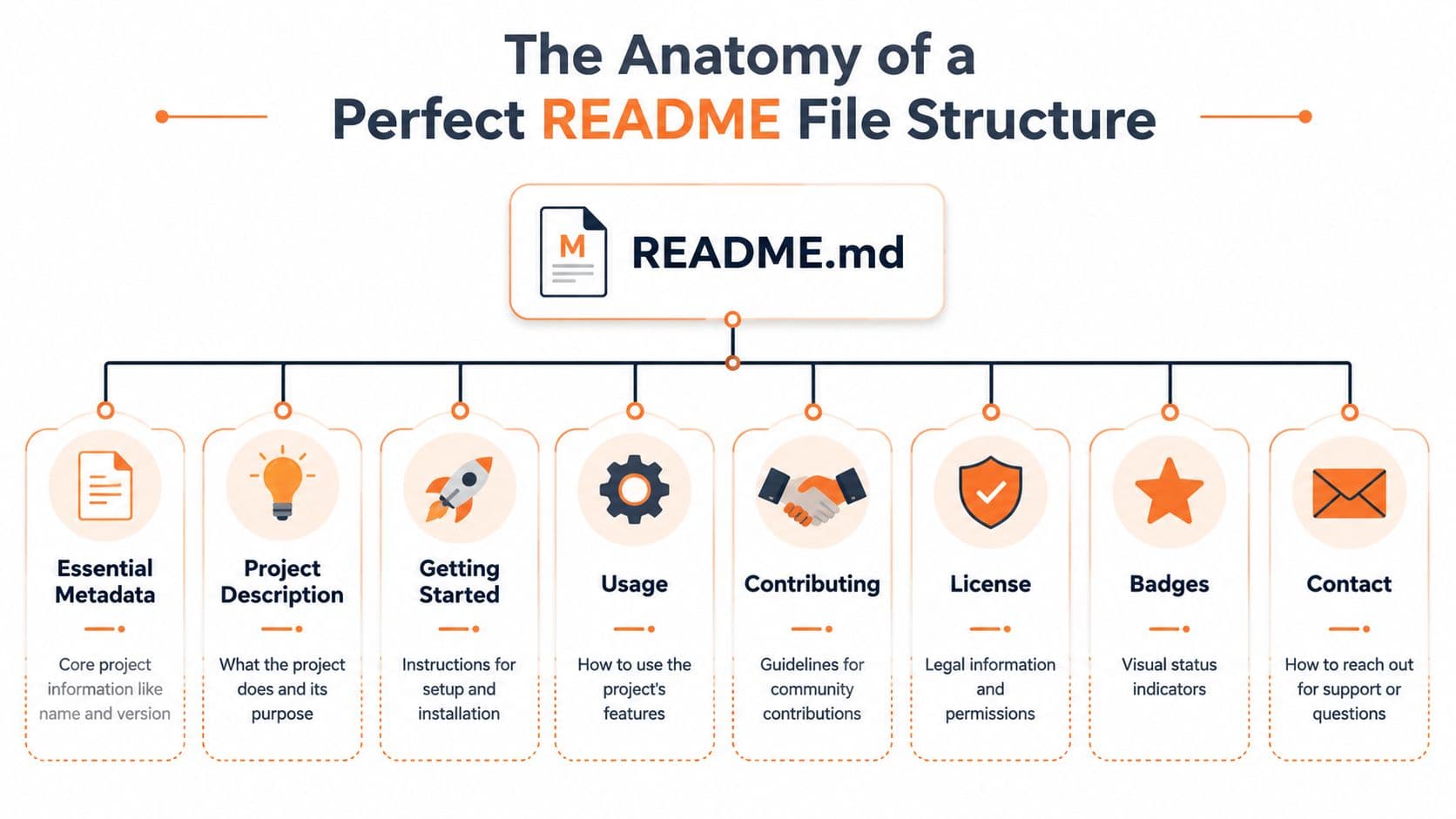
Good repositories tend to repeat the same core shape: project title, plain-language summary, installation, usage, configuration, repository overview, contribution path, and license. That pattern exists for a reason. Humans scan it quickly. Machines map it cleanly. If the README hides any of those answers in marketing copy or scattered examples, the project becomes harder to evaluate, cite, and trust.
This matters beyond GitHub polish. Teams that care about traceability already document systems in a structured way because audits, handoffs, and reviews break when key facts are buried. The same logic shows up in AuditReady documentation best practices. Structure reduces interpretation.
The sections that actually matter#
Start with the minimum viable skeleton.
# Project Title

Short summary of what the project does.

## Installation

## Usage

## License
That baseline works because it answers the first questions fast. What is it. How do I install it. How do I use it. Can I legally adopt it.
Then expand only where needed.
-
Project Title Use the project's name. Not a slogan. Not a tagline. This becomes the anchor for indexing and citation.
-
Badges
Keep them relevant. Build status, package version, docs status, and test coverage can help. Ten decorative badges don't. They add noise if the text beneath them is weak. -
High-Level Description
One short paragraph. State the problem, the audience, and the outcome. Skip hype. -
Installation
Include exact commands. Separate local development setup from end-user installation if they differ. -
Usage
Show the smallest working example. A README without a runnable usage example makes users hunt through source code.
Sections teams skip and regret later#
Most repos also need a few supporting blocks.
## Configuration

List environment variables, config files, or required settings.

## Repository Overview

- `src/` application logic
- `docs/` extended documentation
- `examples/` sample usage

## Contributing

Explain how to open issues, run tests, and submit changes.
The Repository Overview section is underrated. It gives both developers and LLMs a quick map of the repo. That matters more in larger projects, data repos, and monorepos.
Good README structure reduces support questions before anyone opens an issue.
For teams working in regulated or process-heavy environments, the discipline overlaps with broader documentation governance. The same habits behind AuditReady documentation best practices apply here. Name things consistently. Separate purpose from procedure. Make the current state obvious.
A practical order that works#
Use this order unless you have a strong reason not to:
- Title
- Badges
- Short description
- Installation
- Usage
- Configuration
- Repository overview
- Contributing
- License
- Contact or support
That order isn't fashionable. It's durable. That's why it keeps showing up in healthy repos.
Human-Readable vs AI-Parseable Documentation#
A README that reads well can still fail the systems now deciding whether your project gets surfaced, cited, or ignored.
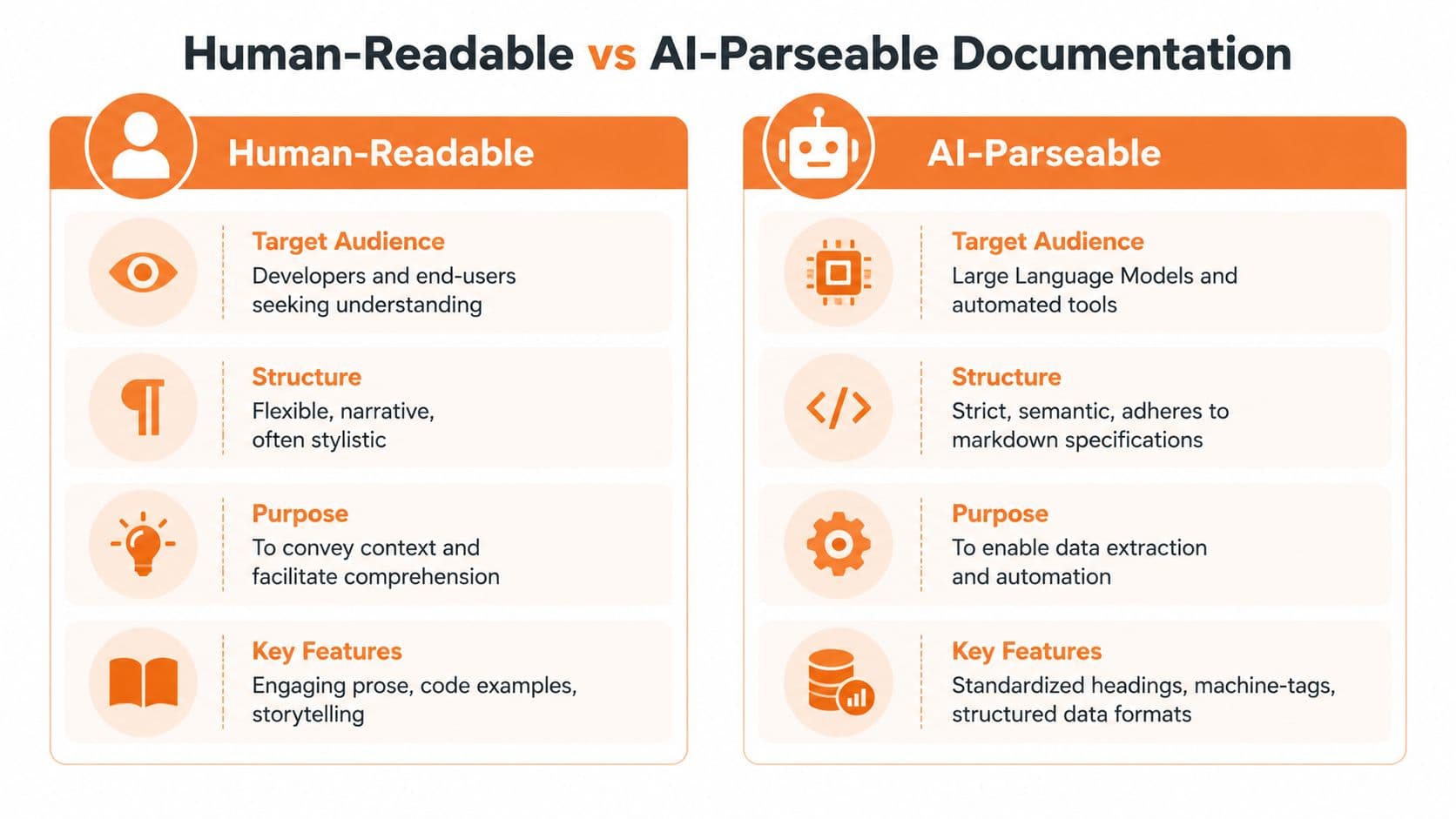
GitHub rewards polish. Retrieval systems reward explicit structure. LLMs, code search tools, and agent workflows do not infer as much as human readers do. They chunk text, rank passages, and look for clear statements they can quote back with low risk.
That is why so many READMEs fail. They were written for a person skimming a repo page, not for a model trying to answer, "What is this package for, how do I install it, what environments does it support, and what should I not assume?"
What humans tolerate and models penalize#
A human can fill in gaps from context. A model usually cannot.
If you write:
# FastAPI Utils

A tiny package for teams that want to stop rewriting auth, pagination, and logging glue every sprint.
a person can infer the rough shape of the project. A model still has to guess whether this is a library, starter kit, internal pattern repo, or code sample. It may miss supported Python versions, package manager instructions, and whether "auth" means OAuth helpers or full identity flows.
Now compare that with this:
# FastAPI Utils

Utilities for FastAPI services.

## Purpose

Reusable helpers for authentication, pagination, and structured logging.

## Installation

## Usage

## Compatibility

## License
Same project. Better machine boundaries.
Rendered soup vs semantic structure#
Most failing READMEs share a few traits:
- Narrative blocks instead of labeled sections
- Visual separators instead of markdown hierarchy
- Setup instructions mixed with product explanation
- Repo layout buried far below the fold
This is why Webclaw's HTML to Markdown approach is useful context. When docs get converted or normalized for LLM consumption, semantic clarity matters more than decorative layout. If your structure only works after rendering, you're depending on the wrong layer.
Machines don't read your page the way a person scans it. They ingest chunks, headings, lists, code blocks, and local context windows.
That is also where llms.txt enters the picture. If you're working on AI-facing documentation strategy, Dokly's guide to llms.txt is a practical reference for how explicit machine-readable entry points fit into the modern docs stack.
A simple test for AI readability#
Ask three blunt questions:
| Test | Bad signal | Good signal |
|---|---|---|
| Can the model identify purpose quickly | Buried in prose | Stated under a named header |
| Can it isolate setup steps | Mixed into narrative | In dedicated install/config sections |
| Can it cite legal reuse terms | License omitted or vague | Explicit license section |
If your README fails those tests, it may still impress people on GitHub. It won't travel well through AI systems.
The Universal AI-First README Template#
Most README templates are too generic to be useful or too bloated to maintain. The fix is a lean structure with explicit headers and comments that force clarity.
Use this as a starting point:
# Project Title

One-line summary of what the project does.

## Motivation

Explain the problem this project solves and who it's for.

## Method and Results

Summarize the approach, key capabilities, or expected outcomes.

## Installation

```bash
# add the real installation command hereUsage#
# add the smallest working example hereConfiguration#
List required settings, environment variables, or config files.
Repository Overview#
src/core source codedocs/extended documentationexamples/example usagetests/automated tests
Include file naming conventions if they matter.
Contributing#
State how contributors should open issues, run tests, and submit changes.
License#
Name the license and any reuse constraints.
Contact#
Add the maintainer, team, or support channel.
<a id="why-this-template-holds-up"></a>
### Why this template holds up
It works because the sections are explicit, not clever. `Motivation` frames the why. `Method and Results` helps summarize the what. `Repository Overview` gives machines a map. `License` answers a question too many teams postpone.
If you're documenting datasets, add dataset names, source terminology, collection details, and processing notes under dedicated headers rather than hiding them in paragraphs. If you're documenting software, keep commands executable and examples minimal.
A README should answer first-order questions fast. If readers have to infer the basics, the template failed.
<a id="adapting-the-structure-for-different-projects"></a>
## Adapting the Structure for Different Projects
README structure should follow the retrieval job the repo needs to do.
That is the part generic templates miss. They optimize for a person skimming a GitHub page. They do not optimize for an AI agent trying to answer, "What does this repo contain, how do I run it, what files matter, and can I cite this safely?" Those are different jobs. A human can tolerate ambiguity for a minute. A model cannot. If your headings are vague, your file map is missing, or your setup details are buried in prose, the README stops being useful the moment a tool tries to chunk, quote, or route from it.
Project type changes what the README must expose. A library needs fast proof that it works. An internal SaaS repo needs ownership and operational boundaries. A data science repo needs explicit metadata and file relationships. One template can support all three, but only if you change the emphasis instead of cargo-culting the same sections into every repository. If you need a starting point, an [AI-first README generator](https://www.dokly.co/tools/readme-generator) is faster than editing a generic template into shape by hand.
<a id="readme-section-requirements-by-project-type"></a>
### README section requirements by project type
| Section | Open-Source Library | Internal SaaS Tool | Data Science Repository |
|---|---|---|---|
| Title | Mandatory | Mandatory | Mandatory |
| Short description | Mandatory | Mandatory | Mandatory |
| Installation | Mandatory | Recommended | Optional |
| Usage | Mandatory | Recommended | Recommended |
| Configuration | Recommended | Mandatory | Recommended |
| Repository overview | Recommended | Mandatory | Mandatory |
| Deployment | Optional | Mandatory | Optional |
| Contributing | Mandatory | Optional | Recommended |
| Dataset overview | Optional | Optional | Mandatory |
| Data processing notes | Optional | Optional | Mandatory |
| License | Mandatory | Mandatory | Mandatory |
| Contact | Recommended | Mandatory | Recommended |
<a id="open-source-libraries-need-immediate-proof"></a>
### Open-source libraries need immediate proof
Public package READMEs are judged fast. The reader wants the package purpose, install command, first successful example, compatibility limits, and license. Anything that delays those answers lowers adoption.
AI systems judge them fast too. They look for clear install steps, import paths, supported versions, and a usage example that can be quoted without guesswork. Headings like `## Quickstart`, `## API`, and `## Supported Versions` are easier to parse than clever labels. Keep the happy path obvious. Put edge cases lower.
Contributing matters more here than in many other repo types because outside contributors do not know your branch rules, test command, or release flow.
<a id="internal-saas-tools-need-boundaries-not-marketing"></a>
### Internal SaaS tools need boundaries, not marketing
Internal READMEs often fail because they assume shared context. The author knows which service owns billing, where secrets live, and who gets paged on failure. The next engineer does not.
A good internal README names the service boundary, upstream and downstream dependencies, deployment environment, configuration surface, and on-call owner. It should also state what the service does not own. That one detail prevents bad assumptions during incidents and refactors. For AI agents, these sections create a semantic map of the system instead of a pile of disconnected setup notes.
Useful internal sections often include:
- **Ownership:** Team, Slack channel, escalation path
- **Dependencies:** Datastores, queues, external APIs, sibling services
- **Environments:** Local, staging, production differences
- **Deployment:** How releases happen and where rollbacks live
- **Runbooks:** Incident and recovery links
<a id="data-science-repositories-need-explicit-metadata"></a>
### Data science repositories need explicit metadata
Generic software advice reaches its breaking point.
A data repo is rarely one thing. It usually contains raw inputs, cleaned outputs, notebooks, scripts, schemas, and assumptions that never made it into code. If the README does not name those artifacts directly, both humans and models have to infer relationships from filenames. That inference is unreliable.
Write dataset names as headings. List source systems. Define columns, units, date ranges, and processing steps in plain language. Explain how files relate to each other. If one notebook produces a table used by three later scripts, say so. If a model should not cite a derived dataset as primary evidence, say that too. Good data READMEs do not just help someone rerun the work. They help an AI system cite the right part of the work.
For data projects, `Repository Overview`, `Dataset Overview`, and `Data Processing Notes` are core structure, not extras.
<a id="best-practices-for-clarity-and-discoverability"></a>
## Best Practices for Clarity and Discoverability
Good structure can still be undermined by careless execution. A clean readme file structure needs disciplined formatting, careful placement, and direct language.

<a id="do-the-obvious-things-most-teams-skip"></a>
### Do the obvious things most teams skip
**A standard README belongs in the top-level folder of the project it describes**, because root placement is the expected first entry point for both people and AI systems. The verified guidance tied to [Cornell's README recommendations](https://data.research.cornell.edu/data-management/sharing/readme/) makes that root-level placement explicit. Put it in a subfolder and you force both humans and models to start from the wrong place.
Here are the habits that consistently help:
- **Use descriptive headings:** `## Installation` beats `## Getting Rolling`.
- **Keep commands copyable:** Every example should be runnable with minimal edits.
- **Write short paragraphs:** Dense blocks lower scan speed and chunk quality.
- **Prefer bullets for inventories:** Directory maps, config variables, and prerequisites belong in lists.
- **Name the license clearly:** Don't make readers hunt through package files.
<a id="small-formatting-choices-matter"></a>
### Small formatting choices matter
GitHub lets teams get away with styling tricks that don't survive machine parsing.
Avoid these patterns:
- **Skipping heading levels:** Don't jump from `#` to `####`.
- **Burying setup in tabs or collapsible blocks:** Fine for secondary detail. Bad for core steps.
- **Replacing text with screenshots:** Images complement text. They don't substitute for it.
If you're designing documentation for machine retrieval more broadly, [Dokly's guide to docs for AI agents](https://www.dokly.co/blog/docs-for-ai-agents) is useful reading because it focuses on parseability rather than just visual presentation.
> A README should be skimmable in a browser and chunkable by a model. If it only succeeds at one of those jobs, it isn't finished.
<a id="a-quick-pre-publish-checklist"></a>
### A quick pre-publish checklist
Before you merge, check these five things:
1. **The README is at the repo root**
2. **The first screen states what the project is**
3. **Installation and usage are separated**
4. **The repository layout is explained if structure matters**
5. **The license appears as its own section**
That checklist catches more problems than most template debates.
<a id="stop-building-readmes-manually-use-an-ai-native-platform"></a>
## Stop Building READMEs Manually Use an AI-Native Platform
Manual README writing breaks down long before the repo gets large.
It breaks down when three teams document the same kind of project three different ways. One README is clean. One reads like release notes. One hides the install path halfway down the page. Humans can fight through that. AI agents usually do not. They extract what they can, skip what they cannot parse cleanly, and move on to a better source.

That is the primary gap. Teams still optimize READMEs for GitHub readers while search systems, coding assistants, and answer engines now ingest them as structured input. A nice-looking markdown file is not enough if the underlying output is inconsistent, semantically weak, or missing machine-readable discovery files. Traditional doc tools still treat that problem as an afterthought.
Raw markdown gives full control. It also gives every contributor a chance to create a new format. Static site generators such as Docusaurus can produce excellent docs, but they ask teams to own setup, theming, content modeling, and maintenance. Mintlify reduces some of that overhead, but its workflow still pushes teams toward the platform's shape. That trade-off is fine for some organizations. It is a poor fit for teams that need repeatable README structure without turning documentation into an infrastructure project.
An AI-native platform fixes a different class of problem. It standardizes sections, preserves semantic structure, and publishes docs in a form both humans and models can consume reliably. That matters if you want your project cited correctly by assistants, surfaced in retrieval systems, and understood without a human guessing where the install command lives.
Dokly fits that model well. The editor is visual, but the output stays structured. Teams get cleaner publishing defaults, less formatting drift, and a better path to AI-facing artifacts such as `llms.txt`. If you need a first draft before adopting a fuller workflow, the [AI README generator](https://www.dokly.co/tools/readme-generator) is a practical place to start.
What should a platform automate?
- **Section consistency:** the same core headings appear across repos
- **Semantic output:** content ships as parseable structure, not editor noise
- **AI discovery files:** `llms.txt` and related metadata are generated without manual setup
- **Operational signals:** search and analytics show what readers and agents look for
This matters outside engineering too. Support teams need fewer dead-end docs. Product managers need a stable way to explain features and setup. Compliance owners need license and usage terms to appear in predictable places. Nobody benefits from spending review cycles fixing heading levels by hand.
For a product walkthrough, this demo is worth watching.
| Embedded Dokly Demo |
|---|
| <iframe width="100%" style={{aspectRatio: "16 / 9"}} src="https://www.youtube.com/embed/rCt9DatF63I" frameBorder="0" allow="autoplay; encrypted-media" allowFullScreen></iframe> |
The practical takeaway is simple. Hand-written READMEs still work for small, disciplined repos. They fail fast across teams, products, and doc types. AI-native documentation platforms are not about writing less markdown. They are about producing documentation that machines can trust, index, and cite without stripping out the meaning.
<a id="your-readme-questions-answered"></a>
## Your README Questions Answered
<a id="readmemd-vs-changelogmd"></a>
### README.md vs CHANGELOG.md
They serve different jobs.
The README explains the project now. The CHANGELOG records what changed over time. If your README starts listing every release detail, it becomes noisy. If your changelog tries to explain the product from scratch, it becomes useless. Most real projects need both.
<a id="how-should-you-handle-large-images-and-gifs"></a>
### How should you handle large images and GIFs
Keep them out of the critical path.
Use compressed assets, store only what helps understanding, and don't let visual demos replace actual instructions. A screenshot can support a setup section. It can't stand in for setup text. If the repository needs to stay light, host heavier media separately and reference it carefully.
<a id="whats-the-best-way-to-document-a-monorepo"></a>
### What's the best way to document a monorepo
Don't force one README to do every job.
Create a root README that explains the monorepo purpose, workspace layout, and package map. Then give each independent package or service its own local README with package-specific install, usage, and ownership details. The root file should route. The local files should instruct.
<a id="should-a-readme-include-the-full-api-reference"></a>
### Should a README include the full API reference
Usually no.
A README should contain one or two examples and a clear path to the full reference. If you dump the entire API surface into the README, scanning gets worse and maintenance gets harder. Keep the README focused on entry-point understanding.
---
If your team is tired of writing docs that look fine on GitHub but disappear inside AI workflows, [Dokly](https://dokly.co) is worth a hard look. It gives you an AI-native docs stack, clean semantic output, built-in `llms.txt` support, and practical tools like the [README generator](https://www.dokly.co/tools/readme-generator) that make better documentation the default instead of another manual cleanup job.