Most advice about a template for technical documentation is stuck in the wrong era.
It assumes the job of documentation is to look organized for a human reader who lands on a page, skims a sidebar, and maybe copies a code snippet. That still matters. It's just no longer enough. In practice, your docs now have two readers: the person using your product, and the AI system deciding whether your product is worth recommending, citing, or using as a source.
That changes the template itself. A documentation template isn't just a writing scaffold anymore. It's a content schema. If your docs live inside opaque editor blocks, messy rendered HTML, or pages with weak structure, AI agents can read them poorly even when humans think they look fine. If your docs are clean, structured, auditable, and easy to chunk, they become a usable knowledge asset instead of a dead archive.
Table of Contents#
- Why Most Technical Documentation Templates Are Obsolete
- Building the Core Sections of Your Template
- Writing Content That Machines Can Understand
- Designing an Interactive API Reference
- Ensuring Your Docs Are Discoverable and Fast
- Your No-Brainer Path to AI-Native Docs
Why Most Technical Documentation Templates Are Obsolete#
Most documentation templates fail before the first sentence gets written.
They fail because they treat structure as a formatting choice instead of an information architecture problem. A pretty page in Notion or Confluence can look polished and still be terrible for retrieval, citation, and reuse. A heavily configured Docusaurus setup can be powerful and still become a maintenance burden if the team never standardizes what goes on each page.
Most templates optimize for layout, not retrieval#
The common template advice is familiar: add an overview, installation, troubleshooting, FAQ, and changelog. That's not wrong. It's incomplete.
A recurring gap in documentation template guidance is that public templates from Asana, Microsoft Word/Copilot, Slite, and Miro recommend familiar sections like overview, requirements, troubleshooting, FAQs, and changelogs, but they rarely answer the harder question of how much technical detail is enough for different readers or document types, as noted in Asana's technical documentation template guidance. That's exactly why so many teams ship docs that are either too shallow for developers or too bloated for everyone else.
If you need a refresher on the scope of docs work itself, Dokly's explanation of what technical documentation includes in practice is useful because it frames docs as an operating asset, not a pile of support articles.
Most teams don't have a writing problem. They have a decision problem. Nobody decided what belongs in the page, what belongs in reference material, and what should never leave an internal runbook.
What an AI-native template changes#
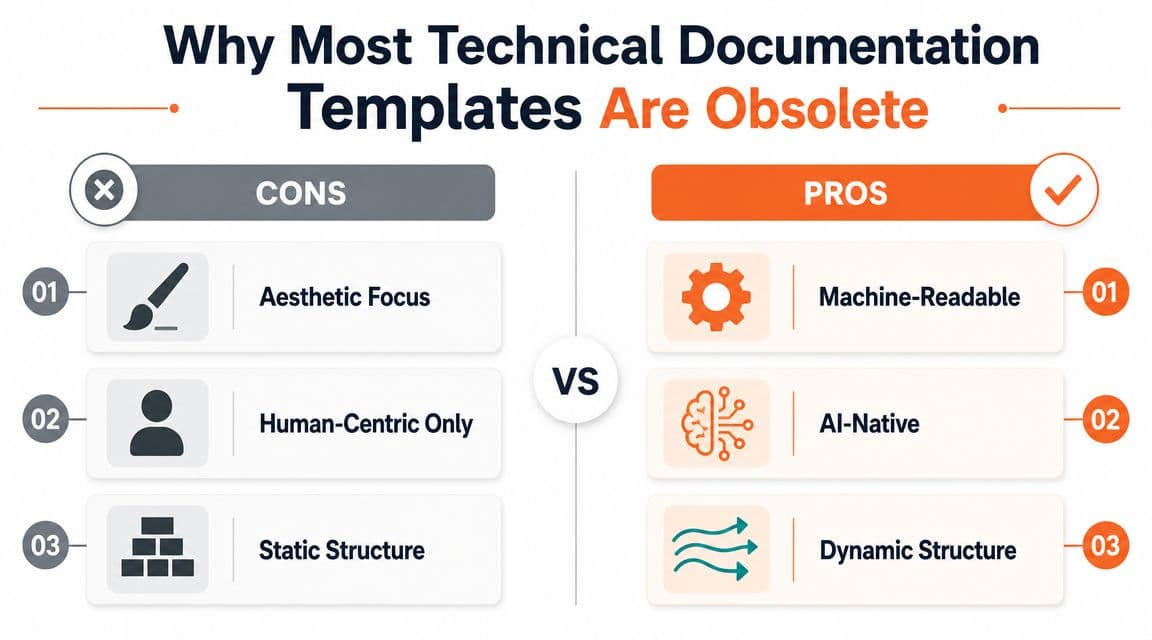
A modern template has to do three things at once:
- Guide the writer: It should remove blank-page anxiety and force useful consistency.
- Help the reader scan: The page should answer one problem, one task, or one concept cleanly.
- Expose structure to machines: Headings, code, metadata, and page purpose should be obvious enough that an AI system can chunk and cite them correctly.
That's why a human-only template is obsolete. It assumes that if a person can eventually find the answer, the doc is good enough. It isn't.
What works now is semantic documentation. That means your headings act like labels, your sections have one clear job each, your examples are explicit, and your metadata tells a system whether the page is draft guidance, stable reference, or versioned decision history.
Practical rule: if a page tries to explain the concept, teach the workflow, document every edge case, and act as a release log, the page is already broken.
Building the Core Sections of Your Template#
A useful template for technical documentation should feel boring in the right way. Writers know where things go. Reviewers know what to check. Readers know what kind of page they're on within seconds.
Microsoft's guidance on reusable technical documentation templates points to a fixed set of sections such as overview, background and context, requirements or specifications, technical details, compliance references, implementation guidance, a glossary, and a change log. It also recommends defining the document type up front and then using AI to generate a structured outline, which reflects the broader move toward standardized documentation formats in Microsoft's template guidance.
The sections that actually earn their keep#
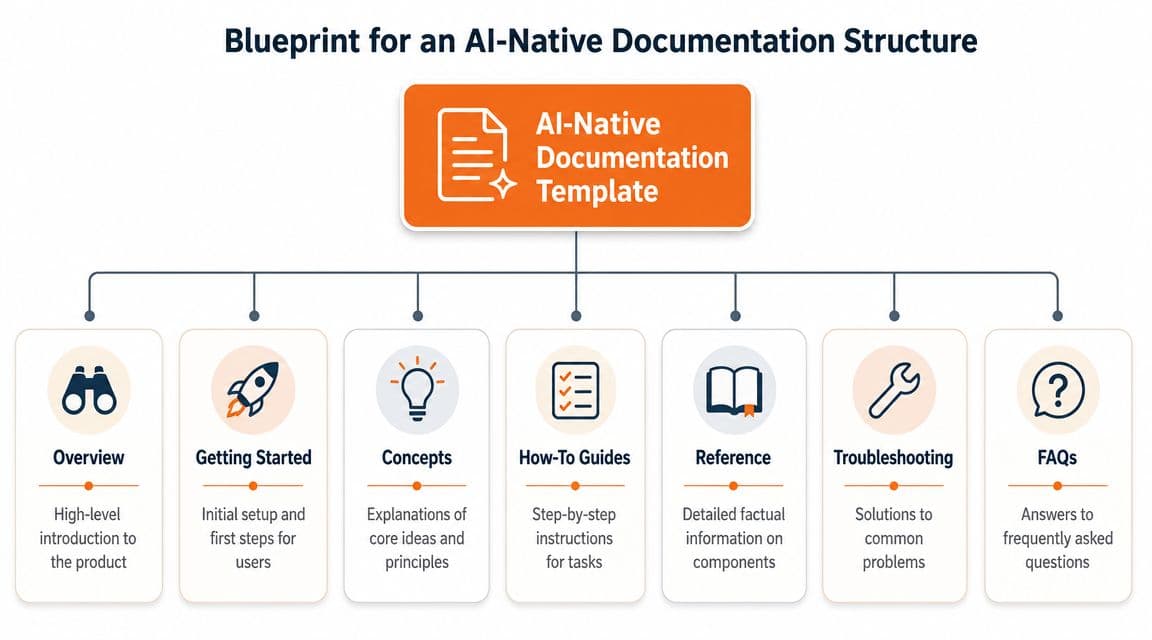
The exact outline should change by document type, but these page families carry organizations further than an overstuffed “master template” ever will.
-
Overview pages
These explain what the product, feature, service, or system is. They should orient fast. Good overview pages define terms, scope, audience, and the problem being solved. -
Getting started pages
These are linear by design. They're for first success, not exhaustive explanation. If this page turns into a full product manual, you've lost the point. -
Concept pages
On concept pages, you explain how something works and why it's designed that way. Keep concepts separate from task instructions. Mixing them makes both worse. -
How-to guides
One guide, one outcome. “Set up webhooks” is a guide. “Everything about integrations” is a category mistake. -
Reference pages
This is factual material. Parameters, fields, endpoints, supported behaviors, limits, response shapes, decision records, and version notes belong here. -
Troubleshooting pages
These should start with symptoms, then causes, then fixes. Not the other way around. -
Glossary and changelog pages
These stop teams from redefining the same term five different ways and help readers understand what changed over time.
A practical outline you can copy#
Here's a structure that works for most product and engineering teams:
| Page type | Primary job | What belongs there |
|---|---|---|
| Overview | Orientation | summary, audience, scope, definitions |
| Getting started | First success | prerequisites, setup, first task, expected result |
| Concepts | Shared understanding | architecture logic, workflows, design constraints |
| How-to | Task completion | ordered steps, examples, validation, next steps |
| Reference | Exact facts | fields, endpoints, methods, schemas, statuses |
| Troubleshooting | Problem resolution | symptom, likely cause, fix, escalation path |
| Changelog | Change history | version notes, dates, impact, deprecations |
A lot of teams use one giant page template because it feels efficient. It isn't. It creates hybrid pages that are hard to maintain and harder to parse.
What works better is a template system, not a single template. Give each document type its own strict outline, and add shared metadata at the top.
For example, every page can start with:
- Document type
- Audience
- Owner
- Status
- Last reviewed
- Version or related release
- Primary intent (concept, task, reference, policy, decision)
That last field matters more than teams think. If the writer can't name the page's intent in one phrase, the page will drift.
Writing Content That Machines Can Understand#
Good structure isn't enough if the content itself is muddy. Machines don't struggle only with bad information. They also struggle with inconsistent formatting, unlabeled code, vague headings, and editor output that hides meaning inside presentation markup.

GitBook's documentation guidance recommends a repeatable workflow: define the audience and goal first, gather source material from product specs, support tickets, and subject-matter experts, choose the right document type, draft with headings that match user search intent, add examples and troubleshooting, and review with SMEs before publishing and maintaining updates in GitBook's writing process for technical documentation. That workflow matters because machine-readable writing starts with editorial discipline, not tooling.
Clean structure beats editor sludge#
If you want AI systems to understand your content, write like each block has a single job.
Bad example:
- Heading says “Advanced setup”
- Paragraph mixes prerequisites, warnings, setup steps, and known issues
- Code block has no language label
- Table headers are vague
- Callout says “important” but never names the risk
Better example:
- Heading names the exact task
- Prerequisites are listed separately
- Steps are numbered
- Code block declares a language
- Warning explains consequence
- Troubleshooting covers failure cases after the task, not in the middle
Write headings the way users search. “Configure SSO with Okta” beats “Identity provider setup.”
A Notion-like editor can be fine if it outputs clean content. The problem isn't visual editing. The problem is opaque output. That's where some modern tools, including Dokly, are more practical than old-school doc stacks because the editor experience stays simple while the published content remains semantic MDX instead of editor soup.
MDX patterns worth standardizing#
You don't need to turn every writer into a frontend developer. You do need to standardize a few patterns.
Use language-labeled code blocks
fetch("/v1/projects", {
  method: "GET",
  headers: {
    Authorization: "Bearer YOUR_TOKEN"
  }
})
That is better than an unlabeled code fence because the language label gives both humans and machines immediate context.
Use callouts with a clear purpose
> Warning: This action revokes the current token immediately.Don't use callouts as decoration. Use them only when the reader needs to stop, avoid damage, or make a choice.
Use tables for stable facts, not explanations
| Field | Type | Required | Description |
|---|---|---|---|
| name | string | yes | Project display name |
| slug | string | no | URL-safe identifier |
Tables are excellent for reference. They're terrible for multi-step reasoning.
Later in the workflow, a visual editor that preserves this structure is much easier to live with than hand-editing everything. This product walkthrough shows the idea well:
What usually fails is the middle ground. Teams start in a friendly editor, add layers of formatting, embed random blocks, and end up with content that looks polished but has weak semantic signals. That's the worst of both worlds.
Designing an Interactive API Reference#
API reference pages are where weak templates get exposed fastest.
A static page with copied cURL examples, hand-written parameter lists, and half-maintained error notes can survive for a few weeks. After that, product changes start outrunning the docs. The page still exists, but nobody fully trusts it.

Static endpoint pages are a maintenance trap#
The old model was simple: write a page per endpoint and update it manually. That breaks because reference docs are the least forgiving docs you publish. If a concept article is slightly stale, readers can often recover. If an auth header, request field, or response example is wrong, integrations fail.
The better model is to treat the API specification as the source of truth and generate the reference layer from it. That gives you consistency across endpoints, example payloads, parameter schemas, and error handling. It also makes the docs far more usable for AI systems because the structure is predictable.
If you want a concrete example of why an interactive surface matters, Dokly's explanation of an API playground and how teams use it in docs is a useful reference point. It shows the difference between passive reading and active testing.
What your API reference template should include#
Miro's technical document template shows a useful principle that applies here too. Canonical software documentation often includes auditable fields such as author, date, status, summary, background, proposed solution, and alternatives considered. Miro also formats dates as YYYY-MM-DD and uses status labels like Draft, Under Review, or Approved, turning documentation into a versioned decision record rather than a static page in Miro's technical document template.
That matters for API docs because APIs change under pressure. Your reference template should reflect both the endpoint behavior and the operational state around it.
A practical API reference template should include:
-
Endpoint identity
Method, path, short purpose, and current status. -
Authentication requirements
Don't bury this in a generic intro page. Repeat the relevant auth model where the endpoint is documented. -
Request schema
Parameters, headers, body fields, and required constraints. -
Response schema
Success shape, common error shapes, and field meanings. -
Executable examples
cURL is fine. Language-specific examples are better when you can support them consistently. -
State and ownership metadata
Author, review status, version context, and decision notes for breaking or deprecated behavior.
API docs stop being trustworthy when the examples are written by hand and the schema is generated somewhere else.
In this context, Redoc and similar open-source tools can be strong if your team is willing to manage the setup. Many teams also encounter difficulties at this stage. They don't need more flexibility. They need fewer moving parts.
Ensuring Your Docs Are Discoverable and Fast#
A strong template still fails if the site around it is challenging to browse, slow to load, or impossible to search.
Many teams waste a lot of time. They spend weeks debating page layouts and almost no time deciding how users and agents will move through the knowledge base. Then they wonder why support keeps answering the same questions.
Navigation and search fail before writing does#
Docs usually break at the system level in three places:
-
Sidebar sprawl
Categories grow without clear parent-child logic. Readers can't tell the difference between concept docs, setup docs, and reference docs. -
Manual cross-linking
Writers add links when they remember. The result is uneven pathways and orphaned pages. -
Search mismatch
Page titles use internal language, while readers search with problem language.
A better navigation model is nested and intentional. Group content by user goal first, then by product area, then by depth. “Get started,” “Concepts,” “How-to,” “Reference,” and “Troubleshooting” is usually more usable than organizing everything by internal team ownership.
The discoverability layer also needs to work for AI agents, not just people. If your docs aren't easy to crawl, chunk, and classify, they're harder to surface in AI-driven research workflows. Dokly's article on making docs discoverable by AI agents makes that point clearly.
The low-friction stack usually wins#
Here's the trade-off:
| Approach | Upside | Cost |
|---|---|---|
| Confluence or Notion-first docs | easy authoring | weak public structure, messy output, inconsistent reference patterns |
| Docusaurus | high control | repo workflow, setup tax, ongoing configuration work |
| Open-source search plus custom deployment | flexible | maintenance burden for small teams |
| Managed docs platform | faster publishing | less appetite for bespoke behavior |
For solo founders and small engineering teams, the low-friction path usually wins because the docs ship. Search gets configured. Publishing happens. Reviews stay lightweight enough that pages are updated instead of abandoned.
Speed matters here too. Slow docs don't just annoy readers. They make the whole documentation system feel unreliable. If you're diagnosing that problem, a simple check like Dokly's website speed test tool is more useful than arguing about theme polish.
The best documentation stack is rarely the most customizable one. It's the one your team will still maintain after the launch rush is over.
Your No-Brainer Path to AI-Native Docs#
A solid template for technical documentation in 2026 does four things well.
It separates document types instead of forcing everything into one master page. It uses semantic structure that machines can parse cleanly. It treats API reference as generated, interactive infrastructure instead of hand-maintained prose. And it makes discovery fast through deliberate navigation, search, and performance choices.
That's why so many familiar tools feel increasingly awkward. Notion is easy to start in, but public technical docs often become a formatting-first compromise. Docusaurus gives you control, but the configuration tax is real if your team just wants to publish reliable docs. Mintlify looks sharp, but many teams still want a cleaner authoring path and tighter AI-readability assumptions throughout the stack.
The useful decision isn't “Which docs tool has the nicest theme?” It's “Which platform helps us produce structured, maintainable, machine-readable docs without creating a side project for engineering?”
If your current system makes authors fight the tool, reference pages drift, and AI agents can't reliably parse the output, the template isn't the only problem. The platform is part of the problem too.
A good platform should let non-developers publish structured docs, keep metadata and navigation consistent, turn API specs into an interactive reference, and avoid the repo-and-config burden that drags small teams into endless setup. That's the bar now.
If you want to put this into practice without rebuilding your docs stack from scratch, Dokly is built for that exact use case. It gives teams a visual editing workflow that publishes semantic MDX, supports AI-readable documentation structure, and turns OpenAPI specs into interactive reference docs without requiring a repo or config-heavy setup. Start with the free plan and test whether your docs become easier to publish, easier to trust, and easier for both humans and AI systems to use.