If you're still treating documentation as a website for humans plus a side bet on Google, you're behind. The first system reading your new feature page often isn't a person. It's an AI agent deciding whether your product gets cited, recommended, or ignored.
Teams often miss the core problem. Their docs are public, polished, and packed with screenshots, but they're delivered as client-side rendered HTML soup with weak metadata and no machine-facing entry points. That works for a patient human. It fails for an agent trying to fetch, parse, compare, and answer quickly. If that sounds abstract, read why AI agents can't read your docs.
To make your docs discoverable by AI agents, you need to stop thinking like a web designer and start thinking like an interface designer for machines. That means explicit files, clean content delivery, semantic structure, modular writing, and a testing loop that catches what your docs platform hides.
Table of Contents#
- The Unseen Prerequisite Your Docs Are Missing
- Build the Machine-Readable Welcome Mat
- Write Semantically for Robots and Humans
- Ensure Your Docs Are Crawlable and Fast
- Structure Content for Vectorization and Citations
- The Final Loop Testing Security and Monitoring
The Unseen Prerequisite Your Docs Are Missing#
Your docs need a machine-readable layer. Not a nicer theme. Not smarter search. Not another writing sprint.
Vercel puts it plainly in its guidance for AI-readable documentation. The important shift is moving from HTML-only pages to explicit machine-facing document layers such as /llms.txt, sitemap.xml with accurate lastmod, a semantic sitemap.md, robots.txt, JSON-LD on every page, and direct markdown delivery so agents receive markdown instead of a rendered DOM tree via Vercel's AI-readable documentation guidance. That's the prerequisite many organizations are missing.
The old model was simple. Publish docs, add navigation, maybe tune for SEO, and trust people to browse. The new model is harsher. Agents don't browse like humans. They retrieve, compress, rank, and cite. If your docs hide meaning behind JavaScript, decorative wrappers, and ambiguous page structure, the agent doesn't admire the design. It skips, misreads, or fabricates around the gaps.
Your docs are no longer just content. They're retrieval infrastructure.
That changes what "good documentation" means. A page that looks elegant but can't be fetched cleanly by an agent is broken. A page with explicit metadata, predictable structure, and direct markdown access is useful even if the design is plain.
The hard truth is that many popular documentation stacks still optimize for visual polish first and machine readability second. That's backwards now. If ChatGPT, Claude, Cursor, or Perplexity can't reliably discover your docs, your prospects won't hear your product's explanation. They'll hear a competitor's.
Build the Machine-Readable Welcome Mat#
You don't need to guess what agents want. The welcome mat is known. Publish it properly and keep it current.
Public does not mean discoverable#
A public docs site with no machine-facing guidance is like a public API with no schema. Technically accessible. Operationally annoying.
The core requirement is a stack of standardized files and metadata surfaces. Vercel recommends a curated /llms.txt, sitemap.xml with accurate lastmod dates, a semantic sitemap.md, robots.txt, and JSON-LD on every page in its implementation guidance for AI agents. That's the difference between "our docs are online" and "our docs are discoverable."
Start with format, not cosmetics.
The minimum file set#
Here is the bare minimum I expect on any docs site that wants agent visibility.
# /llms.txt
# Product Docs
> Technical documentation for setup, APIs, auth, and troubleshooting.

## Start here
- /docs/getting-started.md
- /docs/authentication.md
- /docs/api-reference.md

## Core concepts
- /docs/webhooks.md
- /docs/errors.md
- /docs/rate-limits.md
This file tells an agent where the useful material lives. Keep it curated. Don't dump every marketing page into it.
# /robots.txt
User-agent: *
Allow: /

Sitemap: https://example.com/sitemap.xml
If your robots rules accidentally block important crawlers, you won't notice until your docs vanish from agent answers. Teams break this constantly during staging-to-production migrations.
<!-- /sitemap.xml -->
<urlset xmlns="http://www.sitemaps.org/schemas/sitemap/0.9">
  <url>
    <loc>https://example.com/docs/authentication</loc>
    <lastmod>2026-01-15</lastmod>
  </url>
</urlset>
If lastmod is stale or meaningless, you're telling agents your content might be outdated. That's not a minor detail. It's trust.
A semantic sitemap.md also helps. So does JSON-LD per page. And if you can serve .md endpoints directly or expose text/markdown alternates, do it. Agents parse markdown more cleanly than bloated rendered HTML.
For a practical walkthrough of the file itself, Dokly's post on how to structure an llms.txt file is useful.
The underlying point is simple. The machine-readable layer must be explicit.
Manual setup versus automated maintenance#
Many teams encounter issues as they create llms.txt once, forget to regenerate it, ship stale sitemap dates, and assume visibility is handled.
That manual path hurts because every docs update now has hidden dependencies:
- New pages need inclusion: If a page matters, it must show up in the machine-facing layer.
- Moved pages need cleanup: Dead links inside
llms.txtor sitemaps poison retrieval. - Metadata needs discipline: Dates, alternates, and structured data have to stay aligned.
- Markdown delivery has to remain intact: Frontend changes often break clean agent access without anyone noticing.
The better path is to generate these assets during your publishing workflow instead of maintaining them by hand. Some platforms make that easier than others. Dokly, for example, auto-generates llms.txt and llms-full.txt as part of the docs layer rather than leaving it as a side project in your backlog.
A quick visual walkthrough helps:
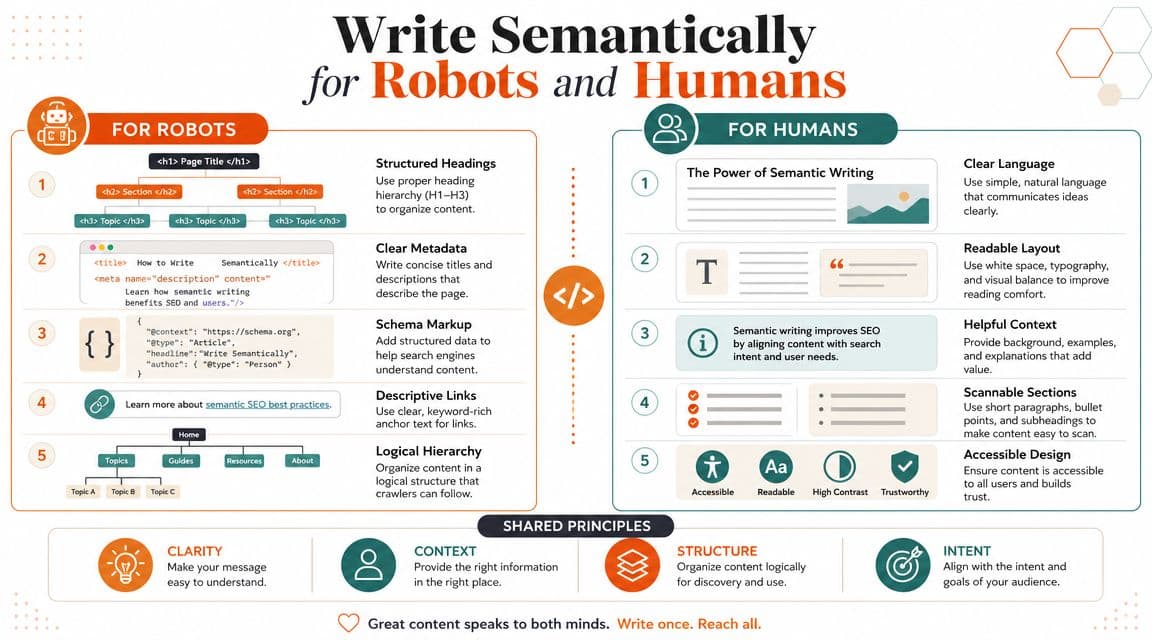
Write Semantically for Robots and Humans#
Bad structure doesn't just hurt accessibility. It hurts retrieval, summarization, and citation quality.
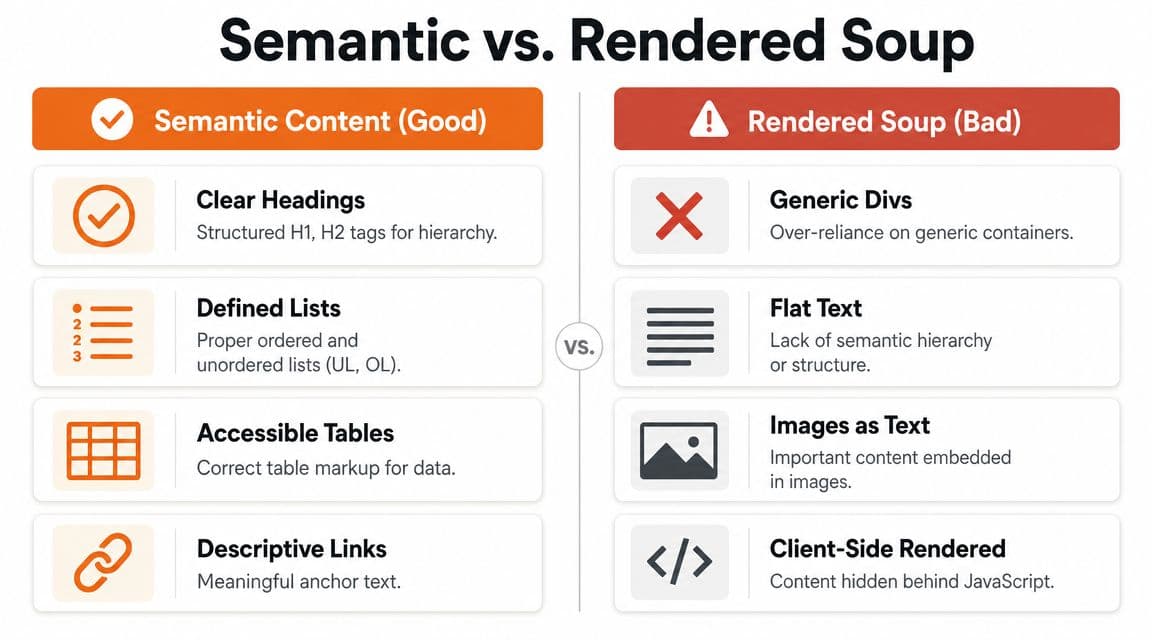
Rendered soup is the enemy#
The fastest way to make your docs invisible to AI agents is to publish pages that only become readable after a pile of JavaScript executes. TechDocs Studio's practical checklist is blunt about it. Verify the site is crawlable without JavaScript, test robots.txt for AI crawler access, and serve clean markdown URLs for token-efficient parsing alongside structured data like Schema.org or OpenAPI via this docs discoverability checklist.
That advice matters because agents aren't reading with eyes. They're parsing structure. If the meaning of the page only emerges after a client-side app hydrates, you've created unnecessary friction.
Confluence exports, old wiki systems, and heavily customized docs themes often produce the same mess. Endless nested divs. Weak heading hierarchy. Code samples stripped of context. Tables rendered in ways that are fine visually but ugly structurally.
Practical rule: if you copy the page source and the important meaning disappears, your docs aren't agent-ready.
What good semantic authoring looks like#
A strong page has obvious hierarchy and obvious intent. An agent should be able to answer three questions immediately:
| Element | What the agent learns |
|---|---|
| Clear headings | What the page covers and how topics are grouped |
| Named sections | Where setup, auth, errors, limits, and examples live |
| Structured code blocks | What code belongs to which language or task |
| Frontmatter and metadata | Title, context, and citation signals |
That means writing with real document elements. Use proper headings. Use lists for procedures. Use tables only for actual tabular data. Put code examples under explicit section titles. Keep link text descriptive.
A practical page standard#
If you're writing docs that need to be cited correctly, use a standard like this:
- Start with a precise title: "Authenticate with API keys" beats "Authentication".
- Add a one-paragraph summary: Tell the reader and the agent what problem the page solves.
- Break procedures into distinct sections: Setup, request example, response example, failure cases.
- Keep code adjacent to explanation: Don't dump examples at the bottom.
- Expose machine-readable specs: OpenAPI, GraphQL, Protobuf, or Schema.org where relevant.
A human skims for understanding. An agent extracts fragments. Good semantic writing serves both.
Ensure Your Docs Are Crawlable and Fast#
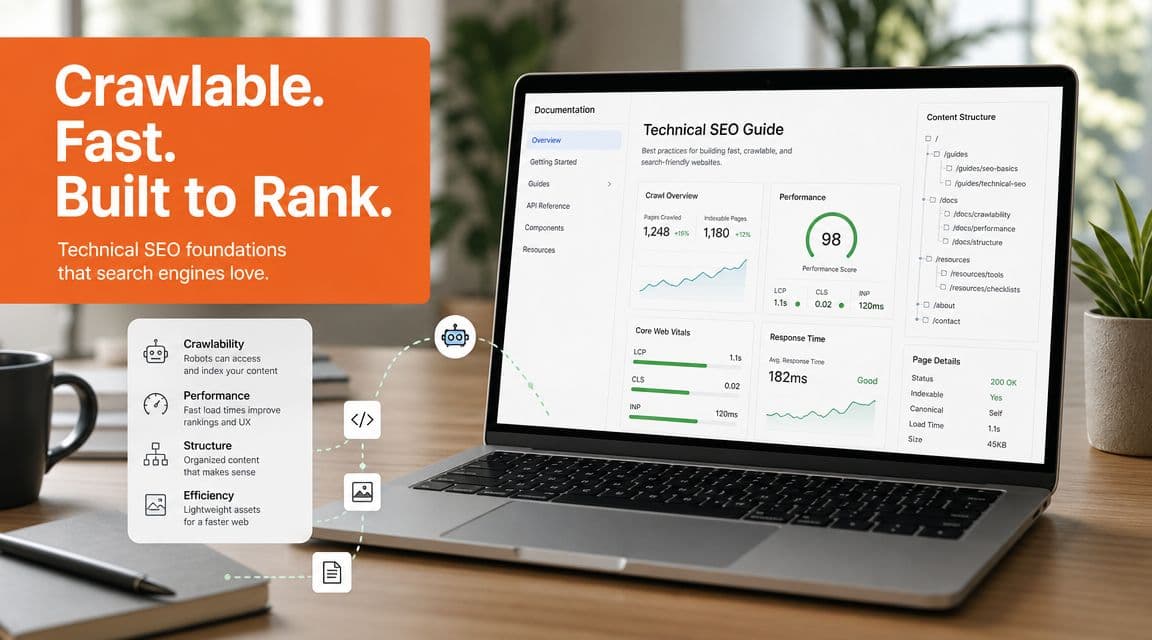
A docs page that technically exists but loads like a web app demo is not discoverable in practice.
Turn JavaScript off and see what survives#
This is the fastest test I know. Open a docs page in a fresh browser profile, disable JavaScript, reload, and look at what remains. If the core content vanishes, you've built a shell, not documentation.
Microsoft's Azure AI Foundry guidance highlights why freshness and structure matter for agents. Up-to-date sitemap.xml, visible dates or lastmod, and semantic HTML help agents interpret current content, while material buried in images or heavy client-side scripts is harder to interpret according to Azure AI Foundry's guidance on optimizing for agents.
That doesn't mean every interactive docs feature is bad. It means your core content must survive without the client runtime.
Freshness and speed are part of readability#
Teams treat freshness as an SEO afterthought. Agents treat it as a credibility clue.
If your docs update frequently, expose that clearly. Put visible updated dates on important pages. Keep sitemap dates honest. Make sure old versions don't outrank current ones inside your own information architecture.
Speed matters for a simpler reason. Slow pages waste retrieval effort. The more work an agent has to do before it can access the actual content, the less reliable the result becomes.
What to fix first#
Don't start with visual redesign. Start with delivery.
- Render content server-side: Agents should receive meaningful HTML immediately.
- Reduce client-side dependency: Interactive widgets are fine. Core explanations can't depend on them.
- Publish markdown endpoints: Let agents fetch content without scraping chrome.
- Keep critical docs lightweight: Setup, authentication, pricing mechanics, and API references should be easy to retrieve.
- Stop embedding important text in images: If an image contains instructions, replicate them in text nearby.
If your docs homepage is fast but your actual reference pages are slow, the speed work isn't finished.
This is also where some tools often fail by default. Beautiful frontends often ship with heavy hydration, opaque content blocks, or page builders that produce fragile structure. That's expensive for humans and worse for agents.
Structure Content for Vectorization and Citations#
Crawlability gets you into the index. Structure determines whether the agent can use what it finds.
Write chunks not essays#
Addy Osmani's guidance on writing reliable specs for AI systems lands on the pattern documentation teams should adopt too. Break large specs into smaller sections, create an extended table of contents with concise summaries, and keep context tight rather than overloading the model with one giant prompt in his guidance on good specs for AI workflows.
That's the right model for docs.
A monolithic page forces the agent to fish through unrelated content. A chunked page gives it retrievable units. Each section should answer one real question well enough to stand on its own.
Bad chunking looks like this:
- A giant "API guide" page that mixes auth, pagination, webhooks, SDK setup, and errors.
- Code examples with no surrounding explanation.
- Generic headings like "Overview" or "Advanced".
Good chunking looks like this:
- One page for API key auth.
- One page for pagination rules.
- One page for webhook signature verification.
- One page for error handling with clear examples.
Build summaries into the document itself#
A useful extended table of contents isn't fluff. It's retrieval scaffolding.
For longer pages, add short summaries under major headings. That gives agents a quick map of what each section contains without scanning the whole document. If you're drafting rough material and need help tightening those summaries, a utility like Dokly's AI summarizer can help turn long prose into shorter section abstracts.
Use summaries especially for:
- Reference pages: Clarify what the page covers before the parameter details begin.
- Migration guides: Summarize what changed and who needs to act.
- Troubleshooting pages: State the symptom, then the fix path.
- SDK setup docs: Summarize prerequisites before code samples.
How this changes your writing workflow#
Technical writers and engineers usually resist. They want one canonical page because it's easier to "keep everything together."
That's easier for authors. It's worse for retrieval.
Try this instead:
| Old workflow | Better workflow |
|---|---|
| Draft one large page | Draft a page cluster around user questions |
| Add TOC at the end | Add section summaries near the top |
| Explain code globally | Explain each code block locally |
| Keep hidden assumptions in team knowledge | Put assumptions in the page itself |
Smaller, self-contained sections don't just help agents. They also stop your own team from shipping vague docs.
If you want to make your docs discoverable by AI agents, write every section as if it might be fetched, quoted, and judged on its own.
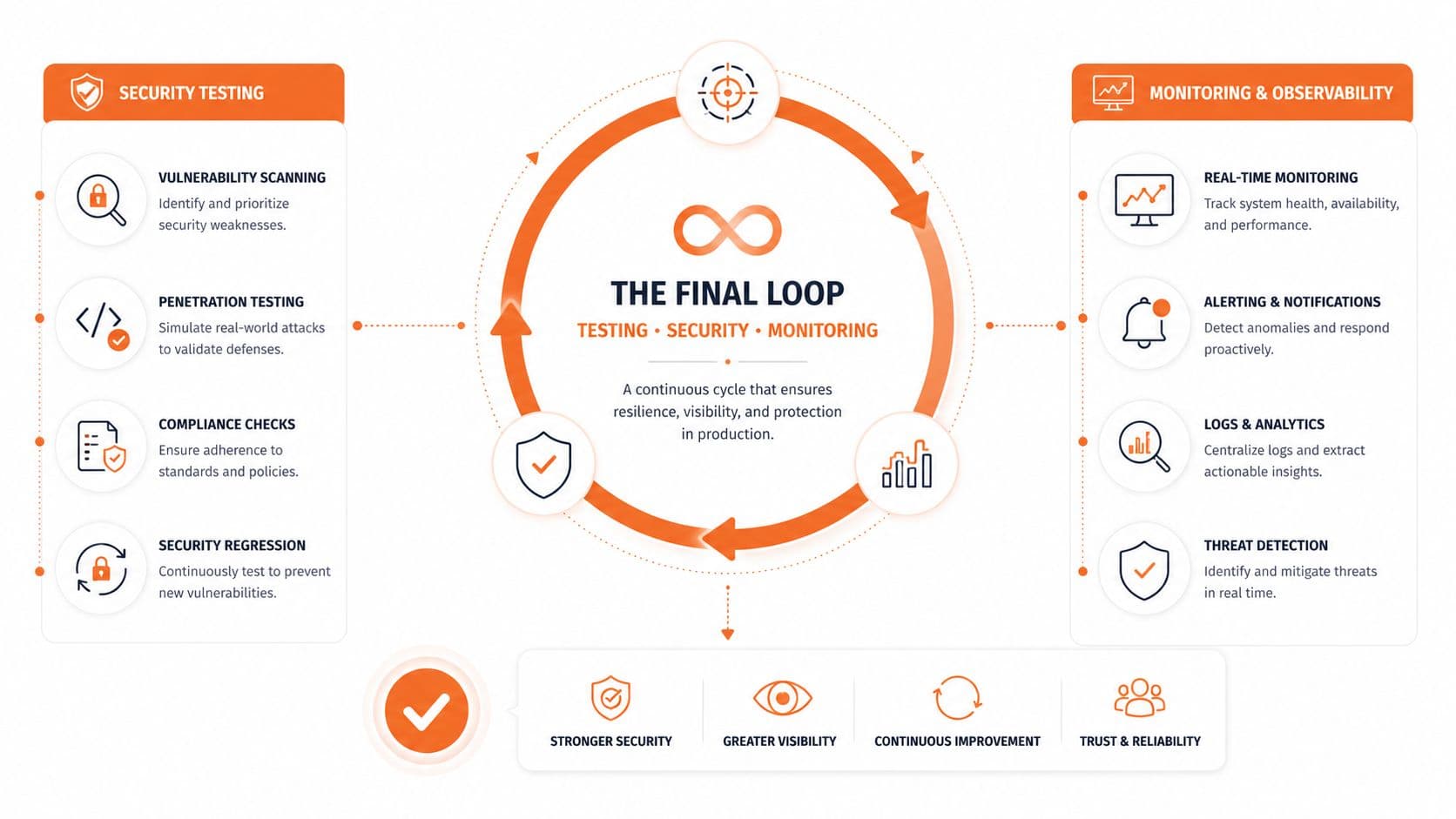
The Final Loop Testing Security and Monitoring#
Publishing machine-readable docs is not the finish line. You need proof that agents can use them correctly and boundaries that keep sensitive material out.
Test the same way your users ask#
Yext's guidance on agentic interactions frames the shift correctly. AI readiness is about making content and actions machine-executable, not just human-readable, and that requires exposing key actions and information in ways an agent can parse without brittle scripting through Yext's write-up on agentic booking and machine-executable experiences.
Apply that standard to docs testing. Ask the actual questions your users ask in ChatGPT, Claude, Cursor, and Perplexity. Then inspect the answers.
Look for:
- Correct citations: Is the agent pulling the right page?
- Current instructions: Does it mention the latest auth flow or an obsolete one?
- Action clarity: Can it find the next step, not just a description?
- Stable excerpts: Are code snippets extracted with enough surrounding context to stay useful?
If an agent keeps misunderstanding a page, don't blame the model first. Blame the page structure, the missing metadata, or the way the task is buried.
For teams tracking whether docs are performing, this matters more than vanity traffic. You need to know what users and systems are trying to find. A practical starting point is documentation analytics and metrics that reflect real usage patterns.
Set boundaries on what agents can use#
Not every document should be public and machine-readable.
Create clear rules for:
- Public documentation: Product docs, API references, migration guides, support content.
- Restricted documentation: Internal runbooks, incident notes, customer-specific implementation details.
- Gray-zone material: Partner docs, beta features, and pages still under review.
This boundary work matters because once your docs become agent-friendly, they become easier to retrieve at scale. That's a feature for public docs and a risk for the wrong material.
Treat docs like an executable surface#
The old view was that documentation described the product. The new view is that documentation helps machines use, compare, and sometimes act on behalf of users.
That means your final loop should be continuous:
- Publish machine-readable content.
- Test retrieval in real agents.
- Watch logs and analytics for what gets hit.
- Fix weak pages, stale dates, and missing summaries.
- Re-test after every meaningful docs change.
The painful manual way is obvious. You write docs, ship them, hope an agent finds them, and learn too late that the wrong page is getting cited. The integrated way is operational. Publishing updates the machine-facing layer, pages stay semantically clean, retrieval stays testable, and docs become part of your product surface instead of an afterthought.
If your documentation still ships as beautiful rendered soup, you're making your product harder to discover than it needs to be. Dokly is one option for teams that want a docs platform built around AI-readable output, including semantic MDX, generated llms.txt files, server-side rendering, analytics, and a visual editor that doesn't force you into a heavy repo workflow.