Many believe bad documentation fails because the writing is weak. That's only part of the problem. In practice, a lot of documentation fails because it isn't usable by the systems that now mediate discovery, support, and product evaluation.
That matters because technical documentation isn't just a help center. It's a broad category of written or web-based material that explains the how, what, when, where, and why of a product, service, system, or process. It includes user manuals, installation guides, API documentation, technical specifications, and troubleshooting guides for different audiences, from end users to developers to internal stakeholders, as outlined in this definition of technical documentation.
In 2026, the first reader often isn't a human skimming your sidebar. It's an AI system trying to parse your docs, extract meaning, and decide whether your product is worth surfacing. If your docs are visually polished but structurally messy, they're not doing their job.
Table of Contents#
- What Is Technical Documentation and Why Most of It Is Obsolete
- The Four Core Types of Technical Documentation
- Why Most Technical Documentation Fails in 2026
- The Anatomy of Great Machine-Readable Documentation
- A Simple Workflow for Creating Docs That Work
- Choosing Your Documentation Stack The Smart Way
What Is Technical Documentation and Why Most of It Is Obsolete#
Most technical documentation being published today is already obsolete. Not because the information is wrong on day one, but because the format assumes a human will patiently browse, interpret, and reconstruct the answer.
That assumption no longer holds.
Technical documentation is usually described as the material that explains how a product, service, system, or process works. That's correct, but too soft to be useful. In real teams, documentation is an operational system. It defines tasks, captures decisions, explains interfaces, supports onboarding, and reduces repeated support work.
There's also a practical structure to it. Technical documentation commonly splits into process documents and user documents. Process documents cover development and internal workflows. User documents help people operate and troubleshoot products. That distinction matters because a docs system has to support the full lifecycle, not just public help pages, as explained in ClickHelp's overview of documentation types.
Obsolete doesn't mean old#
A newly published page can still be obsolete if it has these traits:
- Hard to parse: Headings don't reflect the actual topic, content is trapped inside visual blocks, and code examples aren't clearly separated.
- Hard to maintain: The writer has to update the same instruction in multiple places.
- Hard to retrieve: Search returns vague matches instead of direct answers.
- Hard for machines to chunk: An AI system can't reliably identify prerequisites, steps, parameters, or outcomes.
Practical rule: If an AI agent can't tell what problem a page solves within a few seconds of parsing it, that page is mostly decorative.
A lot of legacy content falls into this trap. Teams migrate old docs, preserve the mess, and then wonder why support keeps answering the same questions. If you're dealing with that problem, this guide on migrating legacy documentation is worth reviewing before you rewrite anything.
What good docs actually do#
Good technical documentation removes ambiguity. It tells the right person exactly what they need, at the moment they need it, in a format they can act on. Today that means writing for humans and structuring for machines.
That's the answer to what is technical documentation. It's not a pile of pages. It's a system for making product knowledge executable.
The Four Core Types of Technical Documentation#
Four doc types cover almost everything a software team needs to publish: tutorials, how-to guides, technical references, and explanations. The split matters because each type serves a different job, a different reader state, and a different retrieval pattern. If you mix them together, humans slow down and AI systems misclassify the page.
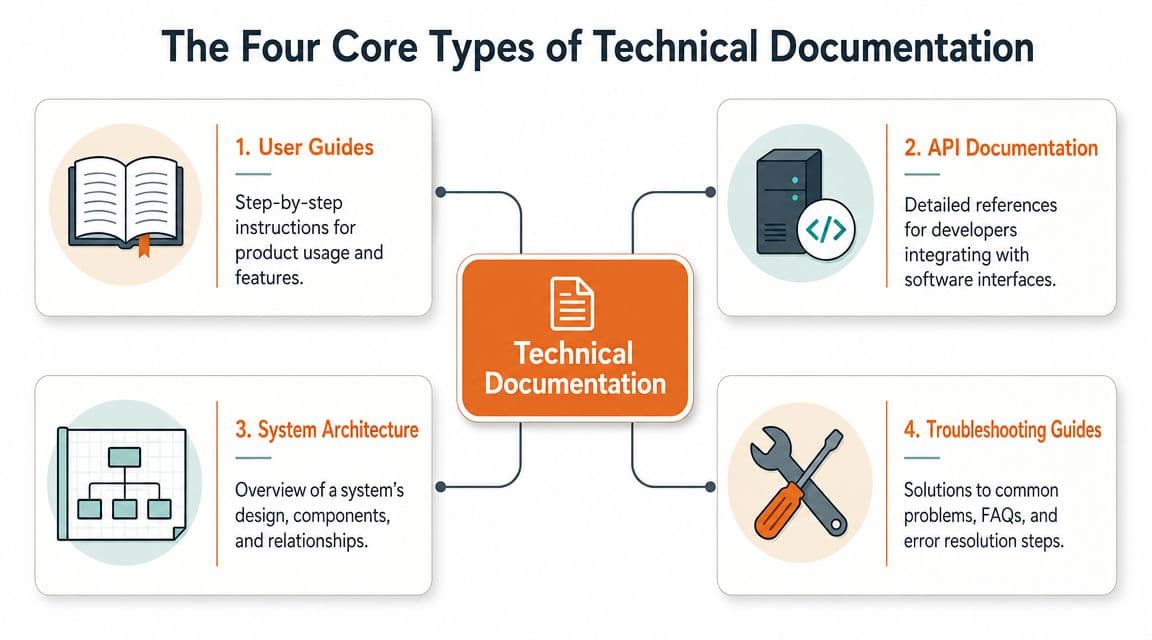
The practical test is simple. Can a person and a machine both tell, within a few seconds, what the page is for? Good documentation systems make that obvious from the title, headings, page structure, and content shape.
Tutorials#
Tutorials help someone get from zero to a working result. They are for onboarding, first success, and confidence-building.
A good tutorial stays on one path. It gets the user to a defined outcome such as making the first API call, shipping a basic integration, or deploying a starter app. It should not stop to explain every option, variant, or edge case. That is how teams turn a usable walkthrough into a bloated mess.
What works:
- A single goal: One end state, clearly stated at the top
- Ordered steps: Each action depends on the last one
- Visible checkpoints: The reader can confirm progress as they go
- Low branching: Fewer decisions means fewer drop-offs
A tutorial also needs machine-readable signals. Prerequisites should be explicit. Steps should be numbered. Expected outputs should be labeled. If an AI agent cannot separate setup, actions, and success criteria, it cannot guide users through the flow reliably.
How-to guides#
How-to guides solve a known problem. The reader is not exploring. They are trying to complete a task or fix something that broke.
This is the doc type support teams feel most directly. If common operational tasks are buried inside long conceptual pages, tickets pile up fast. Good how-to guides deal with specific jobs such as:
- Rotate an API key
- Configure SSO for a workspace
- Recover a failed webhook integration
- Fix a common deployment error
The best ones get to the action early. Put prerequisites near the top. Put the procedure next. Add short context only where it changes the decision or prevents mistakes.
I usually treat how-to guides as operational runbooks with cleaner language. They need stable headings, scannable steps, and obvious outcomes. AI retrieval depends on that structure. If the task, conditions, and fix are all tangled together, search and support bots will pull the wrong answer.
The easiest way to wreck a how-to guide is to front-load background and hide the procedure.
Technical references#
Reference documentation describes the system precisely. In it, developers check endpoints, parameters, objects, auth rules, request formats, response shapes, SDK methods, and error codes.
Reference pages are lookup tools. They live or die on consistency.
For developer products, this type usually carries the highest day-to-day load. Teams use it during implementation, debugging, and maintenance. That means the content has to be exact, current, and structured in a way that machines can parse cleanly. Field names, types, defaults, constraints, and examples should be labeled the same way every time.
A useful reference page makes these things obvious:
| Element | What the reader needs |
|---|---|
| Endpoint or object | What it is |
| Inputs | Required and optional fields |
| Output | Response shape or return value |
| Constraints | Limits, validations, and edge behavior |
| Example | A realistic request and result |
This is also the doc type where weak structure causes the most damage. If auth rules are in a paragraph, error definitions are missing, and examples do not match the schema, developers guess. AI agents guess too. Both outcomes create support work.
Explanations#
Explanations teach the model behind the product. They answer why the system works the way it does, what trade-offs shaped it, and when one approach fits better than another.
Teams often underinvest here because explanations do not look immediately transactional. That is a mistake. Without them, users can complete steps without understanding the system. They copy examples, then make poor decisions the moment the happy path changes.
Good explanations cover topics like:
- Why the permission model is designed the way it is
- How event-driven workflows differ from polling
- When to choose one authentication flow over another
- Why behavior changes across environments
These pages should still be structured with retrieval in mind. Clear subheads, defined terms, and explicit comparisons make them easier for humans to learn from and easier for AI systems to summarize correctly.
The common failure is trying to force all four types into one page. A tutorial should not carry the full reference. A reference page should not act like onboarding. An explanation should not hide the task flow. Separate the job of each page, and the whole docs system gets easier to maintain, easier to search, and far more useful to machines.
Why Most Technical Documentation Fails in 2026#
Technical documentation in software isn't just content. It acts as a product and process control layer. Product docs define what gets built and how users or developers interact with it. Process docs standardize how teams work. When either side is poor, teams make implementation mistakes and development slows down, as described in AltexSoft's explanation of documentation in software development.
That sounds obvious. The failure mode is less obvious. Teams often think they're shipping documentation when they're really shipping pages.
Pretty sites can still be bad docs#
A polished docs site can still be structurally broken. This is common with tools that optimize for visual output first. The page looks modern, but the underlying content is flattened into components, marketing-style layouts, or editor abstractions that make retrieval harder.
The result is what I call rendered soup. Humans can sometimes work around it. Machines struggle.
Common symptoms:
- Headings exist for styling, not structure
- Key steps are buried in tabs or accordions
- Code examples lose context
- Search snippets don't match the user's task
- Pages answer multiple intents badly
Mintlify and GitBook can produce attractive docs quickly. That's useful. But attractive isn't the same as parseable, and parseable matters more than is generally appreciated.
The setup tax is real#
Open source stacks like Docusaurus give teams control. They also demand upkeep. Someone has to own configuration, deployment, theming, broken builds, plugin friction, and content workflow.
That tax doesn't show up in a pricing page. It shows up in engineering time and stale docs.
A self-hosted stack often fails for predictable reasons:
- No clear owner: Engineering sets it up, then nobody maintains the system.
- Writers are blocked: Simple edits depend on repository workflow.
- Customization drifts: Each improvement adds another maintenance burden.
- Publishing slows down: The friction makes people postpone updates.
For teams with strong platform engineering and a real docs program, that trade-off can be acceptable. For most startups, it isn't.
Internal search usually tells the truth#
You can tell whether documentation works by watching what people fail to find. Human readers use site search. AI systems try retrieval and chunking. Both expose the same weakness. The content isn't structured around tasks and entities.
Bad search is usually not a search problem. It's an information architecture problem.
If users keep typing the same question and landing on broad overview pages, your docs aren't missing polish. They're missing retrieval logic.
The following usually breaks usability:
| Failure point | What it causes |
|---|---|
| Weak page intent | One page tries to answer everything |
| Inconsistent naming | Search misses the obvious match |
| Outdated steps | Users stop trusting docs |
| Fragmented ownership | Public and internal docs drift apart |
Most technical documentation fails because teams optimize for publishing, not for retrieval. In 2026, that's backwards.
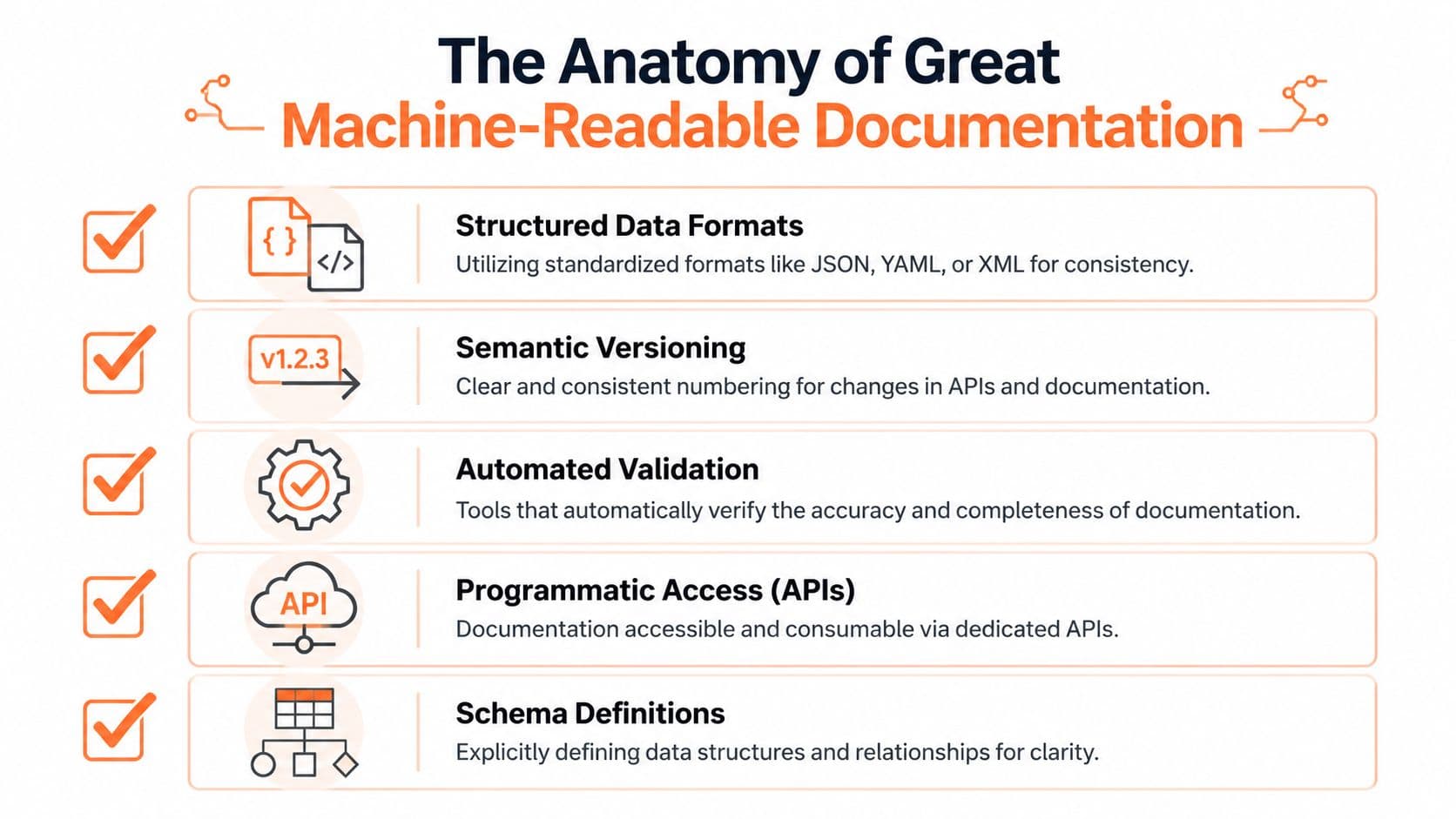
The Anatomy of Great Machine-Readable Documentation#
High-quality technical documentation is audience-specific, current, and structured to minimize cognitive load. Best practices include consistency in style and tone, templates, and clear navigation so readers can find information quickly and support burden drops, according to Contiem's summary of technical documentation best practices.
Those principles still matter. The difference now is that "readers" includes machines.
Structure beats decoration#
Machine-readable documentation isn't a branding exercise. It's an information architecture discipline.
The page has to expose meaning in a way that software can reliably parse. That means stable headings, predictable content patterns, clean code blocks, obvious parameter tables, version clarity, and metadata that helps systems understand what the page is for.
A lot of teams still evaluate docs like a design project. Wrong instinct. The critical question is whether a parser, crawler, or AI assistant can identify the page intent, the task steps, the inputs, and the outcome.
If you want a deeper take on that shift, read why docs for AI agents require a different structure.
What machine-readable docs need#
The exact implementation can vary by stack, but the underlying requirements are pretty consistent.
- Semantic source content: Markdown or MDX is usually easier to preserve, inspect, and transform than opaque editor output.
- Explicit hierarchy: Heading levels should reflect real structure, not visual preference.
- Stable templates: A troubleshooting page should look like a troubleshooting page every time.
- Structured examples: Code samples need labels, context, and relation to the surrounding text.
- Clear navigation: Humans browse. Machines chunk. Both need predictable paths.
A practical standard for modern docs also includes a few technical expectations:
| Capability | Why it matters |
|---|---|
| Server-side rendering | Improves initial accessibility and parseability |
| Machine-oriented text files | Helps agents discover and interpret docs |
| OpenAPI-based references | Keeps API details aligned with the actual spec |
| Consistent metadata | Improves filtering by audience, product area, or version |
The pages that perform best are boring underneath#
This is the part many teams resist. The best documentation systems are often plain under the hood. Not primitive, just disciplined.
They're built from repeatable page types. They separate tutorials from references. They avoid hiding critical instructions inside fancy UI. They keep canonical answers in one place. And when teams use a hosted platform, they should prefer one that preserves semantic output instead of trapping content inside presentation-heavy blocks. Tools in this category include self-hosted stacks, hosted visual platforms, and newer systems such as Dokly that generate semantic MDX, machine-oriented files, and interactive API docs from structured inputs.
Great docs feel simple because someone did the hard work of removing ambiguity before publishing.
That's what "modern documentation quality" means now. Not prettier pages. Better structure for both humans and machines.
A Simple Workflow for Creating Docs That Work#
Docs fail long before publishing. They fail when nobody decides who the page is for, what job it must do, and what format makes it usable by both people and machines.
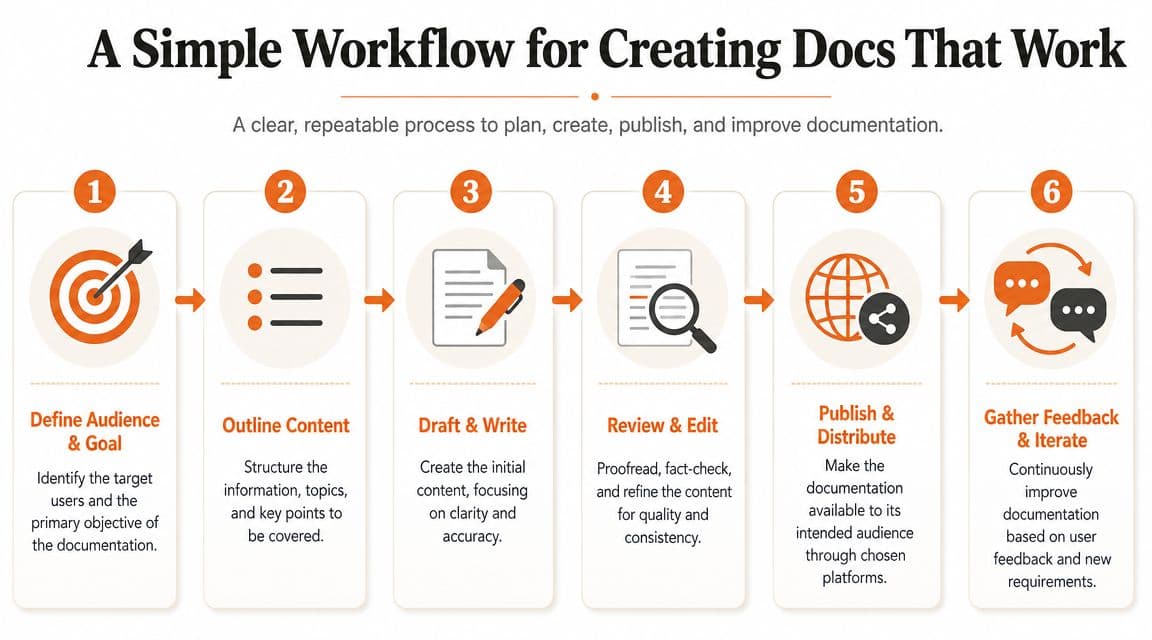
A workflow that holds up in a product team needs to cover internal process docs and external product docs. Release runbooks, onboarding steps, API references, troubleshooting guides, and admin setup pages should not live in separate worlds with separate standards. If engineers document one way and support documents another, search breaks, duplication spreads, and AI retrieval gets noisy fast.
Start with the job, not the page#
Do not open the editor first. Define the task first.
Every doc request should answer four questions before anyone writes a line:
- Reader: developer, admin, support agent, or end user
- Intent: learn, fix, integrate, compare, or verify
- Context: onboarding, active implementation, incident response, or routine use
- Success condition: what the reader can do after reading
This sounds basic. It removes a surprising amount of bad documentation.
Teams skip this step and produce pages that mix launch notes, setup steps, warnings, and sales copy into one page. Humans have to hunt for the answer. AI systems pull the wrong chunk because the page tries to do five jobs at once.
A lightweight planning table is usually enough:
| Dokly Workflow in Action | What happens |
|---|---|
| Audience defined | The page is written for one reader, not everyone |
| Goal chosen | The page solves one primary task |
| Draft created | The first version focuses on clarity, not formatting tricks |
| Enhancements added | Code blocks, callouts, diagrams, or API elements are inserted where useful |
| Review applied | Language, accuracy, and structure are tightened |
| Publishing completed | The page goes live and becomes easy to update |
Draft in a format your team will keep using#
The best workflow is usually the one with the lowest update cost. If contributing to docs feels like opening a frontend project, filing a content ticket, and waiting for review bandwidth, people stop contributing.
I have seen this pattern repeatedly. Teams blame culture. The actual problem is usually friction.
Writers and engineers need fast drafting, collaborative review, and publishing that does not require ceremony. A Notion-like editor helps because more people will fix a doc when the input format feels familiar. That matters even more now because AI tools work better on clean, structured text than on pages assembled from decorative blocks and hidden UI.
This product walkthrough makes that workflow easier to picture:
The workflow itself is straightforward:
- Outline before prose: lock the page structure before polishing sentences
- Answer the primary question early: put the task, fix, or key concept near the top
- Keep one page to one job: split tutorials, references, and troubleshooting instead of blending them
- Add interactive elements only when they reduce confusion: examples, API tools, and diagrams should support the task
- Use AI as a reviewer: let it tighten wording, spot repetition, and suggest clearer headings, but keep technical judgment with the team
Review for accuracy, then review for retrieval#
Most doc reviews stop at grammar and correctness. That is not enough anymore.
A modern review pass should also check whether the page is easy to retrieve and quote. Headings should describe real tasks. Terminology should stay consistent with the UI and API. Version details should be explicit. Steps should be sequential. Canonical answers should live on one page, with other pages linking back to it instead of paraphrasing it badly.
This is the practical test: can a new support engineer find the answer in under a minute, and can an AI assistant pull the same answer without stitching together three half-relevant pages? If not, the doc is still unfinished.
Publish fast, then fix based on evidence#
Publishing should be boring. One click, custom domain, version control where needed, and no deployment tax for routine edits.
After that, usage tells you what to fix:
- Search queries show where users expect answers and do not find them
- Support tickets expose weak troubleshooting and missing prerequisites
- Implementation blockers reveal where setup steps are out of order
- Stale reference content points to a broken source of truth between product changes and docs
Teams choosing tools for this workflow should compare authoring friction, structured output, and publishing speed, not just page aesthetics. This comparison of knowledge base platforms for modern teams is a useful starting point if you're evaluating stacks.
The workflow that survives release week is usually simple: clear ownership, easy editing, fast review, and pages structured well enough that both humans and machines can use them. That is what makes documentation work now.
Choosing Your Documentation Stack The Smart Way#
Choosing a documentation stack used to be a branding and workflow decision. Now it's also a machine-readability decision. If your docs look polished but aren't easy to parse, retrieve, and cite, the stack is working against you.
The three paths most teams choose#
Organizations often end up in one of these buckets.
Docusaurus (self-hosted) gives you control. It also gives you setup, maintenance, repository workflow, and a steady stream of decisions most early teams don't need to make. That's workable if you want docs to behave like an internal frontend project.
Mintlify or GitBook (hosted) reduce setup pain. They can look excellent and feel fast to launch. The trade-off is that teams can end up optimizing presentation more than structure, especially when pages rely heavily on components and visual assembly.
AI-native hosted platforms are a newer category. They focus on semantic output, machine-oriented discovery, and low-friction publishing from the start. If you're comparing options in this space, this roundup of knowledge base platforms for modern teams is a useful place to sanity-check requirements.
Documentation tooling comparison 2026#
| Criterion | Docusaurus (Self-Hosted) | Mintlify (Hosted) | Dokly (Hosted) |
|---|---|---|---|
| Setup effort | Higher. Requires technical ownership | Lower. Faster to launch | Lower. Designed for no-config publishing |
| Authoring workflow | Repo-centric | Hosted editor and docs workflow | Visual editor with semantic output |
| Maintenance burden | Ongoing team responsibility | Lower than self-hosted | Lower than self-hosted |
| AI readability focus | Depends on implementation quality | Varies by page structure | Built around machine-readable docs |
| API documentation workflow | Flexible but manual setup is common | Good for public docs | Supports structured API publishing from OpenAPI |
| Best fit | Teams that want full control | Teams prioritizing launch speed and polished presentation | Teams that want low friction plus AI-oriented structure |
The smart choice depends on what you optimize for. If you want total control, self-host. If you want a quick hosted launch, pick a hosted tool. If you want docs that are easy to publish and built to be read by both humans and AI systems, pick a platform designed around that requirement from the start. You can also explore practical utilities in the Dokly tools library.
If your team is rethinking what is technical documentation in an AI-first world, Dokly is worth a look. It gives you a hosted docs workflow with semantic MDX output, machine-readable files for agents, custom domains, built-in search, and OpenAPI-based interactive references without the usual setup tax.