
Your feature worked perfectly on localhost:3000. Then you deployed to Vercel, Netlify, or a Docker container, refreshed the page, and got undefined. The API key was there yesterday. The analytics ID vanished. The server route still works, but the client component is broken. Someone on the team edits .env.production, someone else changes dashboard variables, and now nobody knows which value the app is using.
That mess is why Next.js environment variables keep breaking projects.
The problem usually isn't the file names. It's that teams don't understand the lifecycle. In Next.js, config isn't just config. Some values stay on the server. Some get baked into the browser bundle. Some change immediately at runtime. Some don't change until the next build. If you miss that distinction, you'll waste hours chasing the wrong layer.
I've seen this go bad in tiny side projects and larger production apps. The fix isn't memorizing a cheat sheet. It's building a mental model you can trust. If your team also struggles to explain technical setup clearly, studying well-structured docs like these sample technical documents helps because environment mistakes often start as documentation mistakes.
Table of Contents#
- Introduction
- The Unbreakable Rule Public vs Server Variables
- Managing Variables Across All Your Environments
- The Critical Timing of Build Time vs Runtime
- Production Secrets Management Beyond Env Files
- Debugging Common Pitfalls and Migration Notes
Introduction#
Most Next.js environment variable bugs look random until you see the pattern.
A developer adds API_URL to .env.local. The server component can read it, so everyone assumes it's wired correctly. Then a client component tries to read the same variable and gets nothing. Someone renames it with NEXT_PUBLIC_, the browser starts working, and now the team has accidentally exposed something that never should've left the server.
That isn't a weird edge case. That's the system doing exactly what it was designed to do.
Next.js makes a hard distinction between server-only variables and public ones. It also turns the build step into a configuration boundary, not just a compilation step. If you don't respect that boundary, deploys become guesswork. If you do, nextjs environment variables become predictable instead of mysterious.
The fastest way to leak a secret in Next.js is to treat the browser like a trusted runtime. It isn't.
The official model is stricter than many developers expect, and that's a good thing. It forces you to be explicit about what the client may see and when those values become part of the shipped app. This is why production failures often happen. Teams change variables in one place, but the app already baked different values somewhere else.
The Unbreakable Rule Public vs Server Variables#
The rule that breaks projects is simple. Every environment variable is server-only unless you explicitly mark it public with NEXT_PUBLIC_.
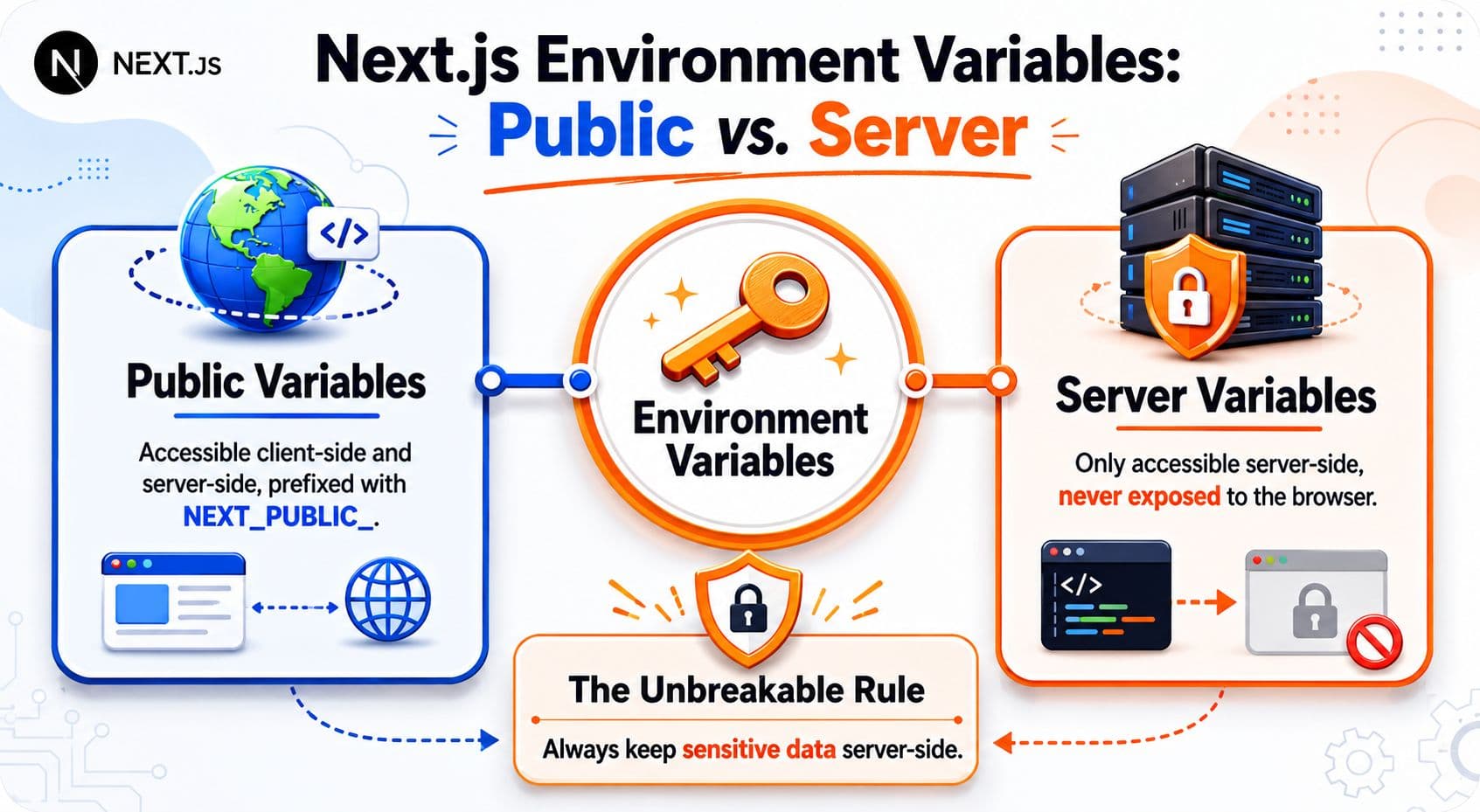
That prefix is not a naming convention for convenience. It is a declaration that the value can be shipped to the browser. Once a value crosses into client-side code, users can inspect it in DevTools, view it in the bundle, or pull it from network responses. Treat NEXT_PUBLIC_ as an exposure flag.
This is the part teams get wrong in production. They see a value work in a server component, assume it is globally available, then try to read the same variable in a client component. It comes back undefined, someone adds NEXT_PUBLIC_ to make the bug disappear, and a private credential ends up in the frontend build. The framework did its job. The team changed the security model to silence the symptom.
Why Next.js draws a hard line#
Next.js separates server code from browser code because those runtimes have different trust boundaries.
Server code runs in a controlled environment. It can read secrets, talk to private services, and hold credentials that never leave your infrastructure. Client code runs on a user's device. There is no such thing as a private client-side environment variable. If the browser can read it, the user can read it.
That is why NEXT_PUBLIC_ should be limited to values that are safe to expose, such as:
- Analytics identifiers: IDs used to initialize browser-side analytics tools.
- Public integration config: Browser-safe keys for maps, feature flags, or public endpoints.
- Display-level constants: Non-sensitive values that affect client behavior or rendering.
Keep these off the client:
- Database credentials: Never needed in browser code.
- Private third-party tokens: If a provider calls it a secret, believe them.
- Anything that grants authority: Admin tokens, signing keys, webhook secrets, and service credentials stay on the server.
A good rule is blunt. If seeing the value in DevTools would make you uncomfortable, do not prefix it with NEXT_PUBLIC_.
There is another reason this matters. Public variables are not fetched from some hidden config store at runtime in the browser. They are baked into the client bundle during the build. After that, the value is part of the app you shipped.
Here's the Dokly video slot requested for this topic, and it fits because this is the part many development teams need drilled into them visually:
What this looks like in real code#
The safest pattern is boring. Secrets stay on the server. The client gets only the minimum data it needs.
Server code can read private values:
// app/api/billing/route.ts
export async function GET() {
  const secret = process.env.BILLING_SECRET_KEY

  if (!secret) {
    throw new Error('Missing BILLING_SECRET_KEY')
  }

  return Response.json({ ok: true })
}
Client code can only read public values:
'use client'

export function AnalyticsBoot() {
  const analyticsId = process.env.NEXT_PUBLIC_ANALYTICS_ID

  return <div data-analytics={analyticsId}>Ready</div>
}
The common failure is trying to read process.env.BILLING_SECRET_KEY in a client component and treating undefined like a configuration bug. It is a protection mechanism. Next.js is stopping a secret from being bundled into code that runs in the browser.
The better pattern is straightforward. Use Route Handlers, Server Components, or server actions to access the secret on the server. Return only safe data to the client. This becomes even more important on Vercel, Netlify, and Docker deployments, where teams often assume "the env var exists in the container" means the browser can read it too. It cannot. Server availability and client exposure are two different things, and Next.js forces you to choose deliberately.
Managing Variables Across All Your Environments#
Teams rarely break Next.js config because they forgot to create a .env file. They break it because the same variable exists in three places, each environment loads a different one, and nobody knows which value won.
Next.js resolves environment variables in a fixed order. Shell and platform-injected values sit at the top, then local overrides, then environment-specific files, then the base .env. That sounds tidy until a developer has an old .env.local, CI injects something else, and production gets a third value from Vercel, Netlify, or Docker. At that point, "it works on my machine" usually means "my override masked the underlying problem."
The load order that actually decides the value#
When a variable looks wrong, stop editing files at random. Trace the source of truth.
| File | Environment | Purpose | Commit to Git? |
|---|---|---|---|
process.env | Any | Values injected directly by the shell, CI, or hosting platform | No |
.env.$(NODE_ENV).local | Environment-specific local override | Machine-specific override for one environment | No |
.env.local | Local | Personal machine secrets and overrides | No |
.env.$(NODE_ENV) | Environment-specific shared config | Shared development, production, or test values | Usually yes, if non-secret |
.env | Default | Shared fallback defaults | Usually yes, if non-secret |
The usual failure pattern is boring and expensive:
- A developer adds
API_BASE_URLto.env. - Another developer already has a different value in
.env.local. - CI injects a third value for preview or staging.
- Docker builds with one value, but the container runs with another.
- Someone burns an hour debugging application code when the problem is config precedence.
This is why file lists alone are not enough. The rule that matters is ownership. Every variable needs one clear owner for local development, one for CI, and one for deployed environments.
A setup that stays readable under pressure#
Use .env for safe shared defaults. Use .env.development or .env.production only for non-secret values that differ by environment. Keep .env.local for machine-specific overrides and secrets. Let the hosting platform or CI inject the final values for staging and production.
That split reduces drift because each layer has a job.
I also recommend treating .env.local as disposable. If a teammate says, "I fixed it by changing my local file," that fix probably belongs in shared config, deployment settings, or documentation instead. Personal overrides are useful, but they hide team-wide mistakes fast.
Here is the practical version:
.env: safe defaults everyone can use.env.development/.env.production: shared non-secret values that differ by environment.env.local: developer-specific secrets and overrides- Platform or CI variables: final deployed values for preview, staging, and production
An .env.example file is still worth committing. It is not busywork. It gives new contributors a checklist, shows which variables exist, and makes missing config obvious before the first deploy. Pair it with deployment notes that explain where each value is supposed to come from. If your team is bad at writing setup docs, study a clear API playground documentation example. Good config docs solve the same problem. They remove ambiguity before it turns into downtime.
One more production reality gets ignored in a lot of guides. Vercel, Netlify, and Docker do not share a single mental model for environment variables. Vercel and Netlify encourage dashboard-managed values by environment. Docker often splits values between build arguments, compose files, and runtime -e flags. If you copy the same variable name across all of them without deciding who owns it, you create a system where local, CI, preview, and production can all disagree while looking "correct" in isolation. That is how broken config survives code review.
The Critical Timing of Build Time vs Runtime#
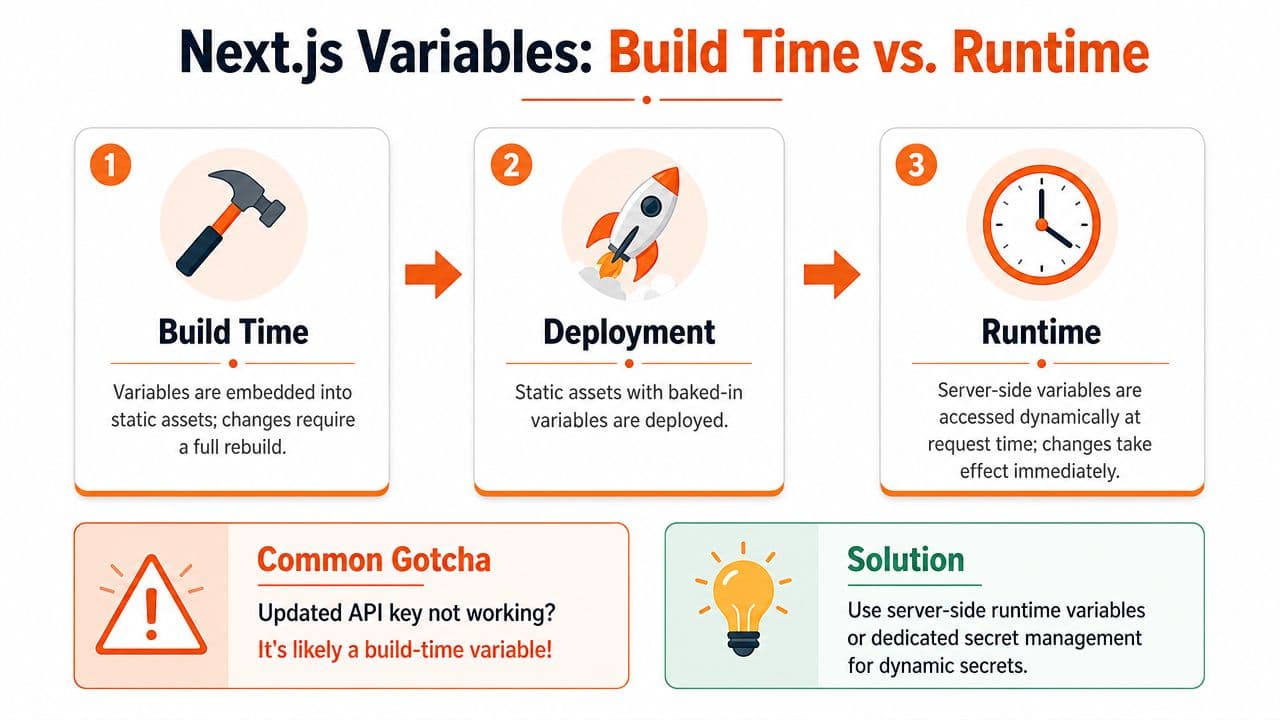
Friday afternoon deploy. Someone updates an API URL in Vercel, the deployment passes, and the frontend still calls the old endpoint. Then the guessing starts. CDN? stale cache? hydration bug? In practice, this usually comes down to one rule people keep forgetting: some environment variables become part of the build output, and some are read later at request time.
NEXT_PUBLIC_* is the line that matters. If that variable is used in browser code, Next.js does not fetch it live from the environment after the app is deployed. It replaces the reference during next build, and the browser gets the compiled value.
What gets frozen at build time#
Public variables are client build config.
That means this code:
const apiBase = process.env.NEXT_PUBLIC_API_BASE_URLis not a live lookup once the app is running in the browser. At build time, Next.js replaces that expression with the value available during the build. Change the value in a hosting dashboard after the build finishes, and the shipped JavaScript still contains the old string until you rebuild.
This is the "why" behind the rule. Browser code has no secure way to read server environment variables at runtime. The value has to be embedded into the assets the browser downloads. That makes public variables predictable, but it also means they are tied to the lifecycle of the build artifact, not the lifecycle of the server process.
Server-only values work differently. If code runs on the server during request handling, it can read the current runtime environment then. That is why the same dashboard change can appear to work for one variable and fail for another.
Use this mental model:
| Variable type | Read when | Where it matters |
|---|---|---|
NEXT_PUBLIC_* in client code | Build time | Browser bundle |
| Server-only values in server execution | Runtime | Server request handling |
That table explains a lot of broken deploys.
Where teams get tripped up#
Vercel and Netlify dashboards make env vars look like a single feature. They are not. The dashboard stores values, but your app may consume them at two different stages. One stage is the build. The other is server execution. If you do not separate those in your head, you end up changing the right value in the wrong phase.
Docker adds another failure mode. Teams build an image with one public API base URL, then run the container with a different -e NEXT_PUBLIC_API_BASE_URL and expect the frontend to switch over. It will not. The container has the new runtime value, but the browser bundle inside that image was already compiled with the old one.
I see this mistake a lot in preview and staging setups. CI builds the artifact once. Operations promotes the same artifact across environments. That is a valid deployment strategy for server config, but it breaks down fast if the frontend depends on environment-specific NEXT_PUBLIC_* values. At that point, you either need separate builds per environment or a different design for client configuration.
Practical rules that prevent bad deploys#
- Treat
NEXT_PUBLIC_*as code generation input, not as mutable runtime config. - Rebuild any time a public variable changes.
- Keep secrets and server-only credentials out of client code, even by accident.
- If one Docker image is promoted across multiple environments, avoid environment-specific public values in the client bundle.
- If a value must change without a rebuild, read it on the server and expose it through an API or server-rendered path you control.
The important trade-off is simple. Build-time inlining is fast and static. Runtime reads are flexible. Mixing them up is what causes long debugging sessions where every system looks correct on its own but the deployed app is still wrong.
Production Secrets Management Beyond Env Files#
A production incident rarely starts with code. It starts when a secret was rotated in one place, never updated in another, and the app keeps failing with a vague auth error while every dashboard looks "correct."
.env files help during local development. In production, they are only one delivery mechanism. The underlying issue is secret ownership, rotation, and runtime access. If that part is sloppy, Next.js just exposes the sloppiness faster.

The three setups that show up in real projects#
Local .env files are fine for development and throwaway apps. They stop being acceptable the moment a team starts copying credentials through chat, keeping old values in personal machines, or committing "temporary" fallbacks that never get cleaned up.
Platform-managed environment variables on Vercel, Netlify, and similar hosts are the practical default for many Next.js apps. They keep secrets out of Git, scope values by environment, and fit how these platforms deploy. The catch is operational sprawl. If CI owns some values, the hosting dashboard owns others, and nobody knows which one wins, debugging turns into archaeology.
Dedicated secret managers such as Doppler, HashiCorp Vault, or AWS Secrets Manager make sense once you have multiple services, stricter access control, or regular rotation requirements. They add setup and policy work. They also remove a lot of human error, which is usually the primary source of secret leaks and broken deploys.
Here is the trade-off in plain terms:
| Approach | Best for | Main advantage | Main downside |
|---|---|---|---|
.env files | Local development, small apps | Fast and familiar | Easy to mishandle, weak audit trail |
| Hosting platform variables | Most production web apps | Good environment scoping and deployment fit | Values get scattered across dashboards and CI |
| Dedicated secret manager | Larger systems, stricter controls | Centralized access, rotation, and policy | More setup and operational overhead |
What actually holds up in production#
For a small app, .env.local for development plus platform-managed variables for preview, staging, and production is usually enough.
For anything with multiple apps, shared infrastructure, or compliance requirements, I stop treating env files as the system of record. They become a local convenience, not the source of truth. The source of truth needs to be explicit, auditable, and accessible to the runtime that needs the secret.
That last point matters more than many guides admit. A database password used in a Route Handler or Server Action belongs in a server-side secret store or platform env setting. A browser bundle must never see it. An API key that needs rotation without redeploy pressure should come from a system built for rotation, not from a file someone copied six months ago.
A few rules prevent a lot of pain:
- Keep production secrets out of Git. No exceptions disguised as convenience.
- Decide who owns each variable. CI, hosting platform, or secret manager. Pick one source of truth.
- Store only browser-safe values in
NEXT_PUBLIC_*. Everything else stays server-side. - Plan for rotation before you need it. If changing a key feels risky, the setup is brittle.
- Audit access. If too many people can read production secrets, assume one will eventually leak.
The common failure pattern is not "we forgot an env var." It is fragmented ownership. One value lives in .env.production, another in Vercel, another in GitHub Actions, and a fourth only exists in last month's Docker build arguments. That works until a secret rotates, a deploy fails, or an incident forces someone else to trace the whole chain under pressure.
Debugging Common Pitfalls and Migration Notes#
When an environment variable is broken, don't start with theory. Start with elimination.
Most failures fall into a small set of boring causes. A client variable wasn't prefixed correctly. A server variable wasn't present in the deployment environment. A public value changed but the app wasn't rebuilt. Or the app is running in a runtime where your assumptions about process.env don't hold cleanly.
A short checklist when a variable is undefined#
If a variable is undefined, I go through this in order:
- Check the execution side: Is this code running on the server or in the browser?
- Check the naming: If the browser needs it, does the variable start with
NEXT_PUBLIC_? - Check where the value is set: Local file, shell, CI, hosting dashboard, or container config.
- Check whether a rebuild is required: Public values in client code usually need one.
- Check for overrides: Another env layer may be winning.
- Check the deployment target: Preview, staging, and production often have separate settings.
That order matters. Too many teams jump straight to framework superstition.
Most "Next.js env bugs" are naming bugs, scope bugs, or lifecycle bugs.
Another practical habit helps a lot. Fail fast on the server. If a required server variable is missing, crash early with a useful error instead of letting the app limp into a weird partial state.
Runtime edge cases and migration friction#
The Edge runtime is where people often discover that their old habits don't transfer cleanly. If your app mixes Node-oriented assumptions with edge execution, direct env access may not behave the way your server-only code expects. That doesn't mean Edge is broken. It means your environment strategy has to match the runtime you are deploying.
Migration pain also shows up when teams move from Pages Router patterns to App Router patterns without rethinking boundaries. A value that used to be read in server-side data fetching may suddenly get referenced from a client component because the architecture changed. That's how accidental exposure attempts happen.
A few migration notes are worth keeping in mind:
- Server Components are a gift for secret handling: Keep secret-dependent logic there when possible.
- Client Components should stay dumb about secrets: Pass data, not credentials.
- Docker builds need discipline: Public values available during build and server values available during runtime are different concerns.
- Platform previews aren't production: Validate each environment independently.
If your team keeps tripping over config changes, the issue usually isn't just technical. It means the handoff between code, deployment, and documentation is weak. Even a simple Git workflow guide like this rebase branch in Git walkthrough is a reminder that operational clarity saves more time than clever fixes.
If your team wants docs that are easier for both humans and AI tools to parse, Dokly is worth a look. It gives you an AI-native documentation workflow without the setup tax of tools like Docusaurus or Mintlify, turns structured content into clean MDX, and makes things like API references and interactive tooling much easier to publish. For teams documenting deployment steps, config rules, internal runbooks, or public developer docs, that simplicity becomes a real advantage fast.