The most common answer engine optimization advice is also the least useful. “Add FAQs.” “Use schema.” “Write concise answers.” None of that fixes the true failure mode.
Most product docs in 2026 still ship as polished pages for humans and messy output for machines. They look fine in the browser, but the first serious reader often isn't a developer. It's ChatGPT, Perplexity, Claude, Gemini, Cursor, or Google's answer layer. If that system can't reliably chunk your page, resolve what each section means, and identify which sentence is the source of truth, your docs don't compete. They disappear.
Answer engine optimization is the technical discipline of making content retrievable, extractable, and citable by AI systems. That sounds like marketing language until you look at the distribution shift. By 2026, 60% of US/EU searches end in zero clicks, and the average #1 result CTR dropped 64% in one year, from 0.73 to 0.26, according to Jack Limebear's AEO 2026 summary. If users get the answer before they ever see your page, ranking alone doesn't protect you anymore.
The practical implication is blunt. If your docs aren't machine-readable, they're commercially invisible.
A lot of teams feel this already. They publish setup guides, API references, migration notes, and troubleshooting pages, then wonder why AI assistants recommend a competitor's tutorial or summarize stale forum posts instead. Usually the problem isn't that the docs are missing. It's that the docs are structurally weak.
If you've been thinking about llms.txt as part of the documentation surface area, you're already closer to the right problem. The hard part isn't writing more content. It's making the right content legible to retrieval systems.
Table of Contents#
- Your Docs Are Invisible to AI
- AEO vs SEO A Fundamental Shift in Strategy
- How Answer Engines Find and Trust Your Content
- The AEO Technical Checklist for Product Docs
- Real-World Examples of AEO in Action
- Choosing Your AEO-Ready Documentation Platform
- Frequently Asked Questions About AEO
Your Docs Are Invisible to AI#
The first reader changed#
Teams still evaluate docs by asking whether a human can easily use them. That's outdated. The first meaningful pass often comes from an answer engine that wants one paragraph, one step list, one code block, or one product fact it can safely reuse.
That changes how documentation should be built. A page doesn't need to be merely readable. It needs to expose structure so a retrieval system can identify sections, isolate claims, and decide which passage is safe to cite.
Practical rule: If an LLM can't tell where one concept ends and the next begins, it will either skip the page or synthesize a weaker answer from somewhere else.
Why most doc stacks fail#
A lot of documentation platforms output what I'd call content soup. The page renders cleanly, but beneath that surface you get generic wrappers, shallow heading semantics, brittle navigation state, duplicated snippets, and blocks that only make sense inside a browser session.
That hurts answer engine optimization in three ways:
- Retrieval gets noisy: The system pulls chunks that mix setup steps, product marketing, warnings, and unrelated navigation text.
- Scoring gets weaker: The engine can't confidently tell which passage is the answer versus surrounding filler.
- Citation becomes risky: If the source looks ambiguous, the model picks a cleaner page.
The result is brutal because it's silent. There's no error log saying “your docs were ignored.” You just stop showing up in answers.
This is why old advice about “ranking” feels incomplete. In the answer era, your docs need to function as a machine-usable knowledge base, not a styled collection of pages. If they don't, the best page on your site may still lose to a simpler competitor page with cleaner semantics.
AEO vs SEO A Fundamental Shift in Strategy#
What each discipline is optimizing for#
Traditional SEO and answer engine optimization overlap, but they are not the same job. SEO tries to win placement in ranked results. AEO tries to become a trusted input to generated answers.
Here's the clean comparison.
| Aspect | Traditional SEO | Answer Engine Optimization (AEO) |
|---|---|---|
| Goal | Rank pages in search results | Get passages selected and cited in generated answers |
| Optimization unit | Whole page | Section, answer span, definition, step list, code sample |
| Primary signals | Keywords, links, crawlability, page relevance | Structure, factual clarity, freshness, extractability, citation-worthiness |
| Output | Blue-link visibility | Inclusion in answer layers and AI summaries |
| User path | Search, compare, click | Ask, receive answer, maybe click |
| Failure mode | Low rankings | No retrieval, weak extraction, bad synthesis, no citation |
| Best content pattern | Comprehensive page coverage | Self-contained chunks with explicit meaning |
| Team mindset | Search acquisition | Source-of-truth publishing |
Why the metrics changed#
The old metrics still matter, but they're no longer enough. CTR, rank position, and sessions tell you how pages perform in a click-based interface. They don't tell you whether AI systems trust your content enough to quote it.
A better AEO operating model cares about:
- Citation presence: Does your product or page appear in generated answers?
- Answer accuracy: Does the system describe your product correctly?
- Passage selection: Which part of your docs keeps getting used?
- Drift: When your docs change, do model answers stay aligned?
SEO asks, “Did the user click our result?”
AEO asks, “Did the model trust our page enough to use it?”
That distinction affects how engineers and writers should collaborate. SEO can survive fuzzy page structure if the page still ranks. AEO can't. Retrieval systems are much less forgiving when headings are vague, sections are overloaded, and key product facts are buried in prose.
Many teams waste time by continuing to apply classic SEO techniques to AI interfaces, only to wonder why visibility doesn't translate. Ranking is still useful. However, answer systems increasingly select from a broader field than classic top positions, so the source that wins isn't always the one with the strongest old-school search footprint.
How Answer Engines Find and Trust Your Content#
RAG is a retrieval problem before it is a writing problem#
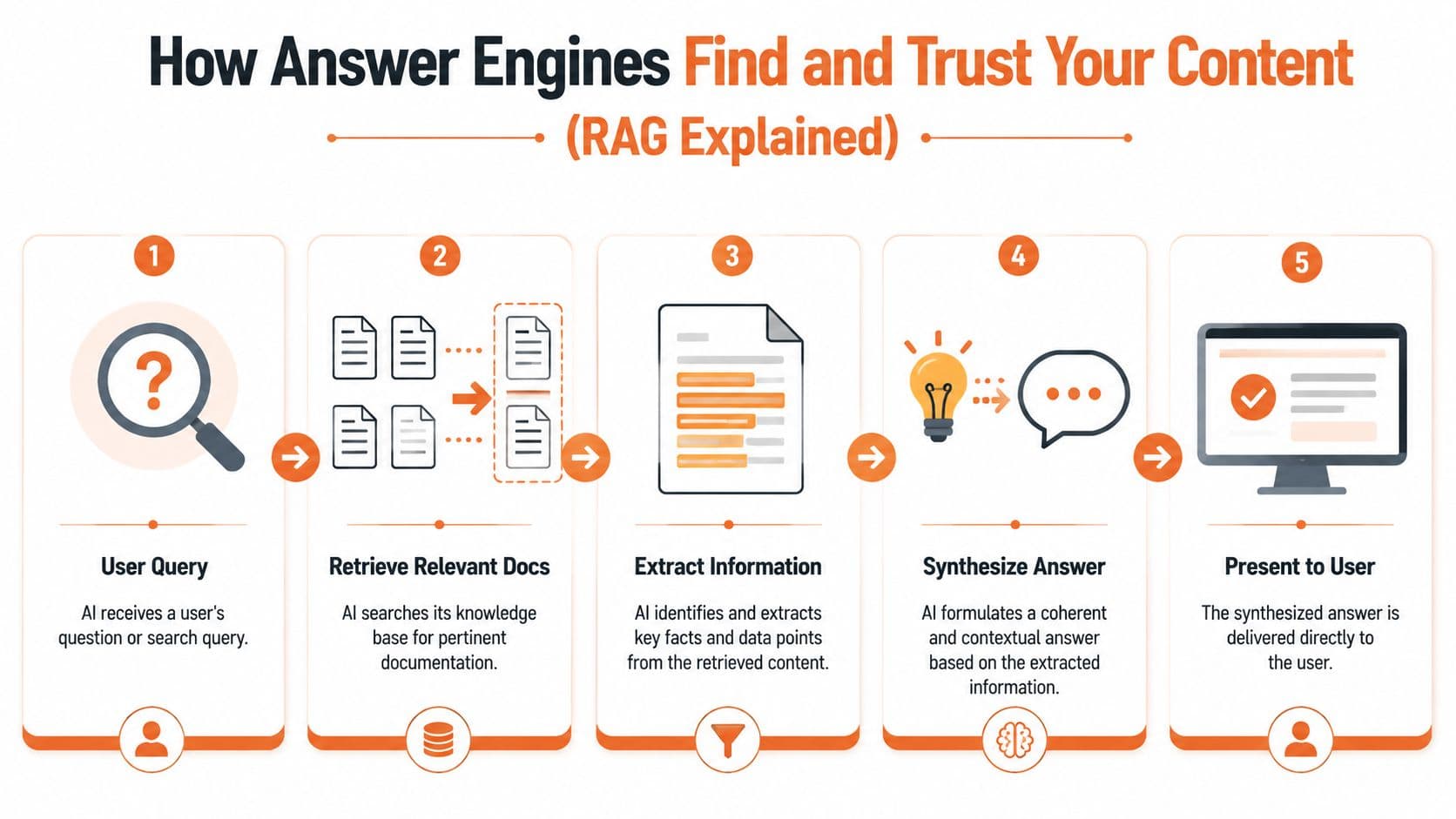
Modern AI search relies on Retrieval-Augmented Generation, or RAG. Systems retrieve passages from indexed sources, extract text, and synthesize answers. Recent coverage also notes that Google AI Overviews appear on 15% of queries and ChatGPT has 3.8 billion monthly visits, which is why optimizing for the retrieval pipeline is no longer optional.
The easiest mental model is a research assistant. The assistant gets a question, pulls relevant documents, highlights the strongest passages, writes a summary, and cites where the facts came from. Your documentation enters that process as raw material.
Some teams are already designing for AI agent friendly documentation, even if they don't call it AEO. That's the right instinct. You aren't only publishing for human navigation anymore. You're publishing for machine extraction.
A quick visual helps frame the pipeline:
Why content soup loses#
RAG systems don't “read” a page the way a person does. They split it into chunks. That chunking process depends heavily on semantic boundaries.
When a page has strong headings, scoped sections, and code examples tied to a clear topic, the chunks stay coherent. When a page is one long scroll of mixed concepts, the retrieved chunk often contains half an answer and half noise. That's enough to lose a citation.
Three common failures show up over and over:
- Overloaded sections: One heading covers definition, setup, caveats, pricing notes, and troubleshooting.
- Visual hierarchy without semantic hierarchy: The page looks organized, but the underlying HTML doesn't express that organization.
- Detached code samples: Snippets exist, but the surrounding text doesn't clearly say what they do or when to use them.
What answer engines reward#
Answer systems prefer sources they can parse without guessing. That usually means:
- Atomic answers: One section answers one question.
- Stable wording: Product names, features, and limits are expressed consistently.
- Good locality: The explanation, example, and caveat are close together.
- Visible metadata: Titles, dates, breadcrumbs, and page type are explicit.
If you're vague, the model has to infer. Inference is where accuracy starts to drift.
The AEO Technical Checklist for Product Docs#
Semantic HTML and stable hierarchy#
Start with the boring layer. It's the one many teams skip.
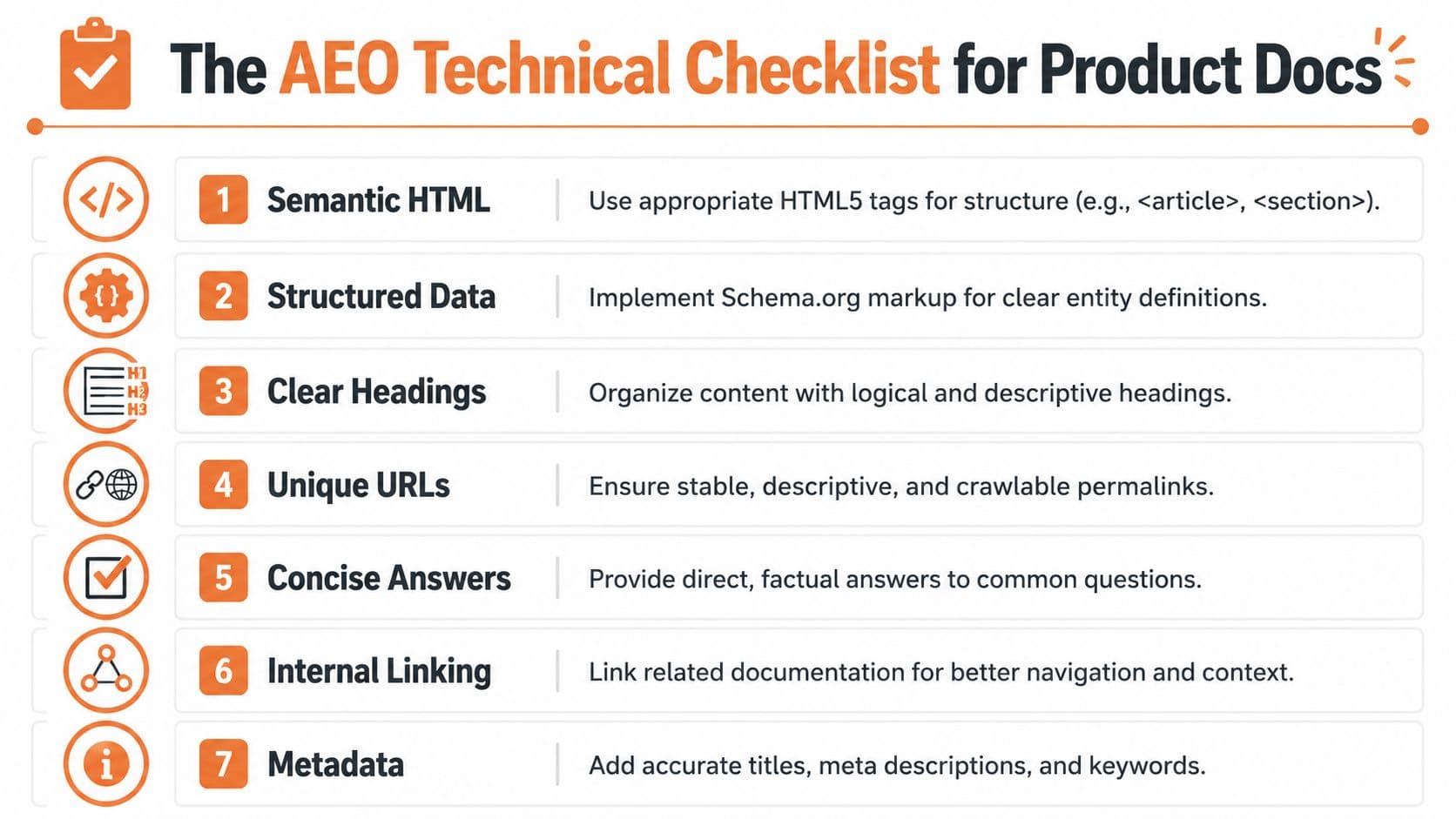
Use actual heading levels, ordered lists for procedures, tables for parameter maps, and separate sections for separate concepts. Don't fake structure with styled divs. Don't put critical guidance in accordions that collapse context. Don't treat every page as a landing page.
Why it matters: the retriever needs clean chunk boundaries. Semantic HTML gives it those boundaries.
How to implement it:
- Use one topic per section: “Authentication,” “Rate limits,” and “Webhook retries” should not share the same block.
- Keep headings descriptive: “Configure API keys” is better than “Getting started.”
- Pair code with explanation: A snippet should have a nearby heading and a short sentence that says what the snippet demonstrates.
Metadata that explains the page#
Frontmatter and page metadata aren't decoration. They are part of the machine-readable contract.
Add clear titles, short descriptions, page type labels, and last-updated signals. If your docs platform supports tags, use them carefully and consistently. “API”, “Guide”, “Reference”, and “Troubleshooting” tell retrieval systems what kind of artifact they are looking at.
A practical frontmatter shape might include:
- Title: The exact topic of the page
- Description: One sentence with the core answer
- Category: Guide, reference, tutorial, FAQ
- Product surface: API, SDK, dashboard, CLI
- Updated marker: A visible signal that the page is current
Structured data that exposes answer spans#
Structured data improves extractability because it tells machines what the page means. Guidance consistently recommends schema such as FAQPage, HowTo, and BreadcrumbList because they expose question-answer pairs, step sequences, and hierarchy. AIOSEO's summary explains why exact answer spans and semantic headings help engines surface direct answers more reliably.
That matters a lot for docs. Product documentation is full of entities, steps, parameters, methods, and edge cases. Schema doesn't replace clean writing, but it makes the page less ambiguous.
A simple implementation checklist:
- FAQPage: Use it for actual FAQs, not for stuffing unrelated copy into a Q&A shape.
- HowTo: Use it on procedural guides with a real step sequence.
- BreadcrumbList: Reinforce site hierarchy so context survives retrieval.
- Article or tech-doc metadata: Make authorship, dates, and page purpose explicit where your stack allows it.
Clean schema on a messy page is lipstick on a parser problem. The page still needs usable structure.
Canonical source control#
Many teams duplicate content across docs, blog posts, changelogs, in-app help, and support centers. Then they act surprised when models quote the wrong version.
Pick a source of truth and mark it clearly. Canonicals, stable URLs, and internal links should all point toward the authoritative page. If a setup guide exists in three places, answer systems may retrieve whichever copy is easiest, not whichever one is correct.
What works:
- One canonical page per concept
- Redirects for retired pages
- Versioned docs with explicit labels
- Cross-links from summaries to the main source
What doesn't work:
- Multiple near-identical pages with tiny wording changes
- Changing slugs every quarter
- Publishing release notes that contradict the main reference
llmstxt and machine-facing entry points#
A growing share of AEO work is about reducing ambiguity before retrieval starts. That includes machine-facing files that summarize where the best documentation lives and what it covers.
An llms.txt-style surface helps by exposing clean pointers to the most relevant documents. Think of it as a compact orientation layer for model consumers and tool builders. It won't rescue weak content, but it lowers the cost of finding your good content.
Search and analytics for drift detection#
Answer engine optimization doesn't end when the page is published. AI answers are volatile. If your docs change and the generated answer doesn't, users get outdated guidance with your name attached.
Watch for:
- Queries that repeatedly trigger wrong summaries
- Pages with high product importance but weak retrieval visibility
- Common support issues that the docs answer poorly
- Search terms from humans and agents that don't match your page structure
A good docs stack should help you detect these mismatches early. If it can't show what people search for, what content they land on, and where answers go stale, you'll always be reacting late.
Real-World Examples of AEO in Action#
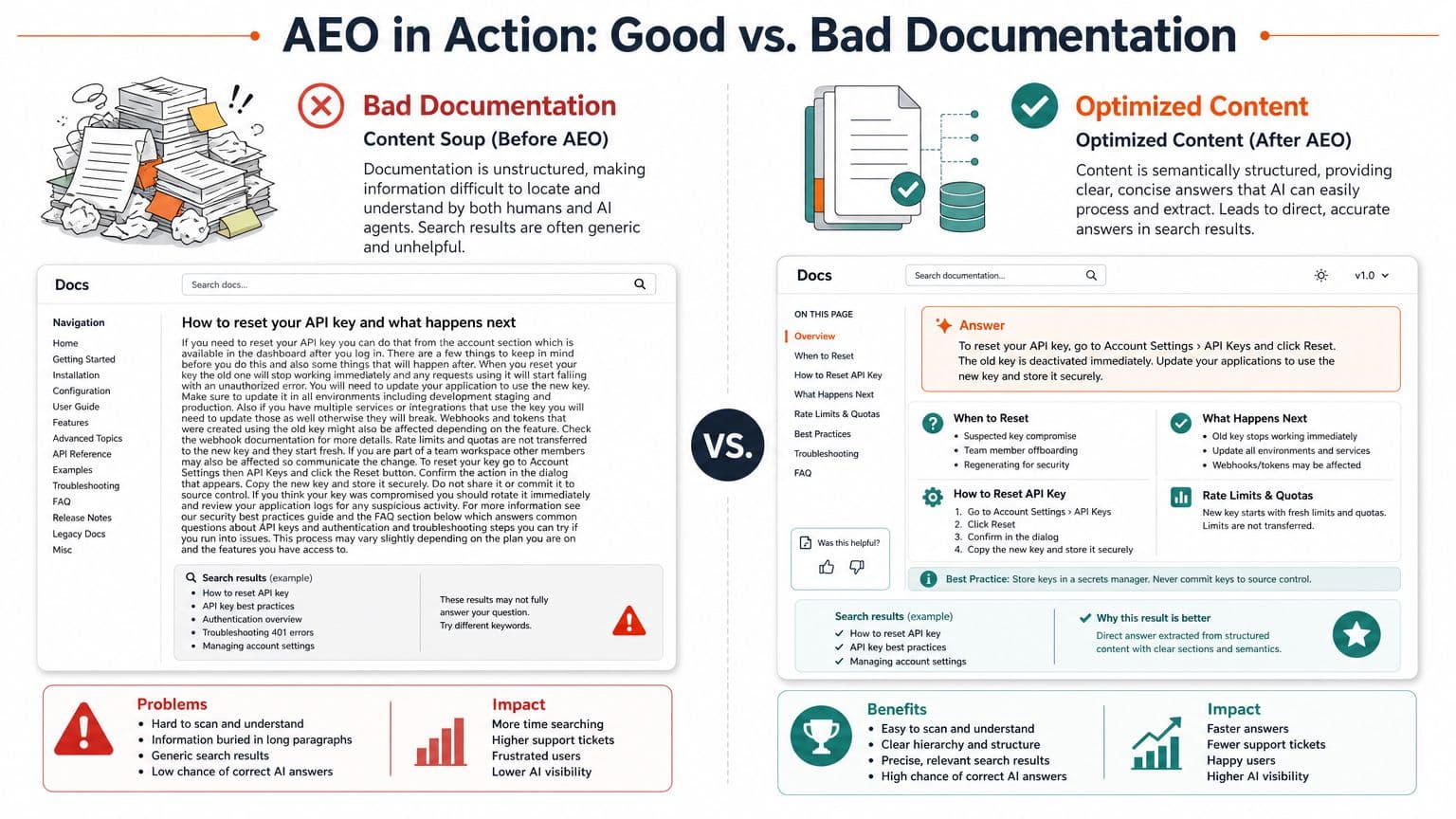
Bad documentation looks complete but parses poorly#
A weak documentation page often looks respectable at first glance. It has a sidebar, branded styling, tabs, expandable blocks, and a long article body. Then you inspect the content flow and see the problem.
The page starts with a broad intro, follows with a giant “Overview” section, buries the actual setup command halfway down, mixes warning text into the same container as the happy path, and ends with unrelated FAQ copy pulled in from another template. For a human, that's annoying. For an answer engine, it's unstable.
Typical failure traits:
- Generic headings: “Overview,” “Usage,” “Details”
- Long narrative blocks: multiple concepts under one heading
- UI-driven tabs: key facts hidden behind interaction state
- Duplicated snippets: same instruction on several pages with slight differences
Optimized documentation gives the model less room to improvise#
A stronger page is usually simpler. The title states one job. The first paragraph defines the topic directly. Each H2 handles one question. Code samples sit under the step they belong to. Errors and constraints get their own subsection instead of being tucked into body text.
That structure doesn't just improve visibility. It improves answer quality.
Content governance matters here. Content Marketing Institute warns that marketers can rank for queries that don't matter or for answers that are “factually off,” and argues for reducing hallucination risk by making docs structurally parsable and monitoring drift from source-of-truth documentation, as discussed in their piece on answer governance in AEO.
The less the model has to infer, the less often it gets your product wrong.
The “good” page usually has these properties:
| Weak page | Strong page |
|---|---|
| Topic blended with adjacent concepts | One concept per section |
| Heading text is vague | Heading text names the exact task or fact |
| Important caveats are buried | Constraints and exceptions are isolated |
| Snippets are detached from meaning | Snippets are introduced and scoped |
| Several competing sources say similar things | One page clearly acts as source of truth |
This is the under-discussed side of answer engine optimization. Being cited is only half the job. The other half is making sure the answer remains accurate as the product evolves.
Choosing Your AEO-Ready Documentation Platform#
The DIY route#
The DIY path usually means tools like Docusaurus or a custom MDX stack. Sometimes Mintlify lands in this bucket too, depending on how much your team needs to customize around defaults.
The upside is control. Engineers can shape the output, own the repo, and tune the build pipeline. The downside is the AEO tax. Someone still has to police semantic consistency, metadata standards, stable URL design, schema implementation, machine-facing surfaces, and content drift across versions.
That tax gets expensive in attention, not just in code.
The legacy knowledge base route#
Platforms like Confluence and Zendesk work for internal support workflows and help-center publishing. They are not ideal when your public docs need to act as a retrieval-grade source for AI systems.
The usual problems are familiar. Weak public information architecture. Inconsistent page semantics. Limited control over machine-readable output. Public pages that prioritize ticket deflection over clean extraction.
These systems can publish content, but answer engine optimization needs more than publication. It needs source clarity.
The AI-native route#
An AI-native documentation platform should assume that models are reading before users click. That means clean semantic output, machine-readable metadata, stable content architecture, and tooling for freshness and monitoring built into the product, not bolted on later.
That requirement is becoming harder to ignore. Frase's 2026 guide cites analysis of 17 million AI citations showing that AI-surfaced URLs were 25.7% fresher than traditional search results, and that only 38% of AI Overview citations came from pages already in Google's top 10. The same source says companies with early AEO strategies saw 3.4x more answer-engine traffic. The takeaway from Frase's AEO guide is straightforward: machine-readable structure and freshness now create a real competitive edge.
If you're comparing options, use criteria that map to that reality:
- Output quality: Does the platform emit clean semantic structure?
- Source control: Can it support a clear source-of-truth model?
- Machine-facing surfaces: Are files and metadata exposed cleanly?
- Analytics: Can you observe what users and agents search for?
- Operational burden: How much of this is manual?
For a broader comparison of categories and trade-offs, this roundup of knowledge base platforms is useful as a decision lens.
Frequently Asked Questions About AEO#
Is AEO just featured snippet optimization with a new name#
No. Featured snippets were about winning a small extraction inside a search results page. Answer engine optimization is about being retrieved, trusted, synthesized, and often cited inside AI-generated responses across tools like ChatGPT, Perplexity, and Google's answer layer.
Is schema markup enough on its own#
No. Schema helps, but it can't rescue bad structure. If your page has weak headings, mixed concepts, unstable canonicals, or inconsistent wording, schema only adds a thin machine-readable layer over a messy source.
What should product teams actually track#
Track whether your documentation is being used correctly, not just whether it ranks. Useful signals include citation presence, answer accuracy, recurring misstatements about your product, pages that should be the source of truth but aren't, and internal search patterns that reveal missing structure.
How long does answer engine optimization take to matter#
It depends on how broken the current docs are and how often your product surface changes. If the architecture is already sound, improvements can show up as cleaner retrieval and better answer accuracy fairly quickly. If your docs are fragmented across tools, duplicates, and stale pages, the first phase is cleanup, not optimization.
The important part is this. AEO is cumulative. Teams that treat docs as a structured data product improve over time. Teams that treat docs as a design artifact keep fighting the same visibility problems.
If your current stack makes machine-readable docs feel like an infrastructure project, Dokly is worth a close look. It's built around the premise that documentation has to work for AI agents first, not as an afterthought. You can also explore Dokly tools if you want practical tooling around modern documentation workflows.