Most advice on how to write a standard operating procedure is backwards. It treats SOPs like compliance paperwork first and operating tools second. That's why so many teams end up with bloated Word docs nobody reads, stale PDFs in SharePoint, and “processes” that still live in one senior employee's head.
A good SOP isn't boring admin work. It's a way to make work repeatable, train faster, and stop preventable mistakes. A bad SOP does the opposite. It adds friction, creates ambiguity, and gives people one more document to ignore.
Table of Contents#
- Write SOPs That Actually Get Used
- Before You Write Define Scope Audience and Format
- Drafting Actionable SOPs People Will Follow
- Enhance SOPs with Visuals and Practical Examples
- The Modern Way to Review Publish and Maintain SOPs
- Common Questions About Standard Operating Procedures
Write SOPs That Actually Get Used#
Most SOPs fail for one simple reason. The writer optimizes for documentation completeness instead of usability.
That's the wrong target. If people can't skim it, trust it, and act on it in the moment they need it, the SOP is dead. Nobody cares that it's detailed if the instructions are vague, over-explained, or buried in a folder tree that requires archaeology.
The business case is stronger than many leadership groups realize. Organizations with clearly defined SOPs outperform their competitors by 31%, according to McKinsey research cited by Whale's writeup on the importance of SOPs. That same source notes that the U.S. military heavily mandated SOPs during World War II to ensure uniform execution and reduce training times by up to 50%. That history matters because it gets to the point. SOPs exist to make execution consistent under pressure.
Practical rule: If your SOP reads like policy language instead of action language, rewrite it.
The common assumption is that SOPs are naturally tedious. They're not. Bad SOPs are tedious. Good ones provide operational advantage. They reduce repeated explanations, cut down on “just ask Sarah, she knows how this works,” and make onboarding less dependent on whoever happens to be available.
A useful SOP usually has these traits:
- It solves one clear problem: “How to process a refund in Stripe” is useful. “Finance operations policy” is not.
- It's easy to scan: People should be able to find the next step in seconds.
- It names responsibility clearly: If nobody owns a step, that step will drift.
- It stays current: The fastest way to kill trust is to leave outdated instructions live.
If you're building process documentation as an actual operating system, not a compliance graveyard, it helps to study examples of SOP documentation setups that support day-to-day execution.
Before You Write Define Scope Audience and Format#
The fastest way to waste time on an SOP is to open Word first.
Static documents invite bloated writing, vague ownership, and stale instructions. If you want an SOP people will use, define the job before you draft the document. Better yet, build it in a system designed to be updated, assigned, and improved over time. That is the gap old SOP advice misses. A living SOP in a platform like Dokly is easier to maintain than a file buried in a folder called “Final_v3.”

Start with scope, not a blank page#
Scope decides whether the SOP will be usable.
Bad scope: “Customer onboarding.”
Good scope: “Create a new customer workspace after contract signature.”
The second version gives the reader a trigger, a finish line, and a clear boundary. That keeps you from mixing setup, training, billing, and support into one bloated procedure.
Use this pre-write checklist before you draft anything:
- Define the trigger: What event starts the procedure?
- Define the endpoint: What result marks it complete?
- List exclusions: What is outside the scope?
- Name linked procedures: What related SOP handles the next step or exception?
A short SOP with hard edges beats a long SOP that tries to explain the whole department.
Write for the person doing the task#
An SOP is an execution tool. Write it for the operator, not the approver.
A new support rep needs plain instructions, named systems, and examples. A senior engineer handling an incident needs less explanation and faster access to decisions, dependencies, and escalation paths. If you ignore that difference, the SOP turns into generic sludge.
Put ownership near the top. Use job titles. Keep them specific. The FDA Group's guide to effective SOPs notes that unclear responsibilities are a common reason procedures fail in practice. That should not surprise anyone. If a step says “notify the team,” nobody knows who is on the hook.
Here is the difference:
| Version | Example |
|---|---|
| Poorly scoped | “Marketing publishes product updates across channels and coordinates messaging with product and support.” |
| Well scoped | “After release approval, the product marketer publishes the changelog entry and sends the support summary.” |
That second version assigns work to a role, sets the trigger, and limits the procedure to a single job.
Choose the format based on how the work actually happens#
Do not force every SOP into the same template. The right format depends on the shape of the task.
Use a checklist for short, linear work. Use nested steps for procedures with phases or dependencies. Use a decision tree when the next action changes based on inputs. Use screenshots when the task happens inside software. Use annotated images or short clips when physical actions or interface details are easy to miss.
The old Microsoft Word approach treats format as decoration. It is not. Format affects speed, scanability, and error rate. A modern SOP platform also gives you an advantage here. You can turn the same procedure into a step list, an embedded visual guide, or a role-based workflow without rebuilding it from scratch.
Research from the UK Health and Safety Executive on human factors in procedures shows that document structure, clarity, and presentation affect whether people follow instructions correctly. Flat walls of text are harder to use under pressure. That is reason enough to stop treating SOP formatting as an afterthought.
At minimum, your SOP header should include:
- Title and version
- Document ID
- Purpose and scope
- Roles and responsibilities
- Revision history
Skip filler. Define the work, the user, and the format first. Then write.
Drafting Actionable SOPs People Will Follow#
Now write the document. Most documentation loses its edge at this stage. The writer starts narrating instead of instructing, adds background nobody needs mid-task, and leaves critical decisions implied instead of explicit.
Write steps like commands not commentary#
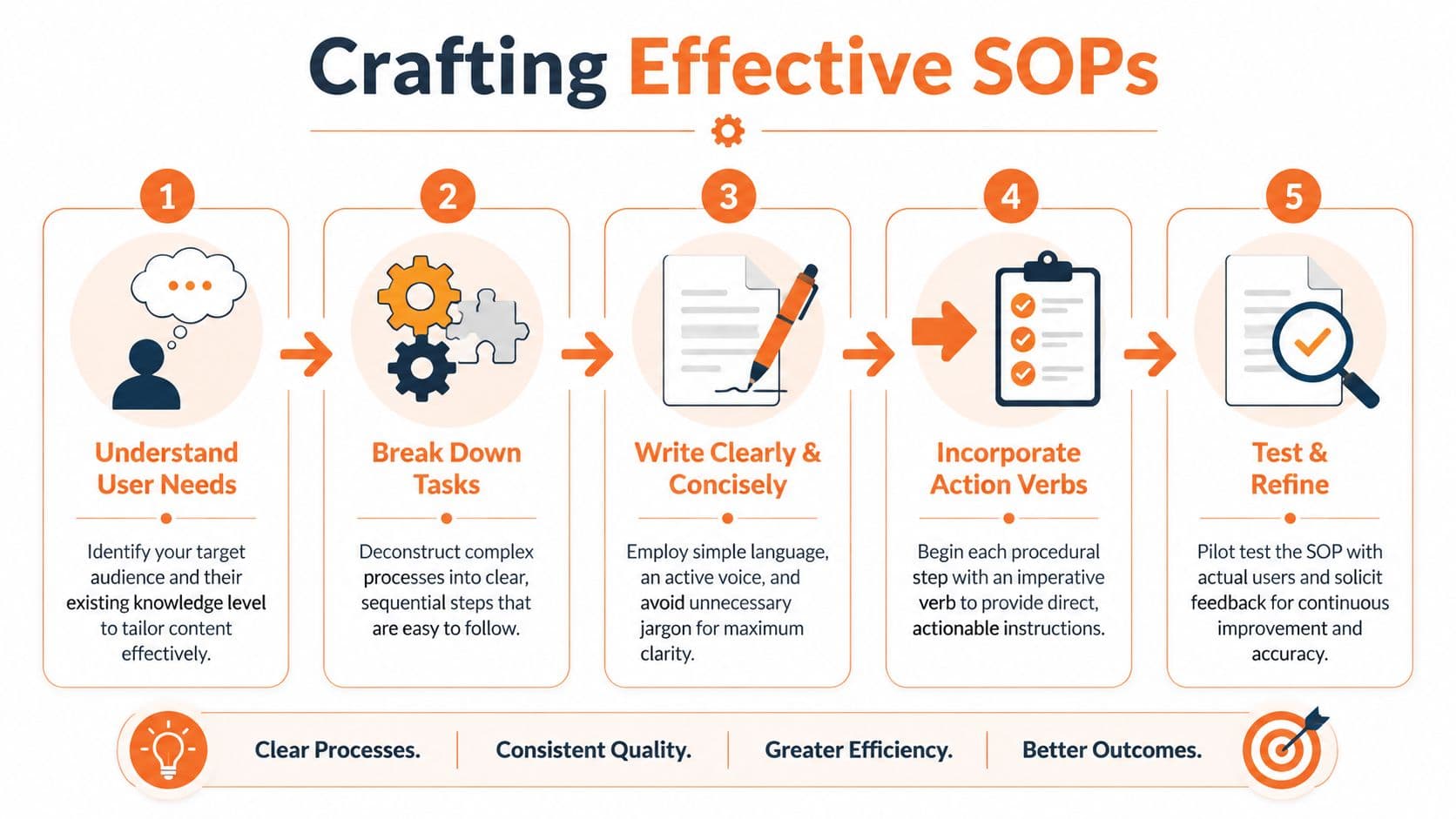
Each step should tell someone what to do, not describe the process in abstract terms.
Weak: “The invoice should be reviewed for accuracy.”
Better: “Review the invoice amount, billing period, and customer name before approval.”
Use active voice. Start steps with verbs. Keep one action per step unless two actions are inseparable. If the reader needs to verify something before moving on, say what to check and where to check it.
A practical structure for the body looks like this:
- State prerequisites
- List required tools or inputs
- Walk through sequential actions
- Call out decision points
- Add verification criteria
- State escalation path for exceptions
This is also where formatting matters more than people admit. Long, dense paragraphs make procedural writing harder to follow than it needs to be.
Build quality checks into the procedure#
A decent SOP tells people what to do. A strong SOP also tells them how to know they did it correctly.
That means adding QA or QC checkpoints inside the flow instead of tacking “review work” onto the end. If the process includes approvals, validation, safety checks, or compliance references, put them beside the relevant step.
For example:
- Checkpoint after data entry: Confirm the account ID matches the CRM record.
- Checkpoint before publishing: Verify the changelog title matches the release ticket.
- Checkpoint before closure: Confirm the customer received the final notification.
These checks prevent the most common failure mode in process docs. People complete the steps but miss the quality bar.
A short demo can help if your team is trying to shift from vague process notes to usable operational docs:
Test the draft before you bless it#
Here's the step too many teams skip. Test the SOP with someone who didn't write it.
Expert SOP development includes pilot testing with naive users, measuring comprehension via error rates with a target of less than 5% and time-to-completion with a 20% reduction benchmark, according to Atlassian's guide on writing an SOP. The same source notes that poor formatting can cause 40% misinterpretation. That should kill any remaining affection for giant text blocks.
Use a lightweight test loop:
- Give the draft to a first-time user: Don't coach them unless safety requires it.
- Watch where they hesitate: Hesitation usually means ambiguity.
- Ask what they expected next: Their answer exposes missing steps.
- Revise for clarity: Shorter sections and cleaner structure usually win.
- Re-test the rough spots: Don't assume one pass fixed them.
If a new team member can't follow the SOP without side-channel help, the SOP isn't done.
One more opinionated rule. Don't write “should” when you mean “must.” “Should” invites interpretation. Procedures need less interpretation, not more.
Enhance SOPs with Visuals and Practical Examples#
Text-only SOPs belong in the same bucket as giant PDF manuals and five-level SharePoint navigation. They still exist, but they're not the best way to help people do work.

Use the right visual for the right job#
Not every SOP needs visuals. Many do. The trick is matching the visual to the confusion.
Use this rule of thumb:
- Flowcharts work best when the next step depends on a yes or no decision.
- Annotated screenshots help with software tasks where button labels, menus, or fields matter.
- Tables are good for comparing conditions, approvals, or exception paths.
- Short videos help when motion, timing, or sequencing is hard to explain in text.
- Diagrams clarify systems, handoffs, and relationships between teams or tools.
This isn't cosmetic. Visuals reduce ambiguity because they expose structure that prose tends to hide. A support escalation flowchart is often more useful than five paragraphs about severity levels. A screenshot of the exact admin panel saves back-and-forth that plain text invites.
If you care about readability and layout, this guide on documentation design that improves scanning and comprehension is worth reviewing.
Plain text is fine for simple tasks. The moment a reader has to visualize a path, compare branches, or identify an interface element, add a visual.
Examples remove hidden assumptions#
Examples do a different job than visuals. They show the reader what “good” looks like.
That matters because procedural writing often hides assumptions inside generic verbs like “verify,” “prepare,” or “complete.” Those words sound precise but usually aren't. A practical example fixes that.
Instead of this:
- Verify the release summary before sending
Use this:
- Verify the release summary includes the feature name, customer-facing impact, rollout status, and support note before sending
Or better, include a small example block inside the SOP:
Good release summary example
Feature: SSO login update
Impact: Admins must reauthorize one integration
Rollout status: Fully deployed
Support note: If customers report login loops, direct them to the reauth steps
Examples are especially useful for:
- Naming conventions
- Ticket summaries
- Approval notes
- Customer replies
- QA pass and fail criteria
If your SOP explains a task in software, pair one example with one screenshot. If it explains a workflow, pair one example with one flowchart. That combination gives the reader both the pattern and the proof.
The Modern Way to Review Publish and Maintain SOPs#
The old SOP workflow is a mess. Someone drafts in Microsoft Word, reviewers leave scattered comments, a PDF gets exported, and the final version lands in Confluence, SharePoint, Google Drive, or an internal wiki that already has three outdated copies of the same process.
That's not documentation management. That's document shuffling.
Stop managing SOPs like static files#
An SOP is a living document. It needs drafting, review, approval, publishing, discoverability, and maintenance in one workflow. If your team uses one tool to write, another to collect feedback, another to publish, and none to track usage, the process will decay.
That's why old-school setups break down:
| Tooling pattern | What goes wrong |
|---|---|
| Word plus PDF | Version confusion starts immediately |
| Google Docs plus separate help center | Publishing becomes manual busywork |
| Confluence as the final destination | Structure drifts and pages get noisy |
| Docusaurus or repo-based docs for non-technical teams | Setup friction discourages ownership |
Confluence is fine for rough internal notes. It's not where many organizations produce polished, durable SOP systems. Docusaurus gives engineering teams control, but it also assumes repo comfort, config tolerance, and a willingness to maintain the publishing layer. That's overkill for many support, ops, and product teams.
A stronger operating model looks like this:
- Draft in a structured editor
- Review with inline comments
- Publish to a searchable destination
- Track what people read
- Update the same source, not a duplicate
AI should help draft and maintain not replace judgment#
Most older guides are stuck on this point. They treat SOP writing like a manual exercise from start to finish.
That's outdated. A major gap in traditional SOP guides is AI integration. Recent surveys show 68% of technical writers use AI for procedural docs, and platforms with inline AI editing can reduce SOP creation time by 40 to 60%, according to Mintlify's guide to writing standard operating procedures.
Used well, AI helps with the tedious parts:
- Turn rough notes into ordered steps
- Rewrite dense text into simpler instructions
- Spot jargon and undefined terms
- Suggest headings and subheadings
- Help standardize tone across procedures
Used poorly, it produces confident nonsense. So keep the rule simple. Let AI assist with drafting and clarity. Let humans own accuracy, edge cases, approvals, and final wording.
What to fix in your review workflow#
Most review cycles are slower than they need to be because they involve too many handoffs and no clear ownership.
Use this review pattern instead:
- One drafter owns the page
- One subject matter expert validates accuracy
- One real user checks usability
- One approver signs off on the final version
- One owner is assigned for future updates
If you also care about searchability, discoverability, and keeping your docs operational as your library grows, this piece on knowledge base management practices that keep documentation current complements the SOP workflow well.
The modern standard isn't “we documented it.” The standard is “people can find it, follow it, and trust that it's current.”
Common Questions About Standard Operating Procedures#
What is the difference between an SOP and a work instruction#
An SOP defines the standard process for completing a task or workflow. A work instruction goes narrower. It explains exactly how to perform a specific action inside that process.
A simple way to separate them:
- SOP: How the team handles customer refunds
- Work instruction: How to issue a refund inside Stripe
If your page covers triggers, roles, approvals, and checkpoints, it's probably an SOP. If it focuses on a single action with highly specific field-level detail, it's probably a work instruction.
How often should you review an SOP#
Review it when the process changes, the tool changes, the owner changes, or users start asking the same question repeatedly. Those are the primary triggers.
A calendar reminder helps, but blind review schedules can become theater. The better rule is this: if the workflow moved, the SOP must move with it. If the SOP has low trust, update it immediately.
Who should own an SOP#
Ownership should sit with the team responsible for the outcome, not the person who happens to write well.
That usually means:
- Operations SOPs: Ops lead or team manager
- Product release SOPs: Product or engineering lead
- Support SOPs: Support manager or enablement owner
- Compliance-heavy SOPs: Process owner with subject matter review
Technical writers and product managers can absolutely build the system and improve the writing. They shouldn't become the permanent owner of everyone else's process truth.
How do remote teams keep SOPs usable#
Remote teams need fewer hidden assumptions and better findability. That means central publishing, clear ownership, visible revision history, and fewer “ask in Slack” dependencies.
The practical checklist is simple:
- Keep the current version in one place
- Link related SOPs instead of duplicating steps
- Use screenshots when tools change often
- Add examples for approval notes, tickets, and handoffs
- Review pages that trigger repeated support questions
- Retire outdated pages instead of leaving them searchable
Good remote SOPs reduce interruptions. Bad remote SOPs create them.
If you're serious about how to write a standard operating procedure that people use, stop thinking of it as a document and start treating it like product infrastructure. Clear inputs. Clear outputs. Clear owners. Fast updates. No dead pages.
If you want a simpler way to create and maintain SOPs without juggling Word docs, Confluence pages, and a separate publishing stack, Dokly is worth a look. It gives teams a clean editor, fast publishing, built-in structure, and AI help for drafting and cleanup without the config overhead you get with tools like Docusaurus or the clutter that creeps into Confluence. For founders, support teams, and product orgs that want living documentation instead of static files, it's an easy choice.