Most advice on how to migrate SVN to GitHub is too narrow. It treats the move like a repository export, then acts surprised when teams end up with broken authors, missing dependencies, confused developers, and documentation nobody can use.
The code transfer is the easy part. The hard part is preserving the parts that people rely on after the import finishes. That means commit attribution, revision traceability, branch sanity, external dependencies, CI changes, and the pile of old docs that made sense in SVN but become dead weight in GitHub.
That's why “just run git svn clone” is bad advice. It ignores the surrounding system. It also ignores that teams often discover too late that their docs are still stuck in legacy structures that are hard to search, harder to maintain, and almost useless to AI assistants. If you're modernizing your version control, you should also rethink how you manage the knowledge around it. That problem shows up clearly when teams start migrating legacy documentation after the code is already moved and the cleanup bill arrives.
Table of Contents#
- Why 'Just Migrating Code' Is a Losing Strategy
- Phase 1 Planning Your Migration Strategy
- Choosing the Right SVN to GitHub Migration Tool
- Executing the Core Migration Process
- Your Critical Post-Migration Cutover Checklist
- Common Migration Pitfalls and How to Fix Them
Why 'Just Migrating Code' Is a Losing Strategy#
Teams usually say they want to migrate SVN to GitHub. What they need is to migrate a working development system. Those are not the same thing.
A raw code import can leave you with a technically successful migration and an operational failure. The repository exists on GitHub, but git blame is polluted by bad identities, old SVN revision references are gone, externals were never converted, and nobody knows which branches matter. At that point, you haven't modernized anything. You've just relocated the mess.
The two-step conversion process matters more than many teams realize. GitHub doesn't ingest SVN directly. You first convert the Subversion repository into a native Git repository, then push that Git repo to GitHub, as documented in GitHub's Subversion import workflow. That same workflow requires an authors-map.txt file because SVN usernames don't match Git's author format.
Practical rule: If your migration plan starts with commands instead of repository analysis, it's already weak.
The bad outcomes tend to cluster around details that generic tutorials barely mention. Externals are one. Author mapping is another. Documentation is the one often ignored until after the cutover, when onboarding slows down and support starts answering the same basic questions again.
A good SVN to GitHub migration preserves more than files. It preserves traceability, ownership, dependency structure, and the team's ability to work without relearning where everything lives.
Phase 1 Planning Your Migration Strategy#
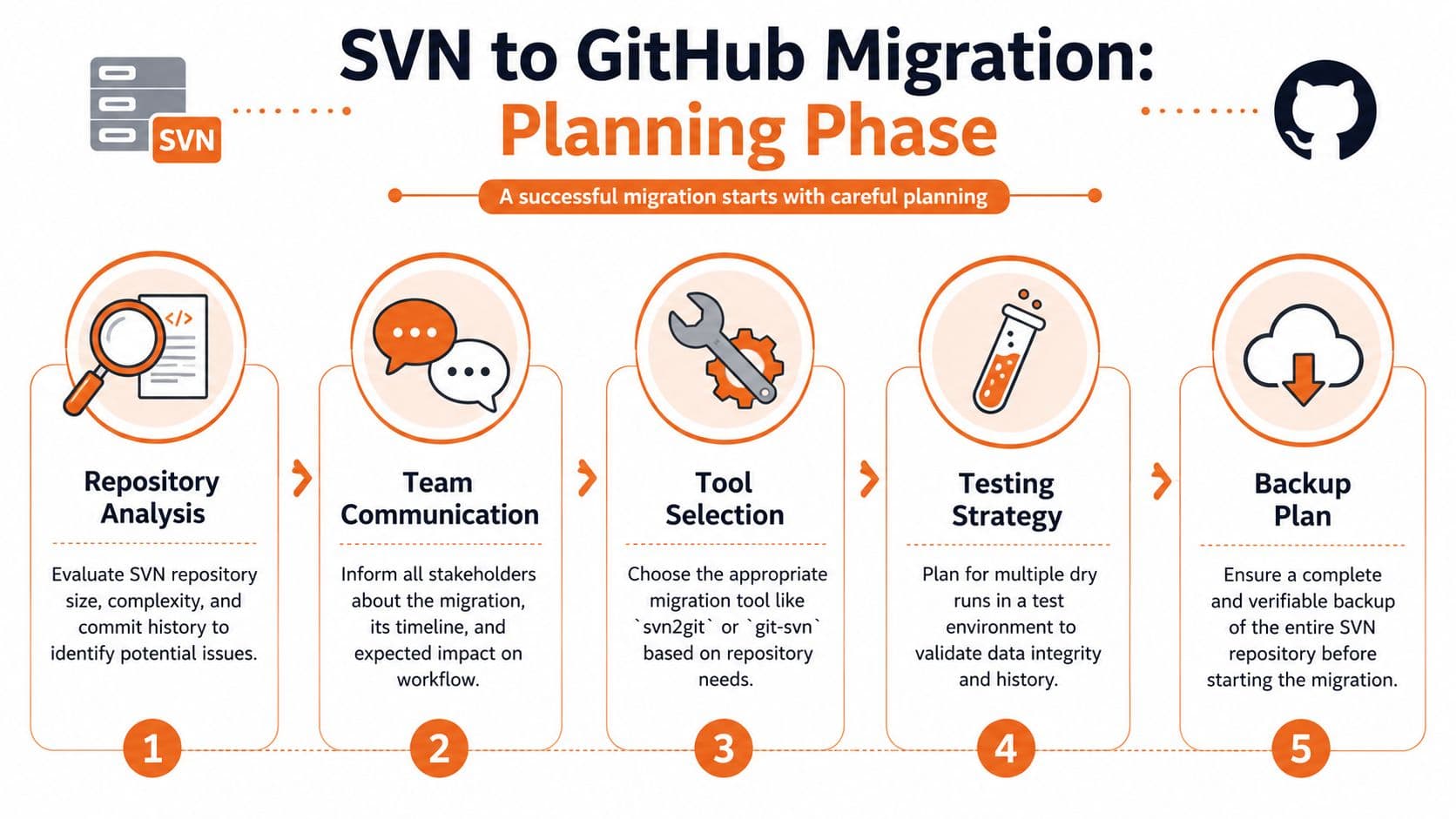
The planning phase decides whether this will be a controlled cutover or an ugly recovery exercise.
Start with the repository you actually have#
Don't assume you have a clean trunk/branches/tags layout just because someone says you do. Audit the actual structure. Check whether branches are consistent, whether tags were used like branches, and whether multiple projects were stuffed into one SVN repo because that's how the team survived at the time.
You also need to decide whether you're migrating all history or only the part that still matters. Microsoft Azure Repos explicitly recommends a tip migration approach for some teams, where you synchronize recent changes while developers keep working in SVN, then lock SVN before the final push. The guidance is laid out in Azure DevOps migration recommendations.
If your developers still confuse Git with GitHub, fix that early. A quick primer that helps non-specialists compare Git and GitHub tools can prevent basic workflow mistakes during training and cutover.
Decide what history deserves to move#
A full-history migration sounds noble until you discover the runtime penalty, storage footprint, and cleanup work attached to years of abandoned branches and binary junk. Sometimes full fidelity is the right call. Sometimes it's bureaucracy disguised as engineering.
Use this checklist before you commit to scope:
- Repository shape: Is this one logical product, or several unrelated codebases sharing an SVN server?
- History value: Do teams actively inspect older commits, or do they only need current state plus recent traceability?
- Branch relevance: Which branches are active, which are archival, and which should never leave SVN except as a backup artifact?
- Dependency model: Where are SVN externals used, and what will replace them in Git?
- Docs sprawl: Which READMEs, runbooks, release notes, or setup docs still point to SVN assumptions?
A lot of version-control problems are documentation-versioning problems in disguise. Teams that haven't thought about doc ownership usually benefit from tightening that up before the move. The strongest starting point is a documented policy for documentation version control, not a pile of ad hoc wiki edits.
Build the author map before the first clone#
This is not optional. Git requires author data in Name <email> format. SVN usually stores a simple username. The official GitHub workflow is explicit about this requirement in its command-line SVN import documentation.
A practical sequence looks like this:
- Extract SVN usernames from the repository log.
- Review edge cases like contractors, shared service accounts, renamed employees, and generic team users.
- Create
authors-map.txtwith one stable identity per SVN user. - Test the mapping on a dry run before touching production cutover timing.
- Freeze the file once validated so you don't produce conflicting history across repeated migration attempts.
Don't “fix authors later.” Rewriting a bad import after people start using GitHub is harder than building the map correctly upfront.
Choosing the Right SVN to GitHub Migration Tool#
Tool choice matters because SVN repos are rarely as clean as their owners think. Some tools are fine for straightforward histories. Some are better when the repository is old, huge, or full of layout quirks. Some aren't worth your time unless your repo is tiny and disposable.
What each tool is good at#
git-svn is the baseline. It's built into Git, it's proven, and it gives you direct control. If I had to migrate an awkward SVN repo and needed something predictable, it would be my starting point. It's not elegant, and it's not fast on deep history, but it's honest about what it's doing.
svn2git is a wrapper, not magic. It can be convenient for standard repository layouts, especially when you want fewer flags and a simpler workflow. It's not where I'd go for a repo with custom branching patterns or a lot of cleanup requirements.
SubGit is the tool I'd pick for harder enterprise migrations when the budget allows and history fidelity matters. Trimble Maps used SubGit, along with Atlassian's svn-migration-scripts.jar, to preserve git blame, enforce a 2 GB target repository size, generate user mapping, and append original SVN revision numbers to commit messages in their migration write-up at Trimble Maps engineering. That combination tells you what serious teams optimize for: attribution, manageable repository size, and revision traceability.
GitHub Importer is the one many teams overestimate. It's fine when you already have Git data to import into GitHub. It is not your primary answer to migrate SVN to GitHub because SVN still needs conversion into native Git first.
Use the simplest tool that matches the repository's mess level, not the simplest tool in the abstract.
SVN to GitHub Migration Tool Comparison#
| Tool | Best For | Cost | History Fidelity | Externals Handling |
|---|---|---|---|---|
git-svn | Teams that want direct control and can tolerate manual cleanup | Included with Git | Strong when configured carefully | Manual |
svn2git | Small to medium repos with standard SVN layout | Depends on your environment, commonly low-friction to use | Good for cleaner repos | Manual |
| SubGit | Complex enterprise repos where preserving history and attribution matters | Paid in many scenarios, free for one-time conversions as noted by Trimble Maps | Very strong | Manual planning still required |
| GitHub Importer | Importing Git into GitHub after conversion work is done | Depends on GitHub plan and workflow context | Not the right primary mechanism for raw SVN conversion | Not suitable as the externals solution |
Who should avoid each option:
- Avoid
svn2gitif your branch layout is non-standard or you already know you'll need serious hand cleanup. - Avoid GitHub Importer if you think it replaces SVN-to-Git conversion. It doesn't.
- Avoid SubGit only if the repo is simple enough that the extra capability buys you nothing.
- Avoid blind loyalty to
git-svnif the migration window is tight and the repo is so complex that higher-level tooling will save days of pain.
Executing the Core Migration Process#
Execution is where teams either stay disciplined or start improvising. Improvisation is how you end up pushing half-cleaned history to GitHub and calling it “good enough.”

Run the conversion locally first#
Start with a local conversion and keep GitHub out of it until the repository looks right. The canonical pattern is still git svn clone, using your author map and explicit layout flags.
git svn clone https://svn.example.com/repo/project \
  --authors-file=authors-map.txt \
  --trunk=trunk \
  --branches=branches \
  --tags=tags \
  --prefix=svn/ \
  project-git
That command is doing the core work. It checks out SVN history revision by revision and converts it into Git commits. On large histories, that takes time. A migration involving over 40,000 historical revisions took approximately 5 hours to convert into native Git in a real-world benchmark discussed on Reddit's Git community. That's why migration windows need real planning, not wishful thinking.
Warning: Don't push to GitHub until the local Git repository is clean, validated, and understandable to someone other than the person who ran the command.
Clean branches and tags before pushing#
After the clone, your branches and tags often won't look like normal Git objects yet. You need to convert remote SVN refs into actual Git branches and tags, then remove the SVN metadata clutter.
A typical cleanup sequence looks like this:
cd project-git

for branch in $(git branch -r | grep "svn/branches/" | sed 's#svn/branches/##'); do
  git branch "$branch" "refs/remotes/$branch"
done

for tag in $(git branch -r | grep "svn/tags/" | sed 's#svn/tags/##'); do
  git tag "$tag" "refs/remotes/svn/tags/$tag"
done

git remote add origin https://github.com/your-org/your-repo.git
Then inspect the result manually. Don't trust a script because it exited successfully.
A walkthrough can help if you want a visual pass before your dry run:
Handle SVN externals before your build breaks#
SVN externals are where “successful” migrations go to die. They don't carry over cleanly into Git because Git has no direct equivalent. You usually need to convert them into submodules or use subtree merges, depending on how tightly coupled the dependency is.
A sensible working pattern is:
- List every external first: Don't discover them during CI failure triage.
- Classify each dependency: Separate internal repos you control from third-party or legacy shared assets.
- Choose the replacement deliberately: Use submodules when separate lifecycle and ownership matter. Use subtree when you want the code embedded and maintained together.
- Update build scripts immediately: Old checkout assumptions from SVN won't survive the move.
- Document developer setup: Git users need clear instructions for initializing submodules if that's the route you choose.
Once the local repo is correct, push it:
git push -u origin main
git push origin --all
git push origin --tags
That's the moment the migration becomes visible. It shouldn't be the moment you discover what you forgot.
Your Critical Post-Migration Cutover Checklist#
A repository on GitHub isn't the finish line. It's the start of the cutover. If the surrounding workflow still points at SVN, people will keep using the old world long after you think the move is done.
Lock the old world and switch the team#
The first rule is simple. Stop split-brain development. Lock SVN once the final sync is complete, then make GitHub the only writable source of truth.
Right after cutover, clean up these operational pieces:
- Developer access: Remove ambiguity about where new work happens.
- CI pipelines: Repoint builds, release jobs, and automation to GitHub.
- Local tooling: Update scripts, hooks, and IDE defaults that still assume SVN checkouts.
- Repository ergonomics: Fix branch protection, default branch settings, and issue the new clone URLs.
If your team is still learning basic GitHub hygiene, small practical gaps matter. Even something as simple as setting up structure in a fresh repository trips people up, so a short guide on creating folders in GitHub can be useful during the first week after cutover.
Treat documentation like part of the migration#
Most migration guides stop at source control. That's shortsighted. Teams also need to rethink how docs are stored, versioned, and consumed after the move.
One under-discussed problem is AI parseability. The migration guidance field talks about history preservation, but it doesn't address how SVN-era docs should be restructured into MDX with semantic headings and llms.txt support for AI agents. That gap is called out in this SVN-to-GitHub migration article from TeraCloud, which highlights that documentation migration strategy for AI-readable systems isn't covered by the usual playbooks.

That matters because GitHub is where your code lives, not where your documentation strategy gets solved. READMEs help, but they don't replace a structured docs system. If you're cleaning up old onboarding docs, setup guides, and ops notes after migration, it helps to standardize them around a stronger README file structure so engineers and non-engineers can find what they need.
The migration isn't complete until new hires can onboard from the post-migration docs without asking what still lives in SVN.
Verify the result before calling it done#
Use hard checks, not intuition. The practical verification commands I like most are the same ones emphasized in YouTube migration guides: git rev-list --count --all to confirm commit count, git branch -a to verify branch presence, and du -sh to inspect final repository size, followed by git gc --aggressive for cleanup and optimization, as shown in this SVN-to-Git verification walkthrough on YouTube.
Also check large files early. If your SVN repo carried bulky binaries, decide whether they belong in Git at all. If they do, Git LFS may be part of your post-migration cleanup plan.
Common Migration Pitfalls and How to Fix Them#
Most failed migrations don't fail all at once. They fail in annoying fragments. The import completes, but the repo is wrong in ways that slow everybody down.
History looks wrong#
Symptom: Commits show generic usernames, missing names, or broken attribution.
Cause: The authors-map.txt file was incomplete, inconsistent, or created too late.
Fix: Rebuild the mapping from the full SVN author list, include service accounts and renamed users, rerun the migration in a test environment, then replace the bad import before the team standardizes on it. If you care about clean ownership, don't patch around this with verbal explanations.
Builds fail after the move#
Symptom: CI starts failing, or developers can't build locally after cloning from GitHub.
Cause: SVN externals were ignored or only partially converted. This is common enough that 72% of new Git users migrating from SVN report build failures due to unresolved externals, according to the RhodeCode guide on SVN externals and migration gaps.
Fix: Inventory every external dependency, decide between submodules and subtree merges, then update the build and onboarding steps to match. Don't leave this as tribal knowledge.
GitHub repo is messy and hard to use#
Symptom: Tags look like branches, branch names are ugly, commit messages lost old SVN context, and developers don't trust the history.
Cause: The repository was pushed before cleanup. This usually happens when teams treat the first successful conversion as production-ready.
Fix: Clean refs locally, normalize branch naming, preserve SVN revision references in commit messages when traceability matters, and only then publish the repo. If the history already hit GitHub, decide quickly whether to rewrite and replace it or live with the mess. Waiting makes both options worse.
Bad migrations usually come from rushing the boring parts. The boring parts are the migration.
If you're cleaning up the documentation mess that usually appears right after an SVN to GitHub migration, Dokly is worth a serious look. GitHub is excellent for code, but it won't make your docs structured, AI-parseable, or easy for support, product, ops, and onboarding teams to maintain. Dokly is the stronger fit if you want modern docs without the setup tax of tools like Docusaurus and without the opaque output that hurts AI readability in many older doc stacks. You can explore practical utilities at Dokly Tools and the team's walkthroughs on the Dokly YouTube channel.