
You're often handed an .ovpn file with a short message like “import this and connect.” It looks simple until it fails, gets edited by three different people, or lands on a router that rejects half the directives. That's when the OpenVPN config file stops being a convenience and starts becoming infrastructure.
Treat it like code, but also like documentation. It defines how the tunnel comes up, what certificates are trusted, how transport is negotiated, and what operational signals your team can collect later. If that file is messy, duplicated, or poorly tracked, your VPN deployment inherits the same problems.
Table of Contents#
- What Is an OpenVPN Config File
- The Anatomy of a Config File
- Core Directives Quick Reference Table
- Annotated Client Config File Example
- Annotated Server Config File Example
- Embedding Certificates and Keys for Portability
- Troubleshooting Common Config File Errors
- Best Practices for Managing Your Config Files
What Is an OpenVPN Config File#
At 2 a.m., the VPN is down, a user sends over an .ovpn file from an old ticket, and nobody can tell whether it matches the current server. That is the essential function of an OpenVPN config file. It is not just something a VPN client imports. It is the plain-text instruction set that defines how the tunnel is built, authenticated, routed, and kept stable.
An OpenVPN config file tells an OpenVPN client or server how to behave. It can set client or server mode, transport protocol, tunnel device, certificate and key locations, authentication settings, routes, and log behavior. If the parameters on each side do not line up, the tunnel will fail outright or come up in a broken state.
Treat the file like operational documentation, not a disposable export. In many IT departments, .ovpn files get passed around in chat, copied between laptops, and edited locally without any record of why a directive changed. That practice creates drift fast. A versioned config file gives the team a change history, a review point, and something a machine can parse later for inventory, validation, or documentation generation.
That matters because the failure modes are messy. A bad config can produce a timeout, a certificate error, or a tunnel that connects but never carries useful traffic. The file is the first place to check because it holds the assumptions for both sides of the connection.
Practical rule: If a config affects authentication, routing, or trust, store it like production code and document the intent behind any non-default directive.
The .ovpn file also belongs in your documentation system. It records the actual implementation choices. Which remote endpoint is in use, which CA signed the connection, whether DNS is pushed, whether traffic is full-tunnel or split-tunnel. That is why it fits cleanly into a broader technical documentation practice for infrastructure and operations, especially if your team wants machine-readable records instead of stale wiki notes.
A good OpenVPN config file should be readable by the daemon, reviewable by another engineer, and traceable in version control.
The Anatomy of a Config File#
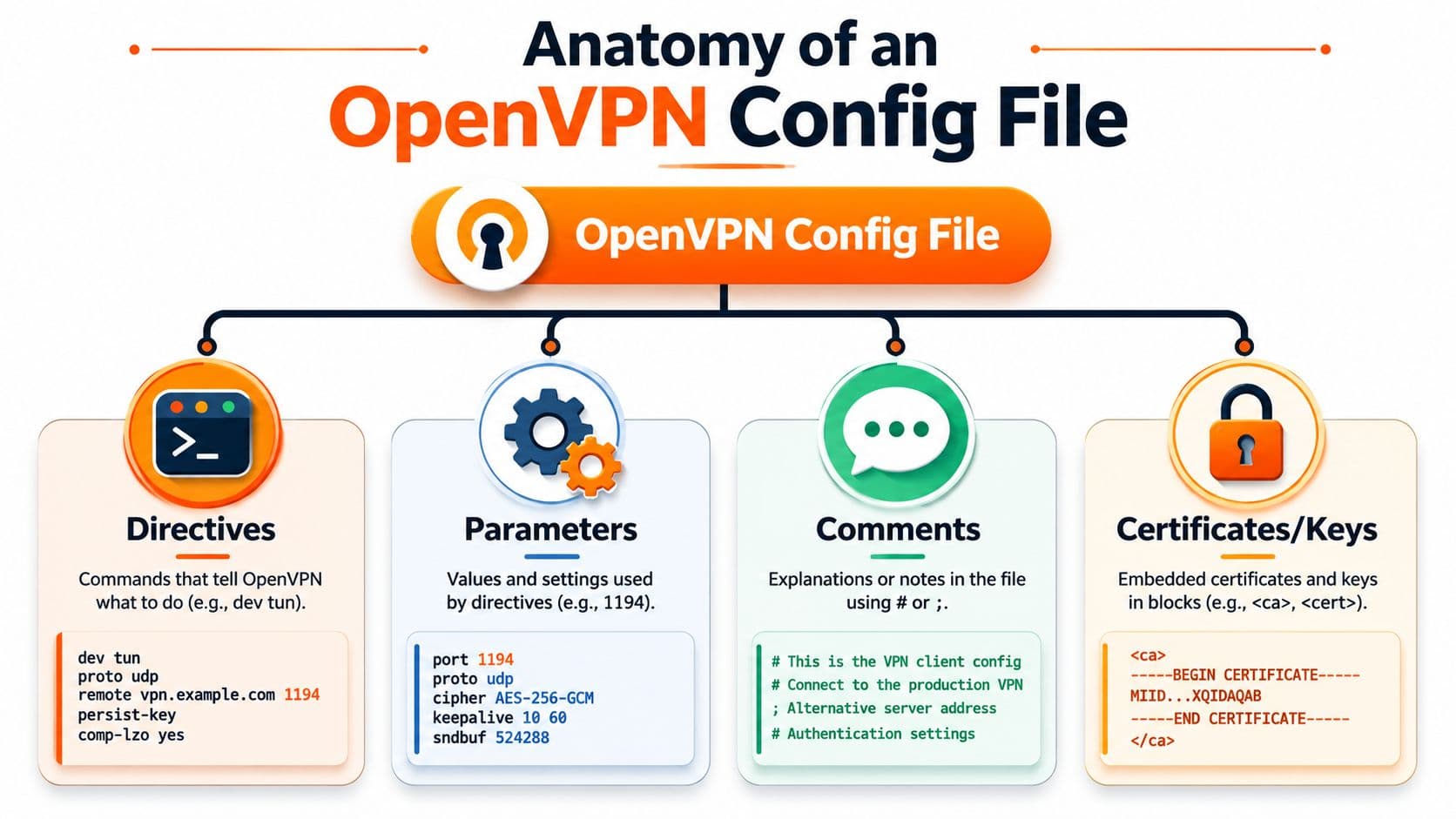
Open a random .ovpn file from an old ticket and the problem shows up fast. You are rarely looking at a clean, self-explanatory profile. You are looking at a mix of transport settings, trust material, inherited defaults, and comments of uneven quality. Read it like an engineer reviewing production config. Identify what controls connectivity, what controls trust, and what depends on the peer matching it exactly.
Directives and parameters#
A directive is the instruction. The parameter is the value attached to it.
A few common examples make the structure clear:
clientenables client modedev tunselects a routed tunnel interfaceproto udpsets the transportremote vpn-gateway.example 1194defines the target host and port
The important part is not memorizing syntax. It is understanding dependency. Some lines stand alone. Others only make sense in relation to the server, the PKI, or the surrounding network design. dev, proto, cipher and auth settings, and certificate expectations are all places where a small mismatch can produce failure that looks vague from the client side.
This is also why the file should be treated as controlled documentation. A profile is not just something the OpenVPN process reads. It is a record of implementation choices that another engineer, an audit tool, or a documentation pipeline should be able to review later.
Comments and readability#
Comments should explain intent, ownership, and exceptions.
Useful comments answer questions a reviewer will have during a change window or incident review:
- Why this profile uses UDP instead of TCP
- Why a directive was overridden from the team baseline
- Whether certificates are embedded or referenced externally
- Which environment, customer, or gateway this file belongs to
Bad comments repeat the directive. Good comments explain the trade-off. # use UDP to avoid TCP-over-TCP performance issues on this client fleet is worth keeping. # protocol is noise.
For teams trying to standardize that habit, a simple template for technical documentation helps keep config notes consistent across profiles, especially when you want ownership, change intent, and validation steps captured in a format that humans and machines can both work with.
Embedded blocks and included material#
An OpenVPN profile can point to external files such as ca, cert, and key, or it can carry that material inline with tagged blocks like <ca>...</ca>. That distinction matters in operations.
External references are easier to rotate and inspect as separate assets. Inline blocks are easier to distribute as a single portable file. The trade-off is control versus convenience. Inline files reduce packaging mistakes, but they also make the profile harder to diff cleanly and easier to mishandle if someone emails it around without access controls.
Treat those embedded sections as part of the config's documented surface area. If the profile depends on inline trust material, say so in comments and version control. If it depends on companion files, record the expected file paths and naming scheme. A good .ovpn file should tell the next engineer what it needs, why it was built that way, and what cannot be changed casually.
Core Directives Quick Reference Table#
When you're reviewing an OpenVPN config file under time pressure, you don't need a lecture. You need a fast lookup. The table below covers the directives that show up most often in day-to-day work.
Common OpenVPN Directives#
| Directive | Purpose | Typical Context |
|---|---|---|
client | Puts OpenVPN into client mode | Client |
server | Enables server-side network behavior for managing VPN clients | Server |
dev | Chooses the tunnel device type, commonly tun or tap | Both |
proto | Chooses the transport protocol, commonly udp or tcp | Both |
remote | Defines the remote server hostname and port the client should contact | Client |
port | Sets the listening port for the server process | Server |
ca | Points to the certificate authority material used to validate peers | Both |
cert | Points to the local certificate presented by the client or server | Both |
key | Points to the local private key for the certificate | Both |
dh | Supplies Diffie-Hellman parameters when required by the server setup | Server |
nobind | Tells the client not to bind to a fixed local port | Client |
persist-key | Keeps key state across restarts or reconnections | Both |
persist-tun | Keeps the tunnel interface active across restarts or reconnections | Both |
status | Writes connection status information to a file for monitoring or review | Server |
verb | Sets log verbosity for troubleshooting and operational visibility | Both |
tls-auth | Uses an extra shared key for TLS packet authentication | Both |
tls-crypt | Protects TLS control channel material with shared crypto wrapping | Both |
auth-user-pass | Enables username and password authentication workflow | Client |
comp-lzo | Enables compression when used consistently on both sides | Both |
fragment | Adjusts packet fragmentation behavior when used consistently on both sides | Both |
How to use this table in practice#
Start with the lines that define identity and transport. If remote, proto, dev, ca, cert, or key are wrong, nothing else matters. Don't begin by arguing about logging verbosity while the tunnel basics are still unverified.
Then look for directives that imply dependencies. A line such as ca may point to a file that isn't shipped with the profile. tls-auth may require a matching key and direction setting. auth-user-pass may need interactive handling or a secure secret delivery pattern outside the file.
What junior teams often miss#
The file can be syntactically valid and still operationally wrong. That usually happens when someone copies a profile between environments without checking assumptions.
Common examples include:
- Wrong mode assumptions when server directives leak into a client profile
- Partial file bundles where the
.ovpnis present but referenced certs are missing - Silent drift after manual edits on routers, firewalls, or desktop clients
- Conflicting intent when comments describe one setup and the live directives implement another
The table helps you locate the moving parts quickly, but correctness still depends on matching the environment you're deploying into.
Annotated Client Config File Example#
A client profile usually gets attention only after a failed rollout. Someone imports the .ovpn, the tunnel does not come up, and the team starts guessing. In practice, this file should already answer the important questions: where the client connects, how it verifies the server, what identity it presents, and which assumptions are baked into the profile.
Treat the client config as both executable configuration and technical documentation. If it is not readable, reviewable, and versioned, it will drift. Once that happens, the .ovpn file stops being a reliable deployment artifact and turns into tribal knowledge.
Example client profile#
# Run in client mode.
client

# Use a routed IP tunnel rather than an Ethernet bridge.
dev tun

# Choose the transport protocol expected by the server.
proto udp

# Remote server name and listening port.
remote vpn-gateway.example 1194

# Keep retrying name resolution if the remote isn't reachable yet.
resolv-retry infinite

# Don't bind to a fixed local port on the client.
nobind

# Keep key material loaded across restarts.
persist-key

# Keep the tunnel interface across restarts when possible.
persist-tun

# Verify that the peer certificate is meant for a server.
remote-cert-tls server

# Certificate authority used to trust the server certificate.
ca ca.crt

# Client certificate unique to this device or user.
cert client.crt

# Private key matching the client certificate.
key client.key

# Increase or decrease based on how much troubleshooting detail you need.
verb 3
How to read this file like an operator#
Start with remote, proto, and dev. Those lines define whether the client is even attempting the right session. A surprising number of support cases come down to a profile copied from an older deployment that still points at the wrong hostname, port, or transport.
Next, read the trust and identity lines together. remote-cert-tls server tells the client what role the remote certificate must have. ca, cert, and key tell it which trust root to use and which identity to present. If those files are mismatched, expired, or swapped between users, the syntax can still look fine while authentication fails.
The reconnect directives matter more on laptops and unstable links than they do in a lab. resolv-retry infinite, nobind, persist-key, and persist-tun reduce avoidable reconnect problems without adding much complexity.
Why this version works in production#
This profile is short on purpose. Client configs age badly when teams keep appending directives copied from old tickets, vendor examples, or forum posts. A smaller file is easier to review, easier to diff, and easier to explain during an incident.
The better approach is to treat each .ovpn file like a maintained document:
- One profile per identity: each user or device gets its own certificate and key pair
- Comments that explain intent: note why a line exists, not just what it does
- Version control: track changes the same way you track firewall rules or infrastructure code
- Stable naming: use predictable filenames for certs, keys, and exported bundles so automation can validate them
- Machine-parseable structure: keep formatting consistent enough that inventory or validation scripts can flag drift
That last point gets ignored too often. If your team stores profiles in Git, a CMDB, or an internal docs platform, consistency matters. A client config that humans can read and tools can inspect is easier to audit, rotate, and regenerate.
Common review findings#
A client profile can look clean and still be wrong. These are the failures I see most often during reviews:
- Shared client identities: multiple users receive the same
certandkey, which breaks accountability and revocation - Broken file references: the
.ovpnis present but the CA, certificate, or key files were not shipped with it - Comment drift: the comments describe one gateway or trust model while the active directives point somewhere else
- Platform assumptions: Windows paths, Linux paths, and appliance import behavior get mixed into one profile
- Debug leftovers: high
verblevels stay in the shipped file long after troubleshooting ends
A practical checklist before distribution#
Check the endpoint first. Confirm that remote, proto, and dev match the service the user is supposed to reach.
Then check identity. Confirm that the referenced CA, client certificate, and private key belong together and were issued for that user or device.
Finally, check maintainability. The file should have enough comments to survive handoff, enough structure to be linted or parsed later, and a clear place in your versioned documentation set. If a profile cannot be traced back to a source repository or approved template, it should not be the one your team distributes.
Annotated Server Config File Example#
A bad server config usually shows up at the worst time. A certificate rotates, the daemon restarts, and remote users suddenly cannot connect. Then a significant problem appears. No one is sure which server.conf is live, which copy was edited by hand, or whether the comments still match the directives. That is why I treat the server config as production documentation, not just a runtime file. It needs ownership, review, and a place in version control where both humans and tooling can inspect it.

Example server profile#
# Use a routed IP tunnel device.
dev tun

# Listen for OpenVPN traffic over UDP.
proto udp

# Server listening port.
port 1194

# CA certificate used to validate client certificates.
ca ca.crt

# Server certificate presented to clients.
cert server.crt

# Private key matching the server certificate.
key server.key

# Diffie-Hellman parameters for the server setup.
dh dh.pem

# Define the VPN address pool managed by the server.
server 10.8.0.0 255.255.255.0

# Record client address allocations for continuity.
ifconfig-pool-persist ipp.txt

# Keep key state loaded across restarts.
persist-key

# Keep tunnel state across restarts where possible.
persist-tun

# Write a status file for operational visibility.
status openvpn.status

# Control log detail.
verb 3
The server-only directives that matter most#
port, proto, and dev define the listener your clients must reach. If the service is on UDP/1194 with tun, every issued client profile needs to agree with that choice. This sounds obvious, but it is one of the first places template drift causes outages.
server 10.8.0.0 255.255.255.0 does more than declare a subnet. It tells OpenVPN to operate as a VPN server, allocate client addresses from that range, and build the internal routing model around it. Change that line carelessly and you are not making a cosmetic edit. You are changing address assignment, route expectations, and sometimes firewall behavior.
dh dh.pem is there for classic TLS setups that still use separate Diffie-Hellman parameters. In newer deployments, crypto choices may differ depending on the OpenVPN version and your cipher suite decisions. The practical point is simple. Crypto directives on the server deserve the same change control as certificates and keys, because they affect whether new and old clients can still negotiate successfully.
ifconfig-pool-persist ipp.txt looks minor until support needs a stable answer to "which client had which VPN IP?" It gives you continuity across reconnects and restarts. That makes firewall exceptions, audit trails, and incident notes much easier to follow.
status openvpn.status is one of the few low-effort directives that pays back every week. It writes a machine-readable snapshot of connected clients and session state. That file is useful for quick shell checks, scheduled parsing, and feeding internal documentation or inventory systems that need a simple source of truth.
Why status logging belongs in the config#
Operational visibility should be designed into the file from the start. If you wait until users complain, you are already troubleshooting blind.
A status file gives you a local record of active sessions, recent activity, and basic service health without needing a full monitoring stack on day one. It also creates a clean handoff point between runtime configuration and documentation practice. The same config that starts the daemon can expose structured output that your team archives, parses, or maps into a knowledge base.
That matters in real environments. Good config hygiene is not only about making OpenVPN start. It is about producing a server definition that another admin can audit, a script can validate, and your team can trace back to an approved revision.
A server config should answer four questions fast: what is listening, who can authenticate, what address space is in use, and where the runtime state is recorded.
What tends to go wrong on the server side#
The common failures are usually boring, which is why they keep happening:
- Listener drift:
port,proto, ordevchanges on the server, but the issued client profiles still point to the old service - Crypto mismatch: the server certificate, key, or DH settings are replaced without checking client compatibility or file paths
- Observability gaps: the service runs, but there is no
statusoutput, poor logging, or no retained record of who connected - Template sprawl: admins copy an old
server.conf, make local edits, and never push those changes back into the canonical version - Comment rot: the file says one thing about the subnet, port, or trust model while the active directives do something else
Keep the server config under tighter control than client profiles. Fewer people should edit it, every change should be reviewable, and the file should be clean enough that both a teammate and a parser can tell what it is supposed to do.
Embedding Certificates and Keys for Portability#
Separate files are fine until distribution gets messy. You send the .ovpn, the CA file, the client cert, the private key, and maybe another shared secret. Someone imports only one of them. Another person stores them in the wrong path. A router UI strips line breaks. Then the support thread starts.
Embedding trust material inside the OpenVPN config file solves a lot of that.
What embedding looks like#
Instead of referencing external files like this:
ca ca.crt
cert client.crt
key client.key
You can inline the material directly into the profile:
<ca>
...certificate authority content...
</ca>

<cert>
...client certificate content...
</cert>

<key>
...private key content...
</key>
OpenVPN supports embedded file material for security-sensitive directives including --ca, --cert, and --key, as documented in the OpenVPN 2.4 manual.
When embedding is the right move#
Embedding is strongest when the main operational goal is portability. One file is easier to distribute, archive, checksum, and import. It also reduces the chance that someone loses a supporting file or breaks a relative path.
It's also useful in mixed-client environments where you don't fully trust the import behavior of every platform. A single self-contained profile often survives that trip better than a file bundle.
The trade-offs nobody should ignore#
Embedding isn't automatically better. It changes the maintenance burden.
Pros:
- Single-file delivery: Easier to hand off and store.
- Fewer path problems: No dependency on local file layout.
- Cleaner imports: Many client tools handle one profile more predictably.
Cons:
- Harder rotation: Replacing an expired cert means editing the profile itself.
- More sensitive artifact: One file now contains more secrets and deserves tighter handling.
- Larger files: Some devices and import tools are picky about long embedded content.
A portable profile is convenient. A portable secret is still a secret. Handle the file accordingly.
A practical decision rule#
Use external references when you control the filesystem and want cleaner secret rotation. Use embedded blocks when you need reliable single-file delivery across varied clients or less technical users.
Don't mix the two patterns casually in the same fleet unless your documentation clearly records why. Hybrid approaches tend to confuse operators because the troubleshooting path changes from one profile to another.
Troubleshooting Common Config File Errors#
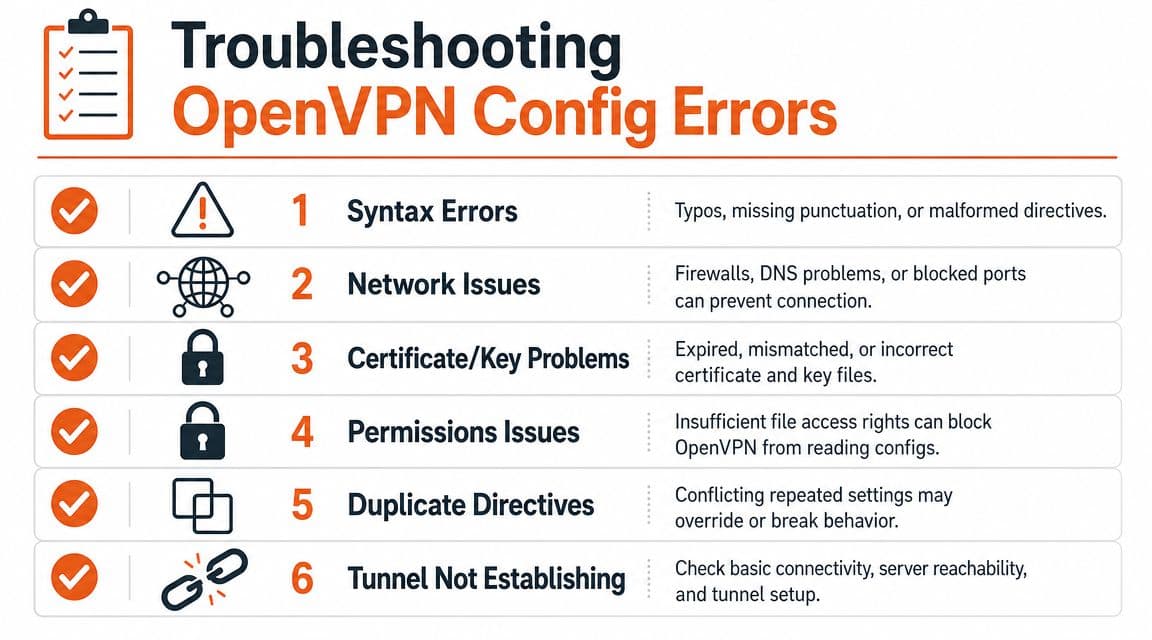
A familiar support ticket goes like this: the user imported the .ovpn file, clicked connect, and got either a silent failure or a tunnel that came up but passed no traffic. In practice, the fastest fix is to treat the config file as a controlled document, not just a blob of settings. Read the symptom, map it to the directive that governs that behavior, and verify the file against the approved version.
Connection fails before the tunnel comes up#
If the client never gets past the first connection attempt, start with the lines that tell OpenVPN where to go and how to speak.
Check:
remotefor the correct hostname or IP and portprotofor UDP vs TCP alignmentdevfortunvstapalignment- Referenced cert and key files if the profile depends on external paths
- DNS resolution if
remoteuses a hostname that the client cannot resolve
Bad edits often show up here first. A copied profile with a changed port, a stale hostname, or a path that only existed on the admin's laptop will fail before TLS even has a chance to start.
This is one reason teams benefit from documentation version control for configuration artifacts. You want a clear answer to a simple question: which .ovpn file is the correct one?
TLS handshake fails#
A TLS error usually means the two sides reached each other but could not agree on trust or identity. The log matters here. So does the exact file revision.
| Symptom | Likely config area | Practical fix |
|---|---|---|
| Handshake starts but fails | ca, cert, key | Verify the CA chain is correct and the private key matches the certificate |
| Peer is rejected | remote-cert-tls | Confirm the client expects the correct peer role |
| Control channel protection mismatch | tls-auth or tls-crypt | Make sure both sides use the same directive and the same key material |
| Imported profile behaves inconsistently | Embedded blocks or copied text | Re-check PEM block boundaries, line breaks, and editor damage |
One malformed line inside an embedded certificate block can consume an hour because the file still looks valid at a glance.
Tunnel connects but traffic does not work#
This is the case that misleads junior admins most often. OpenVPN reports success, but the user still cannot reach anything useful.
Common causes:
- Routes do not match the intended design: The client expects full-tunnel behavior, but the server only pushes internal subnets.
- Gateway handling is wrong:
redirect-gatewayis missing, present when it should not be, or overridden elsewhere. - DNS settings are incomplete: The tunnel is up, but the client still resolves names through a local resolver that cannot see internal zones.
- Server-side forwarding or firewall rules are missing: The config file expresses intent, but the server does not permit the traffic path.
- Old directives are still in the file: Reused profiles often carry lines from earlier deployments that no longer apply.
Initialization Sequence Completed only confirms session establishment. It does not confirm routing, name resolution, or policy.
Syntax and duplication problems#
Plain text is easy to inspect and easy to damage. That trade-off is worth accepting, but only if someone owns the file and reviews changes.
Watch for:
- Duplicate directives where the last occurrence takes precedence
- Commented lines that an operator assumed were active
- Broken indentation or pasted text inside
<ca>,<cert>,<key>, or<tls-crypt>blocks - Mode conflicts from mixing client directives with server directives in the same profile
- Platform-specific leftovers added by GUI exports or imports
When behavior is strange, compare the current file to the last known good version line by line. That is still one of the fastest troubleshooting methods. It also reinforces the bigger point of this guide: an OpenVPN config file is operational code and technical documentation at the same time, so it needs history, review, and a machine-readable source of truth.
Best Practices for Managing Your Config Files#
A common failure pattern looks like this. The VPN worked last quarter, someone exported a profile from a firewall UI, another admin edited it on a laptop, support sent a copy through chat, and now three different .ovpn files all claim to be the current one. The tunnel problem is no longer just a tunnel problem. It is a documentation and change-control problem.

Treat the config as a controlled artifact#
An OpenVPN config file is operational code and technical documentation in one file. It tells the client or server what to do, and it records assumptions about transport, trust material, routing, and compatibility. If that file has no owner, no review trail, and no canonical copy, drift is guaranteed.
Use a simple operating model:
- Version every profile: Keep the authoritative
.ovpnfiles in version control or a controlled documentation system. - Separate templates from deployed variants: Store a clean base profile, then generate environment-specific copies from it.
- Document intent in the file: Comments should explain exceptions, compatibility flags, and temporary workarounds.
- Handle secrets on purpose: Be explicit about which profiles embed certificates or keys and which expect external files.
- Assign ownership: Every profile should have a named maintainer and a known approval path.
Teams that already manage runbooks and SOPs this way should apply the same discipline here. The same ideas behind documentation version control for technical teams fit OpenVPN profiles directly.
What holds up in production#
The cleanest setup is a repository or controlled knowledge base where the profile, change history, deployment target, validation notes, and related runbook live together. That gives operators one place to review before rollout and one place to diff when something breaks.
The weak setup is familiar. A shared folder full of files named client-final, client-final-2, and use-this-one. That creates drift, slows troubleshooting, and blocks automation because context exists only in filenames and tribal memory.
Machine-readable structure matters here. If the only record of why a directive exists is buried in chat or remembered by one engineer, future maintenance gets expensive fast. A well-managed config library should be readable by humans, diffable in code review, and structured enough to support search, parsing, and downstream automation.
Build a repeatable validation check#
Do the same review before any profile is distributed. Consistency matters more than ceremony.
A practical checklist:
- Match the deployment target: Confirm protocol, port, device mode, and tunnel settings still match the server.
- Check the secret packaging model: Verify whether the profile should embed material or reference external files.
- Test on the actual client platform: Appliance imports, mobile clients, and desktop clients do not always handle profiles the same way.
- Review comments and metadata: Make sure another admin can tell why unusual directives are there.
- Confirm the file is the canonical export: Do not distribute hand-edited copies if the source system is expected to generate them.
This takes a few minutes. It prevents hours of avoidable cleanup later.
Keep config hygiene tied to documentation hygiene#
OpenVPN profiles never stand alone. They sit beside onboarding notes, firewall exceptions, DNS details, MFA instructions, and support procedures. If those records are scattered or stored in formats that are hard to parse, engineers keep re-learning the same context and automation stays brittle.
Good config management fixes part of that. Good documentation practice fixes the rest. Treat the .ovpn file as one artifact in a versioned, machine-parseable knowledge base, not as a disposable attachment. That approach makes changes easier to review, incidents easier to trace, and future migrations easier to execute.