Your team probably started the same way teams often do. Someone opened Google Docs, wrote down a process for refunds, onboarding, or publishing a website update, and dropped it into a Drive folder called “Ops” or “SOPs.” Then more docs appeared. A few were useful. A few were duplicates. A few had names like Final SOP v2 and nobody knew which one was current.
That doesn't mean you picked the wrong tool. It means you picked the easiest tool to start with.
Google Docs is a practical home for early SOPs because everyone already knows how to use it, collaboration is built in, and you can get documentation moving without a rollout project. The trouble starts later. A simple document system can handle writing. It usually can't handle control, trust, or retrieval once the library grows.
Table of Contents#
- Why Your Team Defaults to SOPs in Google Docs
- Building a Bulletproof SOP Template
- Writing Procedures People Actually Follow
- Managing Your SOP Library in Google Drive
- The Scaling Wall Where Google Docs Fails
- Future-Proofing Your Company's Knowledge
Why Your Team Defaults to SOPs in Google Docs#
A messy Drive folder is still better than undocumented tribal knowledge. That's why SOP Google Docs setups are so common. Teams need somewhere to put repeatable work, and Google Docs is already sitting there.
Independent tutorials and practitioner guides show that Google Docs is widely used for SOP creation because its outline view, bookmarks, and collaborative editing support fast navigation and scaling of process documentation for recurring work like refunds, onboarding, and website updates, as noted in this practitioner guide on SOPs in Google Docs. For a small team, that's enough to create order quickly.
Why Docs works early#
Google Docs solves three early-stage problems well:
- Access is easy: Nobody needs training to open, comment on, or edit a doc.
- Collaboration is immediate: Managers, operators, and new hires can work in the same file.
- Structure is available: Headings, numbered lists, bookmarks, and links give you basic navigation without extra software.
That's why so many teams use one master doc as a process index and link out to individual procedures. It isn't elegant, but it works when the library is still small and the people involved know the context behind each process.
Google Docs is often “good enough” right up until the moment your team needs consistency from people who weren't in the room when the process was created.
What Google Docs is actually good at#
Docs works best when your team is doing recurring work that benefits from shared reference material. Think customer support playbooks, HR onboarding checklists, finance routines, simple compliance tasks, and basic operations workflows.
A useful way to think about SOPs is that they sit inside a wider communication and adoption system. If you want a broader operational lens, HubEngage's communication framework is a solid reference for how procedures connect to team communication rather than living as isolated documents.
What doesn't work is assuming that a folder full of docs automatically becomes a system. It doesn't. A document repository can store procedures. It can't guarantee they stay current, get followed, or remain easy to find.
Building a Bulletproof SOP Template#
A strong SOP starts as a controlled document, not a writing exercise. If the document has no owner, no version, and no issue date, it's just instructions on a page.
A peer-reviewed guideline in PLOS Computational Biology recommends that every SOP include a cover page, the step sequence itself, and a references or definitions section. It also recommends core metadata such as a title, SOP ID or version number, page numbering, and an issue or version date, which is what makes the SOP a controlled, auditable artifact in the first place, according to the published guideline.
Start with document control, not formatting#
Organizations often begin with “Purpose” and jump straight into steps. That misses the part that makes the SOP trustworthy.
At the top of every SOP in Google Docs, include a small control block with:
- Title: Use the exact process name people search for.
- SOP ID: Create a stable identifier such as
OPS-014. - Version: Keep a visible version number.
- Owner: Name the role accountable for updates.
- Issue date: Use a consistent date format.
- Status: Draft, active, archived, or superseded.
If you're setting up your formatting rules, this guide on how to outline Google Docs is useful for turning headings into a navigable structure instead of leaving the document as one long scroll.
A practical SOP template for Google Docs#
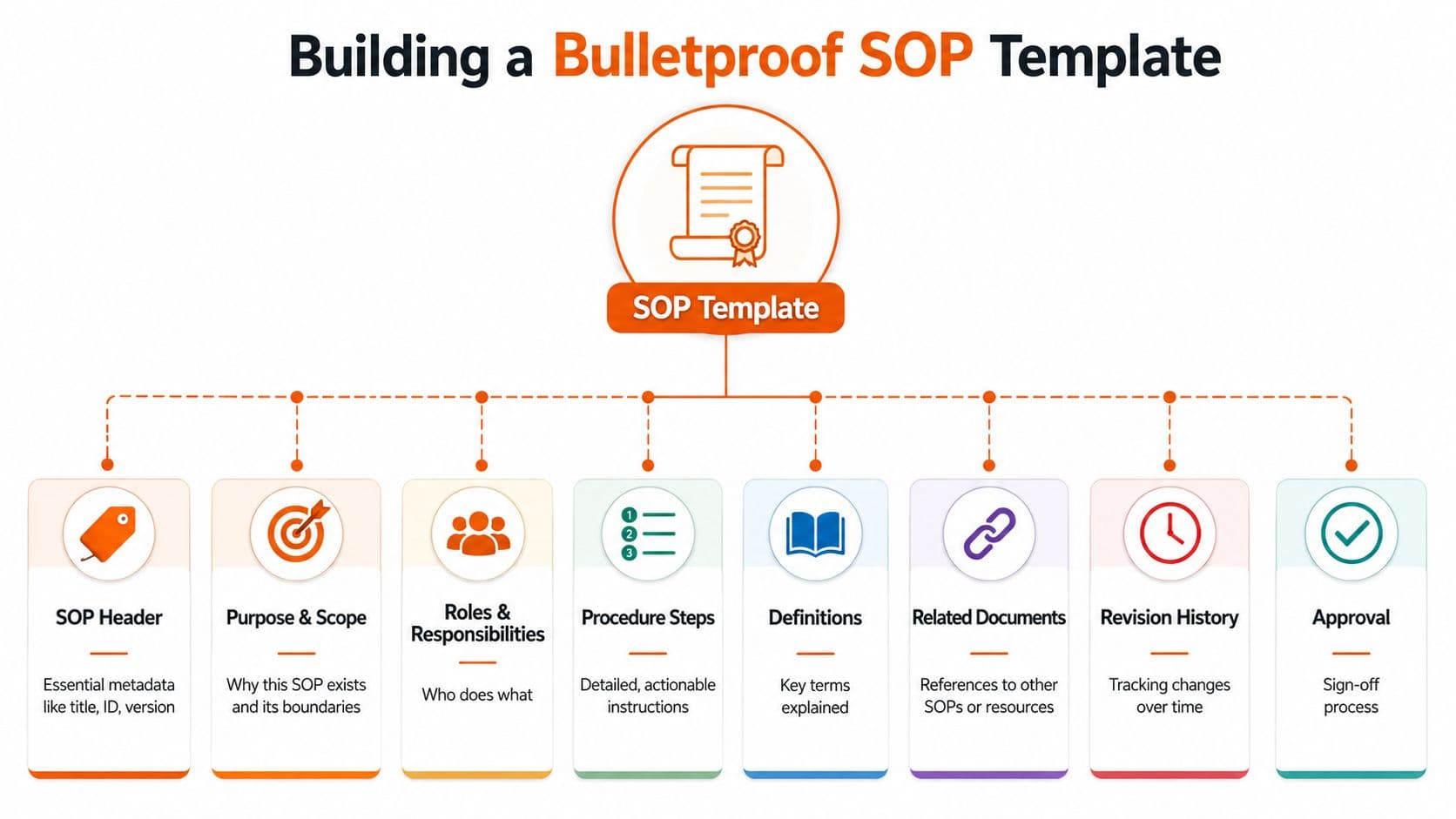
Use this structure every time:
-
Header block Include title, SOP ID, version, owner, issue date, and status.
-
Purpose State why this procedure exists in one or two direct sentences.
-
Scope Define when this SOP applies and when it doesn't.
-
Roles and responsibilities Identify who performs the steps, who reviews the outcome, and who approves changes.
-
Procedure Write the task as ordered, numbered steps with substeps where needed.
-
Definitions Clarify internal terms, acronyms, and system names.
-
Related documents Link to forms, policies, templates, or connected SOPs.
-
Revision history Record what changed and why.
-
Approval Note the approver or approval method used by your team.
If you want examples of how to turn procedures into more executable operating docs, these work instructions samples are useful for seeing where broad SOP language needs more operational detail.
Practical rule: If a new hire can't tell who owns the document and whether it's current within a few seconds, the template is incomplete.
Writing Procedures People Actually Follow#
A polished template doesn't save a weak process. Most bad SOPs fail because the writer already knows the task too well and skips the parts that confuse everyone else.
The best working method is simple. Capture the process while it's happening, turn that raw capture into numbered steps, and then test it. Expert guidance recommends writing SOPs as ordered steps and validating them through test runs where the documented steps are compared with the actual task execution to refine gaps and edge cases, as explained in this guide on creating procedures in Google Docs.
Capture the work before you polish it#
Don't write from memory if the process has more than a few steps.
Instead:
- Do the task live: Open the systems, click through the workflow, and note every decision point.
- Record rough details first: Screenshots, voice notes, transcripts, and raw checklists are fine at this stage.
- Convert to numbered steps later: Clean it up only after the work is captured.
Often, many SOPs become vague. Writers summarize instead of documenting. “Process the refund” isn't a step. It's a heading hiding five or ten smaller actions.
A stronger draft usually has:
- clear action verbs
- one action per step
- short substeps for exceptions
- screenshots only where the interface matters
- defined terms for internal jargon
If you're looking at where AI can help without replacing judgment, this piece on AI-enhanced standard operating procedures is useful context. The draft can be faster with AI assistance. The process still needs human validation.
Test the SOP against reality#
The fastest way to improve an SOP is to hand it to someone else and watch them use it exactly as written.
Look for these failure points:
- Missing prerequisites: Logins, approvals, files, or permissions weren't mentioned.
- Hidden assumptions: The writer knew which button to click, but the reader doesn't.
- Unclear branches: Exceptions were implied instead of stated.
- Bad screenshots: The image exists, but it doesn't help with the decision.
If the user has to ask “what do I do next?” halfway through the procedure, the SOP is still a draft.
Good SOPs aren't just readable. They're executable.
Managing Your SOP Library in Google Drive#
One SOP is a document. Twenty SOPs are a library. A hundred SOPs are an operational system, whether you intended to build one or not.
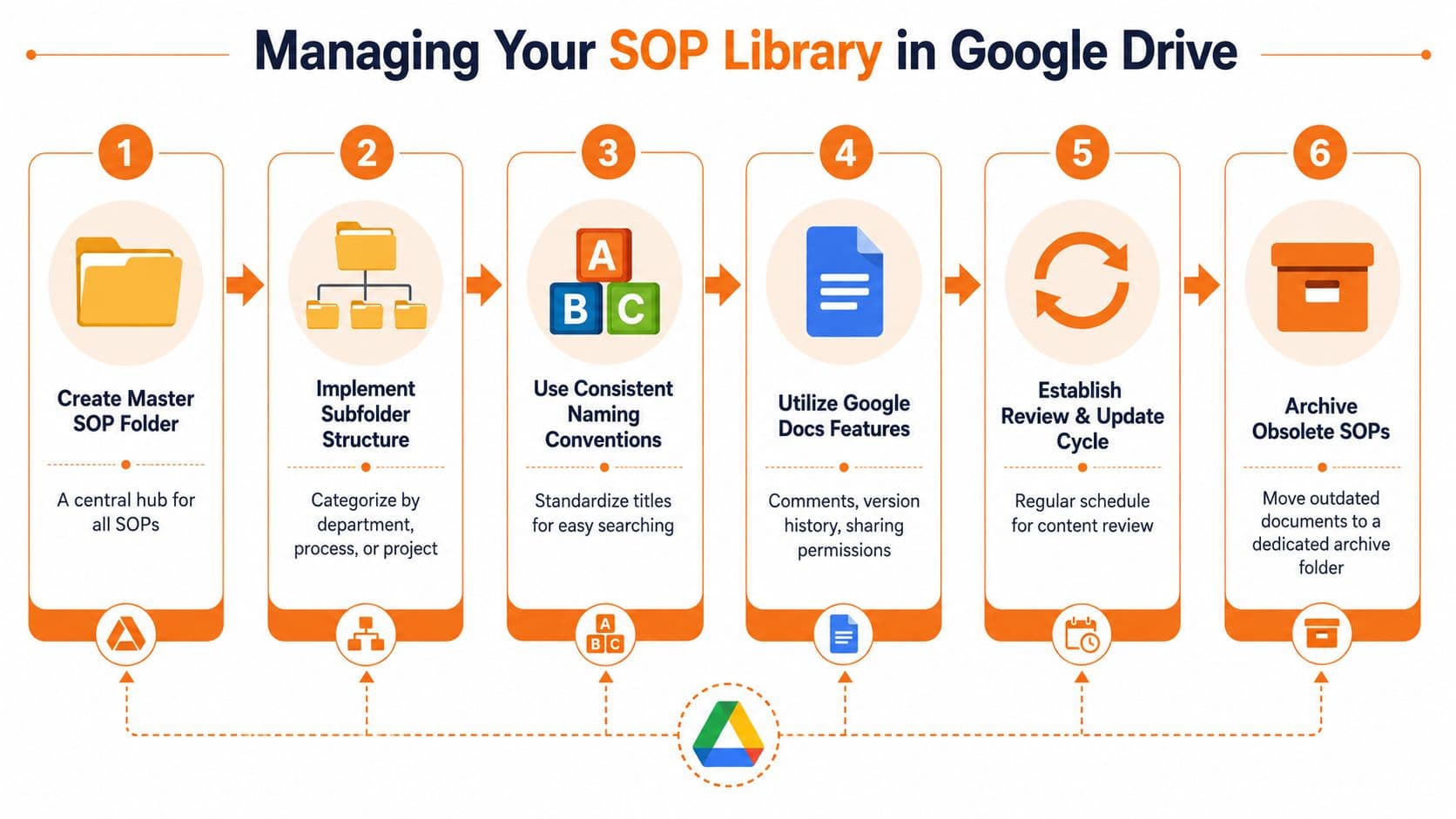
That's where Google Drive starts demanding discipline. Most guides help you create a single SOP. They don't solve governance at scale, including how to prevent drift, manage review cadence, or retire outdated versions. That gap gets worse when AI drafting makes it easier to generate more documents than anyone can properly maintain, a problem discussed in this analysis of SOP governance at scale.
Start with a visual map of the system you're trying to enforce.
Build a manual system that can survive growth#
If you're staying in Google Drive, you need rules that are boring and strictly enforced.
Use a folder structure like this:
- Top level folders:
SOPs,Archive,Templates - Department folders:
Operations,Customer Support,HR,Finance - Process groups inside departments:
Onboarding,Refunds,Billing,Website Updates
Then enforce a file naming convention. Keep it readable and sortable. A format like OPS-014 Customer Refund Procedure v1.3 is usually enough. The key is consistency, not cleverness.
The library also needs a single index document. That master index should include:
| Field | What to include |
|---|---|
| SOP ID | The stable identifier |
| Title | The exact process name |
| Owner | The responsible role |
| Status | Draft, active, archived |
| Last review | The most recent review date |
| Link | Direct link to the SOP |
If your team is still treating Google Drive like a passive file cabinet, this guide to building an internal knowledge base is a useful model for thinking in systems rather than folders.
Use Google Docs features for controlled review#
Google Docs does have a few features worth using seriously.
- Suggesting mode: Use it for edits that need review instead of direct overwrite.
- Comments: Use comments to flag unclear steps, policy dependencies, or exceptions.
- Version history: Use it as a basic audit trail when changes happen.
- Permissions: Restrict editing rights on active SOPs to designated owners.
For teams that want a practical walkthrough, this video is a decent companion to the manual setup work:
This setup can work. It just stays fragile. Every rule depends on people remembering to follow it.
The Scaling Wall Where Google Docs Fails#
The problem with SOP Google Docs isn't that Docs is bad. The problem is that the tool was built for documents, not for operational truth.
The hidden failure gets sharper when teams start asking AI systems or advanced search tools to find and reuse procedures. Human-friendly formatting such as headings, bookmarks, and outlines helps people move through, but it doesn't reliably encode ownership, triggers, inputs, exceptions, or dependencies in a way downstream systems can reason over, as explained in this piece on machine-readability in Google Docs SOPs.
Three failures show up at the same time#
Governance breaks first. Review reminders live in someone's head or in a separate spreadsheet. Approval is informal. Archiving is inconsistent. Old docs stay accessible long after the process changed.
Discoverability breaks next. Drive search can find words. It often can't answer intent cleanly. Someone searches “refund approval procedure” and gets a policy note, a meeting doc, and two outdated SOPs.
Machine-readability breaks last, but matters most. A neat Google Doc looks structured to a human. To an AI workflow or retrieval layer, it's often just formatted text without enough semantic meaning.
That last point matters more than many organizations realize. If you want documentation to support AI assistants, internal search, or downstream automation, the content has to be structured so systems can interpret it consistently. That's also why version control can't stay informal once the library matters. This guide on documentation version control is a good reference for what controlled documentation should look like beyond file history.
SOP Management Google Docs vs. Dokly#
| Feature | Google Docs (Manual Workaround) | Dokly (Built-in & Automated) |
|---|---|---|
| Document structure | Templates and formatting rules | Structured documentation system |
| Ownership | Added manually in header text | Built into the documentation workflow |
| Review cadence | Calendar reminders or spreadsheets | Managed as part of the platform workflow |
| Version control | Version history plus naming discipline | Purpose-built control for documentation changes |
| Searchability | Generic Drive search | Knowledge-oriented retrieval |
| AI readiness | Limited semantic structure | AI-native, machine-readable output |
| Library governance | Depends on team habits | System-level control |
| Reuse across teams | Links, copies, and manual indexing | Centralized knowledge with stronger retrieval |
Google Docs remains a solid drafting tool. It's not a strong long-term operating system for process knowledge.
Future-Proofing Your Company's Knowledge#
Moving out of Google Docs isn't an admission of failure. It's usually proof that the company finally depends on its documentation enough to treat it like infrastructure.
A practical migration starts with prioritization, not a full rewrite. Don't move everything at once. Move the SOPs that create the most operational risk when they're wrong, outdated, or hard to find.
Migrate the right SOPs first#
Start with procedures that have one or more of these traits:
- High frequency: The team uses them every week.
- High consequence: Errors create customer, compliance, or operational problems.
- High confusion: People ask for help every time they run the task.
- High reuse: Multiple teams depend on the same process.
Then clean each SOP before migration. Remove dead links. Replace vague language. Clarify ownership. Separate policy from procedure. A migration is the best time to fix the content you were tolerating because “it was in the doc somewhere.”
The best SOP library isn't the biggest one. It's the one people trust enough to use without asking around first.
Structure knowledge for people and AI#
The next version of operational documentation has to work for two readers. Humans need clarity. AI systems need structure.
That means your documentation should make ownership, triggers, inputs, outputs, exceptions, and dependencies explicit instead of implied. It should also live in a system where approved content is easier to retrieve than stale drafts.
If you're evaluating what that future stack looks like, it helps to think beyond storage and ask harder questions:
- Can this system keep a single current version visible?
- Can it separate draft content from trusted operating content?
- Can search return the right procedure, not just a keyword match?
- Can AI tools reuse the content without guessing what the document means?
For teams making that shift, Dokly's documentation tools are a useful starting point, and the Dokly YouTube channel is worth browsing for product walkthroughs and practical demos.
By that point, the question isn't whether Google Docs was a good start. It usually was. The crucial question is whether your company's knowledge still lives in documents, or whether it has become a system your team and your AI tools can rely on.
If your SOPs are still trapped in folders, scattered versions, and formatting that only humans can interpret, Dokly is the cleaner next step. It gives growing teams a way to turn operating knowledge into structured, searchable, AI-readable documentation without the usual setup tax. If you've hit the point where Google Docs can still write SOPs but can't reliably govern or surface them, Dokly is the obvious upgrade.