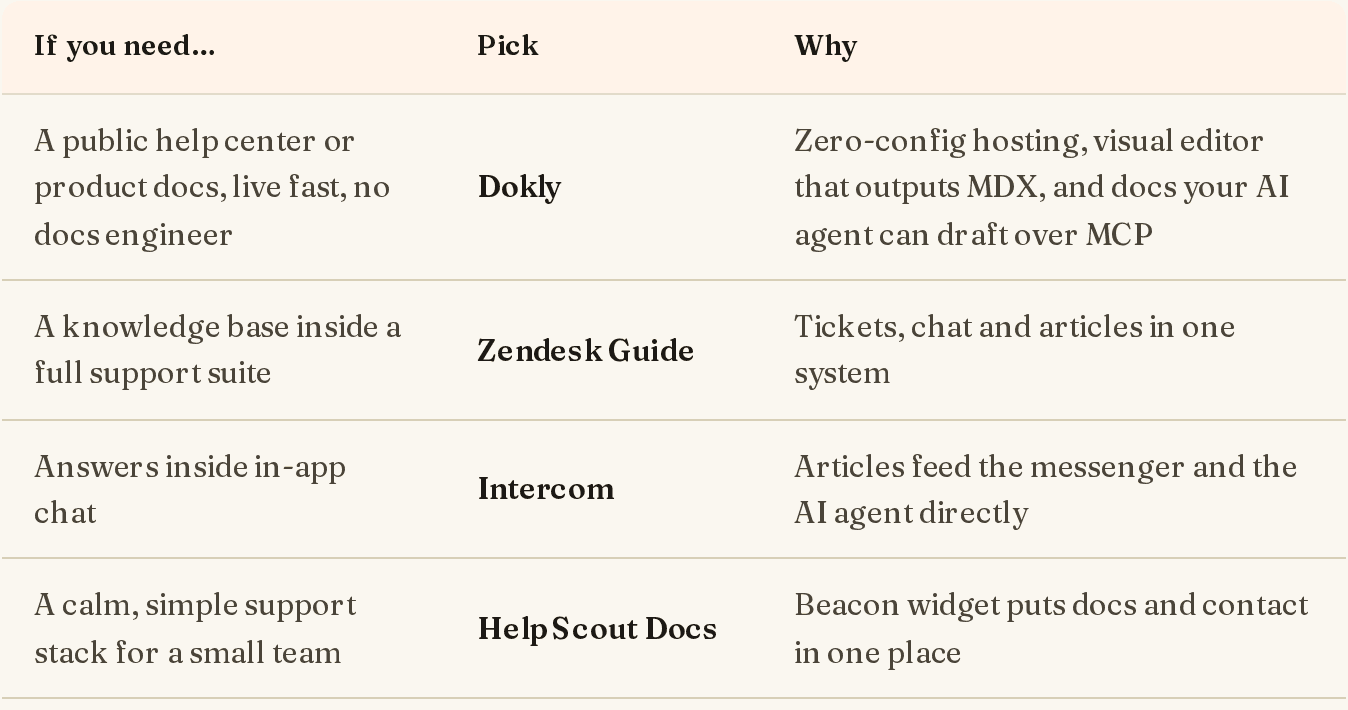
Short answer: pick a support suite if you already need tickets and chat, and a standalone help center if you only need a public place for answers. Here are the picks. Every price was checked on the vendor's own pricing page on 3 November 2026.
| If you need… | Pick | Starting price |
|---|---|---|
| Tickets, chat and a help center in one system | Zendesk | Suite Team $55/agent/mo (annual) |
| Help articles that feed in-app chat and an AI agent | Intercom | Essential $19/seat/mo (annual) |
| A simple inbox plus help center for a small team | Help Scout | Free for 5 users; Standard $25/user/mo |
| Support-suite breadth on a tighter budget | Freshdesk | Growth $19/agent/mo (annual) |
| A help center tied into your CRM and marketing | HubSpot Service Hub | Professional $90/seat/mo (annual) |
| Editorial review, versions and approvals | Document360 | Quote only |
| A standalone help center with editors, not agents | HelpDocs | $99/mo (annual), 5 editors |
| A large knowledge base with vendor-led setup | Helpjuice | $249/mo, 30 users |
| A fast public help center at a flat price, written by your AI agent | Dokly | Free; paid from $29/mo |
I build Dokly, so read that entry with that in mind. It's last in the table on purpose: if you need ticketing, you need one of the first five.
Support suite or standalone help center?#
Help center software comes in two shapes, and most buying mistakes come from mixing them up.
Support suites (Zendesk, Intercom, Help Scout, Freshdesk, HubSpot) sell you an inbox for your agents, and the help center comes with it. You pay per agent. The help center is good, sometimes excellent, and tightly linked to tickets: agents can link articles in replies, and the AI bot answers from them.
Standalone help centers (Document360, HelpDocs, Helpjuice, Dokly) only do the public, self-service part. You pay per plan or per editor, and you keep using whatever inbox you already have, even a shared Gmail.
A quick test: if you'd buy the inbox anyway, take the help center that comes with it. If you'd only be buying the suite for the help center, you're paying for seats you won't use. There's more on that split in what help desk software is used for.
What a three-person support team actually pays#
List prices are per agent, so here's the same small team on each tool's cheapest plan that includes a public help center. Annual billing, before taxes and add-ons.
| Tool | Plan | Monthly cost for 3 people | What's not included |
|---|---|---|---|
| Zendesk | Suite Team | $165 | Copilot ($50/agent); AI resolutions after the included 5 per agent ($1.50 each) |
| Intercom | Essential | $57 | Fin AI Agent at $0.99 per outcome |
| Help Scout | Standard | $75 | AI answers at $0.75 per resolution |
| Freshdesk | Growth | $57 | Freddy AI sessions after the first 500 ($49 per 100) |
| HubSpot | Service Hub Professional | $270 | $1,500 one-time onboarding fee |
| HelpDocs | Sprout | $99 | Inbox (it's help center only) |
| Helpjuice | Knowledge Base | $249 | Inbox (it's help center only) |
| Dokly | Starter / Team | $29 / $99 | Inbox, chat and an AI answer bot |
The per-agent tools get expensive as the team grows; the flat ones don't. The AI line is the one to watch: per-resolution pricing is cheap at low volume and hard to forecast at high volume.
1. Zendesk#
Best for: teams that want tickets, chat, phone and a help center in one mature system.
Zendesk's help center (once called Guide) is the default for a reason: themeable, multi-brand, and wired into every ticket. Agents can turn a reply into an article, and the AI agent answers from your content.
Pricing (3 Nov 2026): Support Team is $19/agent/mo (annual) but its plan comparison shows no help center. Suite Team is $55/agent/mo annual, or $69 monthly, with one help center and one language. Suite Professional is $115/agent/mo annual, with up to five help centers and 40+ languages. Enterprise is contact-sales.
When not to pick it: if you have one or two agents and mostly need public docs. You'll pay for a suite to get the help center.
2. Intercom#
Best for: SaaS teams whose support happens in an in-app messenger.
Intercom's help center feeds the Messenger and Fin, its AI agent, directly. Customers search articles without leaving your app, and Fin answers from them before a human gets involved.
Pricing (3 Nov 2026): Essential is $19/seat/mo billed annually ($29 monthly) with a public help center. Advanced is $85/seat/mo and adds a private, multilingual help center. Expert is $132/seat/mo and adds multiple brands. Fin is $0.99 per outcome on top.
When not to pick it: if most of your support is email, or you want a cost you can predict. Seats plus outcomes is two meters.
3. Help Scout#
Best for: small teams that want a calm shared inbox and a help center without much admin.
Help Scout's help center is called Docs, and its Beacon widget puts articles and a contact form in one pop-up on your site. It's the easiest suite on this list to set up.
Pricing (3 Nov 2026): Free for up to 5 users with one inbox and one Docs site. Standard is $25/user/mo (2 Docs sites), Plus $45 (3), Pro $75 (5). Extra Docs sites are $20/mo annual. AI answers are $0.75 per resolution, with the first three months free.
When not to pick it: if you need deep workflow automation or a heavily customised help-center design.
4. Freshdesk#
Best for: teams that want suite features at a lower per-agent price than Zendesk.
Freshdesk covers ticketing, a self-service portal and the Freddy AI agent, with plenty of automation for the money.
Pricing (3 Nov 2026): Growth is $19/agent/mo, Pro $55, Enterprise $89, all billed annually. Multilingual support starts on Pro. Each plan includes 500 Freddy AI Agent sessions once, then $49 per 100. Copilot is $29/agent/mo on Pro and above.
When not to pick it: if you want a minimal tool. Freshdesk is broad, and you'll configure a lot of it.
5. HubSpot Service Hub#
Best for: companies already running sales and marketing in HubSpot.
The knowledge base lives next to your CRM data, so articles, tickets and customer records share one system, and reporting can show which articles reduce tickets.
Pricing (3 Nov 2026): the Free and Starter tiers don't list a knowledge base. Professional includes one, at $90/seat/mo annual or $100 monthly, with a one-time $1,500 onboarding fee. Enterprise starts at $150/seat/mo and allows up to 25 knowledge bases.
When not to pick it: if you're not on HubSpot already. It's the most expensive way on this list to get a help center.
6. Document360#
Best for: writer-led teams that need review workflows, versioning and access control.
Document360 is a standalone knowledge base built around process: draft, review, approve, publish, in multiple languages, for public, private or mixed audiences.
Pricing (3 Nov 2026): quote only, based on editors, workspaces and languages.
When not to pick it: if you're a small team that wants something live this week, or you want a price before a sales call.
7. HelpDocs#
Best for: a polished standalone help center with a few editors and unlimited readers.
HelpDocs does one job: a fast, good-looking help center. You get unlimited articles and viewers on every plan, with AI credits and a contact form built in.
Pricing (3 Nov 2026): Sprout $99/mo annual ($129 monthly) with 5 editors and 3 languages. Bloom $239/mo annual with 15 editors. Harvest $399/mo annual with 25 editors. Enterprise from $1,250/mo.
When not to pick it: if you need it to talk to your ticket queue, or you want a free tier to start.
8. Helpjuice#
Best for: larger teams that want strong search and hands-on help migrating a big knowledge base.
Helpjuice is a premium standalone knowledge base with customisable themes and analytics, and its team helps with setup.
Pricing (3 Nov 2026): Knowledge Base $249/mo with 30 users. AI-Knowledge Base $449/mo with 100 users. Unlimited AI-Knowledge Base $799/mo.
When not to pick it: if you're small. The entry price assumes a team that needs 30 seats.
9. Dokly#
Best for: small teams that want a public help center live today at a flat price, and want their own AI agent to keep it current.
Dokly hosts a help center from a browser editor. Pick the help-center layout when you create the site and you get a search-first homepage with category cards, article pages with breadcrumbs, and a "Was this helpful?" vote on every article. No repo, no build step, a subdomain straight away.
The difference is how AI fits in. Dokly doesn't run its own AI writer. Your agent, such as Claude Code or Cursor, writes to the help center over MCP, and you approve every edit as a diff. New articles arrive as drafts. When you ship a feature, ask your agent to update the articles that mention it, and review the change before it goes live.
Pricing (3 Nov 2026): Free for one site with unlimited pages. Starter $29/mo adds your own domain, search and agent access. Team $99/mo removes the Dokly badge and adds analytics and five sites. Business $199/mo. Flat, no per-agent fees. New accounts get a 14-day Team trial.
When not to pick it: if you need tickets, live chat, an AI bot that answers customers, or translations. Dokly has none of those. Pair it with an inbox you already use, or choose a suite above.
Help center software comparison table#
| Tool | Type | Pricing model | Paid from | Multiple help centers | AI answers for customers |
|---|---|---|---|---|---|
| Zendesk | Suite | Per agent | $55/agent (Suite Team) | Suite Professional (up to 5) | Yes, per resolution |
| Intercom | Suite | Per seat | $19/seat | Expert (multibrand) | Fin, $0.99 per outcome |
| Help Scout | Suite | Per user | Free; $25/user | 2–5 Docs sites by plan | Yes, $0.75 per resolution |
| Freshdesk | Suite | Per agent | $19/agent | Not stated on pricing page | Freddy, per session |
| HubSpot | Suite + CRM | Per seat | $90/seat (Professional) | Enterprise (up to 25) | Not compared here |
| Document360 | Standalone | Quote | Quote | Yes | Not compared here |
| HelpDocs | Standalone | Per plan | $99/mo | Extra domains on Harvest | AI credits included |
| Helpjuice | Standalone | Per plan | $249/mo | Not stated on pricing page | On AI plans |
| Dokly | Standalone | Flat per plan | $29/mo | 5 sites on Team | No |
"Not stated" means the vendor's pricing page didn't say when we checked.
How to choose help center software#
- Decide whether you need an inbox. If you do, choose the suite whose inbox you like and use its help center. Don't buy two tools.
- Count the people who'll pay per seat. In a suite, every agent is a seat whether or not they write articles. In a standalone tool, only editors count, or nobody does.
- Price the AI separately. Answer bots are billed per resolution, outcome or session. Estimate your monthly support volume and multiply before you compare plans.
- Check how many help centers you need. One product in one language is cheap everywhere. Several brands or languages push most suites up a tier or two.
- Look at who keeps it current. Help centers go stale because nobody owns updates. Pick the tool your team, or your agent, will actually write in. The guide to organising a knowledge base covers the structure side.
If you're also weighing internal wikis and developer docs, the wider knowledge base software roundup compares those. If budget is the main constraint, see free knowledge base software.
Frequently Asked Questions#
What is help center software?#
Help center software publishes a self-service site where customers find answers on their own: how-to articles, FAQs and troubleshooting guides, organised by category and searchable. Some tools are part of a support suite with tickets and chat; others only do the help center.
What is the difference between a help center and a knowledge base?#
A help center is the customer-facing site. A knowledge base is the collection of articles behind it, which can also be internal. Most tools use the terms almost interchangeably for public support content.
Is there free help center software?#
Yes. Help Scout's Free plan includes one Docs site for up to five users, and Dokly's Free plan includes one help center with unlimited pages. Free plans usually keep the vendor's branding and leave out a custom domain.
Which help center software is cheapest for a small team?#
For a public help center only, a flat-price standalone tool is usually cheapest: Dokly Starter is $29/mo regardless of team size. If you also need an inbox, Help Scout Free or the $19/agent plans from Intercom and Freshdesk are the lowest starting points.
Do I need AI in my help center?#
Not to start. Good structure and search deflect most simple questions. AI answer bots help at higher volume, but they're billed per resolution, so estimate the cost from your real ticket numbers first.
Final thoughts#
The best help center software is usually the one attached to the inbox you'd buy anyway. If you don't need an inbox, don't pay per agent for one: a standalone help center does the public part for a flat price.
If you want a help center that's live today and that your own AI agent can keep up to date while you approve each change, try Dokly free.