Most advice on this topic is stuck a few years behind reality. It still treats help desk software like a shared inbox with tags, assignment rules, and a nicer interface for email. That description isn't wrong. It's just incomplete to the point of being misleading — and it quietly assumes you need the software at all.
If you're asking what a help desk software is used for, the practical answer in 2026 is this: it's used to run service operations. It captures demand, structures it, routes it, measures it, and increasingly tries to resolve it before a human ever touches the ticket. The software matters. But the bigger shift is that help desks now sit on top of automation, workflow logic, and — most importantly — a machine-readable knowledge base.
A weak help desk creates an orderly queue. A strong one reduces the need for the queue in the first place. And a well-run knowledge base is often what makes the difference between the two — sometimes to the point where a small team doesn't need a help desk product at all, just a good self-service layer.
This guide will answer the surface question, then push past it into the more useful one: do you actually need a help desk, or do you need the knowledge base underneath one?
Table of Contents#
- The End of the Simple Ticket Tracker
- From Shared Inbox to Central Command Center
- The Four Core Jobs of a Help Desk
- Help Desk vs. Knowledge Base A Side-by-Side
- When You Don't Actually Need a Help Desk
- Essential Features That Drive Efficiency
- Measuring What Matters Help Desk KPIs
- How to Choose Your Help Desk and Knowledge Stack
- Frequently Asked Questions
- Your Help Desk Is an Engine Fuel It Correctly
The End of the Simple Ticket Tracker#
The old view of a help desk was simple. Customers emailed support. Agents opened tickets. Someone assigned them. Someone closed them. Managers exported a report at the end of the month and called it operations.
That model still exists, but it no longer describes the actual job. A 2026 help desk software industry roundup reports that usage rose from 11% in 2020 to 53% in 2024, and the same source says over 40% of initial support interactions are now handled by AI. That's the clearest sign that help desk software has moved well beyond passive ticket logging.
When more initial interactions are handled by AI, the system stops being just a container for work. It becomes a decision layer. It decides what can be answered instantly, what needs a workflow, what should be escalated, and what should never become a ticket at all.
The real shift is operational#
Teams don't buy help desk software because they love tickets. They buy it because support demand is messy, repetitive, multi-channel, and time-sensitive.
Modern help desks are expected to do a few things at once:
- Capture requests everywhere: Email, forms, chat, and phone shouldn't create separate black holes.
- Apply logic immediately: Severity, ownership, SLA rules, and escalation paths need to trigger without manual triage.
- Resolve repetitive work faster: Common questions should hit self-service or AI-assisted answers before an agent spends time on them.
- Create usable data: If the system can't show where delays happen, managers can't fix staffing or process problems.
The practical test isn't whether a help desk can create a ticket. Every product can do that. The test is whether it can reduce unnecessary human effort without hiding important issues.
A lot of software still markets itself like a glorified queue. Buyers shouldn't accept that framing. The key question isn't "Can this tool track tickets?" The key question is "Can this tool run support as a controlled system with automation and reliable knowledge behind it?"
That's a much tougher standard. It also happens to be the one that matters.
From Shared Inbox to Central Command Center#
A shared inbox is a mailbox. Help desk software is a sorting facility.
That difference matters because support work doesn't arrive in a clean format. It arrives as scattered messages from email, forms, chat, phone calls, and other channels. Good help desk software turns that mess into structured tickets that can be routed, prioritized, and measured. That's the practical definition that matters most.
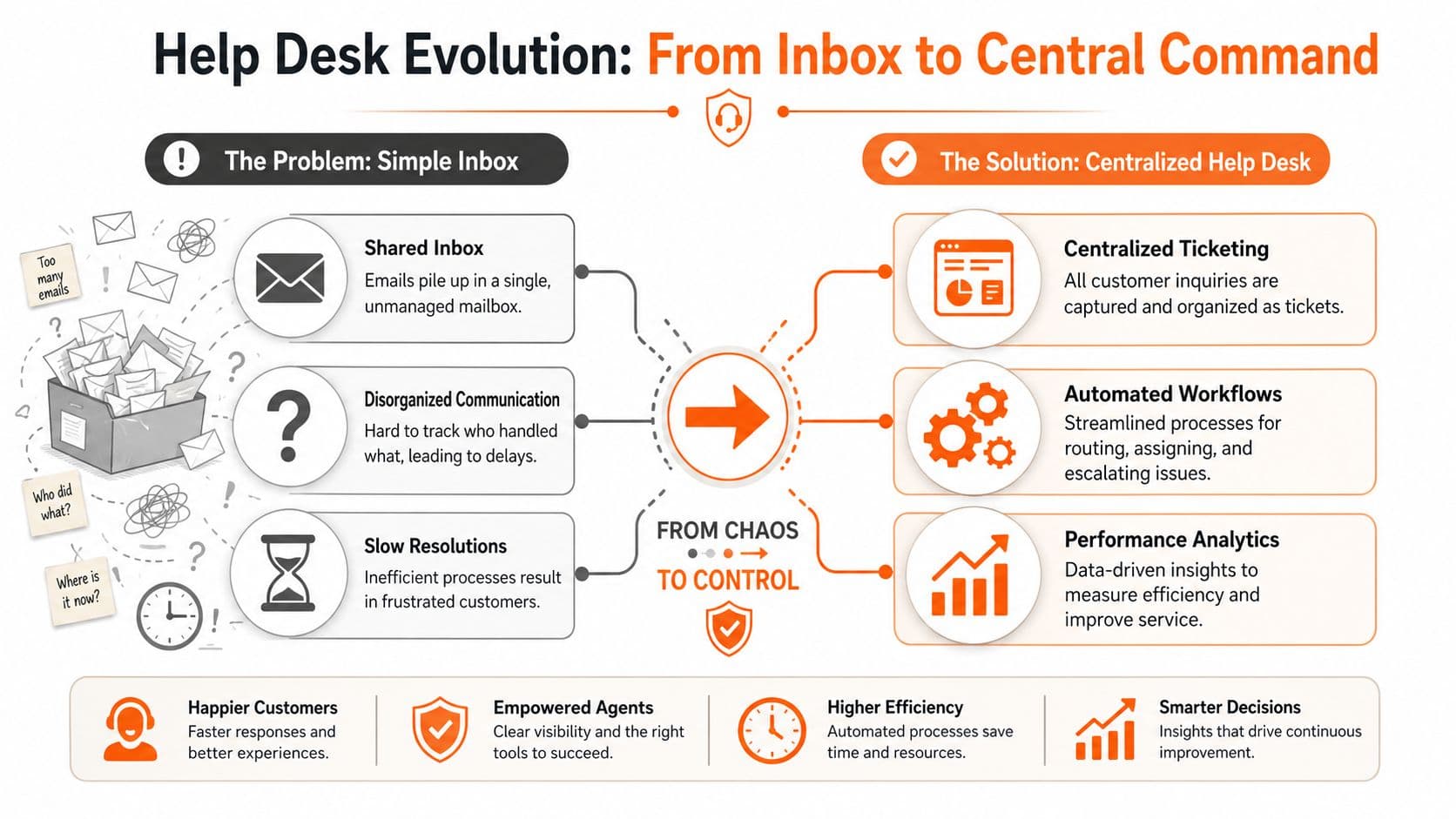
According to ManageEngine's explanation of help desk software, help desk software is used to convert inbound support from email, web forms, chat, phone, and other channels into trackable tickets, then route them through incident, service-request, problem, and change workflows so teams can prioritize severity, enforce SLAs, and keep a single system of record for support operations.
What centralization actually fixes#
Without centralization, teams run into the same failures over and over:
- Duplicate work: Two agents reply to the same issue because ownership isn't clear.
- Lost context: A customer starts in chat, follows up by email, then has to restate everything.
- Weak prioritization: A routine request sits next to an outage because the system doesn't enforce triage.
- No operational memory: Once a conversation disappears in an inbox, escalations get slower and root-cause analysis gets worse.
A proper help desk fixes this by making every request part of the same operating layer.
The ticket is the structure, not the goal#
This is the part many teams miss. The ticket itself isn't the value. The value is what the ticket makes possible.
Once requests are structured, a team can:
- Assign ownership clearly
- Apply workflow rules
- Track response and resolution
- Preserve history for escalation
- Analyze patterns across categories
That last point is where support starts becoming operations instead of inbox management. You can't improve what you can't reliably see.
Practical rule: If your support team still depends on people remembering who owns what, you don't have a help desk process. You have polite chaos.
The strongest systems don't just centralize channels. They create a trusted record of demand. That record becomes the basis for staffing decisions, SLA management, process redesign, and better self-service content later.
The Four Core Jobs of a Help Desk#
This question is often answered too narrowly. People say help desk software is used for customer support, then stop there. That's only one part of the picture.
Major guidance on the category also frames help desk software as a system for internal IT support, employee requests, self-service, and SLA-driven workflow management, not just customer tickets, as noted by HappyFox's overview of help desk software.

Customer support is only the visible layer#
The obvious use case is external support. A customer reports a billing issue, asks for a refund, flags a product bug, or wants clarification on a feature. The help desk gives the team a way to capture the request, assign the owner, maintain context, and close the loop.
That part is table stakes. The better question is whether the software also supports the supporting work around the ticket.
For example:
- Bug reports: Product support needs reproducible details, priority handling, and clean escalation.
- Account questions: Success or billing teams need visibility without living in someone else's inbox.
- How-to questions: The best outcome often isn't an agent reply. It's getting the customer to the right answer immediately.
If you're building that kind of workflow, a help desk use case setup usually works best when request intake, internal notes, and self-service content are treated as one operating system instead of separate tools glued together badly.
Internal service work is where many teams get real value#
Many companies get their first serious ROI from internal workflows, not external support. Password resets, device access, onboarding requests, software permissions, procurement approvals, and policy questions all create service demand. If those requests live in Slack threads or scattered email chains, they become impossible to govern.
A help desk gives internal teams a controlled intake point and a service workflow instead of ad hoc interruption.
Here are the four core jobs I see in practice:
- External customer support: Handle product issues, account questions, and service complaints with clear ownership.
- Internal IT support: Manage access, devices, incidents, and recurring technical requests without constant context loss.
- Cross-department service delivery: HR, finance, and facilities can run request queues with approvals and due dates.
- Knowledge-driven deflection: Publish answers that prevent repetitive tickets from being created at all.
If a request has an owner, a priority, and a promised response, it belongs in a system. Not in somebody's memory.
That last job matters more every year. The strongest help desk isn't the one that processes the most tickets. It's the one that makes fewer tickets necessary.
Help Desk vs. Knowledge Base A Side-by-Side#
The two get lumped together constantly. Most vendor pages describe them as one product. In practice they solve different problems and often live best in different tools.
The short version: a help desk manages the tickets you have. A knowledge base prevents the tickets you would otherwise get. Neither replaces the other, but the balance of investment depends heavily on where your team is and what your users actually need.
| Help desk software | Knowledge base | |
|---|---|---|
| Primary job | Manage inbound support demand | Prevent inbound support demand |
| Main users | Support agents, IT teams | End users, agents, AI assistants |
| Success metric | Time to resolution, SLA adherence | Deflection rate, self-service success |
| Content model | Tickets, conversations, notes | Articles, guides, structured docs |
| Cost driver | Per-agent seat pricing | Per-editor or flat platform pricing |
| Automation surface | Routing, macros, triggers, AI reply | Search, in-product help, AI grounding |
| Fails when | Volume grows faster than staffing | Content is stale, hard to find, or thin |
| Wins when | Team needs process control | Team needs to scale without hiring |
The two are complementary, not substitutable — but many teams over-invest in the ticketing side and under-invest in the answering side, then wonder why headcount keeps climbing. If you already have a serious knowledge base problem, adding another ticketing tool on top of it will not fix the underlying issue. The right move is often to invest in the knowledge layer first, watch ticket volume drop, and then decide how much help desk software you actually need. For teams starting from scratch, our guide to knowledge base platforms is a good next stop.
When You Don't Actually Need a Help Desk#
Nobody who sells help desk software will tell you this, but it needs saying: plenty of teams buy a help desk before they need one, and pay for it every month for years.
There are three patterns where a dedicated help desk product is almost certainly overkill:
- You have a very low ticket volume. If your support demand is a handful of emails a week and one or two people handle it, a shared inbox with tags does the job. A $50–$200/month help desk seat with dashboards you never open is just a tax on a problem you don't have.
- Your questions are highly repetitive. If 70% of your inbound questions are the same five things, the answer isn't a better queue — it's a better self-service layer. A clear, well-organized knowledge base with in-product search and a good landing article will erase most of that volume, and no ticket you never got is worth routing.
- You're pre-product-market-fit and every support conversation is really a product conversation. Founder-led support through a shared inbox is a feature at that stage, not a bug. You want the founders in the messages. A help desk actively hides signal at that scale.
The honest test: look at your last 100 tickets and ask how many of them could have been answered by a well-written article the user could find. If the answer is more than half, your bottleneck isn't ticketing — it's content. Invest there first. If you still have a routing, SLA, or team-coordination problem after the knowledge base is doing its job, then a help desk is the right next purchase. Not before.
This is unfashionable advice in a market that sells $99-per-seat-per-month agent licenses. It also happens to be correct.
Essential Features That Drive Efficiency#
Feature lists are where buyers get distracted. Vendors throw in macros, views, triggers, bots, portals, AI assistants, side conversations, and a dozen dashboard widgets, then call it a solution.
A better way to evaluate help desk software is to ask what work each feature removes. If it doesn't reduce confusion, delay, or repetitive effort, it isn't doing much.
Intake and routing#
This is the mechanical core of the system. If intake breaks, everything downstream breaks with it.
The important capabilities aren't glamorous:
- Omnichannel capture: Requests from email, chat, forms, and phone need to enter one system cleanly.
- Routing logic: The software should assign work based on category, urgency, account type, or team responsibility.
- SLA handling: Response and resolution commitments need timers, alerts, and escalation paths.
- Queue hygiene: Merges, deduplication, and status controls keep the backlog from becoming fiction.
Weak systems dump everything into one queue and rely on agents to sort it manually. That works until volume rises or staffing changes. Then the cracks show fast.
Team coordination#
Support rarely fails because nobody answered. It fails because the right person didn't answer soon enough, or the team answered without enough context.
Useful collaboration features tend to be simple:
- Internal notes: Agents need a private workspace for troubleshooting and handoff context.
- Assignments and reassignments: Ownership has to be explicit.
- Saved replies: Reuse is good when it preserves consistency, but canned text becomes a problem when teams use it to avoid thinking.
- Escalation paths: Product, engineering, billing, and IT teams need a predictable way to engage without blowing up the customer thread.
A canned response library helps when it speeds up known answers. It hurts when agents use it to paste around missing knowledge.
Reporting and operational visibility#
A help desk without reporting is just a queue with a memory. Managers need to see workload, bottlenecks, and service quality without building a spreadsheet graveyard every week.
Good reporting does a few things well:
- Shows queue health clearly
- Separates response speed from resolution quality
- Makes backlog aging visible
- Exposes workload by team, issue type, or channel
This isn't about vanity dashboards. It's about spotting where the process is broken before customers or employees start escalating around the system.
Self-service and deflection#
A lot of legacy help desks feel dated. They often include a built-in knowledge base, but many of those systems were designed as publishing add-ons, not as serious knowledge engines.
The result is content that may look acceptable in a browser but is poorly structured for retrieval, reuse, and AI consumption. Humans can still read it. Agents can still link it. But modern support increasingly depends on systems being able to parse and use the content reliably.
That's the hidden trade-off.
A help desk can automate routing, suggested replies, and triage. But if the knowledge underneath is messy, outdated, or trapped in bloated page builders, automation gets shallow fast.
The best self-service layer should make it easy to:
- Create clear articles quickly
- Keep content updated as products change
- Guide users to answers before ticket creation
- Support both human reading and machine retrieval
A lot of built-in knowledge bases still feel like document storage. Modern support needs something closer to a retrieval layer.
What ticket deflection actually looks like#
Deflection is the metric that reveals whether your knowledge base is doing real work or just decorating a footer link. It's also the metric most teams don't measure honestly.
A workable definition: the percentage of sessions that reach a support surface (help center, in-app search, contact form) and resolve without opening a ticket. That's what you actually care about. It is not "articles viewed per month," which sells vendor decks and predicts nothing.
Rough benchmarks worth internalizing:
- Below 10% — your knowledge base is mostly ornamental. Either nobody can find it, or the content doesn't answer the real questions.
- 20–40% — normal for a functional help center on a moderately complex product. Enough to matter to headcount planning.
- 50–70% — strong performance. Usually requires disciplined content coverage of the top 20 questions, decent search, and in-product entry points that surface answers before the contact form.
- Above 70% — rare, and usually a signal that either the product is very simple or the team has invested seriously in AI-grounded answering on top of a well-structured knowledge base.
The lever that moves this number is boring: cover your actual top questions, keep them updated, put them where users are already looking. In-product search widgets, a good site search, and machine-readable structure so an AI assistant can quote the answer verbatim. A help desk cannot deflect what isn't written down.
If you're building the knowledge layer up from scratch, how to build a knowledge base walks through the ordering of that work.
Measuring What Matters Help Desk KPIs#
Most support reporting goes wrong in one of two ways. Teams either track too little and manage by gut feel, or they track everything and drown in dashboards nobody uses.
The basics still matter most. Industry sources consistently identify ticket volume, first response time, ticket resolution time, first contact resolution rate, CSAT, and agent utilization as core metrics because they show both workload and service quality, according to InetSoft's help desk KPI overview.
Core Help Desk Metrics#
| Metric (KPI) | What It Measures | Why It Matters |
|---|---|---|
| Ticket Volume | How many requests are entering the system | Shows demand level, seasonality, and pressure on the team |
| First Response Time | How quickly someone acknowledges a request | Reveals queue responsiveness and customer waiting experience |
| Ticket Resolution Time | How long it takes to fully solve an issue | Shows process efficiency, handoff quality, and issue complexity |
| First Contact Resolution Rate | How often the issue is solved in the first interaction | Indicates agent effectiveness and knowledge quality |
| CSAT | How satisfied users are after support interactions | Adds the customer or employee perspective to operational data |
| Agent Utilization | How agent time is being used across support work | Helps managers balance staffing, workload, and burnout risk |
If you're still choosing a support system, these are the metrics worth checking in demos. A vendor can promise automation all day. If the reporting can't show queue health and service quality clearly, you're buying a nicer blindfold.
How to read the numbers without fooling yourself#
No single KPI tells the truth on its own.
A fast first response time can hide poor resolutions. Strong first contact resolution can hide agents closing issues too aggressively. High utilization can look efficient while the team burns out. CSAT can stay stable for a while even when backlog risk is building.
Use the metrics together, and read them like signals in tension:
- Rising ticket volume with slower response times usually points to staffing or intake problems.
- Fast responses with long resolution times often means the queue is acknowledged quickly but not progressing.
- Low first contact resolution usually means agents lack authority, knowledge, or both.
- Flat CSAT with messy operational data often means customers haven't revolted yet, not that the system is healthy.
For teams building a stronger self-service layer, documentation analytics and metrics can complement help desk KPIs. Support data shows where requests land. Documentation data shows where users and agents fail to find answers before tickets are created.
How to Choose Your Help Desk and Knowledge Stack#
Choosing a help desk used to mean comparing ticketing systems. Now it's a stack decision.
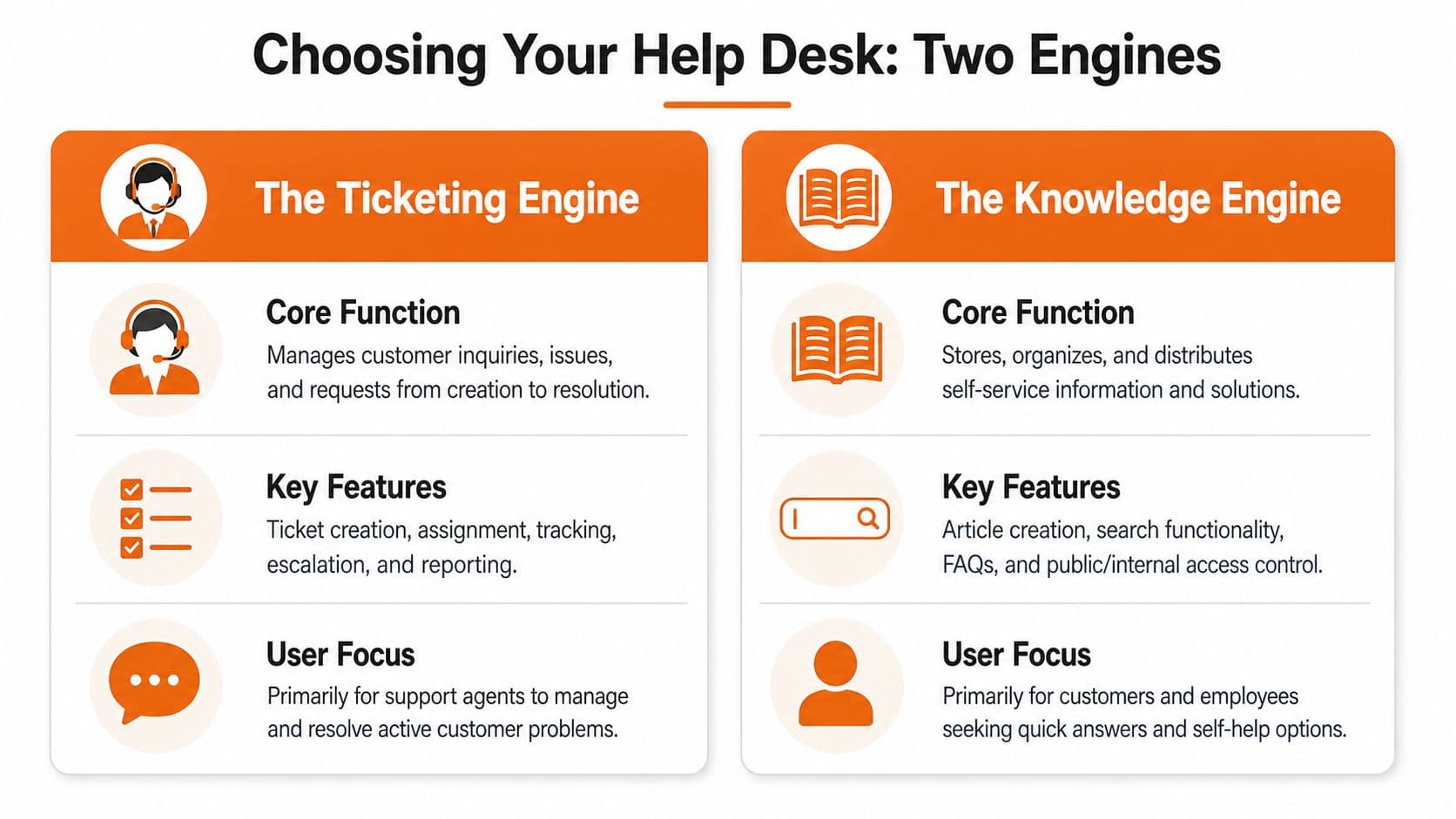
You need one engine to manage live service work, and another to supply trustworthy answers. When buyers collapse those into one checklist, they often end up with a bloated suite that does both jobs acceptably and neither job especially well.
Ticketing engine versus knowledge engine#
The ticketing side should excel at process control. It needs queues, assignment rules, SLA enforcement, escalations, auditability, and reporting.
The knowledge side should excel at answer delivery. It needs clean structure, strong search, easy maintenance, version clarity, and content that works for both human readers and AI-assisted support flows.
Those are related jobs, but they aren't the same job.
Recent market explainers describe help desk software as increasingly using AI for ticket routing, suggested replies, and sentiment analysis, while many buyers still evaluate products in a legacy ticket-tracking frame, as noted in The CX Lead's help desk software roundup. That's the wrong frame for modern buying.
Why monolithic suites often underperform#
Products like Zendesk and Freshdesk are strong ticketing platforms. They can absolutely run serious support teams. The issue isn't that they're weak. The issue is that their built-in knowledge components often reflect an older publishing model.
That model assumes a human will visit a help center, search manually, open an article, and read it end to end. That still happens. But it's no longer the whole game.
Now the first consumer of support content is often an AI assistant, site search layer, chatbot, or internal agent workflow. If your knowledge base is hard to parse, badly structured, or trapped in heavyweight page builders, the automation layer above it gets unreliable. You get suggested answers that miss nuance, retrieval that surfaces stale articles, and bots that sound confident while being wrong.
Buy ticketing software for workflow control. Buy knowledge infrastructure for answer quality. Don't assume one suite is naturally best at both.
If you're trying to evaluate customer service solutions, that distinction is worth forcing into every shortlist discussion.
A modern knowledge layer should support public help content, internal agent references, product documentation, and procedural content in one coherent system. That's especially important when support, product, and operations all depend on the same source of truth.
For teams thinking beyond legacy help centers, a dedicated knowledge base software approach often makes more sense than treating documentation as a side feature inside the ticketing tool.
Internal knowledge base software for the agent side#
The mistake most teams make is treating the knowledge base as a purely customer-facing thing. In practice, half the value of a well-run knowledge base is that agents use it themselves — for handoff notes, escalation playbooks, product internals, refund rules, "the weird thing about the EU billing flow," and every other piece of tribal knowledge that would otherwise live in one person's head.
That's what internal knowledge base software is actually for. It sits behind the same help desk that customers file tickets into, but the audience is the agent, not the customer. And in most support teams, agent-side documentation moves the resolution-time and first-contact-resolution numbers faster than any customer-facing article does — because it removes the "let me check with someone" step that eats resolution time.
A short, blunt list of what the agent-side knowledge base should cover:
- Every recurring escalation path — who owns it, what to attach, what SLA the receiver expects.
- Every refund, credit, or plan-change rule — with the actual thresholds, not "check with billing."
- Every known bug and its workaround — with links to the tickets and the engineering thread.
- Every onboarding step for a new agent — so senior people stop being interruption-driven trainers.
Teams that publish this material internally, keep it current, and search it well — even in a plain markdown-based tool — usually beat teams that bought a $99/agent/month suite and never fed it real knowledge. The suite is the tank. The knowledge is the fuel. Empty tank, expensive tank, still empty.
What a modern stack should do#
A good 2026 stack should answer yes to these questions:
- Can the help desk control work reliably? Routing, ownership, SLA logic, escalation, and reporting need to be strong.
- Can the knowledge layer prevent work? Answers should be easy to find, easy to maintain, and usable before ticket creation.
- Can AI use the content safely? Suggested replies and retrieval are only as good as the underlying documentation.
- Can teams update the system without specialists? If every doc change or workflow change needs a project, the stack will decay.
This walkthrough is worth watching because it shows how an effective knowledge base should be built for actual use, not just for visual polish.
One more practical point. Support teams increasingly depend on docs that include product references, SOPs, and API-facing material in the same ecosystem. Tools like interactive API documentation can matter here too, especially for technical support and developer-facing teams. That's why documentation choices now affect support outcomes more directly than many buyers expect.
Frequently Asked Questions#
What is a help desk software used for? A help desk software is used to capture, structure, route, prioritize, and measure inbound support requests — from customers, employees, or both. In 2026 it also increasingly handles first-touch AI replies, ticket-level automation, and integrations with the knowledge base underneath it. The core job is turning scattered messages into trackable work with clear ownership and SLAs.
What is a help desk software, in simple terms? It's a piece of software that takes support requests coming in from email, chat, forms, and phone, converts each one into a ticket with an owner and a status, and gives the team a shared place to work through them. Think of it as a sorting facility for support demand — not a mailbox, and not a wiki.
What's the difference between a help desk and a knowledge base? A help desk manages the tickets you already have. A knowledge base prevents tickets you would otherwise get. They usually work together: a good knowledge base deflects the repetitive questions, and the help desk handles what's left. Investing only in the help desk leaves you paying per-seat pricing to route questions that a good article would have answered for free.
Do I actually need help desk software? Not always. If your ticket volume is very low, if most of your questions are the same handful of things, or if you're still pre-product-market-fit, a shared inbox plus a good self-service knowledge base is usually enough. The honest test is to look at your last 100 tickets and count how many could have been answered by a well-written article the user could find. If it's most of them, invest in the knowledge base first.
What's a good ticket deflection rate? Below 10% means your knowledge base is mostly ornamental. 20–40% is normal for a functional help center. 50–70% is strong and usually reflects disciplined coverage of the top questions plus decent in-product entry points. Above 70% is rare and typically requires AI-grounded answering on top of well-structured content.
How does an internal knowledge base help a help desk team? It moves resolution-time and first-contact-resolution numbers faster than customer-facing articles do, because it removes the "let me check with someone" step. Agents look up escalation rules, refund thresholds, known bugs, and onboarding steps in one place instead of interrupting senior teammates. This is often the highest-leverage documentation work a support team can do.
Your Help Desk Is an Engine Fuel It Correctly#
A modern help desk isn't a filing cabinet for complaints. It's an operating engine for service delivery.
It captures demand, routes work, enforces accountability, and gives teams enough visibility to improve. But the engine only performs as well as the knowledge feeding it. If your answers are scattered, stale, or hard for systems to parse, the automation layer won't save you. It will just fail faster and at larger scale.
That's why the best support teams treat documentation as production infrastructure. Not as a side project. Not as a marketing asset. Not as a wiki somebody cleans up later.
If you're weighing replacements, migrations, or suite consolidation, it also helps to understand the operational friction involved in understanding help desk switching costs. The software change is rarely the hardest part. Rebuilding workflows, retraining teams, and repairing knowledge is where most of the cost lives.
The practical takeaway is simple. Choose a help desk that controls service work well. Then invest just as seriously in the knowledge system that reduces service work in the first place.
If your team wants documentation that works for humans, agents, search, and AI systems at the same time, Dokly is worth a close look. It gives you a fast way to publish structured knowledge bases, product docs, SOPs, and API documentation without the usual setup tax, which makes it a strong fit for support teams that want self-service to do real work instead of just looking polished.