Most advice about FAQ in website strategy is outdated. It treats the FAQ page as a support appendix. In practice, that's no longer enough. Your FAQ now has two audiences: the person scanning for a quick answer and the machine deciding whether your content is clear enough to surface in search and AI responses.
That changes how you build it. A modern FAQ page isn't just a list of answers. It's a structured content asset that has to be readable, semantically organized, easy to maintain, and machine-parseable. If the technical foundation is weak, the page may still look fine to humans while remaining hard for crawlers and AI systems to interpret.
Table of Contents#
- The New Strategic Role of Your Website FAQ
- How to Find Questions Users Actually Ask
- Designing for Readability and Parseability
- Implementing FAQ Schema to Win Rich Snippets
- Making Your FAQ a Living Asset Not a Dead Page
- Why Most FAQs Fail and How Yours Succeeds
The New Strategic Role of Your Website FAQ#
FAQ pages are still treated like housekeeping content. That is outdated.
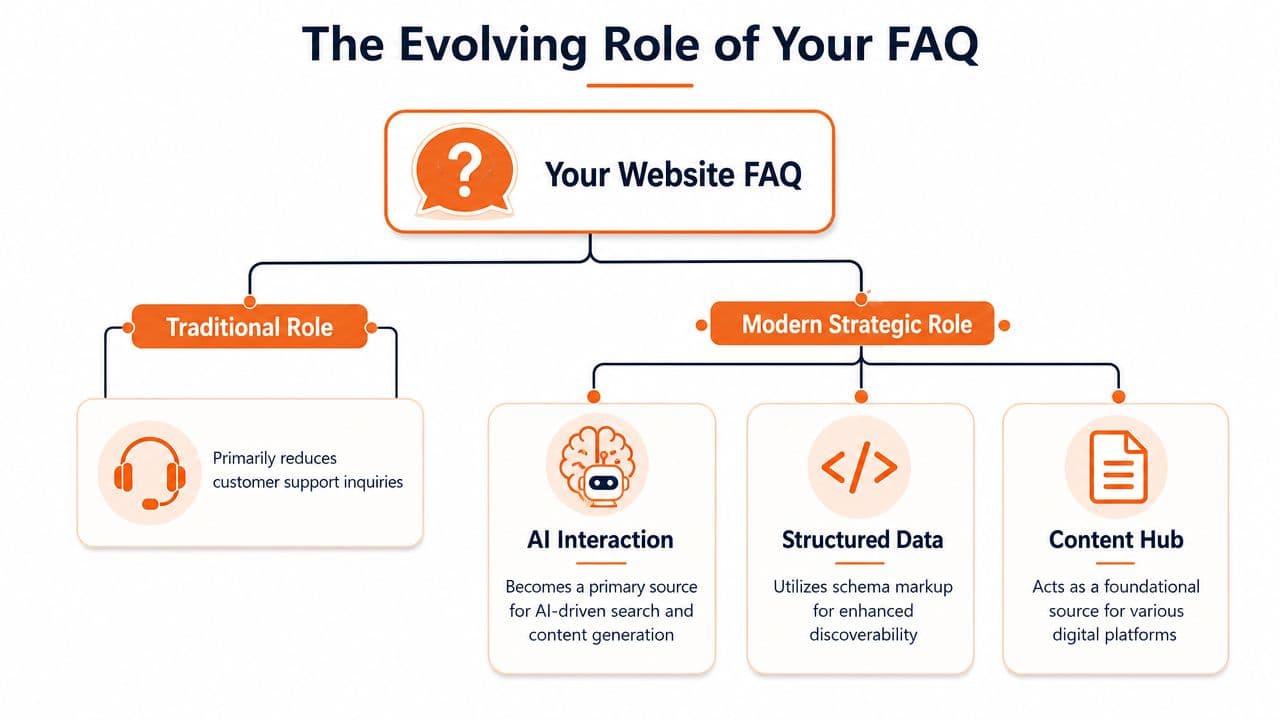
A FAQ in website architecture now does more than deflect support tickets. It helps search systems interpret your company, gives AI agents clean answer blocks to extract, and reduces the chance that your product is summarized from scattered third-party pages instead of your own source of truth.
Human behavior still matters. Future Holidays cites research showing that many customers try self-service before contacting support, and it also notes that visitors often scan rather than read line by line. That makes concise Q&A formatting useful for people who want a fast answer without digging through long-form copy (Future Holidays on FAQ behavior and page design).
The strategic change is technical. Search engines, assistants, and LLM-based tools work better with content that is explicit, well-labeled, and easy to segment. A FAQ page gives you a controlled place to publish exactly that. If the page is written clearly and structured properly, machines can identify the question, isolate the answer, and reuse it with less guesswork. That is a real advantage. In my experience, teams that get this layer right create fewer interpretation errors across search, chat interfaces, and AI answer experiences.
Why the FAQ page matters more now#
A useful FAQ page does three jobs at once:
- Supports self-service: It gives visitors direct answers before they open a ticket or abandon the page.
- Improves interpretation: Clear question-and-answer structure helps search systems understand what your site covers.
- Supplies machine-ready answers: AI agents depend on content that is specific, segmented, and easy to parse.
The third job is the one many guides miss. A polished accordion can still fail if the copy is vague, the headings are generic, or the answer depends on surrounding design context to make sense. AI systems do not experience your page the way a person does. They parse fragments, labels, and relationships. If those parts are weak, your FAQ becomes hard to trust and easy to skip.
A FAQ page used to be a support asset. Now it is part of your answer infrastructure.
There is also a competitive trade-off here. If your team does not publish authoritative answers in a format machines can reliably interpret, those systems will assemble answers from whatever they can find. Sometimes that means review sites, reseller pages, old documentation, or forum posts. Brands that treat the FAQ as a technical content asset have more control over how they are represented.
FAQ and chat should work together#
FAQ content and live support solve different problems. FAQs handle repeated, stable questions well. Chat handles ambiguity, edge cases, and intent that is still forming. The strongest setups connect the two instead of forcing one to do the other's job. If you're evaluating where static answers stop and conversational support should take over, LeadBlaze's guide to website chat is a useful comparison.
The practical takeaway is straightforward. Your FAQ is no longer a page you publish once for human readers and forget. It is a structured knowledge layer for both people and machines, and the technical foundation behind it is now part of your competitive advantage.
How to Find Questions Users Actually Ask#
Most weak FAQ pages start the same way. Someone opens a doc, brainstorms a list from memory, and publishes answers to questions customers didn't ask.
That approach produces dead weight. The better method is to pull questions from demand signals that already exist inside your business. Zendesk recommends mining support tickets, sales data, and Google Search Console to identify repeated questions, then clustering them into themes so users can self-serve more effectively (Zendesk FAQ best practices).
Start with operational evidence#
Begin where questions already show up repeatedly.
-
Support inboxes and ticket tags
Look for phrasing customers use when they're confused, blocked, or comparing options. Don't rewrite the language too early. The original wording often reveals the exact search intent. -
Sales calls and objection notes
Sales teams hear a different class of question. These are usually about pricing logic, implementation, security, onboarding effort, or fit. They belong in a FAQ if the answer helps a buyer move forward without booking another call. -
Search Console queries
This gives you wording from people who are already trying to find answers on your site. These phrases are especially useful because they reflect real vocabulary, not internal jargon.
Then cluster the questions#
Raw question lists become messy fast. Group them by topic and by audience.
A simple working model looks like this:
| Cluster type | What belongs there | Example use |
|---|---|---|
| Product basics | Definitions, setup, core actions | New visitors and trial users |
| Commercial questions | Pricing, billing, contracts, plans | Buyers and procurement |
| Technical issues | Troubleshooting, compatibility, access | Users blocked in workflow |
| Policy questions | Security, privacy, refunds, SLA | Risk review and operations |
For effective website navigation, a FAQ should help people narrow quickly. If every question sits in one long list, scanning breaks down.
Practical rule: If a question appears across support, sales, and search data, it deserves priority.
Write the question the way users ask it#
The wording is not cosmetic. If users search “How do I export invoices?” and your FAQ says “Billing document retrieval workflows,” you've buried the answer.
Use the customer's phrasing for the question. Keep the answer direct. Then link out to deeper product docs, policy pages, or step-by-step guides where needed.
A strong answer usually does four things:
- Gives the direct answer first: Don't make readers work for the conclusion.
- Adds only the necessary context: Include conditions, exceptions, or edge cases only if they matter.
- Points to the next step: Link to the task page, form, or document that solves the issue.
- Signals when support is needed: Some questions can't be resolved in a FAQ alone.
Decide what should not be in the FAQ#
Not every repeated question belongs there.
If the answer requires screenshots, a sequence of steps, or detailed troubleshooting, that content often belongs on a dedicated page. The FAQ should then summarize the issue and route users to the full explanation. That keeps the page tight and avoids turning it into a bloated knowledge dump.
The best FAQ pages don't come from brainstorming sessions. They come from disciplined listening, clustering, and pruning.
Designing for Readability and Parseability#
FAQ design has a split responsibility. People need to scan it quickly. Machines need to parse it correctly. Many teams handle the first part and miss the second.
That's where a lot of modern FAQ pages fail. They look polished in a visual editor, but the underlying output is a mess of nested blocks, weak heading structure, and decorative UI patterns that bury the actual Q&A relationship.
Technical best practice is straightforward. Each question should be treated as a semantic heading, usually an H2 or H3, not just styled to look bold. Progress also warns that overusing accordions for complex answers can hurt usability, and longer topics should often be split into separate pages instead (Progress on FAQ structure and usability).
What helps people scan fast#
For human readers, the FAQ should feel easy to skim.
A good page usually includes:
- Short answer blocks: Lead with the answer. Add detail only when it changes the decision or next action.
- Clear grouping: Bundle related questions under topic headings so users don't search the whole page mentally.
- Internal links: Route readers to setup docs, billing policies, API references, or contact options where needed.
- Search for larger sets: If the FAQ is part of a broader help center, on-page search becomes more useful than endless scroll.
There's a limit, though. If a single answer turns into a mini-guide, stop forcing it into FAQ format.
What helps machines parse correctly#
This is the part most guides barely touch. AI systems don't experience your page like a human does. They rely on structure.
That means:
- Real headings, not visual styling
- Explicit question and answer separation
- Clean HTML output
- Stable linkable sections
- Predictable content hierarchy
Some publishing systems produce what content teams call rendered soup. The page looks acceptable in the browser, but the source structure is noisy and hard to interpret. That hurts both crawlers and AI retrieval systems.
This is one reason many teams are rethinking their documentation stack. A clean MDX-based system with semantic output gives you far more control than opaque block editors. If AI discoverability matters to your team, docs for AI agents is a useful framework for evaluating what your publishing layer emits.
If the structure is weak, your FAQ may still be readable to people while remaining invisible to answer engines.
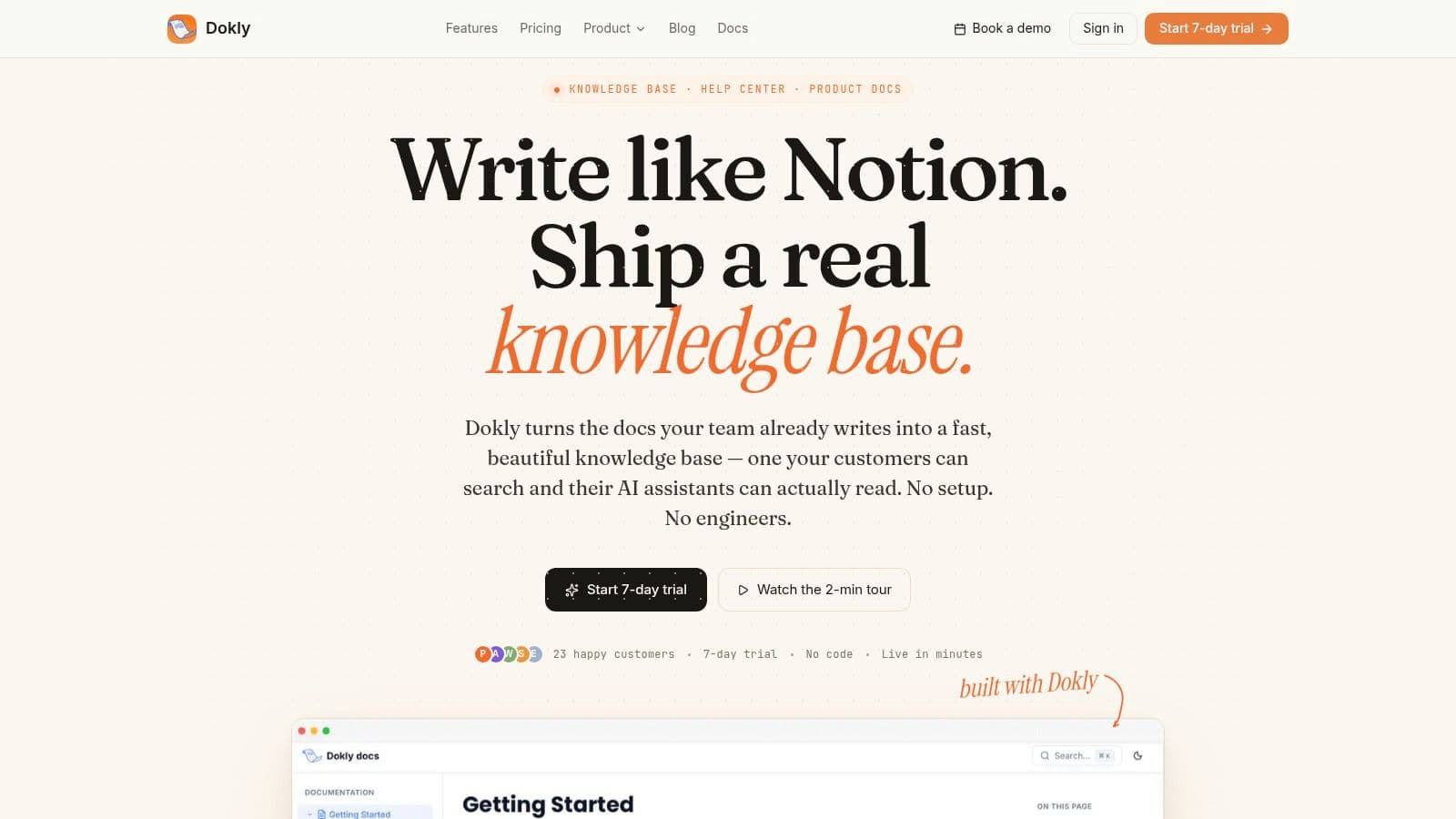
A platform such as Dokly is relevant here because it publishes semantic MDX instead of opaque editor blocks, which makes FAQ content easier to structure cleanly for both users and AI systems. That matters more than visual polish.
A quick design decision table#
| Decision | Usually works well | Usually fails |
|---|---|---|
| Question formatting | H2 or H3 headings | Bold text in generic divs |
| Answer length | Concise summary plus link | Long wall of text |
| Long explanations | Separate dedicated page | Accordion stuffed with complex content |
| Navigation | Topic groups and search | One undifferentiated list |
A modern FAQ in website content design succeeds when the front-end experience and the underlying structure agree with each other. That's the current standard now.
Implementing FAQ Schema to Win Rich Snippets#
A well-written FAQ page can still underperform if search engines have to infer too much. FAQ schema reduces that ambiguity. It tells search systems that the page contains question-and-answer content and gives them a standardized way to read it.
Google's FAQ structured data documentation is the key reference here. It explicitly states that markup can help users discover information in rich results, which is why schema remains one of the clearest technical upgrades you can make to a FAQ page.

What FAQPage schema does#
FAQPage schema is usually implemented in JSON-LD. It doesn't replace the visible content on the page. It describes that content in a structured format that crawlers can process more reliably.
That helps with two practical outcomes:
- Clearer interpretation: Search systems can identify which text is a question and which is the accepted answer.
- Eligibility for enhanced presentation: Structured content is easier to evaluate for rich result features.
If you're also working on broader SERP visibility, this guide on capturing top search snippets is a useful complement because snippet strategy and structured formatting often overlap in practice.
A simple JSON-LD example#
Here's the basic shape:
<script type="application/ld+json">
{
  "@context": "https://schema.org",
  "@type": "FAQPage",
  "mainEntity": [
    {
      "@type": "Question",
      "name": "Do you offer refunds?",
      "acceptedAnswer": {
        "@type": "Answer",
        "text": "Refunds are available according to our policy page."
      }
    },
    {
      "@type": "Question",
      "name": "How do I reset my password?",
      "acceptedAnswer": {
        "@type": "Answer",
        "text": "Use the reset link on the sign-in page and follow the emailed instructions."
      }
    }
  ]
}
</script>
The code isn't complicated. Maintaining it accurately is a challenge. Every time you add, rewrite, reorder, or remove a question, the schema should stay aligned with the visible page.
That's where manual workflows often break. Content teams update the page copy but forget the structured data, or developers hardcode schema once and never revisit it.
A cleaner solution is to publish FAQ content from a system that handles structured output as part of the page model. Teams thinking about that broader shift usually benefit from understanding answer engine optimization, because schema is one piece of a larger machine-readability strategy.
For a practical walkthrough, this official Dokly video shows how structured documentation workflows reduce technical friction in publishing.
Common implementation mistakes#
- Mismatch between page and schema: The visible content and JSON-LD must describe the same questions and answers.
- Using schema on weak content: Markup won't rescue vague or thin answers.
- Treating it as a one-time task: Every FAQ revision should trigger a schema review.
Schema doesn't make a poor FAQ good. It makes a good FAQ easier for search systems to understand.
Making Your FAQ a Living Asset Not a Dead Page#
The fastest way to ruin a FAQ page is to publish it once and declare it done. That's how answers become stale, links break, and support teams stop trusting the page enough to send customers there.
A FAQ only works when it changes with the product, the policy set, and the language customers use. This is especially important now because the machine-readable layer matters as much as the surface copy. The critical gap in many FAQ strategies is ignoring LLM parseability. The available data on this topic points to a major shift in user behavior and tooling: 73% of AI users rely on LLMs for research, 80% of legacy doc tools fail to generate the structured, machine-readable content AIs need, and documentation with semantic MDX sees a 3.5x increase in AI citation rates.
The maintenance rule most teams skip#
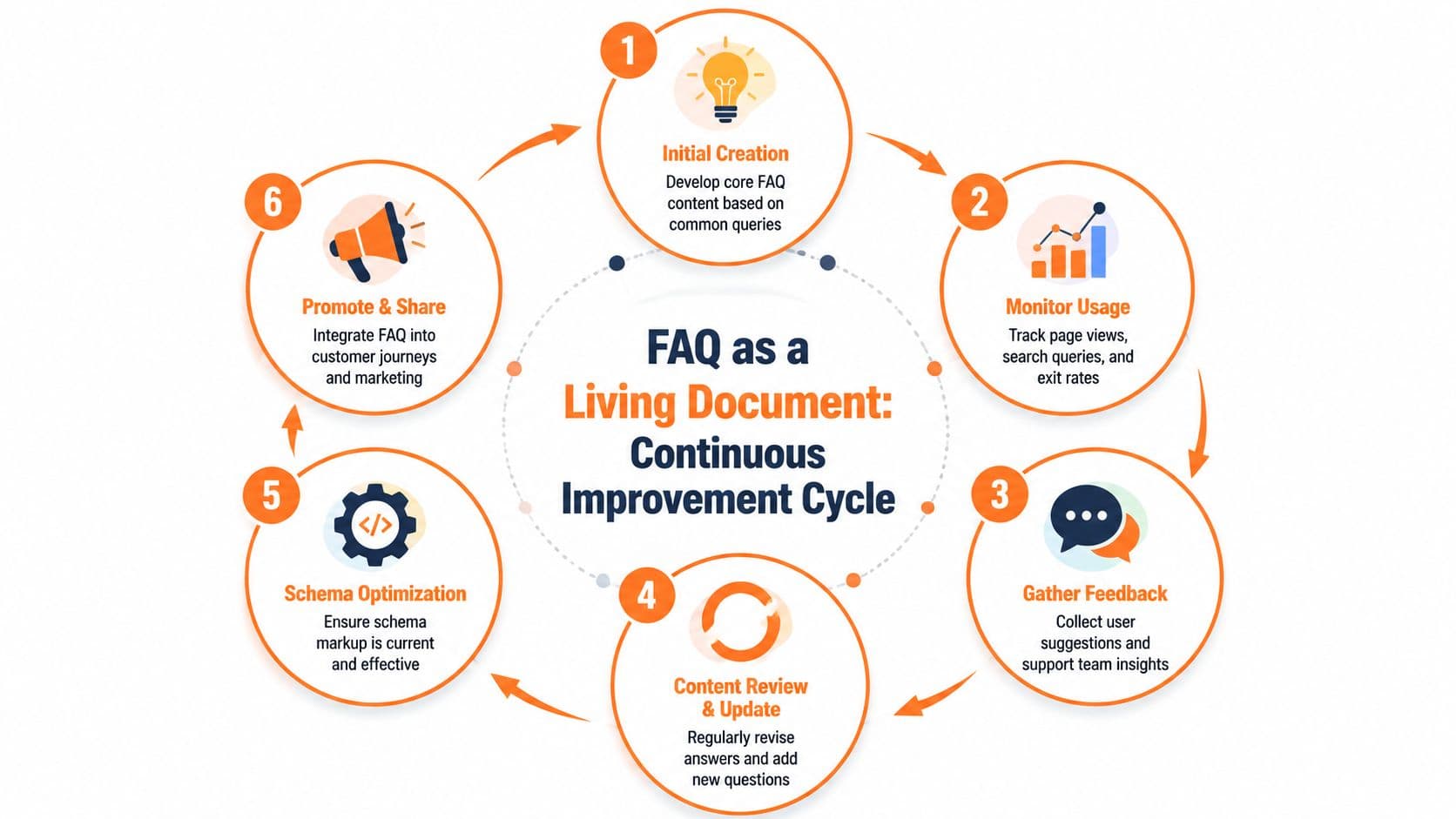
Zendesk's guidance is useful here even beyond initial creation. It advises teams to define criteria for when FAQ content should be updated and to track page performance so stale answers don't undermine self-service.
In practice, maintenance usually needs a trigger model such as:
- Product change: Feature behavior, plan limits, or interface changes invalidate an answer.
- Policy change: Billing, refunds, privacy, or security guidance shifts.
- Support spike: A new theme appears in tickets, chat logs, or onboarding questions.
- Search pattern change: Users start phrasing the question differently than your page does.
A FAQ page loses trust gradually. One outdated answer is usually enough to make users stop relying on the rest.
This is why governance matters more than page design. Someone has to own the update cycle.
Where the FAQ should live in your content system#
A FAQ should not sit alone as an orphaned page in the footer. It works better when it's connected to a broader help center or documentation system.
That means the FAQ should point into:
- Task-based guides for multi-step actions
- Policy pages for official terms and edge cases
- Feature documentation for product behavior
- Support entry points when the issue requires human help
If you're comparing different approaches to knowledge base architecture, Geode's new model for KBs is worth reading because it frames the trade-offs between static FAQ collections and more connected documentation systems.
A healthier model is to treat the FAQ as an entry layer, not the whole answer layer. That's also why teams often look for centralized publishing systems where updates flow cleanly across related content. For that, knowledge base creation is a practical reference for structuring pages, ownership, and update workflows.
What the operating rhythm looks like#
| Workflow step | What the team does |
|---|---|
| Review incoming questions | Pull recurring issues from support, sales, and search |
| Assess content fit | Decide whether the answer belongs in FAQ or a full doc |
| Update content and structure | Revise the answer, heading, links, and machine-readable formatting |
| Validate discoverability | Check whether the page remains easy to scan and parse |
| Reconnect user journeys | Link the FAQ from relevant product, pricing, and support pages |
A living FAQ doesn't happen because the page exists. It happens because the team maintains it like infrastructure.
Why Most FAQs Fail and How Yours Succeeds#
FAQ pages usually fail because teams use them to patch upstream content problems.
A pricing page leaves out billing rules. A product page skips a limitation that affects evaluation. A policy page buries an exception. The FAQ then absorbs the fallout. It becomes the page people visit after the main page failed to answer a basic question.
That creates two problems at once. Human readers have to hunt for context they should have had earlier. AI agents also get a fragmented answer set, where the authoritative explanation sits far away from the page that introduced the topic. For search systems, assistants, and retrieval pipelines, that separation weakens confidence in what the site is saying.
Why Many FAQ Pages Underperform#
Underperformance usually comes from content architecture, not visual design.
Teams often keep adding entries because new questions keep appearing. On the surface, that looks productive. In practice, it often means the site is training users to leave decision pages and search for missing context somewhere else. If an FAQ is carrying pricing logic, product limitations, onboarding caveats, and policy edge cases all at once, the page is doing too much.
The common failure modes are predictable:
- The FAQ becomes a storage bin: unresolved issues from product, support, legal, and marketing all land in one page.
- Answers lose their source context: a user or AI system sees the answer, but not the surrounding page that explains why it matters.
- Short answers handle questions that are not short: setup steps, exceptions, and troubleshooting get compressed into thin summaries.
- The structure collapses as the page grows: categories drift, duplicate questions appear, and retrieval quality gets worse.
- Only the FAQ is machine-friendly: schema exists on one page, while the rest of the knowledge base stays inconsistent or hard to parse.
That last point is where many guides stop too early. A modern FAQ is not just a reader convenience layer. It is also a parsing layer for AI agents that need clean question-answer pairs, stable headings, consistent terminology, and clear links to deeper documentation. If those signals break, the FAQ may still look fine to a person while performing poorly in AI-mediated discovery.
Strong FAQ pages support the main pages. They do not carry the whole information burden.
What successful FAQ systems do differently#
Successful teams set stricter boundaries for what belongs in the FAQ.
They keep core answers on core pages. They use the FAQ for recurring questions that can be answered cleanly in a short format. They move procedural, technical, or high-risk topics into dedicated documentation where the answer can be complete. Then they make sure the relationship between those content types is obvious to both users and machines.
A good FAQ system usually follows four rules:
-
Decision pages answer decision-stage questions
Pricing, product, onboarding, and policy pages should handle the questions that block understanding in that moment. -
The FAQ resolves repeatable questions fast
It should cover common clarifications without becoming the only place where key facts live. -
Deeper topics get their own destination
Troubleshooting, integrations, workflows, and exceptions need room for structure, examples, and updates. -
The whole answer system stays parseable
Schema helps, but clean HTML structure, stable labels, descriptive links, and consistent terminology matter just as much for AI retrieval.
This is the competitive advantage now. Sites with clear answer architecture are easier for LLM-based agents to quote, summarize, and recommend. Sites with scattered answers force the model to guess which page is authoritative.
Many legacy tools still make this harder than it should be. They support publishing, but not always with semantically clean output across FAQs, docs, and help content. If your FAQ is the only page built for machine readability, the rest of the answer experience is still fragile.
The better question is not whether a site needs a FAQ. It is whether each question lives in the right place, with enough structure for both humans and AI systems to interpret it correctly.
If your team wants a FAQ page that works for both human readers and AI systems, Dokly is worth evaluating. It's a documentation platform built around machine-readable output, semantic structure, and AI-facing discoverability, which makes it a practical fit for help centers, knowledge bases, and modern FAQ publishing without adding a heavy technical setup.