
Most advice on knowledge base creation is dated the moment it tells you to “write for humans first.”
That used to be enough. It isn't now. Your customers still read docs, but increasingly they ask ChatGPT, Claude, Perplexity, or an IDE assistant to explain your product, compare your feature set, and troubleshoot issues. If those systems can't parse your documentation cleanly, your knowledge base won't just underperform. It will disappear from the decision path.
That changes the job. Knowledge base creation is no longer a publishing exercise. It's an information architecture problem, a retrieval problem, and an operational discipline. Good docs now need to serve two audiences at once: the human who needs a fast answer, and the machine that needs clean structure, explicit meaning, and retrievable chunks.
Table of Contents#
- The New Mandate Why Your Docs Must Be AI-Readable
- Phase 1 Planning and Scoping Your Knowledge Base
- Phase 2 Building Your Information Architecture and Content
- Choosing Your Tool The No-Config vs Self-Hosted Debate
- Phase 3 Launching and Integrating into Workflows
- Phase 4 Measuring Success and Maintaining Momentum
The New Mandate Why Your Docs Must Be AI-Readable#
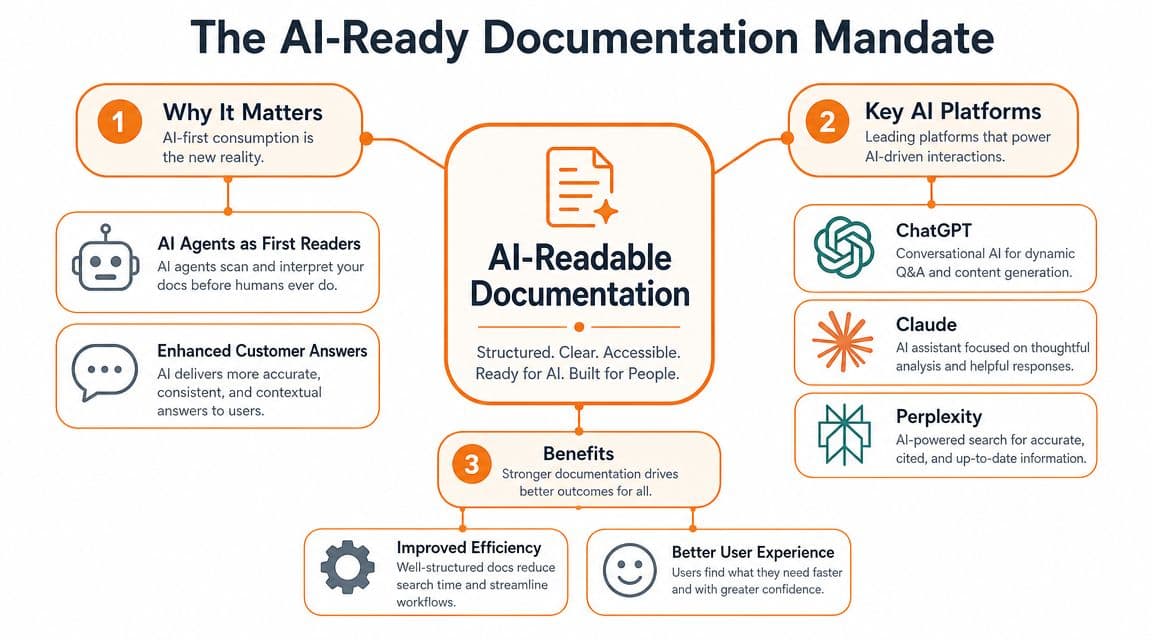
The old assumption was simple: if a human can read the page, the job is done. That assumption breaks the moment an AI assistant becomes the first stop for product questions.
The more useful question now isn't about your stack. It's about structure. As CodeSignal's Bedrock knowledge base lesson notes, the question is not which vector store to use, but what content architecture best serves retrieval by ChatGPT, Claude, Cursor, and Perplexity-style agents. That's the point most knowledge base creation guides miss.
Human-friendly is not enough#
A page can look polished and still fail AI retrieval. That happens when docs are built from opaque blocks, overloaded navigation, weak headings, vague titles, or messy rendered HTML that hides the underlying meaning.
I've seen this mistake in teams using everything from heavily customized Docusaurus sites to polished hosted tools. They focus on theme, search chrome, and animations. Meanwhile, the actual content is hard to chunk, hard to cite, and hard to interpret.
Practical rule: If an agent can't reliably identify what a page is about, what problem it solves, and which steps belong together, your docs are weaker than they look.
That's why workflow matters as much as writing. Teams that publish consistently usually standardize authoring, review, and formatting before they worry about surface polish. A sensible documentation workflow for modern teams does more for discoverability than another redesign ever will.
What AI-native documentation actually looks like#
AI-native docs are boring in the best way. They are predictable, explicit, and semantically clear.
That means:
- Clear page intent: Each page should answer one main question or define one main concept.
- Descriptive headings: Headings should say what the section does, not try to be clever.
- Tight chunks: Steps, requirements, limitations, and examples should be separated cleanly.
- Metadata that matters: Product names, feature names, roles, and prerequisites should be labeled consistently.
- Stable linking: Related pages should connect logically so retrieval systems can follow the graph.
Most doc tools still optimize for human editing convenience, not machine readability. That tradeoff is getting expensive. If AI systems can't parse your docs, they won't recommend your product confidently, and they won't cite your pages when users ask product-level questions.
Phase 1 Planning and Scoping Your Knowledge Base#
A bad knowledge base usually doesn't fail in writing. It fails earlier, in planning. Teams start dumping articles into categories before deciding what the system is supposed to do.
Start with this image in mind. Planning is not paperwork. It's how you avoid building an expensive pile of disconnected answers.

Define two audiences, not one#
The usual prompt is “know your audience.” Too vague. You need to define two concrete readers.
One is the end user. They arrive frustrated, impatient, and task-oriented. They want to fix a problem, configure a setting, or understand a feature without reading your product philosophy.
The other is the AI reader. It doesn't get tired, but it does get confused. It needs explicit terms, stable naming, and clean structure so it can retrieve the right passage and assemble a reliable answer.
Build your scope around both:
- Core user tasks: Account setup, billing actions, integrations, workflows, permissions, troubleshooting.
- Core product concepts: Objects, roles, limits, settings, and dependencies.
- High-stakes moments: Migration, onboarding, failures, API auth, and anything support answers repeatedly.
- Market-facing clarity: Pages that explain what the product does, how it differs, and when to use specific features.
Audit what you already have#
Teams generally already have raw material. It's just scattered across support macros, Slack threads, onboarding docs, release notes, product specs, and old help center articles.
Use a simple audit with three buckets:
- Keep and rewrite: The information is valid, but the structure is weak.
- Merge: You have multiple partial answers to the same question.
- Create net new: The topic matters, but no usable content exists yet.
Don't overcomplicate the first pass. You're looking for gaps, duplicates, and content that still reflects how the product works.
Good planning cuts more content than it creates. If five draft pages answer the same question badly, you don't have five assets. You have one article hiding in five places.
Later in the process, give your team a short walkthrough so everyone uses the same standards for article types, naming, and review. This official video is a useful example of the kind of operational clarity teams need:
Scope for strategic coverage#
A practical knowledge base build starts by defining scope and audience, reviewing existing content, creating a shallow information architecture, then testing and refining with subject-matter experts. One commonly cited accessibility principle is the three-click rule described by C2 Perform, which aims to let users reach needed information in three or fewer clicks.
That's still useful, but I'd add one more filter. Prioritize pages that teach an AI how your product works, not just pages that answer isolated support questions.
A smart initial scope looks like this:
- Product foundations: What the product is, who it's for, and the language you use internally.
- Task completion docs: Step-by-step guides for the actions users take most often.
- Decision support docs: Comparisons, feature explanations, limits, and prerequisites.
- Troubleshooting docs: Specific, symptom-driven pages with explicit causes and fixes.
If you skip the conceptual layer and only publish reactive support content, AI systems will know your edge cases better than your core product. That's backwards.
Phase 2 Building Your Information Architecture and Content#
Bad information architecture kills good documentation.
It does not fail because users cannot browse a sidebar. It fails because AI systems cannot infer what your product is, which pages are authoritative, or how one concept relates to another. If ChatGPT is now a primary path to discovery, your structure has to do more than help a person click around. It has to help a model retrieve the right page, quote it accurately, and trust that it is the canonical answer.
Keep the structure shallow, strict, and boring#
Complex hierarchies look organized to the team that built them. They perform poorly in practice. Nested categories, overlapping tags, and cute labels create ambiguity for search, for support teams, and for LLM retrieval.
Use a short, plain category system. Keep labels literal. Keep page placement predictable.
A sane category set usually includes:
- Getting started
- Account and workspace management
- Core workflows
- Integrations
- API and developer docs
- Troubleshooting
- Billing and security
If you need a category called “Miscellaneous,” your taxonomy is already breaking down.
Keep the hierarchy shallow. A reader should know where a page lives before they search for it. An AI system should see the same pattern across dozens of pages and infer your content model without guesswork. If you are comparing platforms while you design this system, this breakdown of knowledge base platforms for structured, AI-readable docs is the right lens to use.
Build around entities, not just articles#
Docs are often organized by publishing workflow. The better approach is to organize them by product reality.
Your product already has entities: workspace, admin, integration, API key, webhook, invoice, environment, user role. Your docs should define those entities once, use the same term everywhere, and connect every task or reference page back to them. Ontotext's explanation of knowledge bases is useful here because it frames a knowledge base as interlinked descriptions with relationships and rules, not a pile of pages.
That matters. If one page says “organization,” another says “workspace,” and a third says “team” for the same concept, you are training both users and machines to be uncertain. AI-readable docs start with vocabulary discipline.
Use a simple content model:
- Concept pages define what something is and where it fits
- How-to pages explain how to complete one task
- Reference pages document fields, parameters, limits, and behavior
- Troubleshooting pages map symptoms to causes and fixes
This is the structure that scales. It also produces cleaner retrieval because each page has a single job.
Standardize page patterns#
Do not let every writer invent a layout. Templates are editorial control, retrieval control, and maintenance control.
A solid How-to page includes:
- What this task does
- Before you begin
- Steps
- What to verify after completion
- Related tasks
A solid Troubleshooting page includes:
- Problem summary
- Likely causes
- Resolution steps
- When to contact support
- Related issues
A solid Concept page includes:
- Definition
- Why it matters
- Related product objects
- Common misconceptions
- Related actions
Clean structure beats personality here. Support content is infrastructure. Headings should be plain enough that a tired customer, a new support rep, and an LLM all reach the same interpretation.
Write pages that can be cited#
A lot of doc teams still write as if the only goal is page views. The better goal is citation quality.
Each article should answer one clear question, use the product terms consistently, and surface prerequisites, limits, and exceptions in obvious places. Put the answer near the top. Use descriptive headings. Avoid burying important constraints halfway down a long page. AI systems favor pages that are easy to segment and quote. Humans do too.
Rich media helps when it removes ambiguity. Short walkthroughs, UI clips, and API examples can improve comprehension. If your team publishes educational content, embedding selected videos from Dokly's official YouTube channel is a good model. Place media beside the step or concept it explains. Do not drop a long video at the top and expect anyone to scrub for the useful part.
Choosing Your Tool The No-Config vs Self-Hosted Debate#
Tool choice isn't cosmetic. It determines how hard it is to publish, how easy it is to maintain structure, and whether your content stays machine-readable after rendering.
Teams often make an expensive mistake. They choose a docs platform like they're choosing a website theme.
Most teams do not need another docs engineering project#
Docusaurus gives you control. It also gives you setup work, maintenance overhead, plugin drift, and a permanent invitation to bikeshed the docs stack. That trade makes sense for teams with strong frontend bandwidth and a clear reason to self-host.
GitBook lowered the barrier for many teams, but its freemium posture and workflow constraints can become frustrating as the docs operation matures. Mintlify improved developer experience and presentation, which is why technical teams like it.
But in practice, the divide is not open source versus hosted. It's config-heavy versus publish-fast, and AI-readable versus AI-opaque.
If your team needs docs live this week, self-hosted often becomes a delay disguised as control.
What to evaluate now#
Use direct criteria, not vendor slogans.
- Rendering quality: Can machines parse the final output cleanly?
- Content structure: Does the editor preserve semantic headings, code, metadata, and predictable page structure?
- Time-to-value: Can a non-engineer launch and maintain it?
- Operational drag: Who owns themes, deploys, breakage, and fixes?
- Pricing clarity: Can you predict cost without a sales call?
- AI readiness: Does the platform treat LLM consumption as a first-class requirement?
If you want a broader overview before choosing, this roundup of knowledge base platforms for modern teams is a practical starting point.
Knowledge Base Platform Comparison 2026#
| Feature | Dokly | Mintlify | GitBook | Docusaurus (Self-Hosted) |
|---|---|---|---|---|
| Setup model | No-config, hosted | Hosted, developer-friendly | Hosted | Self-hosted |
| Authoring experience | Visual editor with structured output | Markdown-oriented with polished DX | Friendly editor | Depends on repo workflow |
| AI-readiness | Strong emphasis on machine-readable docs, semantic MDX, and AI parsing | Better than legacy tools, but still depends on implementation details | Better for teams than old wiki tools, less opinionated around AI-first output | Varies entirely by how you build and maintain it |
| Time-to-value | Fast | Fast for technical teams | Fast | Slowest for most startups |
| Maintenance burden | Low | Moderate | Low to moderate | Highest |
| Best fit | Founders, startups, support, product, API docs | Developer-focused teams that want a polished hosted product | Teams wanting a collaborative hosted help center | Teams with strong engineering ownership and custom requirements |
| Pricing clarity | Transparent public plans | Check current vendor pricing | Check current vendor pricing | Infra and labor costs are yours |
My opinion is blunt. If your docs team has to think about build chains, deployment quirks, and theme internals before they can publish a troubleshooting article, the platform is stealing energy from their primary job.
Phase 3 Launching and Integrating into Workflows#
A launch does not fail because the docs are late. It fails because nobody changes behavior.
If support keeps writing one-off replies, product keeps shipping without doc updates, and engineering treats documentation as optional cleanup, your knowledge base stays a side project. AI systems notice the same thing human users do. Thin, stale, disconnected docs do not get cited.
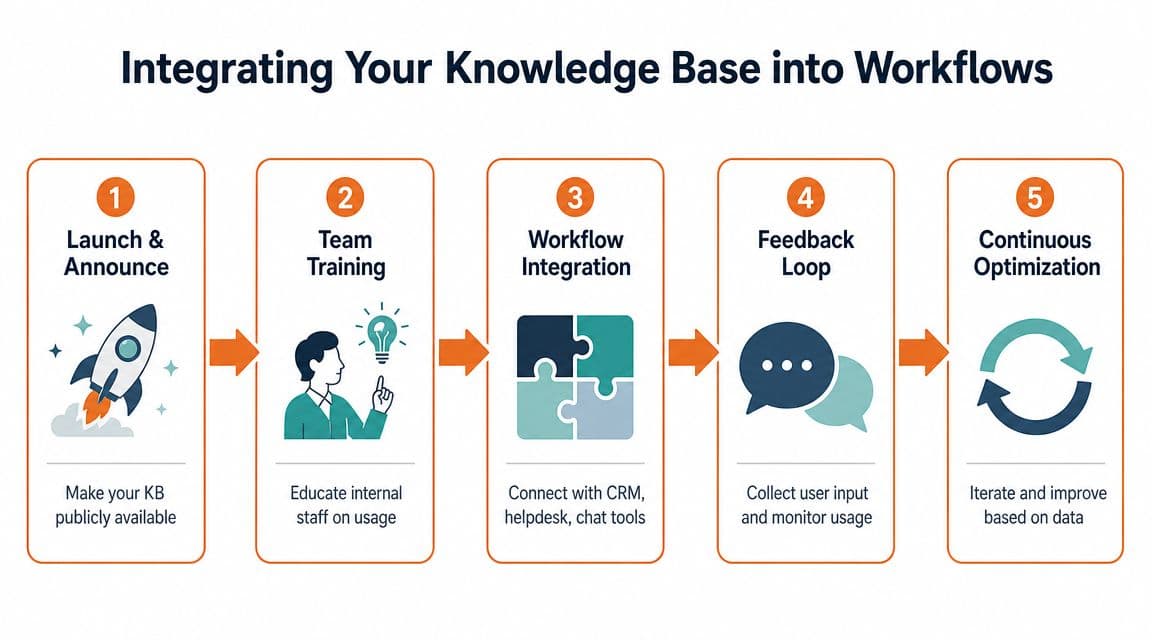
Start with a sharp public release. Then wire the knowledge base into the work people already do.
Launch the smallest set that can carry real demand#
Skip the fantasy of publishing everything before launch. It slows the team down and floods the knowledge base with weak pages that never earn trust.
Launch with a tight set of articles that answer real questions clearly and completely. In practice, that usually means:
- Getting started docs: setup, first success, and core configuration
- High-volume support answers: the issues your team explains repeatedly
- Feature pages with clear use cases: the pages buyers and users are likely to search for in Google and ask ChatGPT about
- Failure-state documentation: login problems, integration errors, billing issues, permissions, and recovery steps
Keep the structure simple. A shallow hierarchy is easier for users to scan and easier for AI systems to parse. Dense tag systems and sprawling FAQ sections usually create noise, not coverage.
My recommendation is blunt. Do not launch with filler. Short FAQ answers, duplicate pages, and vague category intros make the help center look busy while leaving the important jobs undone.
Fewer strong pages beat a large help center full of summaries every time.
Put documentation inside the operating system of the company#
This is the step that separates maintained knowledge bases from abandoned ones.
Support should send public articles from Zendesk or Intercom, not rewrite answers from scratch. Product should link docs in release notes and changelogs. Engineers should update docs in the same cycle as product or API changes. Customer success and sales should use the same public documentation they send to customers, instead of keeping private answer docs that drift out of date.
That operating model needs owners and triggers, not good intentions. A simple pattern works well:
- Support creates a doc request when a ticket needs a custom explanation twice.
- Product reviews affected pages before changing terms, flows, or feature names.
- Engineering ships doc updates with code changes that alter behavior, endpoints, or permissions.
- Success and sales reuse public docs in onboarding, renewals, and follow-ups.
- The docs owner reviews search gaps and article requests in a regular knowledge base management workflow.
This is also where tool choice starts to matter in a practical way. Most doc tools make contribution harder than it should be. They hide structure behind markdown quirks, repo workflows, or brittle publishing steps, so only a small group can keep content current. That model breaks fast.
Dokly fits this phase because it keeps publishing simple while producing docs that are structured enough for both humans and LLMs to use well. That matters at launch. Your knowledge base needs to be easy to update every week, and easy for AI systems to read, segment, and recommend.
Once every team points to the same source of truth, quality rises faster. Gaps become visible. Weak pages get exposed. Good pages get reused, linked, and cited.
Phase 4 Measuring Success and Maintaining Momentum#
A launched knowledge base starts aging on day one.
Teams that treat docs as a side project lose fast. Search quality slips. Duplicate pages pile up. Product terms drift. Then ChatGPT, support agents, and customers all pull different answers from the same mess. If your docs are going to drive support, onboarding, and AI discovery, you need to run them like a product system with a feedback loop.
Track the signals that expose failure#
Vanity metrics are useless here. Pageviews do not tell you whether someone got an answer, and they definitely do not tell you whether an LLM can retrieve the right chunk and cite it cleanly.
Track the signals tied to retrieval quality and task completion:
- Search success shows whether people can find the right page with the words they use.
- Deflection rate shows whether the content resolved the issue without creating a ticket.
- Helpfulness ratings reveal articles that look polished but fail to answer the real question.
- Engagement patterns show where readers abandon the page, jump to another article, or keep searching after reading.

One signal matters more than teams admit. Failed searches. If people keep searching for a term and landing on weak results, you have a content gap, a naming problem, or both. Those gaps should drive your roadmap before anyone asks for another redesign.
Handle that review inside a regular knowledge base management workflow, not in a quarterly cleanup sprint that everyone forgets by week two.
Maintain for retrieval, not just readability#
Human-friendly writing is no longer enough. Your docs also need to be easy for AI systems to segment, rank, summarize, and quote. That changes what good maintenance looks like.
AWS documentation for Amazon Bedrock knowledge bases reflects the new standard. Content gets ingested, embedded, stored, and retrieved as part of a structured pipeline. Your public docs should be maintained with the same discipline. Clear titles, stable terminology, distinct article scope, and clean prerequisites improve retrieval for both users and LLMs.
Use a simple operating loop:
- Review analytics every week
- Rewrite weak or misleading pages
- Merge or archive duplicates
- Standardize feature names and terms
- Add missing context before the main answer
- Refresh screenshots and examples when the product changes
The knowledge base now functions as part of your product's retrieval layer.
When docs get stale or fragmented, the failure shows up everywhere. Support volume rises. Onboarding slows down. AI assistants return partial answers or cite the wrong page. That is why most doc tools disappoint. They make publishing possible, but they do not make consistency easy.
Dokly is the sensible choice if you want momentum to last. It keeps authoring simple, keeps structure clean, and produces documentation that works for readers and for LLM retrieval. That is what a modern knowledge base platform should do.