If you're reading this, there's a good chance your team already has API docs scattered across Confluence pages, half-finished endpoint notes, a few pasted cURL examples, and one heroic page that everyone links to because nobody can find anything else. That setup works longer than it should. Then the API changes, someone duplicates pages for a new version, an OpenAPI macro starts acting weird, and the docs stop being a source of confidence.
That's the essence of API documentation in Confluence. It isn't that Confluence can't hold API docs. It can. The problem is that Confluence is a general-purpose workspace, and API documentation is a very specific discipline with strict requirements around structure, versioning, interactivity, and trust. If you treat it like a wiki, you'll get wiki-shaped problems.
Confluence can still be made useful. But only if you stop improvising and start designing around its limits from day one.
Table of Contents#
- Laying the Foundation for API Docs in Confluence
- Embedding Interactive Specs with OpenAPI and Swagger
- Advanced Confluence Workflows for Versioning and Access
- Hitting the Confluence Ceiling Why Teams Migrate
- The Modern Alternative AI-Native Docs with Dokly
- Making the Right Choice for Your Team
Laying the Foundation for API Docs in Confluence#
Teams often begin in a similar fashion. They create a Confluence space, add an overview page, and then keep stuffing more content into it until navigation collapses under its own weight. The page tree becomes historical, not logical. It reflects who created pages and when, not how a developer uses the API.
A better setup starts by treating Confluence as a published documentation surface, not as a dumping ground for working notes. Atlassian's own guidance on technical documentation emphasizes using examples, graphics, and templates, and Confluence's editor supports structured blocks like tables, files, images, links, and action items. For API docs, the most practical pattern is to standardize endpoint pages into sections like purpose, authentication, request example, parameters, response example, and error cases, because that makes pages easier to scan and easier to use when someone is trying to make a real request without asking support for help, as discussed in this Atlassian technical documentation video.
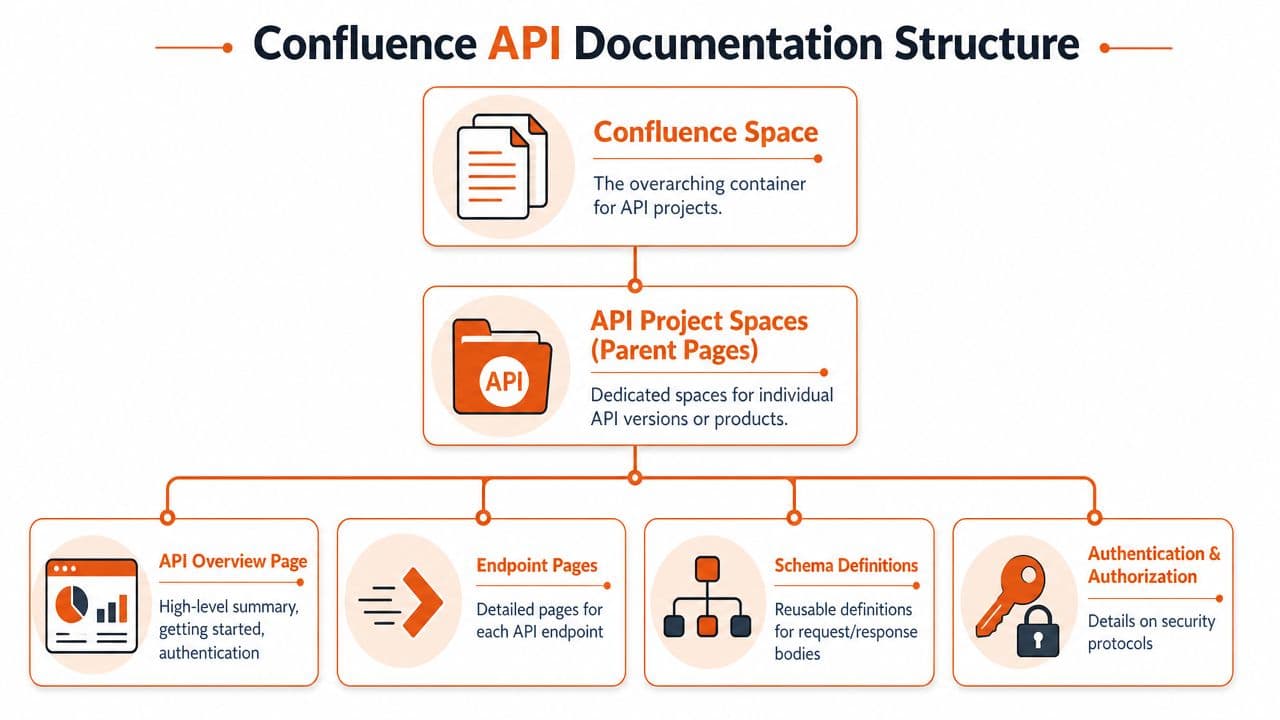
Start with a page tree that matches the API#
If your API is organized by resources and capabilities, your docs should be too. Don't organize around internal teams unless your readers are internal and already understand your org chart.
A structure that usually holds up looks like this:
- Overview page with base URL context, authentication basics, environments, and first request
- Resource group pages such as Users, Orders, Webhooks, or Billing
- Endpoint pages under each resource group
- Shared schema pages for reusable request and response objects
- Operational pages for auth, rate-limit behavior, error handling, changelog, and SDK notes
That keeps the tree shallow enough to explore and predictable enough to maintain. It also gives you a place to separate narrative guidance from raw reference.
Practical rule: if a developer can't guess where an endpoint page lives before they click, the tree is already too clever.
This is also where external examples help. If you're documenting an integration-heavy API, it helps to study a concrete walkthrough like unlocking SE Ranking API, not because you should copy its format blindly, but because it shows how much easier technical docs are to follow when the reader can move from auth to request flow to real use cases without hunting through unrelated wiki content.
Use one endpoint template and enforce it#
Confluence gets messy when every engineer documents differently. One page has prose. Another has a screenshot. Another has a parameter list buried under a meeting note. You fix that by making the template stricter than feels comfortable.
Use a repeatable endpoint page with these sections:
| Section | What belongs there |
|---|---|
| Endpoint purpose | One short explanation of what the operation does |
| Authentication | Required auth method, scopes, and caveats |
| Request example | A concrete request in cURL or language snippet |
| Parameters | Table with name, type, required status, and meaning |
| Response example | Successful response body with notes |
| Error cases | Common failures and how to recover |
| Usage notes | Pagination, idempotency, ordering, or side effects |
A few implementation choices matter more than people think:
- Put examples near fields so readers don't have to jump between the prose and the payload.
- Use tables for parameter matrices because paragraphs are terrible at expressing optionality and types.
- Keep one endpoint per page unless the operations are inseparable.
- Avoid long introductions on endpoint pages. Developers came for execution details, not internal philosophy.
The best version of API documentation in Confluence is disciplined, repetitive, and slightly boring. That's a compliment. Readers shouldn't notice your doc system. They should get the request working and move on.
Embedding Interactive Specs with OpenAPI and Swagger#
Static pages can explain an API. They don't let people feel it. That's why so many Confluence teams eventually try to embed an OpenAPI or Swagger-based reference into the page itself.
This is the turning point where Confluence starts looking more capable than it really is.
Atlassian Marketplace listings for apps such as Open API Documentation for Confluence describe a meaningful upgrade from plain wiki pages. These workflows can generate interactive docs from OpenAPI-compliant JSON or YAML, embed specs in pages, and expose Try It Out! behavior where readers can view response bodies, status codes, headers, and generated cURL commands without leaving Confluence, as described on the Open API Documentation for Confluence app listing.

What Confluence can do with OpenAPI#
In the best-case setup, you install a macro app, point it at a hosted OpenAPI document or attached spec file, and let it render an interactive reference inside the page. That gives your team a hybrid model:
- Confluence handles narrative docs, rollout notes, and contextual guidance
- OpenAPI handles endpoints, schemas, and example interactions
- The embedded view makes the wiki feel closer to a developer portal
That approach is much better than hand-writing every request and response shape in prose. It also creates a clean separation between editorial content and endpoint definition. If you want a sense of why interactive docs matter so much to API consumers, this API playground guide is worth reading because it focuses on how live exploration changes developer behavior, not just page aesthetics.
The hidden fragility most tutorials skip#
The problem isn't getting the macro to render once. The problem is keeping it reliable.
Independent documentation for a Confluence OpenAPI macro points out a gap most official-looking tutorials gloss over: the browser, not the server, may fetch the JSON or YAML and generate the docs client-side. That means CORS, YAML or JSON hosting choices, browser execution, plugin compatibility, and page mutation side effects all become your problem. The same documentation warns that embedded YAML can break with other formatting plugins and suggests JSON or remote URLs as workarounds in some cases, as documented by the Confluence Open API macro project.
That has a few practical consequences:
- CORS isn't optional: if the browser can't fetch the spec cleanly, the embed fails in ways that look random to non-frontend teams.
- YAML can be brittle: if your Confluence environment includes formatting or page-enhancement plugins, inline YAML may not survive intact.
- Client-side rendering complicates debugging: the page loads, but the spec widget doesn't. Now you're inspecting browser behavior instead of editing docs.
- Marketplace dependency becomes architectural: your reference experience depends on a plugin lifecycle you don't control.
Interactive API docs inside Confluence are possible. Stable interactive API docs inside Confluence take much more operational discipline than most teams budget for.
A safer pattern is to keep the spec externally versioned and embed by remote URL when possible, rather than pasting large documents into Confluence itself. But even then, you're still bolting a developer portal experience onto a wiki page model.
Later, when the macro app updates or another plugin changes page behavior, you're reminded what the system of record is. It isn't Confluence. It's the spec sitting somewhere else.
For a quick product walkthrough on this general problem space, this official Dokly video is useful context:
Advanced Confluence Workflows for Versioning and Access#
A team usually feels the pain here right after its first meaningful API change. v1 is live, v2 is half-shipped, one partner still depends on old fields, and someone asks for external access to only part of the docs. Confluence can handle all of that. It just handles it as a wiki, not as a docs system designed around versioned contracts and audience boundaries.
That distinction matters more than people expect.
Versioning in Confluence is a workflow not a feature#
Confluence page history is not API versioning. It helps you see who edited a page and roll back bad changes. It does not give consumers a clean, reliable way to understand which endpoints, fields, and examples belong to which API release.
Teams usually fall into three patterns.
Some duplicate an entire page tree for each version. That gives readers clear separation, and it gives maintainers a copy problem immediately. Fix a typo, clarify an auth rule, or update an error example in one tree, and now someone has to remember whether the same fix belongs in two other places.
Others keep one canonical page and layer on labels, status macros, expanders, and warning boxes for version-specific behavior. That cuts duplication, but the reading experience gets noisy fast. A reference page stops being a reference page and turns into a negotiation between old behavior and new behavior.
The least fragile setup is spec-first. Version the contract in Git, review it like code, then publish the rendered result into Confluence. That does not make Confluence a real versioned docs platform, but it does reduce drift because the source of truth lives outside the wiki. If your team is already feeling the friction, this guide on documentation version control for engineering teams is worth reading.
Here is the trade-off in plain terms:
| Versioning approach | What it gets right | What usually breaks |
|---|---|---|
| Duplicate page trees | Clear separation by version | Copy drift and heavy maintenance |
| Single pages with version callouts | Less duplication | Reader confusion and clutter |
| Spec-first publishing into Confluence | Better alignment with implementation | Requires stronger process and tooling |
The hidden cost shows up during maintenance, not setup. The first version feels manageable. The third version exposes the pattern. Once the team starts maintaining parallel docs, deprecation notices, and audience-specific variants, Confluence stops being a convenient publishing surface and starts acting like a custom system you are running by habit.
Permissions and analytics get technical fast#
Access control has the same shape. Confluence gives you page restrictions and space permissions, which sound fine until you need internal docs, partner docs, and public docs that share 80 percent of the same content. At that point, teams either split content across spaces or duplicate pages to avoid accidental exposure.
Neither option is clean.
Separate spaces help with governance, but they fragment search, links, and ownership. Page-level restrictions keep content closer together, but they are easy to misconfigure and hard to audit over time, especially after org changes or team handoffs.
Teams that need tighter control usually start scripting around the problem. Atlassian documents Confluence's REST API v1 as the primary way to read and modify Confluence Cloud content in the Confluence REST API v1 introduction. That API also gives teams a way to pull page-level view data. Useful, yes. But once you are automating publishing, permissions, and reporting through scripts, you are already doing platform work.
In practice, advanced teams end up doing some combination of the following:
- Automating page updates to apply templates, sync changelogs, or publish summaries from another source of truth
- Locking down high-risk pages so only a small set of maintainers can edit reference content
- Pulling analytics through scripts to figure out which pages are used and which ones are stale
- Creating separate spaces for internal and external readers because mixed-audience permission models become too brittle
That setup can work for a while. I have seen it work for longer than it should.
But this is usually the turning point. Once versioning depends on conventions and access depends on space design plus automation, the workarounds start costing more than the tool is saving. That is the primary reason teams begin looking at AI-native platforms like Dokly. Not because Confluence is unusable, but because the engineering effort required to keep it trustworthy keeps growing.
Hitting the Confluence Ceiling Why Teams Migrate#
There is a point where the workarounds stop feeling clever and start feeling expensive. That's the Confluence ceiling.
It usually arrives after a team has done the "right" things. They built templates. They embedded OpenAPI. They split spaces. They used labels. They wrote automation against the API. And they still don't trust the docs enough to move fast.
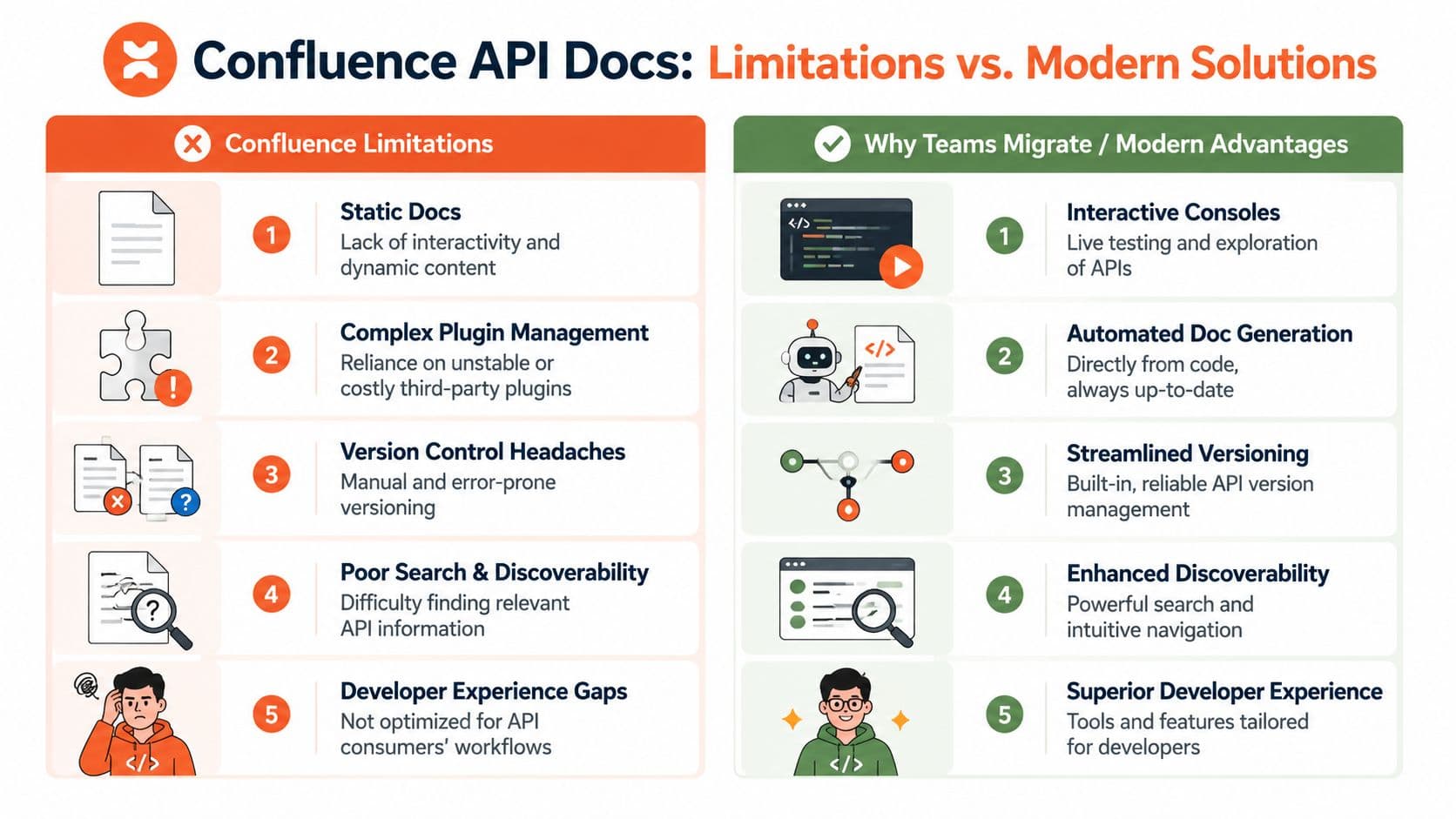
The four limits that keep showing up#
The first is brittleness. A page isn't just text anymore. It's macros, embedded specs, attachments, tables, permissions, and page layout choices that can break when plugins change or editors "clean things up."
The second is discoverability. Confluence can store a lot, but API consumers need to find exact operations, fields, and examples quickly. Wiki search plus nested pages plus inconsistent naming is a rough combination for technical lookup.
Third is maintenance tax. Engineers keep spending time formatting docs around the tool instead of improving the content. A docs update becomes a mini publishing workflow, not a normal part of shipping the API.
The fourth is machine unreadiness. This one matters more now than many teams realize. A page that looks fine to a human can still be poor raw material for AI systems if the underlying structure is muddy, overly rendered, or detached from the actual API contract. If your docs are hard for machines to parse, they won't be cited accurately, summarized reliably, or surfaced well in AI-driven workflows.
A direct comparison between Confluence and newer documentation approaches helps frame that decision. This GitBook vs Confluence comparison is useful because it highlights the gap between a collaboration wiki and a tool built for publishing docs people need to use.
A quick test for whether you have outgrown it#
Ask your team these questions:
- Can someone update the API and docs in one workflow? If not, drift is already baked in.
- Can a new developer make a successful request from one endpoint page alone? If not, the page is descriptive, not usable.
- Can you publish interactive reference material without plugin anxiety? If not, the stack is fragile.
- Can internal and external audiences get the right content without duplicate trees? If not, governance is leaking into structure.
- Can AI systems ingest the docs cleanly? If nobody knows, that is itself a signal.
If most of those answers are no, you're not dealing with a content problem anymore. You're dealing with platform mismatch.
The Modern Alternative AI-Native Docs with Dokly#
A familiar breaking point looks like this. The API changed yesterday, the OpenAPI file is correct, and the Confluence page is already wrong. Someone now has to notice the mismatch, edit the prose, fix the screenshot, and hope no plugin breaks on publish. That is the moment a wiki stops being "good enough" and starts charging maintenance tax on every release.
The better model is simple. Treat the spec as the source of truth, and treat documentation as a publishing layer built around it.
What changes when the spec drives the docs#
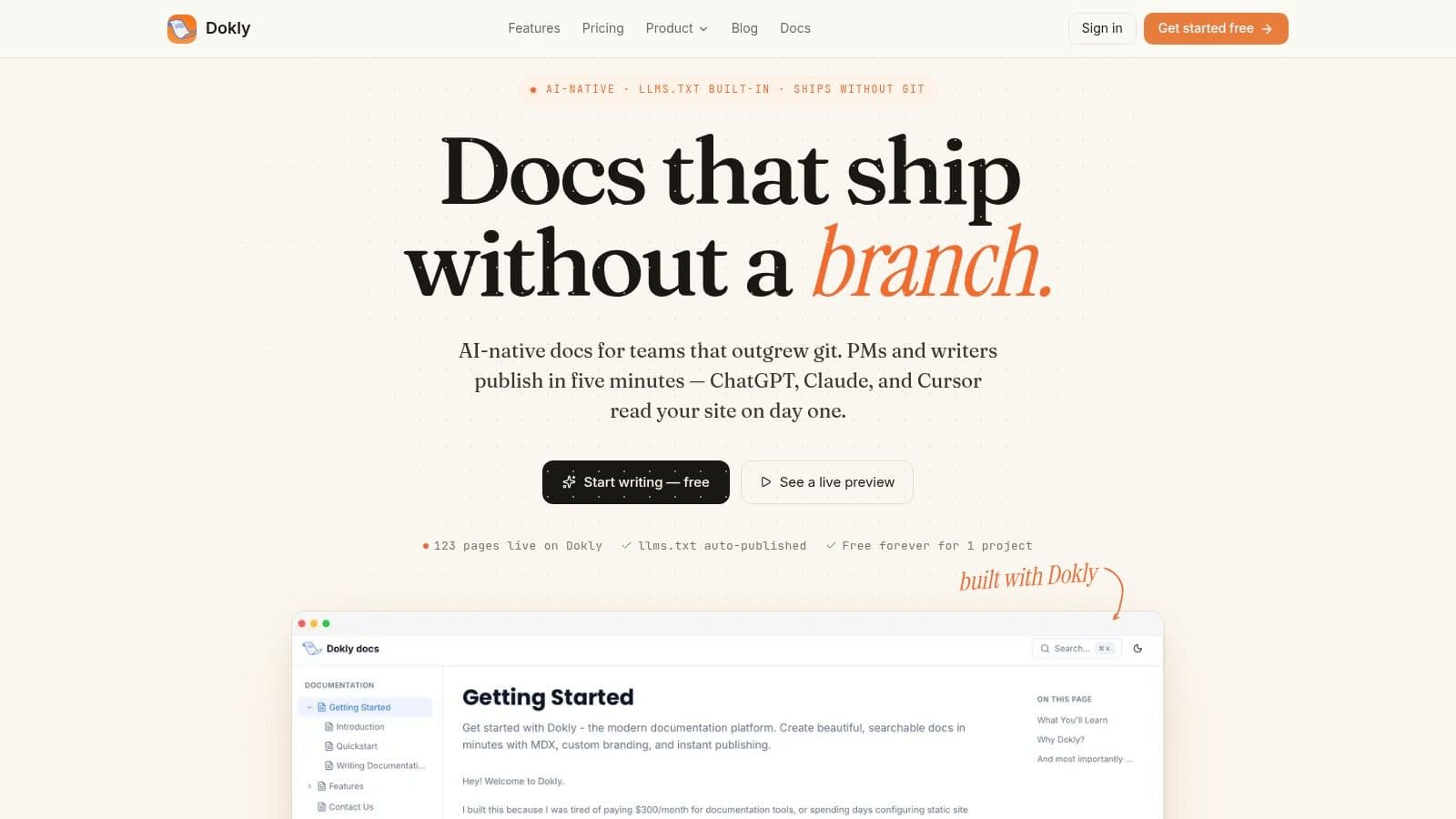
Confluence can be forced into this model, but only with discipline, conventions, and extra tooling. A platform like Dokly starts there by default. The reference layer comes from the OpenAPI spec. Narrative docs sit beside it instead of competing with it. Publishing stays structured instead of turning into a pile of macros and page-specific exceptions.
That changes the work in practical ways.
- Reference stops drifting from the API: endpoints, parameters, and response models come from the spec rather than copied prose
- Interactive docs are built in: teams do not have to stitch together embeds, plugins, and permissions just to let developers test requests
- Editing is easier on mixed teams: product, support, and engineering can update explanatory content without wrecking the underlying structure
- Maintenance drops: fewer custom rules, fewer brittle dependencies, fewer "who owns this page?" debates
If a team is cleaning up a messy docs set, Dokly's API documentation template tool gives them a usable starting structure without a long setup project.
The key gain is not prettier docs. It is fewer opportunities for the docs and the API to diverge.
Why AI-native structure changes the decision#
This is also where the trade-off gets more expensive to ignore. Documentation is now consumed by search agents, coding assistants, support bots, and retrieval systems before a developer reads the page directly. If the content is hard for machines to parse, it will be summarized poorly, cited inconsistently, or skipped.
A useful framing comes from this article on what AI native means for brands. The point applies cleanly to docs. "AI-native" is not branding language. It means the content is structured in a way machines can reliably interpret.
Dokly is built around that assumption. It uses clean semantic MDX, structured metadata, and machine-readable outputs such as llms.txt and llms-full.txt. Confluence pages can look polished in a browser and still produce messy underlying markup that makes chunking and citation harder for AI systems. That gap matters if developers are discovering your API through AI-assisted workflows.
Here is the practical difference:
| Need | Confluence approach | Dokly approach |
|---|---|---|
| Narrative docs | Wiki pages and templates | Visual editor with structured output |
| API reference | Prose or embedded plugin | Spec-driven interactive reference |
| AI readability | Depends on rendered page structure | Built in as a first-class concern |
| Publishing overhead | Process and plugin heavy | Purpose-built workflow |
Dokly also has an official YouTube channel with product walkthroughs if you want to inspect the publishing flow before changing tools.
Confluence still has a place. It works well for drafts, internal notes, decision logs, and collaboration around the API. It is a poor system of record for the docs developers depend on. Once your team starts building workarounds for drift, interactivity, and machine readability, the cheaper option is often to stop patching the wiki and move to a platform built for the job.
Making the Right Choice for Your Team#
If your API docs are mostly internal, your team is small, and Confluence is already where everybody works, staying put can be reasonable. Use a strict template, keep the page tree clean, and don't pretend prose is your source of truth.
If your API is public, versioned, partner-facing, or central to product adoption, the trade-offs change fast. At that point, API documentation in Confluence becomes a system of compensating behaviors. You're managing around the platform instead of benefiting from it.
A useful way to think about the next step is to look at how AI is changing documentation consumption itself. This piece on Crawlchat AI for documentation is a good reminder that docs are increasingly part of an AI retrieval layer, not just a human help center. That makes structure and machine readability strategic, not cosmetic.
Pick the tool that reduces drift, lowers maintenance, and makes your docs usable by both developers and machines. For many teams, that's the moment Confluence stops being "good enough."
If you're ready to stop fighting wiki-shaped API docs, try Dokly. You can publish structured, interactive, AI-readable documentation without plugin sprawl, repo setup, or a long migration project.