Most advice about a technical writing style guide starts in the wrong place. It starts with the file.
That sounds reasonable until you watch what happens. A team writes a polished guide, stores it in Google Drive or Confluence, links it during onboarding, and then keeps shipping docs that ignore half of it. The guide exists. The system does not.
A useful technical writing style guide isn't a PDF, a Notion page, or a wiki chapter. It's an operating standard that shapes how people draft, review, approve, and publish. If it doesn't change writer behavior at the point of writing, it becomes reference material for arguments, not a tool for producing consistent documentation.
The other problem is newer and more consequential. Most style guide advice still assumes a human reader arrives first, scrolls patiently, and interprets structure the way an editor does. That's no longer enough. Documentation now needs to be readable by people and legible to retrieval systems, assistants, and AI tools that depend on clean headings, predictable structure, and unambiguous terminology. If your guide ignores machine-readability, it is already behind.
Table of Contents#
- Why Most Style Guides Fail and How Yours Wont
- The Four Pillars of a Modern Style Guide
- Defining Your Voice Tone and Personality
- Grammar Mechanics and Terminology Rules
- Structuring Docs for Humans and AI Agents
- Establishing Conventions for Code and API Examples
- Implementing and Enforcing Your Style Guide
- Templates and Quick Reference Checklist
Why Most Style Guides Fail and How Yours Wont#
Most style guides fail because they confuse documentation about standards with actual standardization.
Teams usually invest in the visible part. They debate serial commas, heading case, button labels, and code block formatting. Then they produce a long guide that feels complete because it answers many edge cases. Writers still ignore it under deadline pressure, reviewers apply it unevenly, and engineers bypass it when they publish directly.
That's not a writing problem. It's a systems problem.
A technical writing style guide works only when it does three jobs at once:
- It removes choices: Writers shouldn't have to re-decide the same punctuation, capitalization, or product naming issue every week.
- It reduces review noise: Editors should spend less time correcting predictable issues and more time fixing meaning.
- It improves retrieval and reuse: Consistent structure and terminology make docs easier to maintain and easier to search.
Practical rule: If a rule is important enough to argue about repeatedly, it's important enough to encode somewhere in the workflow.
The popular advice to "just create a style guide" misses the harder truth. A style guide isn't useful because it exists. It's useful because writers can follow it without friction. If the only enforcement mechanism is memory, the guide will lose to shipping pressure every time.
What works is narrower and less glamorous. Keep the guide short enough to scan, strict enough to settle recurring disputes, and connected to templates, editorial review, and publishing constraints. When a team treats the guide as a living production system, consistency stops being aspirational.
What doesn't work is the museum model. You know the one. A large guide, no clear owner, no examples from real docs, no glossary discipline, no editorial defaults, and no mechanism for handling judgment calls when rules collide with clarity.
The strongest guides are opinionated in the right places. They standardize the repeatable parts. They leave room for writer judgment in the ambiguous parts. They recognize that style is not the goal. Reader comprehension is the goal. Style is how you get there consistently.
The Four Pillars of a Modern Style Guide#
A technical writing style guide gets messy when teams dump every preference into one flat list. The fix is simple. Separate the guide into a few domains that solve different problems.
Microsoft's move from the old manual model to an online Writing Style Guide reflects the broader shift from static rules to continuously updated standards. That's the right direction. Modern guides need structure, not just content.

Voice and tone#
This is the human layer. It defines how the documentation sounds when it explains a task, describes a limitation, or handles an error. Good voice rules answer questions like these:
- Should the docs address the reader as "you"?
- How direct should instructions be?
- How do we describe failures without sounding defensive?
- When do we simplify terminology, and when do we preserve domain precision?
Without this pillar, two pages about the same feature can sound like they came from different companies.
Structure and formatting#
This is the navigation layer. It defines heading hierarchy, list behavior, callouts, table usage, paragraph length, and page patterns. Structure is where readability becomes repeatable.
A strong structure section does more than say "use headings." It tells writers what kind of information belongs in each heading level and which content patterns should repeat across setup guides, tutorials, references, and release notes.
Grammar and mechanics#
This is the consistency layer. It settles recurring issues so writers don't improvise. Sentence case or title case. Numerals or spelled-out numbers. Acronym rules. UI label formatting. Punctuation inside bullets. All of that belongs here.
This part should be boring. Boring is good. Boring means no one has to keep re-litigating formatting trivia.
Terminology and glossary#
This is the product truth layer. It standardizes feature names, role names, approved synonyms, banned variants, and definitions for domain-specific language.
Teams don't lose consistency because they forgot grammar. They lose it because three groups use three names for the same thing.
If you organize your guide around these pillars, the document stays usable. If you don't, it becomes an archive of loosely related preferences.
Defining Your Voice Tone and Personality#
Voice is where weak guides become vague. "Be clear." "Be professional." "Sound friendly." None of that helps a writer decide what to do with a sentence on a deadline.
Start with rules that are visible on the page.

Ohio State recommends writing to approximately the eighth-grade level and using sentences that average 15 to 20 words in its technical writing style guide. Utah State gives similar advice and recommends sentences of about 10 to 20 words. Those limits matter because they reduce cognitive load. Readers move through procedures, warnings, and explanations faster when syntax stays tight and direct.
Set voice rules that writers can actually apply#
A practical voice section usually includes rules like these:
- Use active voice: "Select Save" is better than "The Save button should be selected."
- Address the reader directly: Use "you" and "your" when the user is performing the action.
- Prefer concrete verbs: "Open," "create," "delete," "review," and "restart" are stronger than padded verbs like "perform" or "initiate."
- Limit sentence complexity: If a sentence tries to explain setup conditions, exceptions, and outcomes at once, split it.
- Drop unnecessary jargon: Use domain terms when precision requires them. Translate them when plain language works.
Here's the difference in practice:
| Weak | Better |
|---|---|
| The user is required to authenticate prior to configuration. | Before you configure the service, sign in. |
| An error will be generated if the token is invalid. | If the token is invalid, the request fails. |
| It is recommended that you review the settings. | Review the settings before you continue. |
These aren't cosmetic edits. They change whether a reader can act without rereading.
Write error states like a responsible product team#
Voice matters most when things go wrong. A style guide should tell writers how to describe failures, limitations, and edge cases without blaming the reader or hiding uncertainty.
Use a pattern like this:
- State what happened.
- State what it affects.
- State what the reader can do next.
That prevents the two extremes that make docs miserable: robotic error prose and faux-friendly fluff.
A short training video can help teams hear the difference between stiff documentation voice and usable instructional voice.
A good voice section also needs examples from your own product docs. Abstract rules drift. Concrete rewrites stick.
Write like a capable teammate standing beside the user, not like a policy document trying to protect itself.
Grammar Mechanics and Terminology Rules#
Many teams either overbuild or underbuild. They create an exhaustive grammar encyclopedia that no one reads, or they publish almost nothing and let each writer invent local rules.
The middle ground works best. Decide the issues that produce repeated inconsistency, document the decision once, and stop debating them.
Choose one authority and stop improvising#
Google recommends adopting one editorial style guide for an organization rather than inventing multiple local rules. NASA also points writers to authoritative desk references for consistency in grammar, tables, figures, and presentation in Google's technical writing resources. That's a useful operating principle even for small teams.
Your internal guide shouldn't try to replace an established editorial standard. It should do two things:
- define the exceptions that matter for your product
- define the product-specific terminology that external guides won't cover
That means your grammar and mechanics chapter should be compact and explicit. A strong version typically settles issues like these:
- Heading case: sentence case or title case
- UI references: whether to write "select Save" or "click the Save button"
- Acronyms: define on first use or assume familiarity in API reference material
- Lists: when to use numbered steps versus unordered bullets
- Punctuation: serial comma, quotation treatment, code punctuation, and list-ending punctuation
- Numbers and units: product-specific presentation for dates, times, and measurements
Build a terminology layer that survives growth#
Terminology gets neglected because it looks simple. It isn't. Product naming drifts faster than grammar, especially once engineering, support, sales, and content teams all write publicly.
A useful terminology section needs more than a glossary. It needs a decision model.
| Term type | What to document |
|---|---|
| Product names | Approved name, banned variants, capitalization |
| Feature names | Exact UI label, acceptable shorthand, plural form |
| Role names | Admin, owner, member, viewer, and how each maps to product behavior |
| Technical concepts | Plain-language definition and when to use the precise term |
| Synonyms | Preferred term and redirects from disallowed alternatives |
Use real examples from your docs, changelogs, and support content. If your product page says "workspace," your API says "project," and your help center says "account" for the same container, the style guide has already failed.
One more rule matters. Keep terminology decisions in one place. Don't maintain separate glossaries in onboarding docs, API docs, and support macros. Writers will update one and forget the rest.
Structuring Docs for Humans and AI Agents#
The missing chapter in most technical writing style guide advice is machine-readability.
Current guidance still focuses on human readability, while emerging documentation workflows increasingly need headings, structure, and metadata that can be chunked, cited, and retrieved by AI tools, as noted in this technical writing discussion of additional style concerns. That's the gap many teams still underestimate.
Good structure creates clean retrieval#
Humans skim. AI systems chunk. Both depend on structure, but they fail in different ways.
A human struggles when the page has no clear hierarchy, overlong paragraphs, weak headings, and buried prerequisites. An AI tool struggles when the page is semantically thin, headings are generic, related concepts are scattered, and key definitions exist only in visual layout instead of explicit text.
That means structure rules need to do more than improve readability. They need to create predictable information boundaries.
Use patterns like these:
- One topic per page: Don't mix conceptual overview, setup, troubleshooting, and API reference on a single long page.
- Descriptive headings: "Generate a token" is better than "Authentication." The first tells retrieval systems what the section does.
- Short sections: Smaller topical blocks are easier to scan, quote, and reuse.
- Explicit prerequisites: Put assumptions before the steps, not halfway through them.
- Stable callouts: Use notes, warnings, and tips consistently so readers know what each block means.
A clean knowledge base depends on that predictable architecture. If you're designing page patterns from scratch, this guide to knowledge base creation is a useful reference for how information categories should separate cleanly.
What strong document architecture looks like#
A well-structured documentation page often follows a simple order:
- What this page helps you do
- What you need before you start
- The task or concept
- Common failure points
- Related pages
That sequence helps humans orient quickly. It also gives retrieval systems stable chunks with self-contained meaning.
If a section heading can't stand alone as an answer candidate, rewrite it.
Internal linking matters too. Link by relationship, not by habit. "Related topics" should point to adjacent decisions, prerequisites, and next steps. Don't dump a generic list of links at the bottom and call that information architecture.
The biggest structural mistake I see is visual polish hiding weak semantics. A page looks modern, but the heading tree is vague, key terms aren't defined in text, and examples are trapped in components that don't expose clean meaning. That's fine for screenshots. It's bad for support, search, and AI retrieval.
A modern technical writing style guide should include a structure chapter that explicitly asks: can a reader find the answer quickly, and can a machine extract it faithfully?
Establishing Conventions for Code and API Examples#
Many docs teams polish prose and then treat code examples as an afterthought. Developers notice that immediately.
A style guide should treat examples as first-class product surfaces. If the example is confusing, outdated, over-commented, or inconsistent with the surrounding terminology, the page loses credibility no matter how clean the prose is.
Treat code examples as product surfaces#
Set rules that make snippets easy to read, test, and compare across pages.
Use standards like these:
- Keep placeholders obvious:
YOUR_API_KEYis clearer than a fake-looking token that someone might paste accidentally. - Match product terminology: If the product calls it a workspace, the example shouldn't switch to project or tenant.
- Limit inline comments: Comment only what isn't obvious from the code itself.
- Prefer realistic minimal examples: Include enough detail to work conceptually, but remove unrelated noise.
- Keep output paired with input: If you show a request, show the response shape that matters.
The guide should also say when not to include code. Some conceptual pages become unreadable when every paragraph is interrupted by snippets that duplicate the reference docs.
A simple standard for API examples#
API examples should follow a consistent frame. That matters more than clever formatting.
| Element | Standard |
|---|---|
| Request purpose | One sentence that says what the call does |
| Method and path | Shown clearly before the body |
| Headers | Only required or instructive headers |
| Body | Minimal valid payload with clear placeholders |
| Response | Representative success example |
| Notes | Explain edge cases, limits, or idempotency if relevant |
For teams building this from scratch, an API documentation template example is a practical starting point for standardizing request and response presentation.
A few judgment calls help here:
- Use copy-pasteable examples over stylized pseudo-code whenever possible.
- Keep naming consistent across languages.
- Don't let sample data imply guarantees your API doesn't make.
- If a value is optional, label it clearly instead of omitting it silently.
One more rule belongs in every style guide. Every code sample should have an owner. If no one owns examples after launch, they decay faster than prose.
Implementing and Enforcing Your Style Guide#
Style guides succeed or fail here.
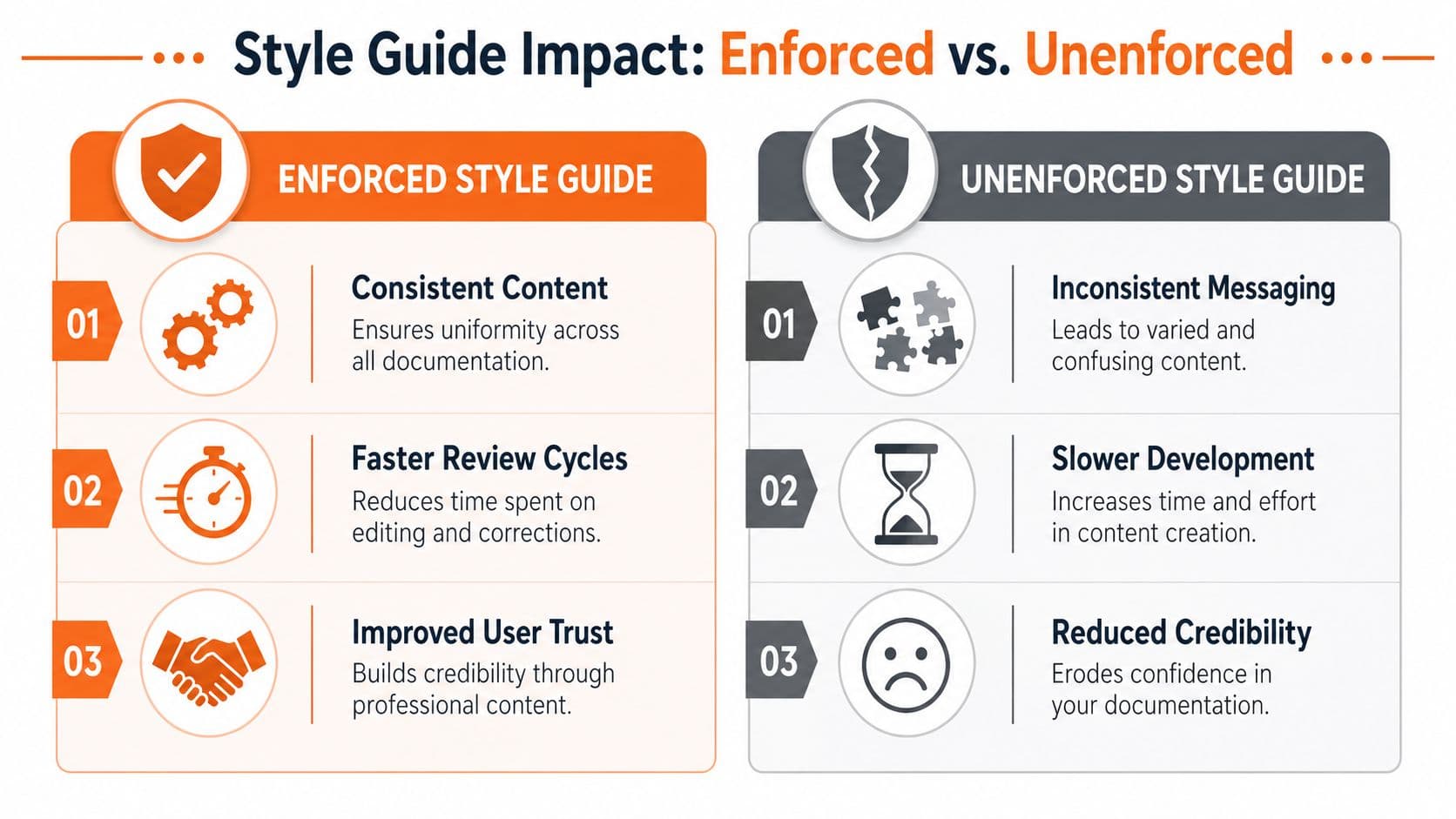
Many teams spend their energy writing rules and almost none deciding how those rules will be enforced. Then they wonder why reviews stay slow and inconsistencies keep slipping through. The answer is simple. A rule no one checks is a suggestion.
Quanos makes the right distinction in its guidance on guidelines, style guides, and editorial guides. Terminology and syntax checks belong directly in the CMS or authoring workflow where they can be automatically validated as text is written. The style guide itself should reserve space for higher-level editorial decisions and real examples.
The guide should live in the workflow#
Manual enforcement breaks first in fast-moving teams.
Here's the old pattern:
- Writer drafts in one tool.
- Reviewer checks style manually.
- Another reviewer catches different issues.
- The team argues over whether the guide even says that.
- The same fixes repeat on the next page.
That process creates editing theater. It looks rigorous, but much of the work is repetitive and preventable.
A stronger model separates automatable rules from editorial judgment.
Automatable rules include:
- terminology mismatches
- heading case
- banned phrasing
- obvious passive constructions
- formatting drift
- structural omissions in templates
Editorial judgment includes:
- whether the explanation matches user knowledge
- whether a warning is proportionate
- whether an example is representative
- whether clarity should override a default preference
Enforcement should remove low-value review work, not replace editing.
What enforcement should cover#
If you're implementing a technical writing style guide, enforce in layers.
| Layer | Best use |
|---|---|
| Editor guidance | Templates, inline suggestions, and approved terms at draft time |
| Content system rules | Reusable page structures, required fields, and component constraints |
| Review checklist | Meaning, accuracy, audience fit, and exceptions |
| Governance | Ownership, revision cadence, and change approval |
This is also where many legacy docs stacks become expensive in the wrong way. Tools that rely on separate lint setup, repo conventions, and custom enforcement workflows can work well for teams with dedicated docs engineering support. They can also impose a setup tax that smaller teams never fully pay down. Docusaurus-based workflows often need extra tooling to enforce style consistently. Mintlify can produce polished output, but polished output alone doesn't solve editorial enforcement.
What works better is tighter integration between writing and compliance. When writers get feedback while drafting, adoption rises because the correction cost is low. When enforcement happens only in review or CI, people learn to fear the style guide instead of using it.
A strong implementation plan also names owners:
- Documentation lead: owns policy decisions
- Product or engineering partner: validates terminology and examples
- Reviewers: escalate ambiguous cases into the guide
- Writers: flag rules that create friction without improving clarity
For practical walkthroughs on modern docs workflows, the tutorials on Dokly's official YouTube channel are worth browsing.
The best style guides don't win because they're strict. They win because they make the right behavior the easiest behavior.
Templates and Quick Reference Checklist#
A style guide should be easy to start and easy to consult. If your team needs to read a long narrative every time they want to format a heading or choose a term, the guide is too hard to use.
A lightweight template solves that. So does a short checklist that writers can run before review.
A practical style guide template#
Use this as a starting structure:
# Documentation Style Guide

## Editorial Standard
- Primary external reference:
- Internal exceptions:

## Voice and Tone
- Use active voice
- Address the reader as "you"
- Preferred tone:
- Error message guidance:
- Jargon policy:

## Readability
- Sentence length target:
- Paragraph length preference:
- When to split complex instructions:

## Grammar and Mechanics
- Heading case:
- Serial comma:
- Numerals and units:
- Acronym rule:
- UI label formatting:
- List punctuation:

## Structure and Formatting
- Required page sections by doc type
- Heading hierarchy rules
- Callout types and usage
- Table usage rules
- Internal linking rules

## Terminology
- Approved product names
- Feature names
- Banned variants
- Definitions
- Role names

## Code and API Examples
- Placeholder format
- Syntax highlighting rule
- Commenting rule
- Request and response format
- Example ownership

## Exceptions and Judgment Calls
- When clarity overrides default style
- How to document exceptions
- Who approves changes
If you want a more complete base document, this template for technical documentation is a good companion resource.
Pre-publication checklist#
Before a page ships, writers should be able to answer yes to these:
- Voice is consistent: The page uses direct, active language and addresses the reader appropriately.
- Terminology is stable: Product terms match the approved glossary and UI labels.
- Structure is scannable: Headings describe tasks or concepts clearly, and prerequisites appear before actions.
- Examples are usable: Code and API samples are copy-friendly, realistic, and aligned with the text.
- Links are intentional: Related pages support the current task instead of distracting from it.
- Warnings are precise: Notes and cautions appear only where they reduce user error.
- The page can stand alone: A reader doesn't need hidden context to understand the core task.
That checklist is short on purpose. If it grows too long, no one uses it.
When to break your own rules#
A mature technical writing style guide needs one section many teams skip: judgment under ambiguity.
Gernot Heiser's guidance on technical writing style decisions is useful here. Technical writing should be self-contained, should not assume more than the reader knows so far, and should discuss tradeoffs rather than presenting a chosen design as the only right answer. That matters because standards are created by people, and rules can conflict with clarity.
Here are the cases where breaking a rule is often justified:
- Audience knowledge changes the right term: A beginner page may need a plain-language phrase before the formal technical label.
- Domain convention is stronger than house style: Developer audiences may expect certain terms, code conventions, or reference patterns.
- A short sentence becomes choppy: Readability rules should improve flow, not produce mechanical prose.
- A strict terminology rule hides an important distinction: Sometimes a close synonym helps explain nuance before you narrow to the approved term.
Document these exceptions. Don't let them live only in reviewer comments or writer folklore.
A good guide creates consistency. A great guide also teaches judgment.
If you want a documentation platform that treats a technical writing style guide as a system instead of a static file, Dokly is worth a close look. It's built for teams that need clean, structured docs without config overhead, and it fits the two gaps most guides miss: practical enforcement in the writing workflow and machine-readable output for AI-native documentation. You can also explore useful free utilities in the Dokly tools collection and related tools across Dokly Tools.